- NewsmagRequirements for Newsmag
- NewsmagtagDiv Social Counter tutorial
 fatih-2
 Hi Calin
Just find this topic. We are using cloud templates for posts and category pages. Instead of adding yoast breadcrumbs individually via gutenberg editor., we would like to embed this all posts and most of the pages. How do we achieve that?
 Bettina
 Hello!
If you use a cloud/PRO template, then you should add the ads when you edit the post with TagDiv Composer in the element called ” Single Post Content ” in the tab ADS.
For a default template you should add the ads in theme panel.
If you set up correctly, and the problem is still there, then the issue can be from a plugin conflict, that’s why, please deactivate ALL plugins except tagDiv ones, also if you are using child theme or cache plugin, deactivate them, clear all cache(also from your browser) and try again.
If this problem is not solved after that, then we need to take a look and see what happened there.
Please contact us via email at contact@tagdiv.com and provide the following:
– admin url and credentials
– a link to this topic in order to identify you
Our team will take a look!
Thank you!
 byothe
Hello,
When my article is laoding, there is a “Sing in form” that shows up for a very short time at the top of my page… It appears after I used a template from Cloud Library for my posts.
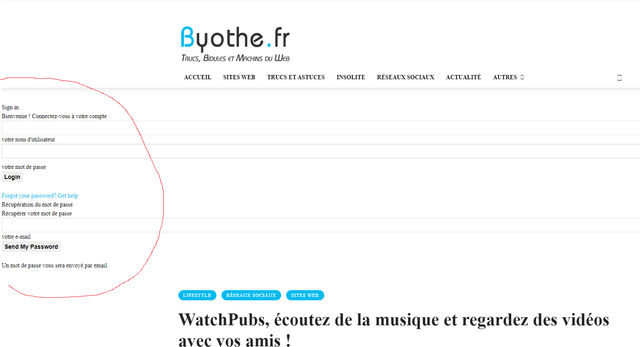
Is it possible to remove that ? It’s very quick but annoying… And I don’t need this form that doenst appears on the loaded page.
Bettina Hello!
In order to have the same dimensions, please be sure you use a cloud/PRO template as on desktop, so you can edit the pages with TagDiv Composer: https://forum.tagdiv.com/tagdiv-composer-tutorial/
Thank you!
 Anamaria
 Hello,
Unfortunately, you can’t have the same template for pages, like the post.
tagDiv Composer is a page and cloud builder, it can be used only for pages and cloud templates, therefore you can use it on a single post template from tagDiv cloud library to adjust the layout, but not to write the post content, for this, you need to use the WordPress editor.
You can find more tutorials on our channel on youtube =>https://www.youtube.com/user/tagdiv which can help you to design.
Thank you!
Anamaria Hello,
Please do these steps
1. disable tagDiv Composer and tagDiv Cloud Library
2. uninstall tagDiv Composer and tagDiv Cloud Library
3. clear cache (if cache plugin exists)
4. re-install tagDiv Composer and tagDiv Cloud Library again from Newspaper plugins => https://www.screencast.com/t/WLy01lbc
5. activate tagDiv Composer and tagDiv Cloud Library
6. clear cache (if cache plugin exists)
Let me know the results!
Thank you!
 crodexter
Hello,
Where I can edit file for style 2 DEFAULT SITE POST TEMPLATE?
In version 8 it was in includes folder.
I think there should be default option to enable latest posts instead related posts.
I believe a lot of people would like to list only latest post under on each single post at the bottom of post.
Btw, I would like to move tag to the very end of post page.
I know there is option to use cloud templates and front end editor but I need only basic layout and it is easier to change code in template
Thank you
 tangierads
Pre-designed Templates – tagDiv Cloud Library
problem: Invalid reply from server endpoint
 ashwintembhekar
i am not able to allow add the image logo to the cloud header template through tagdiv composer i uploaded the logo image but its not showing the image . it is only allowing text to be used as header and not image. i downloaded the header 7 template. i faced the same issue with london news and gadgets pro header templates. please help. i have gone throuh all the troubleshooting given in the forum but nothing works .
 loslunes
 Three more time since I posted:
FIRST ONE HAPPENS IN A VISIT TO THIS URL : https://www.loslunesseriefilos.com/2019/12/series-merli-sapere-aude-critica.html (the url is not the same each time happens so that makes this error more strange and makes url not important).
190.230.166.66 - - [01/May/2021:02:53:17 +0200] "GET /wp-content/plugins/td-standard-pack/Newspaper/assets/css/images/sprite/weather/broken-clouds-n.png HTTP/2" 500 1053 "-" "Mozilla/5.0 (Windows NT 10.0; Win64; x64; rv:88.0) Gecko/20100101 Firefox/88.0"
190.230.166.66 - - [01/May/2021:02:53:17 +0200] "POST /wp-admin/admin-ajax.php?td_theme_name=Newspaper&v=10.4 HTTP/2" 500 138 "https://www.loslunesseriefilos.com/2019/12/series-merli-sapere-aude-critica.html" "Mozilla/5.0 (Windows NT 10.0; Win64; x64; rv:88.0) Gecko/20100101 Firefox/88.0"
190.230.166.66 - - [01/May/2021:02:53:17 +0200] "GET /wp-content/plugins/td-standard-pack/Newspaper/assets/css/images/sprite/weather/mist.png HTTP/2" 500 1053 "-" "Mozilla/5.0 (Windows NT 10.0; Win64; x64; rv:88.0) Gecko/20100101 Firefox/88.0"
190.230.166.66 - - [01/May/2021:02:53:17 +0200] "GET /wp-content/plugins/td-standard-pack/Newspaper/assets/css/images/sprite/weather/shower-rain-d.png HTTP/2" 500 1053 "-" "Mozilla/5.0 (Windows NT 10.0; Win64; x64; rv:88.0) Gecko/20100101 Firefox/88.0"
190.230.166.66 - - [01/May/2021:02:53:17 +0200] "GET /wp-content/plugins/td-standard-pack/Newspaper/assets/css/images/sprite/weather/scattered-clouds-d.png HTTP/2" 500 1053 "-" "Mozilla/5.0 (Windows NT 10.0; Win64; x64; rv:88.0) Gecko/20100101 Firefox/88.0"
190.230.166.66 - - [01/May/2021:02:53:17 +0200] "GET /wp-content/plugins/td-standard-pack/Newspaper/assets/css/images/sprite/weather/snow-n.png HTTP/2" 500 1053 "-" "Mozilla/5.0 (Windows NT 10.0; Win64; x64; rv:88.0) Gecko/20100101 Firefox/88.0"
190.230.166.66 - - [01/May/2021:02:53:31 +0200] "GET /wp-content/uploads/2021/04/Nasdrovia-segunda-temporada-324x400.jpg HTTP/2" 200 18724 "https://www.loslunesseriefilos.com/2019/12/series-merli-sapere-aude-critica.html" "Mozilla/5.0 (Windows NT 10.0; Win64; x64; rv:88.0) Gecko/20100101 Firefox/88.0"
190.230.166.66 - - [01/May/2021:02:53:17 +0200] "GET /wp-content/plugins/td-standard-pack/Newspaper/assets/css/images/sprite/weather/shower-rain-n.png HTTP/2" 500 1053 "-" "Mozilla/5.0 (Windows NT 10.0; Win64; x64; rv:88.0) Gecko/20100101 Firefox/88.0"
190.230.166.66 - - [01/May/2021:02:53:17 +0200] "GET /wp-content/plugins/td-standard-pack/Newspaper/assets/css/images/sprite/weather/clear-sky-d.png HTTP/2" 404 51210 "-" "Mozilla/5.0 (Windows NT 10.0; Win64; x64; rv:88.0) Gecko/20100101 Firefox/88.0"
190.230.166.66 - - [01/May/2021:02:53:17 +0200] "GET /wp-content/plugins/td-standard-pack/Newspaper/assets/css/images/sprite/weather/clear-sky-n.png HTTP/2" 404 76739 "-" "Mozilla/5.0 (Windows NT 10.0; Win64; x64; rv:88.0) Gecko/20100101 Firefox/88.0"
190.230.166.66 - - [01/May/2021:02:53:17 +0200] "GET /wp-content/plugins/td-standard-pack/Newspaper/assets/css/images/sprite/weather/few-clouds-d.png HTTP/2" 200 0 "-" "Mozilla/5.0 (Windows NT 10.0; Win64; x64; rv:88.0) Gecko/20100101 Firefox/88.0"
190.230.166.66 - - [01/May/2021:02:53:17 +0200] "GET /wp-content/plugins/td-standard-pack/Newspaper/assets/css/images/sprite/weather/few-clouds-n.png HTTP/2" 200 0 "-" "Mozilla/5.0 (Windows NT 10.0; Win64; x64; rv:88.0) Gecko/20100101 Firefox/88.0"
190.230.166.66 - - [01/May/2021:02:53:17 +0200] "GET /wp-content/plugins/td-standard-pack/Newspaper/assets/css/images/sprite/weather/scattered-clouds-n.png HTTP/2" 200 0 "-" "Mozilla/5.0 (Windows NT 10.0; Win64; x64; rv:88.0) Gecko/20100101 Firefox/88.0"
190.230.166.66 - - [01/May/2021:02:53:17 +0200] "GET /wp-content/plugins/td-standard-pack/Newspaper/assets/css/images/sprite/weather/broken-clouds-d.png HTTP/2" 404 29438 "-" "Mozilla/5.0 (Windows NT 10.0; Win64; x64; rv:88.0) Gecko/20100101 Firefox/88.0"
190.230.166.66 - - [01/May/2021:02:53:17 +0200] "GET /wp-content/plugins/td-standard-pack/Newspaper/assets/css/images/sprite/weather/rain-d.png HTTP/2" 404 0 "-" "Mozilla/5.0 (Windows NT 10.0; Win64; x64; rv:88.0) Gecko/20100101 Firefox/88.0"
190.230.166.66 - - [01/May/2021:02:53:17 +0200] "GET /wp-content/plugins/td-standard-pack/Newspaper/assets/css/images/sprite/weather/rain-n.png HTTP/2" 404 40552 "-" "Mozilla/5.0 (Windows NT 10.0; Win64; x64; rv:88.0) Gecko/20100101 Firefox/88.0"
190.230.166.66 - - [01/May/2021:02:53:17 +0200] "GET /wp-content/plugins/td-standard-pack/Newspaper/assets/css/images/sprite/weather/thunderstorm.png HTTP/2" 200 0 "-" "Mozilla/5.0 (Windows NT 10.0; Win64; x64; rv:88.0) Gecko/20100101 Firefox/88.0"
SECOND TIME: https://www.loslunesseriefilos.com/2012/12/y-tu-de-quien-eres-shield-o-sons-of.html
190.190.228.108 – – [01/May/2021:07:15:16 +0200] “POST /wp-admin/admin-ajax.php?td_theme_name=Newspaper&v=10.4 HTTP/2” 200 0 “https://www.loslunesseriefilos.com/2012/12/y-tu-de-quien-eres-shield-o-sons-of.html” “Mozilla/5.0 (Windows NT 10.0; Win64; x64; rv:88.0) Gecko/20100101 Firefox/88.0”

190.190.228.108 – – [01/May/2021:07:15:16 +0200] “GET /wp-content/plugins/td-standard-pack/Newspaper/assets/css/images/sprite/weather/rain-n.png HTTP/2” 500 1053 “-” “Mozilla/5.0 (Windows NT 10.0; Win64; x64; rv:88.0) Gecko/20100101 Firefox/88.0”

190.190.228.108 – – [01/May/2021:07:15:16 +0200] “GET /wp-content/plugins/td-standard-pack/Newspaper/assets/css/images/sprite/weather/scattered-clouds-d.png HTTP/2” 500 1045 “-” “Mozilla/5.0 (Windows NT 10.0; Win64; x64; rv:88.0) Gecko/20100101 Firefox/88.0”

190.190.228.108 – – [01/May/2021:07:15:16 +0200] “GET /wp-content/plugins/td-standard-pack/Newspaper/assets/css/images/sprite/weather/clear-sky-d.png HTTP/2” 500 1016 “-” “Mozilla/5.0 (Windows NT 10.0; Win64; x64; rv:88.0) Gecko/20100101 Firefox/88.0”

190.190.228.108 – – [01/May/2021:07:15:16 +0200] “GET /wp-content/plugins/td-standard-pack/Newspaper/assets/css/images/sprite/weather/scattered-clouds-n.png HTTP/2” 500 1053 “-” “Mozilla/5.0 (Windows NT 10.0; Win64; x64; rv:88.0) Gecko/20100101 Firefox/88.0”

190.190.228.108 – – [01/May/2021:07:15:16 +0200] “GET /wp-content/plugins/td-standard-pack/Newspaper/assets/css/images/sprite/weather/few-clouds-d.png HTTP/2” 500 1053 “-” “Mozilla/5.0 (Windows NT 10.0; Win64; x64; rv:88.0) Gecko/20100101 Firefox/88.0”

190.190.228.108 – – [01/May/2021:07:15:16 +0200] “GET /wp-content/plugins/td-standard-pack/Newspaper/assets/css/images/sprite/weather/shower-rain-n.png HTTP/2” 500 1016 “-” “Mozilla/5.0 (Windows NT 10.0; Win64; x64; rv:88.0) Gecko/20100101 Firefox/88.0”

190.190.228.108 – – [01/May/2021:07:15:16 +0200] “GET /wp-content/plugins/td-standard-pack/Newspaper/assets/css/images/sprite/weather/rain-d.png HTTP/2” 500 15632 “-” “Mozilla/5.0 (Windows NT 10.0; Win64; x64; rv:88.0) Gecko/20100101 Firefox/88.0”

190.190.228.108 – – [01/May/2021:07:15:16 +0200] “GET /wp-content/plugins/td-standard-pack/Newspaper/assets/css/images/sprite/weather/broken-clouds-d.png HTTP/2” 500 1053 “-” “Mozilla/5.0 (Windows NT 10.0; Win64; x64; rv:88.0) Gecko/20100101 Firefox/88.0”

190.190.228.108 – – [01/May/2021:07:15:16 +0200] “GET /wp-content/plugins/td-standard-pack/Newspaper/assets/css/images/sprite/weather/snow-n.png HTTP/2” 404 76740 “-” “Mozilla/5.0 (Windows NT 10.0; Win64; x64; rv:88.0) Gecko/20100101 Firefox/88.0”

190.190.228.108 – – [01/May/2021:07:15:16 +0200] “GET /wp-content/plugins/td-standard-pack/Newspaper/assets/css/images/sprite/weather/thunderstorm.png HTTP/2” 404 76799 “-” “Mozilla/5.0 (Windows NT 10.0; Win64; x64; rv:88.0) Gecko/20100101 Firefox/88.0”

190.190.228.108 – – [01/May/2021:07:15:16 +0200] “GET /wp-content/plugins/td-standard-pack/Newspaper/assets/css/images/sprite/weather/few-clouds-n.png HTTP/2” 404 76714 “-” “Mozilla/5.0 (Windows NT 10.0; Win64; x64; rv:88.0) Gecko/20100101 Firefox/88.0”

190.190.228.108 – – [01/May/2021:07:15:16 +0200] “GET /wp-content/plugins/td-standard-pack/Newspaper/assets/css/images/sprite/weather/snow-d.png HTTP/2” 404 76714 “-” “Mozilla/5.0 (Windows NT 10.0; Win64; x64; rv:88.0) Gecko/20100101 Firefox/88.0”

190.190.228.108 – – [01/May/2021:07:15:16 +0200] “GET /wp-content/plugins/td-standard-pack/Newspaper/assets/css/images/sprite/weather/mist.png HTTP/2” 404 76738 “-” “Mozilla/5.0 (Windows NT 10.0; Win64; x64; rv:88.0) Gecko/20100101 Firefox/88.0”

190.190.228.108 – – [01/May/2021:07:15:16 +0200] “GET /wp-content/plugins/td-standard-pack/Newspaper/assets/css/images/sprite/weather/shower-rain-d.png HTTP/2” 404 76714 “-” “Mozilla/5.0 (Windows NT 10.0; Win64; x64; rv:88.0) Gecko/20100101 Firefox/88.0”

190.190.228.108 – – [01/May/2021:07:15:16 +0200] “GET /wp-content/plugins/td-standard-pack/Newspaper/assets/css/images/sprite/weather/broken-clouds-n.png HTTP/2” 404 76740 “-” “Mozilla/5.0 (Windows NT 10.0; Win64; x64; rv:88.0) Gecko/20100101 Firefox/88.0”

190.190.228.108 – – [01/May/2021:07:15:16 +0200] “GET /wp-content/plugins/td-standard-pack/Newspaper/assets/css/images/sprite/weather/clear-sky-n.png HTTP/2” 404 76676 “-” “Mozilla/5.0 (Windows NT 10.0; Win64; x64; rv:88.0) Gecko/20100101 Firefox/88.0”
THIRD ONE: https://www.loslunesseriefilos.com/2021/04/critica-el-inocente-serie-oriol-paulo-netflix.html
83.58.233.81 – – [01/May/2021:12:29:21 +0200] “GET /wp-content/plugins/td-standard-pack/Newspaper/assets/css/images/sprite/weather/few-clouds-d.png HTTP/2” 404 76739 “-” “Mozilla/5.0 (iPhone; U; CPU iPhone OS 4_0 like Mac OS X; en-us) AppleWebKit/532.9 (KHTML, like Gecko) Version/4.0.5 Mobile/8A293 Safari/6531.22.7”

83.58.233.81 – – [01/May/2021:12:29:21 +0200] “GET /wp-content/plugins/td-standard-pack/Newspaper/assets/css/images/sprite/weather/clear-sky-n.png HTTP/2” 404 76735 “-” “Mozilla/5.0 (iPhone; U; CPU iPhone OS 4_0 like Mac OS X; en-us) AppleWebKit/532.9 (KHTML, like Gecko) Version/4.0.5 Mobile/8A293 Safari/6531.22.7”

83.58.233.81 – – [01/May/2021:12:29:21 +0200] “GET /wp-content/plugins/td-standard-pack/Newspaper/assets/css/images/sprite/weather/clear-sky-d.png HTTP/2” 404 76714 “-” “Mozilla/5.0 (iPhone; U; CPU iPhone OS 4_0 like Mac OS X; en-us) AppleWebKit/532.9 (KHTML, like Gecko) Version/4.0.5 Mobile/8A293 Safari/6531.22.7”

83.58.233.81 – – [01/May/2021:12:29:29 +0200] “GET /wp-content/plugins/td-standard-pack/Newspaper/assets/css/images/sprite/weather/scattered-clouds-d.png HTTP/2” 404 76713 “-” “Mozilla/5.0 (iPhone; U; CPU iPhone OS 4_0 like Mac OS X; en-us) AppleWebKit/532.9 (KHTML, like Gecko) Version/4.0.5 Mobile/8A293 Safari/6531.22.7”

83.58.233.81 – – [01/May/2021:12:29:29 +0200] “GET /wp-content/plugins/td-standard-pack/Newspaper/assets/css/images/sprite/weather/few-clouds-n.png HTTP/2” 404 76713 “-” “Mozilla/5.0 (iPhone; U; CPU iPhone OS 4_0 like Mac OS X; en-us) AppleWebKit/532.9 (KHTML, like Gecko) Version/4.0.5 Mobile/8A293 Safari/6531.22.7”

83.58.233.81 – – [01/May/2021:12:29:29 +0200] “GET /wp-content/plugins/td-standard-pack/Newspaper/assets/css/images/sprite/weather/scattered-clouds-n.png HTTP/2” 404 76713 “-” “Mozilla/5.0 (iPhone; U; CPU iPhone OS 4_0 like Mac OS X; en-us) AppleWebKit/532.9 (KHTML, like Gecko) Version/4.0.5 Mobile/8A293 Safari/6531.22.7”

83.58.233.81 – – [01/May/2021:12:29:34 +0200] “GET /wp-content/plugins/td-standard-pack/Newspaper/assets/css/images/sprite/weather/broken-clouds-d.png HTTP/2” 404 76740 “-” “Mozilla/5.0 (iPhone; U; CPU iPhone OS 4_0 like Mac OS X; en-us) AppleWebKit/532.9 (KHTML, like Gecko) Version/4.0.5 Mobile/8A293 Safari/6531.22.7”

83.58.233.81 – – [01/May/2021:12:29:34 +0200] “GET /wp-content/plugins/td-standard-pack/Newspaper/assets/css/images/sprite/weather/shower-rain-d.png HTTP/2” 404 76713 “-” “Mozilla/5.0 (iPhone; U; CPU iPhone OS 4_0 like Mac OS X; en-us) AppleWebKit/532.9 (KHTML, like Gecko) Version/4.0.5 Mobile/8A293 Safari/6531.22.7”

83.58.233.81 – – [01/May/2021:12:29:34 +0200] “GET /wp-content/plugins/td-standard-pack/Newspaper/assets/css/images/sprite/weather/broken-clouds-n.png HTTP/2” 404 76740 “-” “Mozilla/5.0 (iPhone; U; CPU iPhone OS 4_0 like Mac OS X; en-us) AppleWebKit/532.9 (KHTML, like Gecko) Version/4.0.5 Mobile/8A293 Safari/6531.22.7”

83.58.233.81 – – [01/May/2021:12:29:39 +0200] “GET /wp-content/plugins/td-standard-pack/Newspaper/assets/css/images/sprite/weather/shower-rain-n.png HTTP/2” 404 76713 “-” “Mozilla/5.0 (iPhone; U; CPU iPhone OS 4_0 like Mac OS X; en-us) AppleWebKit/532.9 (KHTML, like Gecko) Version/4.0.5 Mobile/8A293 Safari/6531.22.7”

83.58.233.81 – – [01/May/2021:12:29:39 +0200] “GET /wp-content/plugins/td-standard-pack/Newspaper/assets/css/images/sprite/weather/rain-n.png HTTP/2” 404 76740 “-” “Mozilla/5.0 (iPhone; U; CPU iPhone OS 4_0 like Mac OS X; en-us) AppleWebKit/532.9 (KHTML, like Gecko) Version/4.0.5 Mobile/8A293 Safari/6531.22.7”

83.58.233.81 – – [01/May/2021:12:29:39 +0200] “GET /wp-content/plugins/td-standard-pack/Newspaper/assets/css/images/sprite/weather/rain-d.png HTTP/2” 404 76713 “-” “Mozilla/5.0 (iPhone; U; CPU iPhone OS 4_0 like Mac OS X; en-us) AppleWebKit/532.9 (KHTML, like Gecko) Version/4.0.5 Mobile/8A293 Safari/6531.22.7”

83.58.233.81 – – [01/May/2021:12:29:43 +0200] “GET /wp-content/plugins/td-standard-pack/Newspaper/assets/css/images/sprite/weather/thunderstorm.png HTTP/2” 404 76714 “-” “Mozilla/5.0 (iPhone; U; CPU iPhone OS 4_0 like Mac OS X; en-us) AppleWebKit/532.9 (KHTML, like Gecko) Version/4.0.5 Mobile/8A293 Safari/6531.22.7”

83.58.233.81 – – [01/May/2021:12:29:44 +0200] “GET /wp-content/plugins/td-standard-pack/Newspaper/assets/css/images/sprite/weather/snow-n.png HTTP/2” 404 76713 “-” “Mozilla/5.0 (iPhone; U; CPU iPhone OS 4_0 like Mac OS X; en-us) AppleWebKit/532.9 (KHTML, like Gecko) Version/4.0.5 Mobile/8A293 Safari/6531.22.7”

83.58.233.81 – – [01/May/2021:12:29:44 +0200] “GET /wp-content/plugins/td-standard-pack/Newspaper/assets/css/images/sprite/weather/snow-d.png HTTP/2” 404 76714 “-” “Mozilla/5.0 (iPhone; U; CPU iPhone OS 4_0 like Mac OS X; en-us) AppleWebKit/532.9 (KHTML, like Gecko) Version/4.0.5 Mobile/8A293 Safari/6531.22.7”
Just crazy, if this happens so few times its not so important but would like to know why this png are called. It should be asked always if its a general error, not 3-4 times each day…
I have entered in the route and obviously this resources doesn´t exist. Maybe an installation error of the plugin? How to solve it?
-
This reply was modified 5 years by
loslunes.
 newspaper-user-2
 Mostly related to hosting company. Maybe change to siteground or cloudways.
Caching uses suggested WP Super Cache + cloudflare (APO).
 mehedi57
I am having a problem regarding Article inline ads. I am using a cloud template for a single post. While using Google Adsense ads on Article Inline 2 and 3 after certain paragraph but Google Adsense coming at the begging of the post. Article Inline Ads 1 and Content bottom is working as usual.
The Google Console Problem Link – https://drive.google.com/file/d/177kxY3DYIC57-n2-NBFrUb8HHv5hoRpp/view?usp=sharing
Screenshot of the problem – https://drive.google.com/file/d/1ILIRJyPAVwqcup5tqMu9iQ8Q-EagfSV3/view?usp=sharing
 Infofra
Hello i have a problem with updating mobile version header of article page.
I cancelled the prebuilt text with demo name but it still appears.
Otherwise the wordpress critical error appears on mobile browser.
I already tried you clean caches…
I am just using you cloud builder and i didn t touch your code so can you please
solve those two critical problems.
And guarantee that they will not persist, in particular the wordpress troubleshooting one that would be
pretty shameful.
 fscjasper
Hi,
I am using the Newspaper template with the “Gadgets Pro” prebuilt: https://demo.tagdiv.com/newspaper_gadgets_pro/, which works with Cloud Templates
Is there any way to have the pages in the same style as the posts? So the pages are using the same cloud template as the posts? I can’t seem to get it to work, and the pages look scrambled.
Thanks in advance.
 Nick
NickHello,
Trying to install template of Fast News home page and cannot doing it.
It is just not installing and not redirecting to any other page or error message from Cloud Templates interface.
Please help.
loslunesHi, I´n not using any weather widget but since updating to 10.4 I have received at last 4-5 visits that cause a RAM peak at the same time that log registered this 404 url errors:
/wp-content/plugins/td-standard-pack/Newspaper/assets/css/images/sprite/weather/few-clouds-n.png
/wp-content/plugins/td-standard-pack/Newspaper/assets/css/images/sprite/weather/scattered-clouds-d.p
/wp-content/plugins/td-standard-pack/Newspaper/assets/css/images/sprite/weather/clear-sky-d.png
/wp-content/plugins/td-standard-pack/Newspaper/assets/css/images/sprite/weather/thunderstorm.png
/wp-content/plugins/td-standard-pack/Newspaper/assets/css/images/sprite/weather/broken-clouds-d.png
/wp-content/plugins/td-standard-pack/Newspaper/assets/css/images/sprite/weather/few-clouds-n.png
/wp-content/plugins/td-standard-pack/Newspaper/assets/css/images/sprite/weather/rain-n.png
/wp-content/plugins/td-standard-pack/Newspaper/assets/css/images/sprite/weather/scattered-clouds-d.png
/wp-content/plugins/td-standard-pack/Newspaper/assets/css/images/sprite/weather/shower-rain-n.png
/wp-content/plugins/td-standard-pack/Newspaper/assets/css/images/sprite/weather/scattered-clouds-n.png
/wp-content/plugins/td-standard-pack/Newspaper/assets/css/images/sprite/weather/few-clouds-d.png
As I said I´m not using ANY weather widget. I´m sure you´re going to say me PLEASE DEACTIVE PLUGIN, DEACTIVE AND REINSTALL TD STANDARD PACK, CLEAR CACHES.
No, this is not the solution. I don´t understand why this pngs are called if I don´t have any weather widget. And why 404 error?
Bettina Hello!
If you use a cloud/PRO template, then you should use the element called “Ad box” from TagDiv Composer and there you need to add the ads.
Thank you!
 Patrick93
Hi,
i use Cloud Template for my Posts.
Since i used the Cloud Template, my contribution image is blurred.
>> https://nimb.ws/8vlNJU
>> https://nimb.ws/Y4dUD9
>> https://nimb.ws/NKP9aY
How can i fix that? I used “generate Thumbnail” Plugin also a few times. Nothing happens.
thank you
Anamaria Hello,
Where did you delete the footer? from the page with tagDiv Composer or from the backend?
if you deleted with the composer then go to Cloud Templates, and it should be there, edit it => https://www.screencast.com/t/yquLE1qr, and on the right, you will see the option to Revisions => https://www.screencast.com/t/bjd3BLmstE3J, and restore the version, like this => https://we.tl/t-OSsaNafw7k if delete it from Cloud Templates, then you need to find it in Trash =>https://www.screencast.com/t/AFBXg4Q1
Hope this helps you!
Thank you!
 sparky263
 Hmm. I am not really sure what the point of your suggestions is here. If I understand what you are saying and your screenshots, it is to (1 and 2) copy the short codes out of one template (Tag Cloud Template) and paste it into another (3 and 4) (Single Cloud Template). And then I assume, save it away? So now the Single Cloud Template becomes the Search Cloud Template? Then I would have a template named Single Cloud Template that is really a Tag Cloud Template? Why would I want to do that? Can you pls clarify because I am confused as to what you are doing and why and how does it relate to the question I asked, which was how to turn a page into a template. Since I posted I have done more exploration, and it seems you can apply a template to a post but not to a page. Is this correct?
Because if so, how do I create/apply a template to a page? Can I do so? Or do I just create a duplicate of the page I want to copy, duplicate it, and then change its name?
And then do I have to create a new mobile page of the duplicated page? (I think I do but it would be nice if it created automatically during the duplicating step.)
Pls clarify, because I am confused about 1/ How to turn pages into templates 2/ how to apply templates to pages
-
This reply was modified 5 years by
sparky263.
 comms
comms I do have a cloud/PRO template for that page!
byotheHello
I have created a single template for my posts… but I don’t understant what should I do to use it for all my posts ?
I cant find the equivalent of this :
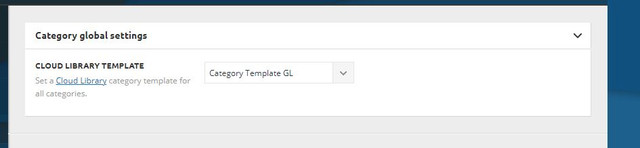
for posts…
Bettina Hello!
You can also duplicate the existing template and for assigning another template go to Newspaper -> Theme panel -> Categories -> Select a category you want and there you can find the setting “Category cloud library template” and choose the template from that dropdown for each category.
Thank you!
Bettina Hello!
If your settings are missing from theme panel, then make sure you have Standard Pack installed and active.
If you use a cloud/PRO template, then please try to re-install TagDiv Composer plugin.
If you don’t mean this, please provide more information about your issue, screenshots and also your website link in order to help you.
Thank you!
byothe And another weird thing is that TagDiv composer doesn’t work anymore… while it was working fine yesterday… I cannot add new elements anymore…
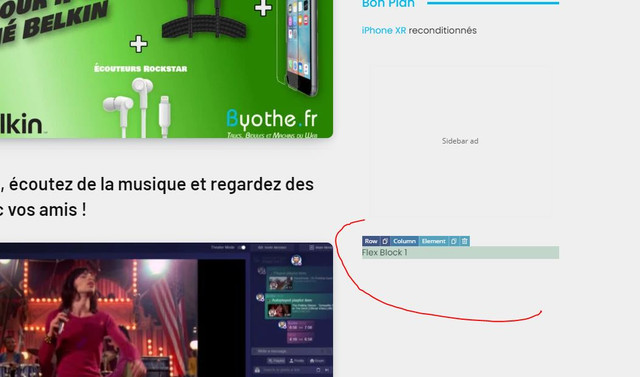
All this was working yesterday since I made some changes on my homepage… I even downloaded a new footer from the cloud library
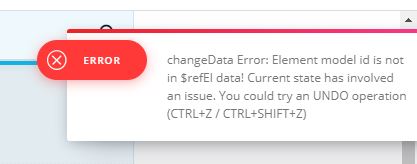
And this error appears when I try to do something