
 PuckWuck
Hi, Didn’t realize until some time after making use of your cloud templates for Tags and Categories.
Every numbered page shows the same exact posts from the first one. Like a loop.
Had to go in and reset to No-Template.
 delphinet
HI, how can we insert a CSS menu that works even without javascript in a cloud template header?
 Equapio
Hi Support-Team,
i want to make my site super fast and am excited to update it to 10.2. now. However the homepage was built with the WPBakery Visual Composer (current installed version is 5.1.1). Will the update break the page?
As far as i understand the situation i need to use the cloud templates+TD Composer to rebuild the homepage. But what is the best way to do this reg. the update? Should i update the theme first with the standard pack installed and then rebuild the homepage or would it be better to do it prior of updating to the latest version of Newspaper in order to not break the page?
 Vlad S
 Hello !
You will have to use a category template in order to have the ability. Find out more about it in our tutorials here: https://forum.tagdiv.com/cloud-library-category-templates/
I hope this was helpful !
Thank you !
 globalhunt
 Dear Sir,
We have found the problem. The problem is with this plugin “tagDiv Cloud Library”. When we deactivate this plugin then pagination is working fine. We have downloaded the theme from themeforest again and get the new plugin from there and uploaded on the website then we run the website then Fatal error is showing on our website, please give me solution.
 PeCould
Hello,
i have already upgraded to newspaper 10.2. Unfortunetely, when i want to see my Preview of draft posts. It show me these fatal erros:

in line 1667 is this:
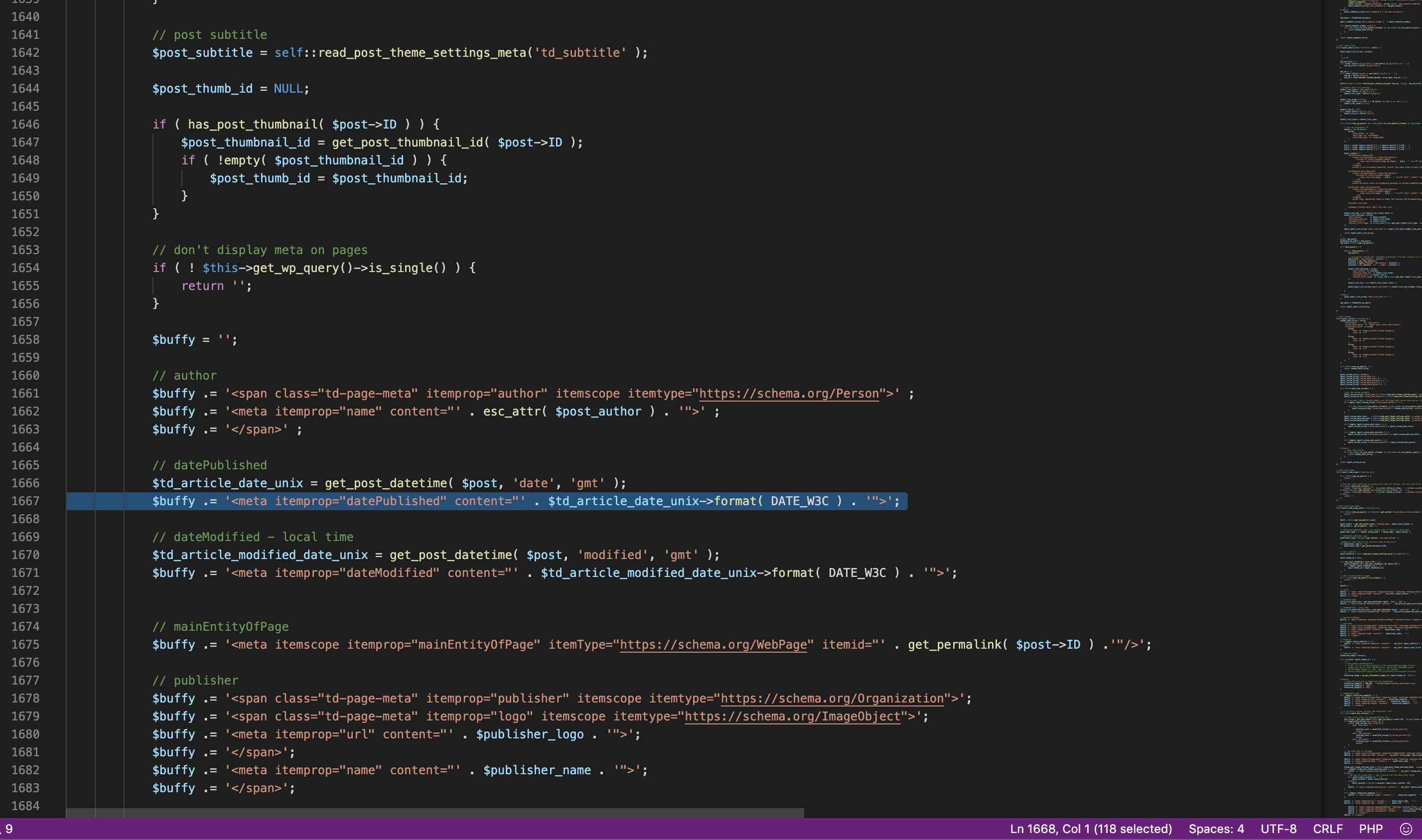
Can anyone help me?
Thank you a lot,
Petr
 jpnunes
Hi.
My Cloud Library was working fine until last week. I went for a download today and this message appears, “Invalid reply from server endpoint”.
I did some changes (I read here at the forum) as required at WP-Memory-Limit at config.php but still not working.
 dmsl
dmsl Hello,
thank you for the answer. I think I accomplished all the system requirements (dedicated server with 16 gb) and I followed already many guides and tips (Leverage Browser Caching, Gzip compression, Optimize images, wp_supercache, etc.). The problem is composer (and td_newsletter, cloud templates and standard plugin) many times cause slow or duplicates queries. This is not a big deal if we have 30-40 visitors. But if we have just a little bit more we have high CPU loads and the site doesn’t load. When I disabled composer and used another template, such as generetepress, even with 200 visitors at the same time, we dind’t have any problem. But I really prefer Newspaper theme, and I’d like to keep using it.
Thanks,
Matteo
 Calin
Calin Hi,
You can integrate/add the javascript code for ads by setting the code with tagDiv Composer on pages and cloud templates in a column text in text area -> https://i.imgur.com/quA2FCZ.png
Hope this will help you!
Thank you!
 Simion C.
 Hi,
1. The primary category has to be set manually for each post, regardless of its language. Setting a primary category for a post in a English for example, won’t have any effect on the translated posts, one has to be set by you.
2. This is a somewhat related topic – https://forum.tagdiv.com/topic/translate-cloud-templates-header/
I see you are using a cloud header template, you can create multiple header templates and set one for each language. You can use the header manager to set the desired header depending on the language. For example edit the translated homepage with the composer and set a header that you craeted for that language – https://prnt.sc/qtvz5v Same for the cloud template for posts, categories etc.
For the footer page, in that topic there will be information about how it can be done. Should work fine.
3/4 Change them how exactly? Those fields are added by the theme, changing the actual fields will require you to make modifications in the theme files. If that is what you want, the fields are defined here – https://prnt.sc/qtw1da
You can set this information for each post, no need to translate those fields, if maybe that is what you want to do.
Let me know.
Thanks
Calin Hi vifed,
You can use our forum and create new topics about the problems or help you need and we’ll try to help you.
I do not quite understand, do you want to have control over the posts that are appearing on homepage? if yes, then you can do this by editing the homepage with tagDiv Composer, click on blocks and filter the posts -> https://i.imgur.com/N28M2ZF.png
Flex Block Settings Guide -> https://forum.tagdiv.com/flex-block-settings-guide/
Hi jrvalle,
If you choose to use cloud templates and tagDiv Composer you can set the ads where you want on the website -> https://demo.tagdiv.com/newspaper_romania_news/ -> https://demo.tagdiv.com/newspaper_gossip/ all you need to do is to make the right settings on the row and use flex blocks not blocks.
Thanks
Vlad S Hello !
That can be achieved by either using a default template. Template 5 does not have featured image. Or to use a cloud library template for your posts ( which we recommend ) and set the layout without the featured image.
I hope this was helpful !
Thank you !
 thenickth
 I enabled it but only mobile menu stick not the desktop one. You can take a look at http://www.bltbangkok.com
PS. I use cloud template header. Tried in both but still didn’t work.
Vlad S Hi,
Unfortunately there is a problem with the new option add in theme panel for disable the schema article, this interfere with preview draft, in order to fix this problem you’ll need to make some changes in theme file or deactivate the schema articles from here: https://www.screencast.com/t/0E3IucACC You will have to check that in order to deactivate the schema, this issue will be fixed in the next update.
The file are wp-content/plugins/td-composer/legacy/common/wp_booster/td_module_single_base.php -> https://i.imgur.com/EMWC74l.png add “|| is_preview()” -> https://i.imgur.com/78beFgC.png
wp-content/plugins/td-cloud-library/state/single/tdb_state_single.php
-> https://i.imgur.com/WIIKHSU.png -> https://www.screencast.com/t/VbigQIINRB
or you can send us an email at contact@tagdiv.com and provide admin login, as well as cPanel or FTP if possible. We will take a look and make the proper changes for you. Include a link to this topic in the email.
Thank you for your understanding!
Vlad S Hello !
You can add the Tags into post template using the tagDiv Composer as you can see it here: https://www.screencast.com/t/QUjxjjjN
If you don’t use a post cloud template you can import one by following our tutorial here: https://forum.tagdiv.com/design-post-pages-using-cloud-library-templates/
Thank you !
Calin Hi,
If you are using PRO demos, that are using cloud templates, then the settings from theme panel will not apply on those templates, only on standard style.
In order to make some changes, you’ll need to edit the pages and templates with tagDiv Composer -> https://i.imgur.com/SbatOH6.png -> https://i.imgur.com/jeFg9aP.png
Thank you!
Calin Hi,
We have a developer working on this option, but from what I know there are some difficulties to integrate and make it to work properly with tagDiv Cloud Library, therefore I can not say when this option it will be add in our theme. i think it will take some time, sorry!
Thank you for your understanding!
Calin Hi,
Unfortunately there is a problem with the new option add in theme panel for disable the schema article, this interfere with preview draft, in order to fix this problem you’ll need to make some changes in theme file or deactivate the schema articles from here: https://www.screencast.com/t/0E3IucACC You will have to check that in order to deactivate the schema, this issue will be fixed in the next update.
The file are wp-content/plugins/td-composer/legacy/common/wp_booster/td_module_single_base.php -> https://i.imgur.com/EMWC74l.png add “|| is_preview()” -> https://i.imgur.com/78beFgC.png
wp-content/plugins/td-cloud-library/state/single/tdb_state_single.php
-> https://i.imgur.com/WIIKHSU.png -> https://www.screencast.com/t/VbigQIINRB
or you can send us an email at contact@tagdiv.com and provide admin login, as well as cPanel or FTP if possible. We will take a look and make the proper changes for you. Include a link to this topic in the email.
Thank you for your understanding!
Vlad S Hi,
Unfortunately there is a problem with the new option add in theme panel for disable the schema article, this interfere with preview draft, in order to fix this problem you’ll need to make some changes in theme file or deactivate the schema articles from here: https://www.screencast.com/t/0E3IucACC You will have to check that in order to deactivate the schema, this issue will be fixed in the next update.
The file are wp-content/plugins/td-composer/legacy/common/wp_booster/td_module_single_base.php -> https://i.imgur.com/EMWC74l.png add “|| is_preview()” -> https://i.imgur.com/78beFgC.png
wp-content/plugins/td-cloud-library/state/single/tdb_state_single.php
-> https://i.imgur.com/WIIKHSU.png -> https://www.screencast.com/t/VbigQIINRB
or you can send us an email at contact@tagdiv.com and provide admin login, as well as cPanel or FTP if possible. We will take a look and make the proper changes for you. Include a link to this topic in the email.
Thank you for your understanding!
Calin Hi,
Unfortunately there is a problem with the new option add in theme panel for disable the schema article, this interfere with preview draft, in order to fix this problem you’ll need to make some changes in theme file or deactivate the schema articles from here: https://www.screencast.com/t/0E3IucACC You will have to check that in order to deactivate the schema, this issue will be fixed in the next update.
The file are wp-content/plugins/td-composer/legacy/common/wp_booster/td_module_single_base.php -> https://i.imgur.com/EMWC74l.png add “|| is_preview()” -> https://i.imgur.com/78beFgC.png
wp-content/plugins/td-cloud-library/state/single/tdb_state_single.php
-> https://i.imgur.com/WIIKHSU.png -> https://www.screencast.com/t/VbigQIINRB
or you can send us an email at contact@tagdiv.com and provide admin login, as well as cPanel or FTP if possible. We will take a look and make the proper changes for you. Include a link to this topic in the email.
Thank you for your understanding!
Calin Hi,
Unfortunately there is a problem with the new option add in theme panel for disable the schema article, this interfere with preview draft, in order to fix this problem you’ll need to make some changes in theme file or deactivate the schema articles from here: https://www.screencast.com/t/0E3IucACC You will have to check that in order to deactivate the schema, this issue will be fixed in the next update.
The file are wp-content/plugins/td-composer/legacy/common/wp_booster/td_module_single_base.php -> https://i.imgur.com/EMWC74l.png add “|| is_preview()” -> https://i.imgur.com/78beFgC.png
wp-content/plugins/td-cloud-library/state/single/tdb_state_single.php
-> https://i.imgur.com/WIIKHSU.png -> https://www.screencast.com/t/VbigQIINRB
or you can send us an email at contact@tagdiv.com and provide admin login, as well as cPanel or FTP if possible. We will take a look and make the proper changes for you. Include a link to this topic in the email.
Thank you for your understanding!
Calin Hi,
Unfortunately for the moment this option do not exist using cloud templates, sorry!
I think this one will be add in the coming updates.
Thank you for your understanding!
 mrsky28
 Hi Calin,
I understand but I’m not using the cloud templates. Can you instead point me on which file should I edit? I know it’s in the tagdiv plugin, but not sure where, specifically. Thank you.
Calin Hi,
from what I can see now the mobile version and the desktop one are the same, maybe before you had the mobile theme plugin activate.
Also you can customize the pages and cloud templates using tagDiv Composer per each device (dis new option will be apply on flex elements and cloud elements) -> https://i.imgur.com/Z6kmrgg.png
Thank you!
Calin Hi,
Unfortunately for the moment there is no option in our theme for this, sorry!
If you are using standard demos and elements you need to change the font family for these in Theme panel > Theme Fonts -> https://i.imgur.com/p04Hcoo.png if you are using cloud templates, then you’ll need to edit theme using tagDiv Composer and set on each element and set the font you need.
Also there is an old solution, a customer provide a function that should change the default fonts, if you want you can check the topic -> https://forum.tagdiv.com/topic/do-i-really-need-to-change-all-the-text-fields-for-fonts/
Thank you for your understanding!



