
- TutorialstagDiv Social Counter Tutorial
 Bettina
 Hello!
Yes. We recommend to use cloud/PRO templates in order to have the possibility to edit them with the TagDiv Composer which contains a lot of functions and features, please check our tutorial here: https://forum.tagdiv.com/tagdiv-composer-tutorial/
More documentation about the cloud templates is here:
– https://forum.tagdiv.com/cloud-library-templates/
– https://forum.tagdiv.com/design-post-pages-using-cloud-library-templates/
– https://forum.tagdiv.com/cloud-library-category-templates/
Thank you!
Bettina Hello!
This issue has been discussed already here, please check: https://forum.tagdiv.com/topic/thumbnails-6/
We recommend to use cloud/PRO templates in order to have the possibility to edit them with the TagDiv Composer which contains a lot of functions and features, please check our tutorial here: https://forum.tagdiv.com/tagdiv-composer-tutorial/
More documentation about the cloud templates is here:
– https://forum.tagdiv.com/cloud-library-templates/
– https://forum.tagdiv.com/design-post-pages-using-cloud-library-templates/
– https://forum.tagdiv.com/cloud-library-category-templates/
Thank you!
 Mark Gilbert
 Anamaria – can I get a cloud template sidebar into standard pack page? I think not, right? The whole page has to be cloud template page, right?
Thanks
MG
 blessdigitalmkt
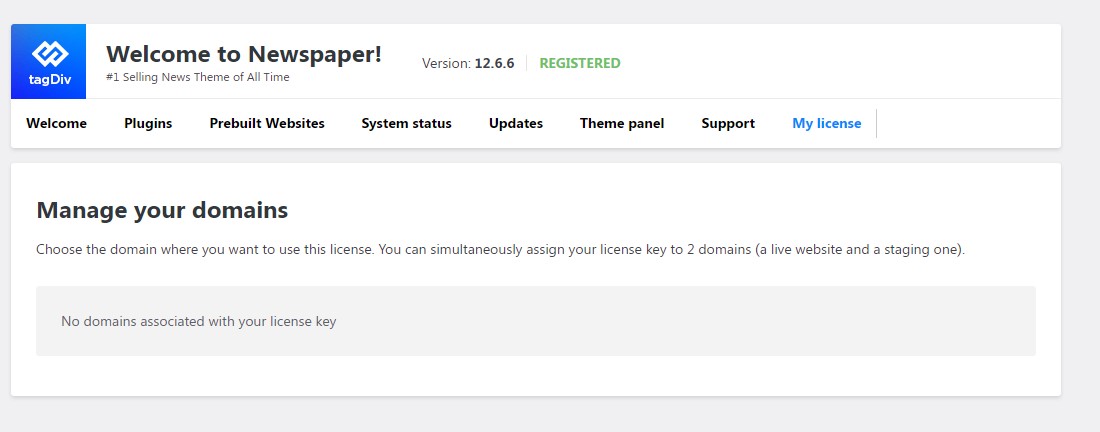
Acabei de comprar o tema newspaper 12 no site https://themeforest.net/, porém eu não estou encontrando onde coloco a licença pra poder usar o cloud library. Eu preciso adicionar e não consigo habilitar a licença. Achei que apenas fazendo o download e instalando ja iria licenciar.
 Anamaria
 Hi,
You can add the flex blocks to the page using cloud templates. Please check the section where you can add the CSS; maybe there is a code added there to set the title center.
Thank you1
Mark Gilbert I’ll check that CSS.
But – how can I get a Flex Block into the sidebar? Only possible with Cloud Templates, which I can’t use easily because of conflict with my paywall plugin?
Thanks
MG
 info@alessandromora.design
 Hola!
Mi web cumple con todos los requerimentos minimos, el limite de mi memoria actual es 512MB, tiene SSL y un ancho de banda de 1GB y aun sigo con el problema de no poder acceder al cloud template y no puedo guardar ningun cambio desde el editor tagdiv…
 reloaded
 Hi again,
did a few tests in the last days (disabling plugins, reuploading old database backups, ext-.), i solved some issues but there’s something which is not clear to me about the td_011_remote_cache stored in wp_option.
What i don’t understand is why it multiply to infinite… this seems to take my site to slow down because as soon as i delete those lines with this command:
DELETE FROM wp_options WHERE option_name LIKE ‘td_011_remote_cache’;
my database is going from almost 300 Mb to 106 Mb (after optimizing wp_option) and the wordpress backend is loading way faster with all options in the post editor.
So, is it really needed all these lines?
i’ve two similar issue, one with td_011_remote_cache and one with transients of cloudflare’s plugin. But the backend goes back to normal only when i delete td_011
the difference i noticed between them is that td_011 has Autoload ON, and cloudflare transient don’t.
Anamaria Hello,
Have you tried to access the cloud templates, as I said? Also, you can try to disable the extra plugin and check after.
What plugins have you activated on the website?
Thank you!
Anamaria Hello,
We’re sorry you encountered problems, our support hours are from 8 a.m. to 4 p.m., from Monday to Friday. Usually the “Invalid reply from server endpoint error” is caused by insufficient WP_Memory_limit, if you’ll set it to 256M, and is still not working, please double it and check the rest of the settings from our guide -> https://forum.tagdiv.com/requirements-for-newspaper/ also make sure that you are using SSL and you have a good bandwidth, the one from our server is 1GB/s and the one that I use at home is 500MB/s, if you have low bandwidth, then you can access parts of the cloud, this can be done from the frontend, for example, if you are on a post -> https://i.imgur.com/4G74M7F.jpg or from tagDiv Composer -> https://i.imgur.com/2F6MhfI.png or from backend -> https://www.screencast.com/t/wekHmc7kJ8J
Thank you!
Anamaria Hello,
Please activate the tagdiv Cloud Library plugin and tagdiv Standard Pack plugin.
Thank you!
info@alessandromora.designHe comprado esta plantilla y ha sido imposible tanto activar la licencia como descargar algo del cloud template. Em principio logre activar la plantilla, pero me daba el error Invalid reply from server endpoint. He enviado el reporte al correo contact@tagdiv.com y nadie responde. Mi web cumple con absolutamente todos los parametros y requerimentos minimos para que funcione perfectamente y aun nada. No quiero arrepentirme con esta compra, ademas este error ya comienza a hacerse recurrente en muchos usuarios.
Anamaria Hello,
Please disable the mobile theme and amp plugins.
Using our theme, you can choose from 3 mobile versions
-> mobile responsive => https://www.screencast.com/t/oJ2ShOp47
-> mobile theme plugin => https://forum.tagdiv.com/the-mobile-theme/
-> mobile page => https://tagdiv.com/newspaper-10-3-7-update-brings-customizable-and-fast-mobile-pages/ The option that you need to use.
Suppose you created the mobile pages with tagDiv Composer. In that case, when you install the Mobile Theme plugin, your pages will be overwritten by the plugin (the mobile theme comes with its templates for page, post, category, etc, so your current templates from the desktop theme will get converted to the mobile theme layout, the page content is made without builders in mobile editor => https://www.screencast.com/t/xbgZG8kH also, the options that are provided to edit the mobile theme version are limited (this keeps the things simple)).
This is a video about Responsive Newspaper Theme, AMP & Mobile Theme, Mobile Pages & Templates -> https://www.youtube.com/watch?v=SpGkOnJeNZY.
So, the mobile responsive is what you see when that you select the viewport on phone => https://www.screencast.com/t/matV17hH, so some settings may apply for each viewport(where is the border blue), and others are not(where the border is black).
The mobile page has the mobile templates from Cloud Library => https://www.screencast.com/t/YCcZ8rL8
The Mobile responsive version of the theme and the mobile page editor can be edit with tagDiv Composer, the mobile theme plugin cannot.
For example, you can have the mobile theme plugin activated and use the mobile page/mobile responsive version for the homepage/pages, but for the categories pages/404 page, you can’t use the mobile page/mobile responsive version if you have the mobile theme plugin activated.
So, if you want to design the pages with tagDiv Composer, you can use the mobile page or mobile responsive version.
Thank you!
Anamaria Hello,
1. Please follow the steps from this topic: https://forum.tagdiv.com/topic/error-at-zones-6models-1dom-the-model-does-not-match-the-content-currene/. If you have a child theme, please use the main theme.
2. You can find the page here https://cloud.tagdiv.com/#/single/page/Pages/2412 When you create a plan, you can set it here the publish limit and set the post type -> https://i.imgur.com/pdfKIzy.png Also, you can find the subscription plan here https://i.imgur.com/qApmmFu.png and if you want to add the page for submit you can see the page id here https://i.imgur.com/VTnBG6d.png https://forum.tagdiv.com/create-frontend-submission-form/
Thank you!
 Thomas
Hello
I really like the header of this new demo https://demo.tagdiv.com/newspaper_free_news_pro
I don’t understand how to achieve to have 2 rows.
So I want to import it and modify it with my infos and colors.
But when I go in the Pre-designed Templates – Cloud Library, I only find all the homepage Homepage – Free News template.
If I import it, I am afraid that it will rease all my template site.
It is correct?
If so how I can achieve to importe ONLY the header of this demo without destroy mine?
Regards
Anamaria Hello,
We have long recommended using the cloud template and discontinuing the tagDiv Standard Pack plugin.
Thank you!
Anamaria Hello,
This feature is not from our theme. You can access the cloud templates from here https://i.imgur.com/eLA0a8d.png
Thank you!
Anamaria Hello,
The cloud templates are now in the cloud library.
Thank you!
 jeevankumar0514
Hi Team,
Td Composer not working, Not allowing to edit any template, Could you please help on this.
Thank you
Anamaria Hello,
The easiest way is to reimport the cloud header template and compare the options there. Have you tried to import the template again, but the issue still happened?
Thank you!
jeevankumar0514Hi Team unable to edit clod template with Td Composer, Getting error 404 and unable to change the logo.
Kindly help on this.
Anamaria Hello,
Please provide more details about what is not available to you. Do you have the cloud library plugin activated? Did you check the cloud templates -> https://cloud.tagdiv.com/#/load/All? You can also create what template and design you want with cloud templates and tagdiv Composer.
Thank you!
Anamaria Hello,
Please check this topic https://community.cloudflare.com/t/i-stuck-at-checking-your-browser-before-accessing-page-when-using-clickfunnels-plugin/295064
Thank you!
 Miroslav Glavić
 I use GIMP, It’s like photoshop but open source.
There are plugins to convert wo webp. As well as AVIF (the latest format I guess).
There is also cloudconvert.com that can covert from one image format to the other. I was using it to convert fornts from ttf to woff2. It can convert more than image formats.
Note I don’t work for Tagdiv. I just had the question you have, a while ago.
 mtdas99
1. I have imported author template Kattmar and Week pro. Assigned Week Pro as global template but whenever I am trying to edit the template an error is showing as https://ibb.co/tXdq8dJ
Error: Error at rows: 2(models) : 3(dom). The model does not match the content Current state has involved an issue. You could try an UNDO operation (CTRL+Z / CTRL+SHIFT+Z)
2. I have found Job listing and App listing submission cloud template but not found post submission template. I setup opt-in subscription plans for Post and Surveys(CPT) submission. How a subscriber submit posts or CPTs after subscribing a plan? Also there are no details available in My Account page about the subscribed plan, Submit post or Surveys(CPTs) link and remaining post submission limits for that author.



