
- NewsmagtagDiv Composer Tutorial
- NewsmagHow to use the Visual Composer plugin
- NewsmagHow to update a plugin
- NewsmagWhat’s included in Newsmag theme package
- NewsmagRequirements for Newsmag
- NewsmagInstall via WordPress
- NewsmagInstall via FTP
- NewsmagBlock settings tutorial
- NewsmagtagDiv Social Counter tutorial
- NewsmagHow to update the WPBakery plugin
- NewsmagPage Menu
- NewsmagCustom ad spots
- NewsmagSmart sidebar
- NewsmagVideo playlist
- NewsmagPage templates
- NewsmagHomepage – How to build and set it
 Simion C.
 Hi,
A long term solution with modifications in the composer files does not exist unfortunately. Modifications would have to be made each time the theme is updated.
One solution would be to add those posts in a category, create a category for this or use one of your existing ones. Then filter the block by that category.
If this is not possible, maybe copy the post ID field content in a text file, make the modifications you want (add, remove post IDs) then enter it in the field again.
I am sorry for this inconvenience, I have added this as a request on our list. Maybe for a future update a definitive solution will be found and implemented.
Thanks
 Calin
Calin Hi,
If I understand correctly you want to remove the padding from mobile view
-> https://www.screencast.com/t/c3vplIQFg
If this is what you want to achieve you need to add this custom css in Theme panel>Custom code>Advance css> Phones
Here is the custom code
.td-container-wrap .td-container, .td-container-wrap .tdc-row, .td-container-wrap .tdc-row-composer {

    width: 100%;

    padding-left: 0;

    padding-right: 0;

}

.tdc-content-wrap .td_block_big_grid_1,

.tdc-content-wrap .td_block_big_grid_2,

.tdc-content-wrap .td_block_big_grid_3,

.tdc-content-wrap .td_block_big_grid_4,

.tdc-content-wrap .td_block_big_grid_5,

.tdc-content-wrap .td_block_big_grid_6,

.tdc-content-wrap .td_block_big_grid_7,

.tdc-content-wrap .td_block_big_grid_8,

.tdc-content-wrap .td_block_big_grid_9,

.tdc-content-wrap .td_block_big_grid_10,

.tdc-content-wrap .td_block_big_grid_11,

.tdc-content-wrap .td_block_big_grid_12 {

     margin-left: 0;

     margin-right: 0;

}
Hope this will help you!
Thanks.
Simion C. Hi,
So you have imported the homepage of the demo with the cloud library, or install the demo? You can edit the respective homepage regardless, with the tagDiv composer. Modify the elements you want as needed, then save it
– https://tagdiv.com/tagdiv-composer-page-builder-basics/
– https://forum.tagdiv.com/block-settings-guide/
Depends on what this design is, what exactly you mean by importing design in the page. Some more details about this would be helpful.
It is true that uninstalling a demo or installing a new one will remove what has been imported by it. A full demo install with content imports demo posts, categories, menus, logo, images, theme panel settings, and in some cases a stylesheet. These will all be removed/reset when uninstalling or installing a new one. Your own created posts, menus, etc will not be affected, just the demo content.
Please let me know if you have more questions.
Thanks
Calin Hi,
The mobile theme is a plugin that provide you a better speed then responsive version of theme, but in order to achieve that speed you’ll need to create a new content for pages because in the most of cases those were made with builders ( tagDiv Composer, WPBakery ) and you need to use only the mobile editor ( you need to set the content for pages in mobile editor and this content will be display on mobile theme)
-> https://www.screencast.com/t/ebUIzt4se
Also please check our documentation for Mobile Theme: Automatic Optimization for Mobile with Newspaper Theme -> https://tagdiv.com/mobile-theme-automatic-optimization-for-mobile-newspaper-theme/
I think that you are referring to those 3 blocks, for those you’ll need to have set seam feature posts (that have set feature category) -> https://forum.tagdiv.com/featured-posts-2/ -> https://www.screencast.com/t/QsJ6ppY4
You’ll need to add some post in feature category -> https://forum.tagdiv.com/featured-posts-2/ if you do not have this category you can create it, just make sure that you set the category name to be
Featured
Thank you for your understanding!
Simion C. Hi,
It is not complicated, just create a page with the elements you want to display in the footer, with the tagDiv composer. Then set it as footer page in the theme panel, that would be all there is to it.
A widget sidebar can be set everywhere the composer can be used. I don’t quite understand where you want to add it however.
If you mean the right column in the footer (add widgets in it), that would be the footer 3 column – http://prntscr.com/n5uork
Let me know if I misunderstand, in that case some more details would be helpful.
Thanks
Simion C. Hi,
Nothing to worry about in this case. That message can be displayed when making changes in the backend of pages, like saving it as draft, changing the page template etc.
In this case the page can still be edited with the composer despite the message, there is no actual problem. I believe there are plans to modify when the message appears. Sorry for any inconvenience. Let me know if you have more questions.
Thanks
 Catalin
 Hi,
Do you have tried the following functionality from the Td Composer from here -> https://www.screencast.com/t/i9omxHfyzQTA You can hide some rows only for mobile. Try and check the results.
Thank you!
Calin Hi,
Unfortunately for the moment there are not many options for amp version, please check our documentation for How to Make an AMP Ready Website with Newspaper Theme -> https://tagdiv.com/amp-newspaper-theme/
Also please check our documentation for Mobile Theme: Automatic Optimization for Mobile with Newspaper Theme -> https://tagdiv.com/mobile-theme-automatic-optimization-for-mobile-newspaper-theme/
The mobile theme is a plugin that provide you a better speed then responsive version of theme, but in order to achieve that speed you’ll need to create a new content for pages because in the most of cases those were made with builders ( tagDiv Composer, WPBakery ) and you need to use only the mobile editor ( you need to set the content for pages in mobile editor and this content will be display on mobile theme)
-> https://www.screencast.com/t/ebUIzt4se
I think that you are referring to those 3 blocks, for those you’ll need to have set seam feature posts (that have set feature category) -> https://forum.tagdiv.com/featured-posts-2/ -> https://www.screencast.com/t/QsJ6ppY4
You’ll need to add some post in feature category -> https://forum.tagdiv.com/featured-posts-2/ if you do not have this category you can create it, just make sure that you set the category name to be
Featured
Thank you for your understanding!
Calin Hi,
Please check our documentation for how to Create custom code with the browser’s Inspector or the Live CSS Box ->https://tagdiv.com/how-to-create-custom-code-in-newspaper-theme/
In tagDiv Composer also -> https://www.screencast.com/t/s2vrIQRm0
Thank you!
 StefvE
Hey,
How can I change the layout of a CPT, for example with TagDiv Composer.
Thanks!
Catalin Hi,
I have checked your video recorded and your problem happens due because your text has been added from Gutenberg Editor and then, that page you have edited with TD Composer and that’s why you cannot add any page builder element for that section. The fix is to remove the text from the Gutenberg editor use only the TD Composer to your page. Paste that text inside a column text or Text with Title and check the results.
Hope you understand!
Thanks.
 HGDienstverlening
 clear _deletePanel js_files_for_wp_admin.min.js:24:109
tdcJobManager.addJob – Error callback – textStatus: error errorThrown: Internal Server Error js_files_for_wp_admin.min.js:24:109
{…}
columns: 2
jobId: 0
postId: “3866”
replyHtml: “”
shortcode: “[td_block_3 offset=\"1\" block_template_id=\"td_block_template_2\"]”
<prototype>: Object { … }
js_files_for_wp_admin.min.js:24:109
tdcJobManager.addJob – ERROR: 500 server error
Full error from firefox the whole TD Composer is not working anymore.
HGDienstverleningWhen i try to edit the block i get this:
tdcJobManager.addJob – Error callback – textStatus: error errorThrown:
[object Object]
tdcJobManager.addJob – ERROR: 500 server error
HTTP500: SERVERFOUT – De server heeft een onverwachte fout ontdekt waardoor het verzoek niet kan worden voltooid.
(XHR)POST – https://gs-media.nl/wp-json/td-composer/do_job?tmp_jobId=0&tmp_blockUid=undefined&post_id=3866&uuid=7708ad57-4f2a-ddde-ed41-379984b3bc91
 mediaapps
I am trying to build a home page with Tagdiv Composer. Here is a screen recording of what I am doing. Please advise where I am going wrong here.
 jamiesharpe
Hi I created a page with TD composer. The first row has a three column layout where I inserted Elements: Title over Images. The second row has a one column layout where I inserted another Element: Title over Image. The layout looks good on desktop but when I switch to mobile view, the second row cuts off the sides of the Element.
I’d be happy to exclude the second row in mobile view, but I don’t know how to do that. Tried in mobile editor but couldn’t get it to work. Could you please advise?
 bob@mrrogersweborhood.com
 Yes, this is exactly what I’m doing on http://mrrwebdev01.org/wp-admin/post.php?post_id=36026&td_action=tdc&tdbTemplateType=page#/
I have 3 ‘rows’, but when changing the bottom ‘row’ from full to 2/3, 1/3 it changes all rows to 2/3, 1/3. I just cannot get it to work. Apparently I’m just not smart enough to use the Tagdiv editor.
If you can make the change to the page http://mrrwebdev01.org/HomeTest and save your work, I would be very interested to see the results.
If we’re unable to manage this theme with tagdiv composer, we’ll be forced to use wp-bakery composer. If we do that, not all of the elements, specifically flex blocks, are listed in the bakery editor.
Can you please advise us on what to do? I thought this was going to be an easy switch to tagdiv. It seems to be a really good editor, perhaps just not for us…
Many thanks again.
 yukiy531
Hello,
I am using
WordPress Version 5.1.1
Newspaper V 9.6.1
WPBakery Page Builder 5.7
The button does not appear.
Which setting
“Backend Editor” “Gutenbeg Editor” “TAGDIV COMPOSER”
How can I display?
 ySV
ySVHello i have newspaper 9.6.1, i try to set in my homepage custom ads on tgComposer but it not show. Is an <iframe> ads. Why?
 Modo
Modo 1. AMP
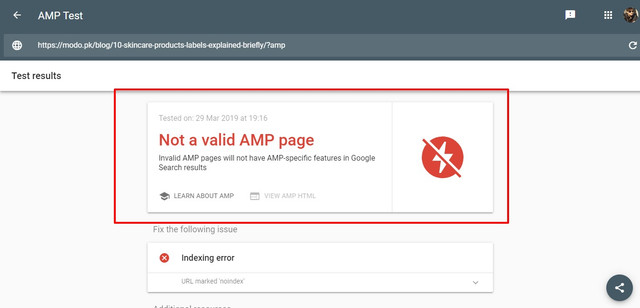
2. Search Template Default VS Custom
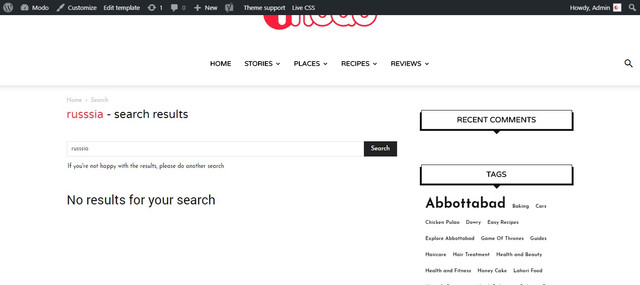
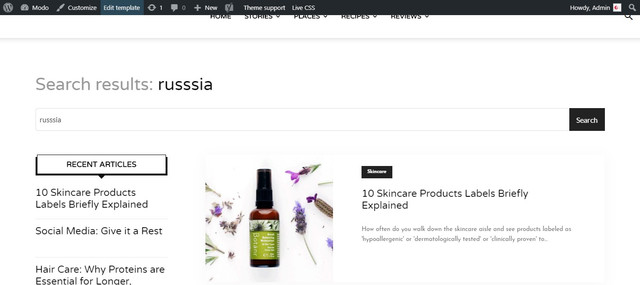
3. Composer layout for search template maybe this is an issue

4. Comments it was an additional feature request A dropdown/actual stars would be a cool addition in order to allow users to rate recipes
I have seen many themes that allow to leave rating with comments.
5. Safari Issue

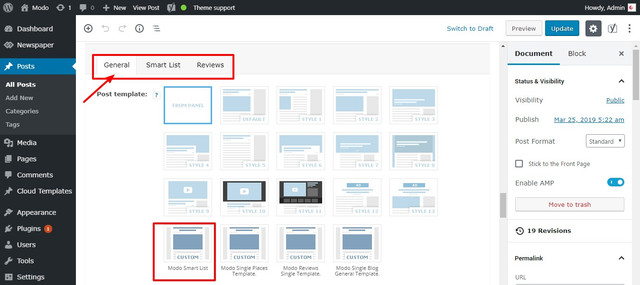
6. Smart List Template
7. Print
Here is how it looks.
https://modo.pk/wp-content/uploads/2019/03/War-of-the-Words-Game-of-Thrones-Best-Dialogues-%E2%80%93-Modo.pdf
 theMMANerd
Hello,
I was wondering if this theme had an option to add “Next Page” Options like the home page. On the home page once the recent posts hit a certain number they add a new page. I don’t see that as an option for different created tabs. Please use the link below to see my “Reviews” tab for my website. On the tagDIV composer it only allows me to adjust how many posts can be shown. Thanks and hope to hear from you soon!
 CarolienBovyn
 Dear TagDiv,
Is there any news about the abovementioned ‘custom’ tabs element being added any time soon to the TagDiv Composer, please.
We know blocks in TD Composer can have Ajax filters, but these do not allow custom tab titles or allow us to control the content within each tab. This would be required as a replacement for WP Bakery / Visual Composer’s tab-block.
We appreciate the feedback.
Kind regards
-
This reply was modified 7 years by
CarolienBovyn.
Calin Hi,
Yes you can achieve something like that using tagDiv Composer here is an example -> https://www.screencast.com/t/QWmwYySBv3 or somethink like this -> https://www.screencast.com/t/acAeQ98A
Please check our documentation for How to Create Beautiful Homepages with Newspaper Theme -> https://tagdiv.com/how-to-create-homepages-with-newspaper-theme/
What is the Cloud Library and How You Should Use It? ->https://tagdiv.com/what-is-the-cloud-library/
In order to achieve that homepage you need to have TagDiv Composer and TagDiv Cloud Library activate.
First select no header like this -> https://www.screencast.com/t/11bZOCkhUtdd after that click on row and stretch it and check the divider -> https://www.screencast.com/t/psTxA0yP -> https://www.screencast.com/t/NfNuz8bU78jM -> https://www.screencast.com/t/xHxiMXhuAG add a new row and stretch it and set the layout of it https://www.screencast.com/t/zw8ZXuXQovO set in left column a single image -> https://www.screencast.com/t/6rW1U0DR and set an image for it -> https://www.screencast.com/t/AfrfESbD0WN -> https://www.screencast.com/t/4NZuM85Cqg -> https://www.screencast.com/t/3Ch2H5ZCM8 after that set in the right column the header logo, header menu, social and the header search -> https://www.screencast.com/t/DsJhE4R1t now you need to set each element to be display inline and the search and social align theme to right -> https://www.screencast.com/t/812LUkv5Lai -> https://www.screencast.com/t/tNrmvVkW2
Hope this will help you!
Thanks!
 philipkirtatas
With Newspaper version 9.6 installed, in Tagdiv Composer the Widged Sidebar does not working. After placing in a column, it disappears.
I returned to version 9.1 and everything is ok.
Please resolve
Simion C. Hi,
Hiding it with CSS would not be recommended, this is a violation of Adsense terms. For non-multi purpose header styles there would be a way for a long term solution, by setting a condition in the header in a child theme. But the multi-purpose header styles files are in the composer plugin.
One way would be to use a cloud library 404 template, there are some designed by us, but you could design your own – https://cloud.tagdiv.com/#/load/404
Then in that 404 template create a new header (with header builder elements) or import one
– http://prntscr.com/n4j5q7
That header will then only be used in the 404 pages. So this would be a solution.
Thanks
Simion C. Hi,
1. That is true, the mobile theme doesn’t have many settings at the moment. There will be more added in the future. However we have to be careful what we add in it, to maintain it’s speed. Not having may settings and using mostly predefined templates is what makes it fast.
2. What exactly is not functional? Currently the solution we provide is not a dedicated AMP plugin, now you can use the official AMP plugin and the mobile theme
– https://tagdiv.com/amp-newspaper-theme/
From what I can see you are using this solution at the moment, seems to be valid
– http://prntscr.com/n4ic9l
3. I checked with a mac using Safari version 12.0.2 (14606.3.4), from what I can see everything looks alright, same as on Chrome for example. Let me know if I should check anywhere specific.
4. The only review system the theme has is like this – https://forum.tagdiv.com/reviews-2/
I am not aware of any plans to add more review or rating capabilities in the theme. Maybe you could use a plugin for this.
5. I don’y quite understand what you mean. The theme uses thumbnails, also category tags. Some more details would be helpful.
6. If there weren’t this many font settings or only for grouped elements, users would request more specific settings. Almost anything has font settings in the theme panel (these are general) and in the tagDiv composer (for specific items).
However something like what you are describing is in development. Not sure how exactly it will be at the moment, but it will be easier to manage the fonts.
7. I made a quick test on my side with a cloud search template, the search works for me same as with the default search template. What exactly is happening in your case?
8. A cloud post smart list template can be used for posts that consist of a smart list. This template will appear anywhere the other post templates appear. If I misunderstand, some more details would be helpful.
9. I can add this on our suggestion list, I don’t believe there were similar request before. There are plugins that could be used for this.
10. How are you testing this? For me the version of this post page
– http://localhost/wp_s2/gadgets/how-to-drive-growth-through-customer-support/
Looks like this – http://prntscr.com/n4isd0
Let me know.
Thanks
