
 Jabed
JabedThis is my current condition 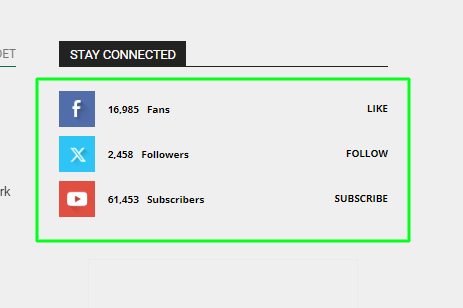
and this is how I want to make change in my site.
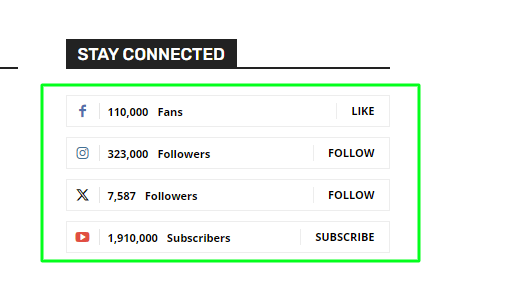
I have got a style similar to this in tagdive composer and it’s style 1 (black) but It’s not exactly as same as I want. I need help to fix it.
 Anamaria
 Hi,
If you have a Single Post Template from Cloud Library, then you need to edit the post with tagDiv Composer => https://www.screencast.com/t/jHatJGC1qRf, select the Single Post Views => https://www.screencast.com/t/NhUGCRfI and with right-click, you can delete it.
Thank you!
 danna
dannaHello, I am currently building a page with “Flex Loop Filters”. Basically, everything works fine. However, since I would like to have a hero image as a header, I wonder if it is possible for the page not to jump all the way to the top when applying a filter, but to stay in place. Currently, you have to scroll down again after each filter you click. Is there a solution for this? Link is: https://rauf-und-davon.at/tagdiv-composer-draft/
All the best,
Daniel
 Bettina
 Hello!
You can upload a cloud footer template for example(default pro demo), so you can edit it easily with the tagdiv composer. Or you can change that only in the Appearance -> Widgets -> Filter(Footer).
Thank you!
Anamaria Hello,
Please press tagDiv Composer, to be able to edit it with tagdiv Composer -> https://i.imgur.com/3RVRqkO.png -> https://forum.tagdiv.com/tagdiv-composer-tutorial/
Thank you!
Anamaria Hello,
Create a new page in Dashboard -> Pages, press the publish button, and view. Edit it with the TagDiv Composer: https://prnt.sc/gGw1zq0zdf3r and start customizing it as you like to add text, image using the elements from tagdiv Composer. You can import from the Cloud Library sections, blocks, etc. already designed.
There is not need to have the pages in cloud templates, because you can see the pages in the section for pages.
Thank you!
 Alucardj
 Hi Bettina! Unfortunately i can’t edit this section with TagDiv Composer as you can see in the photo.
Tagdiv composer problems
Thank you!
-
This reply was modified 2 years by
Alucardj.
Anamaria Hello,
No, you need to create a new page in the Gutenberg and press the button edit with tagdiv Composer -> https://i.imgur.com/JiJkRKN.png after publishing the page.
Also, you can import pages or sections from the cloud library. Please tell me what type of hosting you have, dedicated or shared.
Did you create a new page or edit an existing one? How was that page created?Please follow the steps from this topic https://forum.tagdiv.com/topic/error-at-zones-6models-1dom-the-model-does-not-match-the-content-currene/ if you have a child theme; please use the main theme.
Thank you!
 Romi
Romi When I tried to open TagDiv Composer, the loading is so long and once the composer interface is loaded I got the message.
Error at zones: 6(models) : 1(dom). The model does not match the content Current state has involved an issue. You could try an UNDO operation (CTRL+Z / CTRL+SHIFT+Z)
 Nicolas_MamereRomi
 So we can design the look of all pages including Homepage, Single Post without Cloud Library instead using solely TagDiv Composer that would be great.
And on the page you refer, that means we can design the look from scratch using TagDiv Composer only with Gutenberg interface am I right?
Anamaria Hello,
You can translate them from Theme Panel -> Translations -> Translations -> https://i.imgur.com/ezhjmLq.png and the title of the blocks or other elements you need to edit the pages/templates with tagDiv Composer to change the translation.
Thank you!
 nialmedia
 Hello there,
I tried all 3 version and none of it worked. Not even the AMP. I tried the mobile version provided by the template and built from scratch a page which is not showing on any mobile device. I talking about “Edit with tagdiv composer” -> “edit mobile page”.
I tried using the Mobile Editor from “Edit Page” as well and the information there is still not showing on the mobile homepage.
And I also tried the AMP. I tried all 3 options provided by AMP. I tried all 3 options provided by Theme Panel -> Mobile. I tried Mobile, Mobile + AMP and just AMP.
None of these worked. Whatever I do, it still shows the blank homepage with “Latest Articles”. I turned off the articles option from Theme Panel too.
The thing is, I already used all the plugins provided by Newspaper theme.
Bettina Hello Kent!
We recommend to use cloud/PRO templates in order to have the possibility to edit them with the TagDiv Composer which contains a lot of functions and features, please check our tutorial here: https://forum.tagdiv.com/tagdiv-composer-tutorial/
More documentation about the cloud templates is here:
– https://forum.tagdiv.com/cloud-library-templates/
– https://forum.tagdiv.com/design-post-pages-using-cloud-library-templates/
– https://forum.tagdiv.com/cloud-library-category-templates/
More information about the new blocks:
– https://forum.tagdiv.com/modules-builder-newspaper-theme/
– https://forum.tagdiv.com/flex-block-builder-flex-loop-builder/
– https://forum.tagdiv.com/flex-block-settings-guide/
Thank you!
Anamaria Hello,
You can use the smart list element. You need to use the smart list from tagDiv Composer, inside Single Post Content ->
https://i.imgur.com/dbipPWQ.png according to the documentation https://forum.tagdiv.com/smart-lists/. You can create the smart list in Gutenberg.
Also, you don’t need to use the classic editor, you can use the Gutenberg editor, which is the default editor for WordPress and select/add the element classic https://i.imgur.com/9sWuCtW.png to add the smart list.
Also, please make sure you have the same heading in the post editor and in the smart list element.
Thank you!
Anamaria Hi,
Please check the error log when you receive this error. Did you check only with tagDiv plugins if the issue persists? You can use flex block from tagdiv Composer -> https://forum.tagdiv.com/tagdiv-composer-tutorial
Thank you!
Bettina Hello!
Edit the homepage with the tagdiv composer, click on that block, and check the settings from the left side. I think you use Flex Block 2, so there are some settings for the title length in the general tab and title space in the layout tab.
Thank you!
 Calin
Calin Hi leagcooks, as a workaround what can be done is to add a button with tagDiv Composer set the link on it and adjust it with some css. It is not easy, but it can be done.
Anamaria Hello,
Please let me know in what element you set the link. Please check this topic https://forum.tagdiv.com/topic/tagdiv-composer-does-not-save-only-content-of-homepage/
Thank you!
 AprilSins
 Hi Bettina, I figured out what the problem was. It was the tagdiv composer. I had to deactivate it, connect the ad network, and then reactivate it. I wanted to let you know in case anyone else has any issues in the future. Thanks for your response to my query. Have a good evening,
April
Bettina Hello!
In the tagdiv Composer builder: https://forum.tagdiv.com/tagdiv-composer-tutorial/
More documentation about the cloud templates is here:
– https://forum.tagdiv.com/cloud-library-templates/
– https://forum.tagdiv.com/design-post-pages-using-cloud-library-templates/
– https://forum.tagdiv.com/cloud-library-category-templates/
Thank you!
Romi So I can’t have logo and header without Cloud Library and without Composer?
Bettina Hello!
Unfortunately, no. You can only use cloud templates that are fully editable with the tagdiv Composer, and they need the Cloud Library plugin as well.
Thank you!
RomiIs that possible? If it’s how to have header logo and look and also want to use TagDiv Composer.
Bettina Hello!
We have 3 options available for mobile versions that you can use:
1. Responsive version: A responsive version of your website looks similar to the desktop version. TagDiv Composer is used to edit the page. Click on the mobile viewport: https://www.screencast.com/t/XDQJedlggSB. There, you can see your mobile version and edit or adjust the elements to look better.
2. Mobile pages: https://tagdiv.com/newspaper-10-3-7-update-brings-customizable-and-fast-mobile-pages
3. Mobile theme plugin: The Mobile Theme is a performance-optimized theme included in the main Newspaper theme that only loads on mobile devices. It comes with its own templates and designs for pages, posts, categories, etc., so your current templates from the desktop theme will get converted to the mobile theme layout. Please see https://forum.tagdiv.com/the-mobile-theme/ and https://forum.tagdiv.com/mobile-theme-introduction/ for more information.
A full explanation is here: https://www.youtube.com/watch?v=SpGkOnJeNZY
If you need to use mobile version 1 or 2, then you need to uninstall the Mobile Theme plugin and AMP.
From my point of view, if you don’t use the Mobile Theme plugin, then there is no reason or benefit to AMP. Unfortunately, AMP is not working with the cloud templates because the AMP’s layout is not fully customized.
The AMP version works best with default templates and not cloud templates. That’s why we integrated it with the Mobile theme plugin.
The feedback from our clients about AMP was negative and it is not used anymore, that’s why we didn’t add more customization options. We no longer recommend using AMP because it is deprecated https://developer.bigcommerce.com/docs/storefront/wordpress/platform-integration/enabling-amp
This is a known issue and the opt-in builder is fully updated.
Thank you!



