- NewsmagtagDiv Composer Tutorial
- NewsmagHow to use the Visual Composer plugin
- NewsmagHow to update a plugin
- NewsmagWhat’s included in Newsmag theme package
- NewsmagRequirements for Newsmag
- NewsmagInstall via WordPress
- NewsmagInstall via FTP
- NewsmagBlock settings tutorial
- NewsmagtagDiv Social Counter tutorial
- NewsmagHow to update the WPBakery plugin
- NewsmagPage Menu
- NewsmagCustom ad spots
- NewsmagSmart sidebar
- NewsmagVideo playlist
- NewsmagPage templates
- NewsmagHomepage – How to build and set it
 Bogdan B.
 You can try it out and download it from our free theme: https://forum.tagdiv.com/topic/td-github-page-seems-to-be-gone-or-down/ but keep in mind that it will not run in parallel with visual composer. Please jsut use one or the other as both could create certain issues.
It is still experimental on newspaper and newsmag. On ionMag it is fully implemented and working 100%. On newspaper and newsmag, it can still provide a few hiccups.
Thank you!
 Simion C.
 Hi,
Try this code, enter it in Theme panel->Custom Css, it removes the bottom padding and margin on the module
.td_block_9 .td_module_8 {

padding-bottom: 0;

margin-bottom: 0;

}
Result – https://www.screencast.com/t/O1CsrNnw
That problem with the thumbnail should not happen, some plugin could be causing this. Right now I do not see it in your site – https://www.screencast.com/t/NTRlWzeAe4
If you should encounter this problem in the future, try disabling all the plugins except Visual composer and see if it still occurs.
Thanks
 Catalin
 Hello Berbi,
I have checked your console and I noticed that you have a lot of js errors as you can see here -> https://www.screencast.com/t/62bPU9cOLZcy Also, I saw that you are using some untested plugins which can interact with the theme core files and cause these errors. Please try to disable all of them, leave just Visual cOmposer to active, clear all your caches and install only the plugins that come bundled with the theme packet and rule out any conflicting plugins. Also, if the problem is still there, please make a new clean install via FTP way because this is the surest method in this regard. Notice that the smart sidebar is a sensible functionality of sidebar and if you will have some interferences between JavaScript code, this will not work and that’s why it is very important to rule out all your untested plugins which might cause these errors from your console.
Hope this helps and let us know how it goes!
Thanks for the message!
Bogdan B. Ok, but you still have lots and lots of js errors in your site regarding the theme js. Please inspect your site and access the browser condoe and you will see them as i have suggested above, You have a theme js error and the revolution slider provides a js error. There is too big of a couincidence here. Please deactivate all plugins except visual composer and revolution slider and check your console for errors. Most likely one of your plugins is causing the conflict.
Make sure you get rid of the huge amount of js errors in your console.
Thank you!
 Videnciastral
 Hello
Plugin that I have assets in wordpress:
– Visual Composer and Yoast. I have no more.
– Theme installed is Newspapper 7
Can you help me?
Error of images in Safari Navigator, in Iphone 5s- safari.
https://drive.google.com/file/d/0ByMa6xO4xXEMN1hiZ2VhRDktOUk/view?usp=sharing
https://drive.google.com/file/d/0ByMa6xO4xXEMczd3Nm5CMkZGNms/view?usp=sharing
https://drive.google.com/file/d/0ByMa6xO4xXEMZGdmRjJ5MGpYd00/view?usp=sharing
https://drive.google.com/file/d/0ByMa6xO4xXEMVENhNnZfaldycU0/view?usp=sharing
https://drive.google.com/file/d/0ByMa6xO4xXEMOEo1Zkk0aTd4T0E/view?usp=sharing
Link Web: https://videnciastral.com/
 partha0135
How Can I Active Visual Composer Premium Version
TNX
Bogdan B. Hello,
Unfortunately the theme does not provide any setting in this regard. The video background option is added by visual composer. The theme has o control over the option. If visual composer does not provide these controls, you will have to search or a plugin that can provide the features you require.
Thank you!
Catalin Hello luckykatem,
This could be a plugin conflict so please disable all plugins except visual composer, clear cache and reset CDN files if you use it. Please also check any custom code you might have added to the theme panel or the theme files. If you use a child theme, please switch to the main theme to make sure it does not affect the proper functionality of the theme.
Thank you!
 otsnews
Hello,
Since updating recently to WP 4.7.2, it seems Visual Composer is breaking the edit pages screen. It goes to a blank screen and I cannot get any errors through PHP or WP_DEBUG.
What is the deal with the VC plugin as we have obviously used it to build up the theme, though only deactivating the plugin allows us to access the edit page screen.
Would you be able to give us some help in getting this fixed?
Thanks
 Sal12345
Hello, I have a question that is simple, not sure if it has been discussed in other forums
In your theme Newspaper, in using Visual Composer blocks with different shapes, I want to achieve this result as follow:
I have a category or multiple categories of posts to flow from one block (i.e. block 19) to and through multiple blocks to another (i.e. Block18; block 16, etc…) without showing the same (repeating)number of post/posts in a block into another one/ones (of the same category or other categories) on the same page.
Example: category All =20 posts or Category A; B; C; D with their amount of posts
Block 19 order Desc or random – category all or single, posts to show 6, the overflow of posts into another block with same settings.
This to avoid to show the same post in another block beside separating blocks to show single or multiple categories
Please help achieve this with your theme and visual composer
Thanks Sal
 cre8
cre8 OK I found out that this CSS Classes textbox is from Widget CSS Classes plugin. If I disable it then there’s no Extra CSS textbox like there is at the visual composer page.
We’re using the latest Newspaper version 7.6.1. Up until version 7.5 tagDiv widgets had the Extra CSS textbox for classes at the widget options as well. Now version 7.6.1 this extra class textbox is not present at widgets!
You should definitely enable it again! It’s essential for us and I guess for other customers as well…
 Girltrotteuse
Hi
I followed the social counter settings. Everything was ok : the app id, secret key and son one. I used the visual composer. But the facebook social counter shows up 0 followers.
Is there any step I have to add ? Thank you for your help.
 Dan3011
Hi,
I have problems changing the “Newsticker” from virtual Composer. Usally in the blocks I can change the heading, topics and so on but for the Newsticker there simply are no options. I know its probably a newbie and stupid question but did not find anything in help and documentary, nor search….
cre8Hey guys,
We’re using single post template 10 for a website and we tried to add a class to the popular widget ([tagDiv] Block 7). In the admin area it shows that the widget is applied, but at the post page the class is nowhere at the widget…
Here are some screenshots for proof:
Admin Area

Post page

Any idea what’s going on? At the visual composer page if I apply a css class it works just fine at the frontpage. At the sidebar it’s not working.
Bogdan B. Hello,
1 and 2 You can translate these titles from the theme translation settings: https://www.screencast.com/t/lzB1RPvhHj
3. I’m not sure what a hover tab is. Is it a standard tab element? yu can add a tab in visual composer from it;s element list.
4. Please use this guide to set up your counter: https://forum.tagdiv.com/tagdiv-social-counter-tutorial-2/
I;m nost sure what an archived article is. Posts get archived once they become old enough.
http://www.wpbeginner.com/plugins/how-to-archive-posts-without-deleting-them-in-wordpress/
Thank you!
Bogdan B. Hello,
Unfortunately the big grid cannot be inserted on pages without visual composer. You will need visual composer active for any theme block to display properly. Sorry for the inconvenience.
Thank you!
Bogdan B. Hello,
Please increase the system status parameters like so: https://forum.tagdiv.com/system-status-parameters-guide/
Also , please disable all plugins except visual composer, clear cache and reset cdn files if you use it. Please also check any custom code you might have added to the theme panel or the theme files. If you use a child theme, please switch to the main theme to make sure it does not affect the proper functionality of the theme.
If the border still does not show up, then please contact us via email at contact@tagdiv.com and provide wp-admin so we can login and investigate. Please also include a link to this topic.
Thank you!
Bogdan B. Hello,
Please increase your system status parameters like so: https://forum.tagdiv.com/system-status-parameters-guide/
The issue could be a memory limitation but it could also be a plugin conflict. You should check your browser console when you do not see the error and check it again when you see the error so you can see if there is an error provided that can provide a clue of why this happens.
Right now there is no error on your slider but I can see a console full of errors: https://www.screencast.com/t/Abgfkoq1z1a
please disable all plugins except visual composer and revolution slider, clear cache and reset cdn files if you use it. Please also check any custom code you might have added to the theme panel or the theme files. If you use a child theme, please switch to the main theme to make sure it does not affect the proper functionality of the theme. Then check the browser console again (from the browser inspector)
Thank you!
Catalin Hello anujagnihotry,
Check your system status to be higher increased according to our guide here -> https://forum.tagdiv.com/system-status-parameters-guide/ Also, ensure that you are using the latest version of the theme and also, the right version of Visual Composer which come bundled with the theme packet.
Thanks for your understanding!
Bogdan B. Hello,
If these ad fields are not empty: https://www.screencast.com/t/A1J5N2TQbSz thank maybe these errors in your browser console might have something to do with the disappearing ads:
https://www.screencast.com/t/vepSRPbQ
Please disable all plugins except visual composer, clear cache and reset cdn files if you use it. Please also check any custom code you might have added to the theme panel or the theme files. If you use a child theme, please switch to the main theme to make sure it does not affect the proper functionality of the theme.
Thank you!
Catalin Hello Videnciastral,
You cannot open a ticket to Visual Composer staff because this type of plugin come bundled with our theme, and it is built-in with our theme. If you want to have access to plugin support, you should buy it, but it is unnecessary this thing. If you have some troubles with this plugin in our theme, please ask them, and we will be glad to help you.
Thanks for your understanding!
Catalin Hello mike6209,
I have checked your console, and I have noticed that you have some issues which are not theme related as you can see here -> https://www.screencast.com/t/uGY0geMp2S For example, this type of error -> https://www.screencast.com/t/EfpM1etS happens due to you do not have this snippet of the code in tagdiv_theme.js like this -> https://www.screencast.com/t/F1s9wHd7NLr and the first issue come from your plugins. Please try to remove all untested plugins, leave just Visual Composer to be active, clear all your caches and also, ensure that your tagdiv_theme.js file is intact. To be sure, you should make a new fresh install with the latest downloaded version for Theme Forest and check the results.
Thanks for your understanding!
Bogdan B. Sorry but I cannot provide any other suggestion. Our theme provides modules and blocks, visual composer provides accordions, tabs and a few other elements and you can use revolution slider (not flex slider)
Unfortunately if none of these options are good for your project you will have to use a plugin that can provide the desired effect.
Thank you!
Catalin Hello m0re,
If you are referring to the pages or post pages? If you want to sort the authors on this block, you should check the Visual Composer like this -> https://www.screencast.com/t/9BIP5CDJ From where do you want to remove the authors? Please give me an example on your website so I can identify it the section and also, so I will be able to provide a more accurate response/code. Sorry for this, please provide more details about this.
Thanks for your understanding!
 AndroidKosmos
Hey,
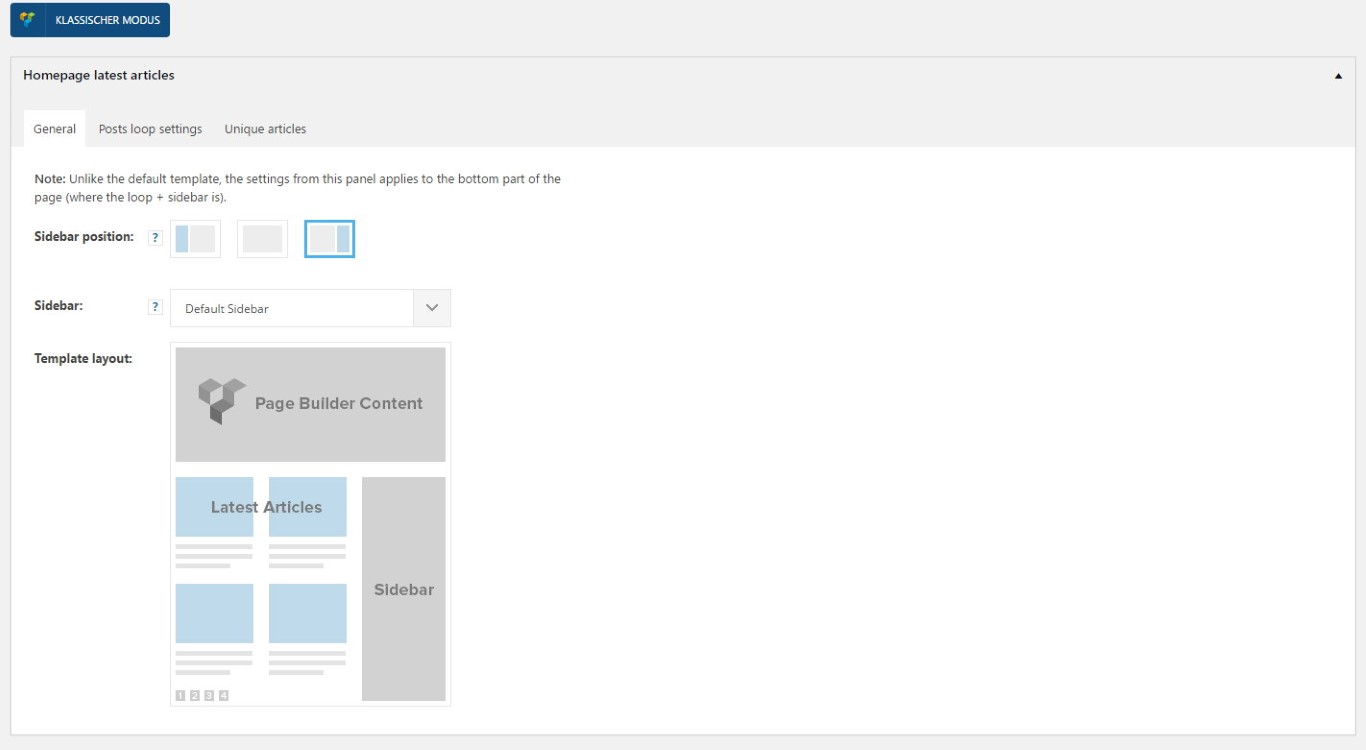
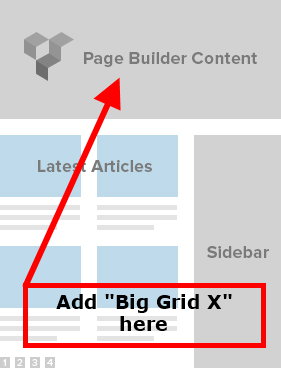
i’ve changed my frontpage completely and now use your “Hompage latest article” function, because i want a blog-style only. So is it possible to get one of your “Big Grid Blocks” above the latest articles?
Then i could deactivate the “visual composer” completely, because visual composer slow down the webpage and use so many scripts i don’t need.