
- TutorialsFrom WPBakery to tagDiv Composer
- TutorialsDefault Block Settings Guide
- TutorialsOffset Feature
- TutorialstagDiv Social Counter Tutorial
- TutorialsHow to Update the WPBakery Page Builder plugin
 Bettina
 Hello @miccmalta !
You can build a sidebar with the TagDiv Composer. Steps:
1. Insert one new row (or delete an existing one).
2. Divide into two columns (2/3 + 1/3).
3. You can add whatever element you want to the second column and consider it a sidebar.
You can also split the row into many columns and set a width for each column: https://prnt.sc/SUVH-Y15HNL9
Thank you!
 Calin
Calin Hi Sudhin,
To replace the live search with google search the best solution is to remove it the one from the theme using tagDiv Composer and use an embed code to set the google search. Editing the theme files are not an option because the files for the live search can not be set in a child theme and will be lost when the theme will be updated.
To create a goggle search you can use this guide: How Do I Add a Custom Google Search to My Website?
To add the code in our theme use a cloud header and set with tagDiv Composer the custom code in a column text or text with title – https://imgur.com/xn721m6 -> https://imgur.com/D475ZN0
I hope this will help you!
Calin Hi,
This can be done using elements from tagDiv Composer (you can try the icon box element), or you can use a column text or text with title to get that layout. After you made one “article” element then you can duplicate it using the right click.
Thank you!
 Anamaria
 Hi,
For us, the error does not appear; we can edit the cloud templates with tagdiv Composer -> https://i.imgur.com/PAOw8Kl.png -> https://i.imgur.com/gmaEudu.jpg
Thank you!
Anamaria Hi,
To add the social icons, you need to edit with tagDiv Composer, search after social icons and set the link for social platforms https://www.screencast.com/t/kATmr6b3yg
You can manage the social icons for the mobile menu from the Theme Panel -> Social/APIS -> Social Networks => https://prnt.sc/10112uu
Please make sure the links contain the https://www.
Thank you!
Anamaria Hello,
Using our theme, you can choose from 3 mobile versions
-> mobile responsive => https://www.screencast.com/t/oJ2ShOp47 you need to deactivate the tagdiv mobile theme plugin.
-> mobile theme plugin => https://forum.tagdiv.com/the-mobile-theme/ you need to activate the plugin.
-> mobile page => https://tagdiv.com/newspaper-10-3-7-update-brings-customizable-and-fast-mobile-pages/
If you created the mobile pages with tagDiv Composer, then when you install the Mobile Theme plugin, your pages will be overwritten by the plugin (the mobile theme comes with its templates for page, post, category, etc so your current templates from the desktop theme will get converted to the mobile theme layout, the page content is made without builders in mobile editor => https://www.screencast.com/t/xbgZG8kH also, the options that are provided to edit the mobile theme version are limited (this keeps the things simple)).
This is a video about Responsive Newspaper Theme, AMP & Mobile Theme, Mobile Pages & Templates -> https://www.youtube.com/watch?v=SpGkOnJeNZY
So, the mobile responsive is what you see then that you select the viewport on phone => https://www.screencast.com/t/matV17hH, so some settings may apply for each viewport(where is the border blue), and others are not(where the border is black).
The mobile page has the mobile templates from Cloud Library => https://www.screencast.com/t/YCcZ8rL8
The Mobile responsive version of the theme and the mobile page editor can be edit with tagDiv Composer, the mobile theme plugin cannot.
For example, you can have the mobile theme plugin activated and use the mobile page/mobile responsive version for the homepage/pages, but for the categories pages/404 page, you can’t use the mobile page/mobile responsive version if you have the mobile theme plugin activated.
So, if you want to design the pages with tagDiv Composer, you can use the mobile page or mobile responsive version.
Thank you!
Calin Hello,
Unfortunately, there is no migrate system from Newsmag to Newspaper, but I will try my best to help you.
First, you need to make sure that you have a full backup for your website and database.
Now what you need to know is that during this process some elements, design from your website can be changed, so here are the steps that you need to do:
Right now you have the Newsmag theme activated, what you need to do is to install via WordPress the Newspaper theme, but do not activate it. After the theme is installed, go in plugins and disable all tagDiv plugins you have enabled, after that you need to activate the new theme (Newspaper theme) and make sure that you update and activate tagDiv Composer, tagDiv Standard pack (those plugins should bring back the website look and can be installed from Newspaper > plugins), also enable the rest of tagDiv plugins that you are using -> https://i.imgur.com/MvKx52B.png
I hope this will help you!
 signorini
Hi there!
For roughly a month, no preview of the post has been shown on socials (I use Facebook and Telegram).
I’ve tried to switch off all the plugins and, incredibly, this issue is caused by tagDiv Composer.
What’s happened? The sharing always worked fine since the installation of the theme?
 Miroslav Glavić
 Edit with TagDiv Composer > click on the element. On the left you will see the editable sidebar thing.
Calin Hi Odufroehliche,
Indeed, the mentioned plugins are from Newspaper (your account license is from Newspaper and that I suppose that it is about the Newspaper).
For Newsmag theme all you need is the tagDiv Composer, if this plugin is enabled what you also can check the theme panel backups – https://i.imgur.com/ImukVN8.png
Thank you!
Anamaria Hi,
Please check the console when you hit the save button. Please check this topic https://forum.tagdiv.com/topic/tagdiv-composer-does-not-save-only-content-of-homepage/
Thank you!
 Odufroehliche
 Thanks Calin. According to hoster the critical error was caused by the TagDiv Composer so they had to deactivate it. After update, reinstall and activation I experience the mentioned trouble regarding the presets.
Where can I find tagDiv Standard pack plugins and tagdiv Cloud Library? In the plugin section there is just Composer, Social Counter, Newsletter etc.
I use Newsmag – maybe different from Newspaper?
Thanks
Petra
Calin Hi Petra,
The theme settings are saved in database and if the theme was used on the restore backup, then the database should contain the theme settings, just make sure that the theme plugins are also installed, for example tagDiv Composer, if you are using classic templates, then you’ll also need the tagDiv Standard pack plugins and for cloud templates the tagDiv Cloud Library, all those plugins can be installed from Newspaper > plugins.
Thank you!
Calin Hi,
Please check with tagDiv Composer if the page where you use the pagination has on rows set the option to be “hide on pagination” – https://i.imgur.com/QwImtVz.jpg – https://i.imgur.com/wwkA1QY.png if the option is enabled, on pagination that row will be hidden.
I hope this will help you!
 coinedition
We have hidden some of our row blocks using the display option under the CSS settings. Now we need to revert it back, how can we do that? We are not able to see the row section even in the tagDiv composer. How can we change the section settings(display) from hidden to show
 zklid
zklid I think I understood the problem:
– there is a bug in your theme: if the “Slide” element is used in tagDiv Composer and a value is assigned to the autoplay option (“Autoplay slider (at x seconds)”, the site crashes in the responsive version on mobile phone.
Check what I said about this bug, thanks.
Bettina Hello!
How did you build your pages? Which editor did you use, WP Bakery? If yes, then please check those screenshots to know how to shift from WPBakery to Composer: https://www.screencast.com/t/6xLVMmlsY ; https://www.screencast.com/t/zWHrRmK1LQC ; https://www.screencast.com/t/vuFdT9Stx ; https://www.screencast.com/t/DWbSf3qj ; https://www.screencast.com/t/QuHyGccTK71v
Follow this guide to clean your WordPress and theme of malware: https://askwpgirl.com/10-steps-remove-malware-wordpress-site/
Thank you!
Bettina Hello @digitalblack!
If you use a default template, then you can not customize it with the TagDiv Composer.
You can add a padding-top: 100px; to that iframe.
Thank you!
Anamaria Hello,
It seems you have the mobile theme plugin enabled; please disable it, clear the cache, and check after.
Using our theme, you can choose from 3 mobile versions
-> mobile responsive => https://www.screencast.com/t/oJ2ShOp47
-> mobile theme plugin => https://forum.tagdiv.com/the-mobile-theme/
-> mobile page => https://tagdiv.com/newspaper-10-3-7-update-brings-customizable-and-fast-mobile-pages/
Suppose you created the mobile pages with tagDiv Composer. In that case, when you install the Mobile Theme plugin, your pages will be overwritten by the plugin (the mobile theme comes with its templates for page, post, category, etc so your current templates from the desktop theme will get converted to the mobile theme layout, the page content is made without builders in mobile editor => https://www.screencast.com/t/xbgZG8kH also, the options that are provided to edit the mobile theme version are limited (this keeps the things simple)).
This is a video about Responsive Newspaper Theme, AMP & Mobile Theme, Mobile Pages & Templates -> https://www.youtube.com/watch?v=SpGkOnJeNZY
So, the mobile responsive is what you see then that you select the viewport on phone => https://www.screencast.com/t/matV17hH, so some settings may apply for each viewport(where is the border blue), and others are not(where the border is black).
The mobile page has the mobile templates from Cloud Library => https://www.screencast.com/t/YCcZ8rL8
Mobile responsive version of the theme and the mobile page editor can be edited with tagDiv Composer, the mobile theme plugin not.
For example, you can have the mobile theme plugin activated and use the mobile page/mobile responsive version for the homepage/pages, but for the categories pages/404 page you can’t use the mobile page/mobile responsive version if you have the mobile theme plugin activated.
So, if you want to design the pages with tagDiv Composer, you can use the mobile page or mobile responsive version.
Thank you!
 afrolio
Whenever I try to edit using td composer I got this Failed to load plugin url: https://xxxxxxxx.com/wp-content/plugins/td-composer/legacy/common/wp_booster/wp-admin/tinymce/customcodes.js
 AlemLolic
Hi,
i use Custom forms shortcodes from TagDiv Composer but i have this error, can someone help me to enable it.
Sorry, post create is disabled on this template!
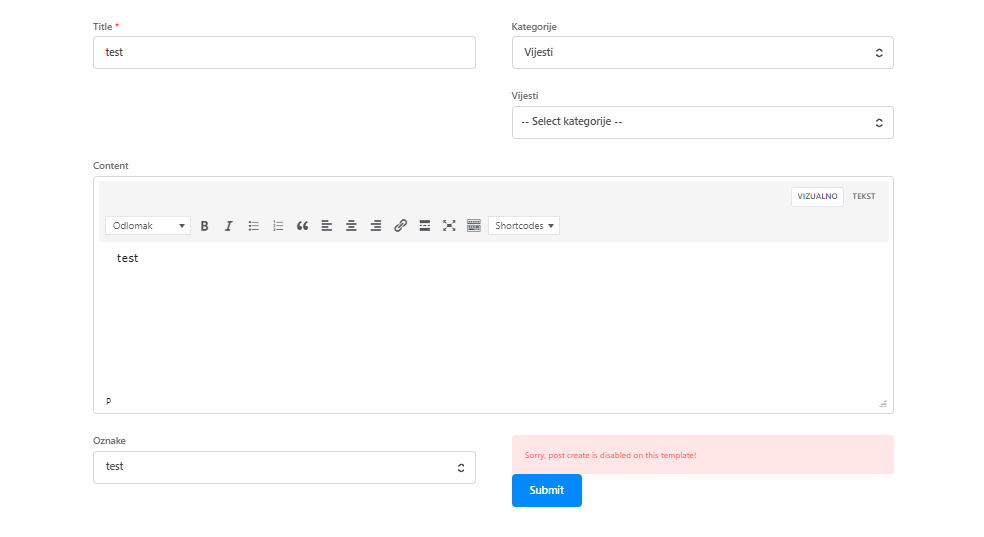
Current demo installed: Fitness Blog PRO
thanks.
 jamie@gundigest.com
We are trying to upgrade our sites from Newspaper 9 to 12. Upon applying the theme and the required plugins there are problems with the headers. What is it about the upgrade from 9 to 12 that would break the headers?
Site 1: (production) GunDigest.com
Staging: https://gundigeststg.wpengine.com/
Issue: The existing Header from Newspaper9 does not show. Editing with Composer does not bring up the editor. Our existing header is not available for selection. Importing a cloud header (real News Pro) makes the entire header look broken. Clicking on the Menu buttons doesn’t launch the editor.
Errors: Composer throws the following error: “Error at zones: 6(models) : 5(dom). The model does not match the content Current state has involved an issue. “
Site 2: (production) Blademag.com
Staging: https://blademagtest.wpengine.com/
Issue: The existing header from the production site shows, but all of the sub-menu items (seen on mouse-over) are unstyled. Editing with Composer does not bring up the editor. Our existing header is not available for selection.Clicking on the Menu buttons doesn’t launch the editor.
Errors: Composer throws the following error: “Error at zones: 6(models) : 2(dom). The model does not match the content Current state has involved an issue.”
What other information do you need to help with this issue?
We need to upgrade the theme in order to protect against the balada malware injector.
Thank you
 digitalblack
This is my site: https://blackmagazine.com.mx/3d-flip-book/octubre/
I’d like to get some space between the header and the PDF.
The problem is I cannot open Composer on this section. I’m using the plugin 3d flip book. Thanks in advance.
digitalblack Hello! Thanks for the answer, the problem is, on this page I cannot open Composer as I don’t see the button as I normally do on my site: https://prnt.sc/9GkJsodgCQjd
 gezimag
Hi
I had a second website it is almos 1 year old and i am using newspaper theme latest version. İ did publish around 50 posts and never republish or update them. I use tagdiv composer to change to publish date to update date. But I do not think it is good on google eye. Because they all new posts and not updated posts. So my question is, is there any easy way to show last updated date (when i actually updated them), and when i do not update the post, want to see the published date. Do not want to add plugin for that. And do you think it is okay to use ”ADD ELEMENT – ADD SİNGLE POST MODIFIED DATE INSTEAD OF PUBLİSHED DATE” but I have not update the posts



