
- TutorialsFrom WPBakery to tagDiv Composer
- TutorialsDefault Block Settings Guide
- TutorialsOffset Feature
- TutorialstagDiv Social Counter Tutorial
- TutorialsHow to Update the WPBakery Page Builder plugin
 Anamaria
 Hello,
Maybe some settings from jetpack interfere with tagDiv Cloud Library.
You can disable the option the Auto Loading on the Single Post Template edit with tagDiv Composer -> Show site wide settings => https://www.screencast.com/t/4RnV1CnxiuA -> https://forum.tagdiv.com/infinite-loading-single-posts/
Thank you!
Anamaria Hello,
I recommend you to use a Single Post Template from tagdiv Cloud Library, and you can design it with tagdiv Composer.
To display the related articles or more from author, you can use Flex Block and filter it https://www.screencast.com/t/SEmxo13Fo2X -> https://i.imgur.com/YIg3nPP.png
if you want to keep those templates the only way to remove the “more from author” tab is to use a custom CSS like this one:
.single .td-related-right{

 display: none;

 }
Set the code in Theme Panel ->Custom code -> Custom CSS
I hope this helps you!
Thank you!
Anamaria Hello,
So, the problem is because the settings are not saved, so please do a test using only tagdiv plugins and check the console -> https://forum.tagdiv.com/topic/tagdiv-composer-does-not-save-only-content-of-homepage/
Thank you!
 phubner
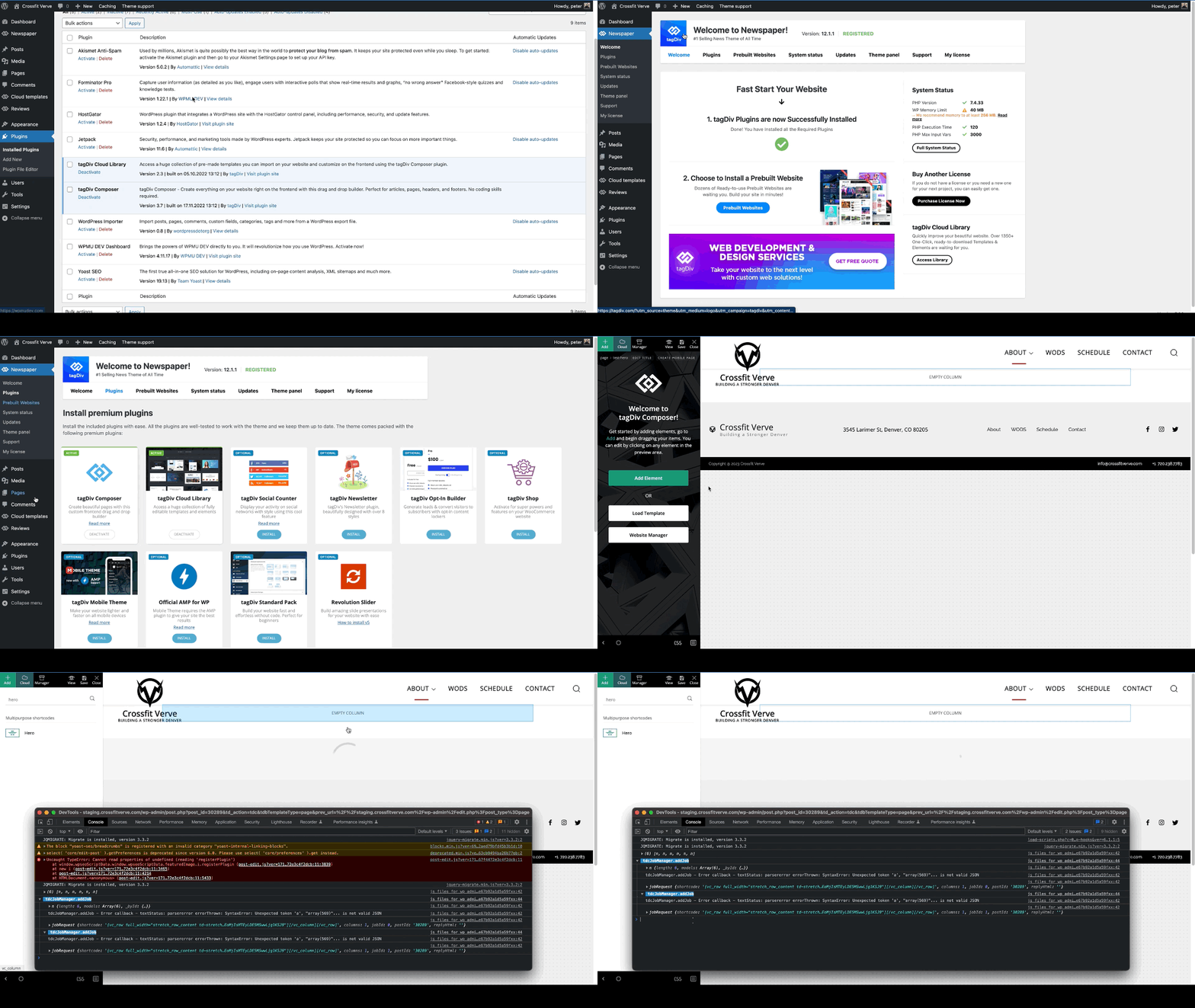
When trying to add a hero modules to pages I am getting the following error. This is happening on multiple sites of mine.
I created a simple test page that was blank and just tried to add the hero module. The page just has the spinner and never completes adding the hero module. In the console this is logged
tdcJobManager.addJob - Error callback - textStatus: parsererror errorThrown: SyntaxError: Unexpected token 'a', "array(569)"... is not valid JSON
jobRequest ...
shortcode
:
"[vc_row full_width=\"stretch_row_content td-stretch-content\"][vc_column][tdm_block_hero title_text=\"SGVybw==\" title_tag=\"h3\" title_size=\"tdm-title-bg\" description=\"V2VsY29tZSB0byB0aGUgZnV0dXJlIG9mIGJ1aWxkaW5nIHdpdGggV29yZFByZXNzLiBUaGUgZWxlZ2FudCBkZXNjcmlwdGlvbiBjb3VsZCBiZSB0aGUgc3VwcG9ydCBmb3IgeW91ciBjYWxsIHRvIGFjdGlvbiBvciBqdXN0IGFuIGF0dGVudGlvbi1jYXRjaGluZyBhbmNob3IuIFdoYXRldmVyIHlvdXIgcGxhbiBpcywgb3VyIHRoZW1lIG1ha2VzIGl0IHNpbXBsZSB0byBjb21iaW5lLCByZWFycmFuZ2UgYW5kIGN1c3RvbWl6ZSBlbGVtZW50cyBhcyB5b3UgZGVzaXJlLg
I did verify that I could add other modules, Author box, Flex grid, Client list, Image info box … etc.
site : staging.crossfitverve.com
Newspaper Version : 12.1.1
plugins : tagDiv Composer, tagDiv Cloud Library, YOAST SEO, Forminator Pro, Jetpack, WPMU DEV Dashboard
 modniportal
Hi I have the same problems like others. When I try to edit home page with TagDiv composer the message appears
“We’ve got some errors at loading API files. It could happen because of a disabled TagDiv plugin!”
wp_booster error:
Internal error: The system tried to use an att that does not exists! class_name: tds_button1 Att name: “button_tdicon” as “1-button_tdicon”
/home/namaportal/public_html/wp-content/plugins/td-composer/legacy/common/wp_booster/td_style.php
I tried everything upgrade/downgarade theme, deactivate all other plugins, delete tagdiv plugins, install tagdiv plugins again, page revisions …
All other pages working well, only home page not.
Kind regards, Grega
 vangeorgo
Hello,
I have Social counter installed on my homepage through TagDiv composer and also Social icons in the header with Cloud Library using TD composer. On my homepage Social counter/Social icons are using very weird font on Safari (looks kinda Japanese) and on Chrome there are only squares.
This problem occurs only on my homepage and I cannot find any setting that could possibly cause this. Can you please help me?
Also, how can I change the label in my sidebar that says “Followers” etc.? Thanks
URL with wrong font: https://svetapple.sk (check upper right corner and sidebar)
URL with correct font: https://svetapple.sk/featured/titanova-konstrukcia-nove-tlacidla-aj-vacsia-ram-toto-vsetko-prinesie-iphone-15-pro/
 Krimiwa
Hi there,
we really enjoy creating cloud templates for our diverse content with your theme.
While creating custom tag templates, we just discovered that the global header is displayed in all templates, even though we chose a different one through Website Manager in tagDiv Composer.
Interesting details:
– The individually chosen header is displayed in tagDiv composer. But not on the Website.
– We use category templates with different headers as well. It works fine there.
Do you have any idea what the problem might be?
Thanks in advance,
Kristof
 observatorulprahovean
Hi there,
We are having an issue that is continuously raising the warning below since 15.11.2022 until now.
It is related to TD Composer WP Booster and specialy to the td_wp_booster_functions.php
Can you help us with it? We are using Newspaper Theme 12.1.1 and PHP Version 8.0.25.
Today, we got a lot of Cloudflare 522 error on WordPress admin actions and found out this.
[15-Nov-2022 22:33:30 UTC] PHP Warning: Attempt to read property “ID” on null in /home/____/public_html/wp-content/plugins/td-composer/legacy/common/wp_booster/td_wp_booster_functions.php on line 2046
————————-
[04-Jan-2023 14:56:16 UTC] PHP Warning: Attempt to read property “ID” on null in /home/____/public_html/wp-content/plugins/td-composer/legacy/common/wp_booster/td_wp_booster_functions.php on line 2046
Thanks!
Anamaria Hello,
You can create a sidebar with tagDiv Composer like in this article https://forum.tagdiv.com/sidebars-tutorial/
Also, if you want to create the sidebar in Appearance -> Widgets and set the sidebar on pages, using the element from tagDiv Composer, Widget sidebar https://i.imgur.com/e1FPdYU.png -> https://i.imgur.com/q20UCZf.png
Thank you!
Anamaria Hello,
I recommend you to use a Single Post Template from tagdiv Cloud Library, and you can design it with tagdiv Composer.
To display the related articles or more from author, you can use Flex Block and filter it https://www.screencast.com/t/SEmxo13Fo2X -> https://i.imgur.com/YIg3nPP.png
You can set the ads in Single Post Template from tagDiv Cloud Library and you can set top ad, 3 inline ads set after x paragraphs and bottom ad, please check this article -> https://forum.tagdiv.com/article-ads/ and video https://www.youtube.com/watch?v=biTpVVlr8j8
Thank you!
 andxtagdiv
 Thank you. I have to leave Newspaper behind. I was hoping for a well integrated solution that I can simply hand over to my client. Turns out, Newspaper and TagDiv Composer only looks good on the surface.
What you describe is not as “builder” but coding. If I wanted that, I’d not choose Newspaper.
I am back with Bricks Builder, that has a better community and better features.
TagDiv never stops disapppointing behind the curve.
 Razvan
Hello, in the theme panel there is an article top ad, but it doesn’t work. Only the article top ad in the td composer works. Moreover, I want to add the article inline ad in the middle of the content. How can I do both?
 richelo
 That solved the problem thank you!
One more thing … In the tagDiv Composer, is it possible to add standard WordPress Widgets into the sidebar?
Anamaria Hello,
I think that I know what the problem is, please edit the cloud template with tagDiv Composer -> https://i.imgur.com/j8YvKks.png click on the block and remove the offset -> https://i.imgur.com/dJ0iFQu.png let that field empty.
Thank you!
Anamaria Hello,
If you referring to this https://i.imgur.com/5a4eZNp.png -> https://i.imgur.com/VXqyYkd.png please delet the element modal popup with right-click
You can change the menu from Appearances -> Menus -> https://i.imgur.com/4aZSILO.png -> https://forum.tagdiv.com/mega-menu/
Thank you!
 sushmasmaurya@gmail.com
 The issue is not getting fixed by doing this: Theme Panel -> Post Settings -> General post settings. This is causing due to tagDiv Composer. How do I fix for this plugin?
Anamaria Hello,
You need to select a dimension for rows, or you can import other pages from tagdiv Composer.
You can find more details here
-> https://tagdiv.com/flexibility-rows-columns-newspaper-theme/
-> https://tagdiv.com/how-to-add-delete-and-duplicate-row-newspaper-theme/
Thank you!
 sco
sco Sorry I made a mistake and couldn’t edit the post…
Disregard this “Then, I changed this background color by editing the “Accent hover color” in red.”.
Actually, the default color for the header template “block header 4” is yellow and the default text color is white.
(1) I tested, leaving the configuration like this, without any modification and… the color of the header background of the block header 4,on the modal popup, remains black.
(2) I tested with this configuration :
* Title background color: green
* Title text color: white
* Accent hover color: red
Nothing changes on the modal popup… the header background remains black.
But I can confirm that the header background changes colors on tagdiv composer and also on the modal page when I visit it directly.
Regards,
 sco
sco Hi,
I’ll try to explain…
Go to you modal page… then through tagdiv composer :
add element>list menu > header settings
From third line “header template” I chosed Block header 4… which by default has a black background.
Then, I changed this background color by editing the “Accent hover color” in red.
What I get :
– all is fine from the right part of tagdiv composer the header has the right background color
– and everything is also fine when I visit directly the modal page.
But… once this modal page is called from the icon trigger… then the background color is missed and turns to black.
Thus… I guess… nothing to do with the background of the page.
As you requested… no background set for this page (transparent), nor for the list menu. And the modal has some white translucent background.
Thanks or your help,
Regards.
sco Hi,
Where can I find in the database the elements that deal with tagdiv composer design ?
Regards,
 jaiessi
I have newspaper version 12.1.1 and am having a super hard time with my logo. I have uploaded regular and retina logos and neither is reflecting on the front end of my website. TagDiv Composer just says “this type of header is not editable with tagdiv composer. Please use a cloud template!” I need help with fixing this issue as it’s beyond frustrating!!
 Calin
Calin Hi,
You can get a homepage like that using tagDiv composer and adding the slide element https://i.imgur.com/B88RW31.jpg and the block 11.
I hope this will help you!
Anamaria Hello,
Please try to delete, install and activate the tagdiv composer from Newspaper -> plugins and check after the results.
Thank you!
andxtagdiv I know how to add custom fields to WordPress – thank you very much. I don’t know how to grab the output, how to put that into the loop element, and finally how to style all of it.
This is a basic function I have come expect as inbuilt, from Oxygen, Bricks, and now even Elemtor. It is hard for me to believe that you invested in your own builder, and not updated it to accomodate professional requirements.
If I may add, years ago when to transitioned Newspaper from VisualComposer over to TagDivComposer, this was exactly what I raised with you: Will you be able to keep up?
Now it seems, you are not.
Do you have an ETA of a proper implementation?
-
This reply was modified 3 years by
andxtagdiv.
-
This reply was modified 3 years by
 Mutazq
ِ
I am getting this error, I tried the suggested solutions in the forum but it did not work.
The PHP version is 7.4 and I am running last updated theme,
I tried also to disable the plugin and other plugins that may effect the theme bu again the theme is not loading and I can not access the dashboard.
the Error I get isL
Error E_COMPILE_ERROR line 47 in file /home2/rawashen/almeena.co/wp-content/plugins/td-composer/legacy/common/wp_booster/td_wp_booster_functions.php.
ِerror message : require_once(): Failed opening required ‘/home2/rawashen/almeena.co/wp-content/plugins/td-composer/legacy/common/wp_booster/td_block.php’ (include_path=’.:/opt/cpanel/ea-php74/root/usr/share/pear’)



