desirevp
 See below what is happening:


desirevpWhen I create an ad with an ad box in desktop and I select just to show it on mobile on mobile, it hides the image in desktop and tablet, but maintains the gap (actually the gap is seen in tagdiv composer as an empty ad box with the sign: “No image ad or is disabled”, and in turn the gap is there in the page in desktop.
Is there a way to hide an ad from a device type and not have the gap of the ad box?
 easherri
 I too cannot even use the template. The theme panel has disappeared, the tag div plugins for the newsletter, composer and standard pack plugins do not work at all
The error is after the 5.9 WP update
This plugin failed to load properly and is paused during recovery mode.
An error of type E_PARSE was caused in line 33103 of the file
 mdfutbol
Buenas noches,
Habro un nuevo tema ya que a la hora de editar con tag div composer en muchas ocasiones se me queda congelado, cargando una de las cosas que he añadido, paradas completamente. Si alguien puede ayudarme en este tema ya que no se por que puede ser.
Muchas gracias,
Hugo
easherriI am in urgent need of an updated plugin for tagdiv composer. It is causing my entire website to malfunction. Started about 45 mins ago.
easherri Hi there, my site at Edmondactive.com just stopped working about a half an hour ago. The error was “The tagDiv Standard Pack plugin requires the tagDiv Composer plugin!” and the composer’s error was Version 3 | built on 22.12.2021 13:03 | By tagDiv | Visit plugin site
This plugin failed to load properly and is paused during recovery mode.
An error of type E_PARSE was caused in line 33103 of the file /home/amateur/domains/edmondactive.com/public_html/wp-content/plugins/td-composer-off/legacy/Newspaper/includes/td_config.php. Error message: syntax error, unexpected ‘?’
 netclick
Hello, I have written in about this before. Just wondering if this has been looked into please?
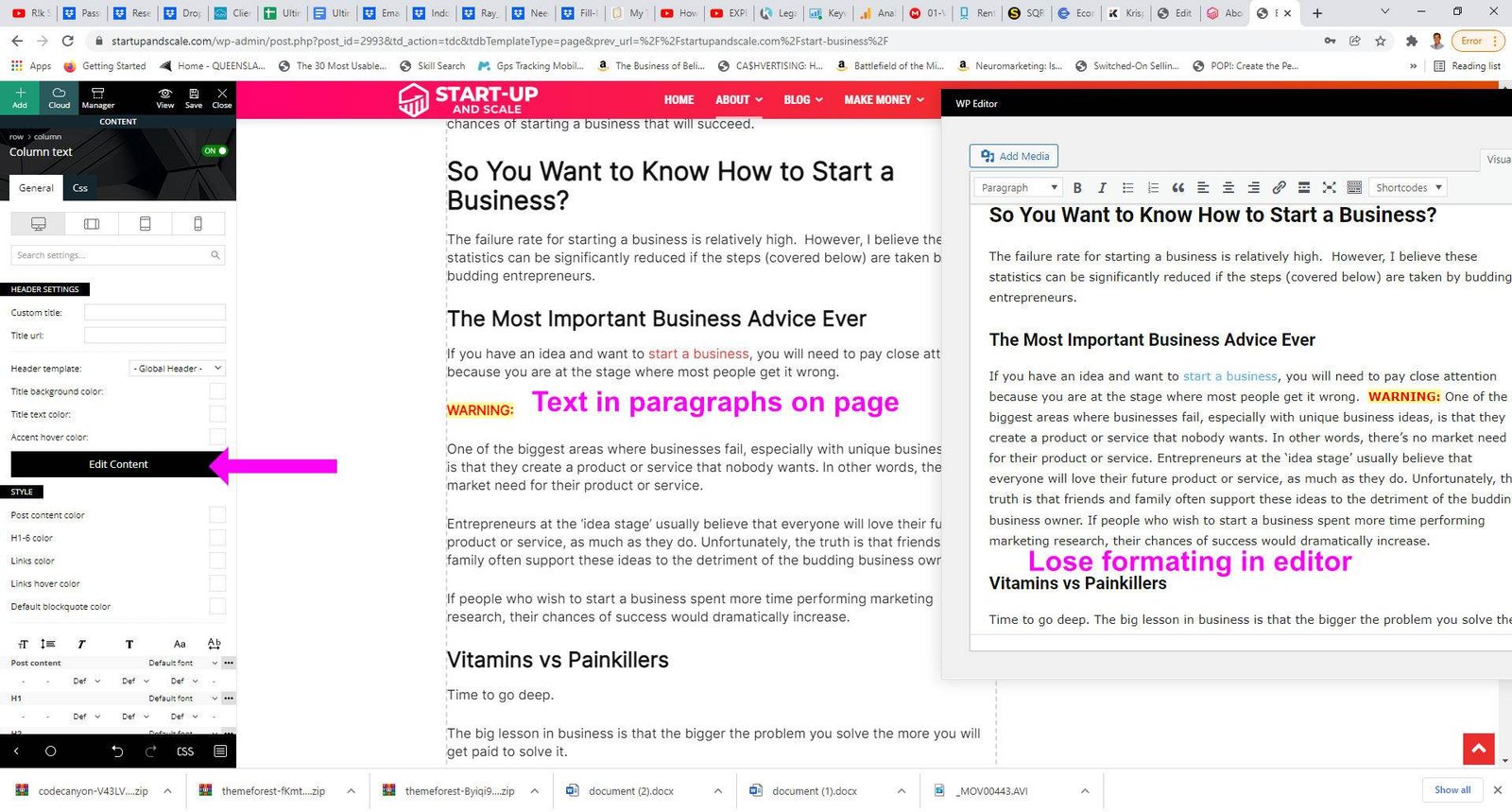
Whenever I edit the text in TagDiv composer, it loses the paragraph formatting (spacing between paragraphs). Could you please help me with this, because it is driving me crazy 🙂
This is a screenshot illustrating the issue
This is the relevant webpage. But it happens on every page.
Many thanks
Ben
 sudipto
Hi,
Is there anyway we can use a cloud template for a custom taxonomy listing page?
We have custom taxonomies in our website. We want to build a template for each custom taxonomy page. At the moment, it just picks up a default template and we cannot find a way to edit it using Tagdiv composer. Is there a way for this to happen?
 Calin
Calin Hi,
That is only the element for the post content, to add the post title, please add it with tagDiv Composer -> https://i.imgur.com/EOqVZhj.png -> https://forum.tagdiv.com/single-post-shortcodes/
Thank you!
 Rhonda
 Remove CSS is greyed out and not available to click on. I have purchased the Newspaper theme 32 times and have active support on the other accounts. I am not able to add any of them under my profile for this username. I get an error message “this account is already in use”.
Could you possibly log into my site and see what the problem is? I am not able to use Tagdiv visual composer to and edit text on any page of my website. Also, the widget content is showing up at the end of my posts and on top of my post content.
-
This reply was modified 4 years by
Rhonda.
Calin Hi dimmisel,
If you are using a cloud header, then the menu can be assigned using tagDiv Composer -> https://i.imgur.com/ACfP50w.png then the socials from the open menu can be set from the theme panel -> https://i.imgur.com/RilGStr.png
Also, the file path for this -> https://i.imgur.com/YzOy26P.png is this one wp-content/plugins/td-composer/legacy/Newspaper/parts/menu-mobile.php
Thnak you!
Calin Hi kimlm, if the single block was made using tagDiv Composer, then yes, you can edit it, but if is set this one -> https://i.imgur.com/WLHmnVN.png then tagDiv Compeer can not be used on that section. Tor that you can change the layout using tagDiv Stannard Pack -> https://i.imgur.com/xqVI2eo.png, this will add standard templates can can be choose from the theme panel -> https://i.imgur.com/NWpJN6r.png
Thank you!
 jojumper
Hi, I get this few errors on blocks
Please help,
Notice: Trying to access array offset on value of type bool in /home/u495161498/domains/pentas.tv/public_html/wp-content/plugins/td-composer/legacy/common/wp_booster/td_module.php on line 554
Trying to access array offset on value of type bool in /home/u495161498/domains/pentas.tv/public_html/wp-content/plugins/td-composer/legacy/common/wp_booster/td_module.php on line 554
Thank you
Calin Hi gwk,
For pages what you can do is to duplicate the page, in this way all you need to do is to change the page content. Or you can make a “page template”, a page that will have the layout and elements that you want on all pages, then just duplicate that “page template” and adjust it after your needs!
With tagDiv Composer you can add the sidebar widget or you can create one for cloud templates, but this will be the same for all posts where will be apply.
Thank you!
 connectgo
 I would like to create the content in the mobile editor, but I don’t want the site to be non functional before I completed the page in the mobile editor. Is there a way that the site can continue to use the TagDiv Composer responsive version for a particular page, until I am completed with the mobile editor, then switch to the mobile version?
 kimlm
kimlmIs it possible to edit a single blog post with TD composer just like with single page?
 gwk
gwk Yes, I know, but when I create a few site, I must add the sidebar on every page.
Also, how add a sidebar in tagdiv composer on post page? I use widget and automatically add sidebar in every blog post. Tagdiv composer also have an option?
 Bettina
 Hello @gwk!
You can place a sidebar very easy using our builder the tagdiv Composer plugin.
For example, you can add the sidebar from tagdiv Composer. Steps:
1. Add 1 row
2. Split into 2 columns( 2/3 + 1/3 )
3. You can add whatever element you want into the second column and consider it a sidebar.
Take a look here in this video for example where I build 6 columns: https://www.screencast.com/t/mZ2c5XamTFN
Thank you!
Bettina Hello @positivenewsfoundation !
It seems that you use the Mobile Theme plugin, so you can not edit the pages with TagDiv Composer. You have only some settings for this layout, which you can find in Theme panel -> Mobile Theme. Please note that if a page is made by Composer, than the content won’t be displayed on Mobile theme version. You should create the content with the Mobile Editor.
We have 3 options of mobile versions:
1. Responsive version: A responsive version of your website is looking similar like on desktop, edit the page with TagDiv Composer, click on the mobile viewport: https://www.screencast.com/t/XDQJedlggSB ; there you can see your mobile version and you can edit the elements there.
2. Mobile pages: https://tagdiv.com/newspaper-10-3-7-update-brings-customizable-and-fast-mobile-pages/
3. Mobile theme plugin: The Mobile Theme is a performance optimized theme included in the Newspaper main theme and it loads only for mobile devices. It comes with its own templates/design for page, post, category, etc so your current templates from the desktop theme will get converted to the mobile theme layout. For more details, please take a look here: https://forum.tagdiv.com/the-mobile-theme/ and https://forum.tagdiv.com/mobile-theme-introduction/
A full explanation you can find here: https://www.youtube.com/watch?v=SpGkOnJeNZY
You can choose to use which one is more affordable and useful for you. For example, if you will deactivate the Mobile theme plugin, then it will loads the responsive version automatically.
Thank you!
Bettina Hello!
Please edit the homepage with the TagDiv Composer, click on the mobile viewport: https://www.screencast.com/t/XDQJedlggSB ; there you can see your mobile version and you can edit the elements there. See if the difference can be seen there or not.
If not, then the problem could be from a plugin conflict or a cache issue, that’s why, please deactivate ALL plugins except tagDiv ones, also if you are using a cache plugin, deactivate it, clear all cache from your browser and try again.
Hope that helps you!
Thank you!
gwk Ok, but i want use sidebar on every page with a full customise. On tagdiv composer is okey, but I must create sidebar in each page, better use widget sidebar but I don’t change style option, only general.
Bettina Hello @gwk!
You can put the element in the header zone, so it will appear on every page from your website where you have the same header. This element can be customizable only in the TagDiv Composer.
Thank you!
Bettina Hello @markyj2000!
For this, you should use cloud templates. You can have different ads in every post/article if you use different template for each post/article. If you want the same design, you can duplicate the templates.
Check this topic: https://forum.tagdiv.com/topic/different-logo-in-categorypage/ ; Here I explained step by step how you can duplicate a template.
We recommend to use cloud/PRO templates in order to have the possibility to edit them with the TagDiv Composer which contains a lot of functions and features, please check our tutorial here: https://forum.tagdiv.com/tagdiv-composer-tutorial/
Documentation here:
– https://forum.tagdiv.com/cloud-library-templates/
– https://forum.tagdiv.com/design-post-pages-using-cloud-library-templates/
– https://forum.tagdiv.com/cloud-library-category-templates/
Check also our video tutorials here: https://www.youtube.com/c/tagdivThemes/videos and more theme documentation on the left side: https://forum.tagdiv.com/newspaper-theme-documentation/
Thank you!
 kabbolig
 Hi Calin,
Thanks a lot for your reply.
Regarding the Iframe, my page is a Category page with video embeds using the TagDiv composer and the Video embed shortcode. Where can I find and edit the generated the code? The same goes for the “Header Live Search”? Where is the code located to be edited to add an Aria-label?
Best regards.
Lars
Bettina Hello @sbibek!
That black line is a row from the TagDiv Composer. Please edit the homepage with the TagDiv Composer, and delete it, make sure you select the row of the element when you drag and drop it: https://www.screencast.com/t/pxuOzYIIpcG
This issue is caused because you have so many elements in page. In order to fix this please check this guide too: https://www.corewebvitals.io/pagespeed/fix-avoid-excessive-dom-size-lighthouse
Thank you!