
- TutorialsFrom WPBakery to tagDiv Composer
- TutorialsDefault Block Settings Guide
- TutorialsOffset Feature
- TutorialstagDiv Social Counter Tutorial
- TutorialsHow to Update the WPBakery Page Builder plugin
 sibyxaviery2k sibyxaviery2k sibyxaviery2k
In tag div composer screen looks 70% 30%. But live site its almost 50% 50%. How to make it as look like in composer.
If the question is not clear please ask. Thanks
 Calin
Calin Hi,
Most of the time, the problem is from a shortcode that is not compatible with our theme or a plugin conflict; therefore, after you set it with tagDiv Composer and save the page/cloud template, the next time you try to edit it, you’ll get that error.
If is only for one page or a cloud template (it can be on the header or footer, you can change them for tests and see if the problem persists), this is from some settings/shortcodes set on it and it can be fixed using the page revision https://wordpress.com/support/page-post-revisions/
Thank you!
Calin Hi,
There are a few ways form how you can get on the popup menu page.
1. You look in your pages after the page name “modal popup” -https://i.imgur.com/liV3uEG.png
2. You check the page id when you are in composer and change it in url https://i.imgur.com/bKPvIkz.png
3. From composer, you can click edit and you’ll open the page containing the code for the menu and from ther,e you can edit it in the composer -https://i.imgur.com/TWJ0Swi.png
Thank you!
Calin Hello,
The cloud button will not be visible on pages, it will be visible only in tagDiv Composer, the theme builder, and the cloud button will be displayed only for website sections that allow templates, like articles, categories, archive, authors…. In you screenshot you have set a cloud category as global, so that template should be used on your website categories and the second image is from your homepage
Thank you!
 Marcellino
Hello, in my sito https://ilpicentino.it I’m not able to modify via Tag Div Composer the mobile menu (see attached image)
I’m not able to tranlsate the text neither to add socials link
Problem is that when I’m in mobile mode in tag dive composer, even if clicking on the mobile menu it doesn’t open and settings don’t appear
Can you help me, please?


 casprom
Hi guys, first and formost, thank you very much for keeping this theme, i’ve been using it since versions 7. and always been loving it.
Unfortunately, last night i was checking for updates on my website and decided saw that there was an update that was long due on the theme. I updated it like we always have but after the theme update, the plugins failed to work and our website that has thousands of readers everyday is now just white with the td-composer shortcodes….
It’s awfull, i cant give you ftp and wordpress access if you can put everything running back again.
Please help.
Website: squared-potato.pt
Calin Hello,
1. For this, you need to edit the homepage using tagDiv Composer and look for the Homepage post element, which should look like this https://i.imgur.com/MPXE4Tv.png, and remove that element.
2. This is the adblocker role, and the ads should not be displayed when a user uses an adblocker; however, if you use only images for your ads, then you can set the images using a different element, so instead of the ad box element, you can use the image element.
Thank you!
Calin Hi,
1. Edit the homepage using tagDiv Composer – https://i.imgur.com/VtfDXeh.png after that, select the manager and in header, tab uncheck the sticky option for desktop https://i.imgur.com/8nHMYyn.png you can do it for both, desktop and mobile.
2. Select the mobile viewport in tagDiv Composer – https://i.imgur.com/8nHMYyn.png then if the image and mobile element are in the same column, use the layout tab to align them https://i.imgur.com/yg1SbqV.png if are in different columns, but under the same row use the layout tab from the row – https://i.imgur.com/UNv0zTL.png
3. For this, you should set the header you want to use as global, then this will be used on the entire website that is not using an individual header. Right now you are using an individual header on the homepage and a global one on the rest of your website. So when the header is edited as you want just set it as global, this can be done from multiple places, for example, from Composer using the manager – https://i.imgur.com/tBSbwLu.png ot from cloud templates – https://i.imgur.com/ZMHim4S.png or from the theme panel – https://i.imgur.com/FE5hmWR.png
Thank you!
 simchris
 Hi
there is some fundamental issue with the current theme install where htaccess directives seem to be entirely ignored, such as redirects and stuff like pagespeed = on kind of things.
Going to have to try default theme to debug, as disabling all plugins had not effect.
Trying to use WP-STAGING plugin, but their pesky platform does not support external uploads locations (e.g., /root/uploads/ vs /root/wp-content/uploads/ … ) which breaks the image links ((sigh)).
Having one of those months over here.
I forget — these days, does Newsmag lose all its settings if I temporarily switch themes and turn off td-composer ?
Calin Hi,
All those texts can be changed using tagDiv Composer, edit the page / template select the text or element and simply change it https://i.imgur.com/QZL9n7p.png https://forum.tagdiv.com/tagdiv-composer-tutorial/
Thank you!
 rahlplx
 I tried what you suggested in the attached image, but it didn’t work. I also attempted to edit it as described in the documentation, but I couldn’t find the Cloud Library button. I then tried editing with TagDiv Composer and clicked the Cloud Library button, but the category templates do not appear. Please see the attached images for a more detailed view of the issue.
Please check-
https://prnt.sc/QzuC9JACWY1i
https://prnt.sc/G1KUbkKrXJpT
https://prnt.sc/ZoWua7LHbYwc
 letrud
I’ve used Newspaper as a theme for years, but there is one thing that has always been bugging me, and I’ve tried several times to work out the issue. Finally I’ve given up, so I’m here asking for assistance.
My header covers the top of my page, and whenever I scroll the page scrolls underneath the header. Which is okay.
What’s bugging me, is that the default offset of all pages and posts is at the top of the browser. Beneath the header.
So all images at the top of posts and pages are cut off. Headers are hidden or cut off.
It’s real easy to see here;

Where the arrow points, there should be a title – like this:
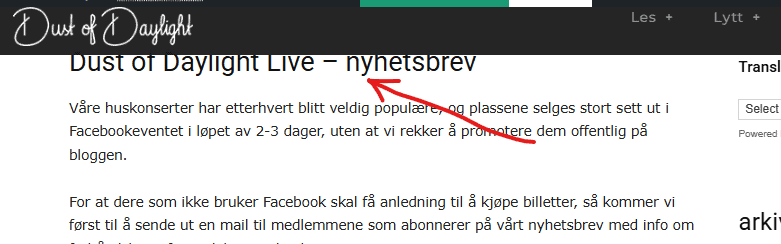
In some browsers you might see half the title, but if I open it in incognito mode, it looks like the first image.
I’m stumped… Header created with TD Composer, I’ve tried putting in empty spaces, extra rows, padding in all thinkable positions, etc. etc. etc. Running v12.7.1, but it’s been this way since I set it up in 2015 (!)
I know the solution is staring me in the face, but I can’t see it, so if anyone has any input – I’ll appreciate it.
 samnash68
 thank you Calin
I tried to add the code on the htaccess file unfortunately I am not an expert IT .. however still the composer is giving me a blank white page.
Overall the site is working okay.. but I can not get the composer to work!!!
Sam
Calin Hi,
The Urban Observer can be edited using tagDiv Composer on the frontend. However, if the footer is not fully displayed in tagDiv Composer, it’s likely that an extra plugin or a custom shortcode is pushing the content down, preventing the full layout from rendering properly.
The simplest and fastest solution is to edit only the footer directly from the Cloud Template:
By doing this, you won’t need to disable any other plugins, and there will be no further interference with tagDiv Composer.
Thank you!
Calin Hi,
I will do my best to try to explain it again. This solution will work only when you are on that page.
1. Using tagDiv Composer – https://i.imgur.com/zlZijIf.png select the element you want to scroll to and set a class – https://i.imgur.com/uPV1adq.png
2. Add a button and in section “scroll to class” set that class – https://i.imgur.com/mz1C0qU.png save the setting and the anchor will work.
There re also other ways to add anchor links using the editor on articles content – https://www.wpbeginner.com/beginners-guide/how-to-easily-add-anchor-links-in-wordpress-step-by-step/
Thank you!
Calin Hi,
Here are the three available solutions for the mobile version:
1. Responsive Desktop Version – The default responsive layout that adjusts to mobile screens.
2.Mobile Page/Template – A custom mobile layout that can be created using the tagDiv Composer.
3. tagDiv Mobile Theme Plugin – A separate mobile theme that provides a dedicated mobile experience.
Note: When the tagDiv Mobile Theme Plugin is activated, it takes priority and will be displayed on mobile devices. If it’s not active, the system will check for a mobile page/template built with tagDiv Composer. If neither of these is in use, the responsive desktop version will be shown by default.
Related to the cache, please check in the cache plugin documentation if this supports mobile cache.
Calin Hello,
Please do a test using only tagDiv plugins and see if the problem is still persisting. Most of the time, this situation is caused by an extra plugin.
Additionally, the ads can be set on a website using tagDiv Composer and ad box element.
Thank you!
Calin Hello,
Please try activating the theme using only the tagDiv Composer plugin, and make sure the permalinks are set to Plain (or Simple) to check if the issue persists.
If the problem continues, feel free to contact us at contact@tagdiv.com
. Kindly include your license key and provide temporary wp-admin access to your website so we can investigate and resolve the issue.
Thank you!
 dimitrisv
Hello, are there any plans to support Object Cache (Redis).
The issues that the lack of support is causing are too many to bear.
Also please remove these licensing calls every time we login in to admin. Earlier today your licensing service was down and we could not enter the admin. The errors logged were something like this.
2025/09/09 04:21:22 [error] 5200#5200: *1296 FastCGI sent in stderr: “PHP message: WP_Error Object
(
[errors] => Array
(
[http_request_failed] => Array
(
[0] => cURL error 6: Could not resolve host: cloud.tagdiv.com
)
)
[error_data] => Array
(
)
[additional_data:protected] => Array
(
)
)
; PHP message: PHP Fatal error: Uncaught Error: Object of class WP_Error could not be converted to string in /home/1463218.cloudwaysapps.com/hvwkzdyqhn/public_html/wp-content/plugins/td-composer/includes/tdc_check_domain.php:151
Stack trace:
#0 /home/1463218.cloudwaysapps.com/hvwkzdyqhn/public_html/wp-content/plugins/td-composer/includes/tdc_check_domain.php(108): tdc_check_domain->check_domain()
#1 /home/1463218.cloudwaysapps.com/hvwkzdyqhn/public_html/wp-content/plugins/td-composer/includes/tdc_check_domain.php(41): tdc_check_domain->set_is_domain_active()
#2 /home/1463218.cloudwaysapps.com/hvwkzdyqhn/public_html/wp-content/plugins/td-composer/includes/tdc_check_domain.php(56): tdc_check_domain->__construct()
#3 /home/1463218.cloudwaysapps.com/hvwkzdyqhn/public_html/wp-content/plugins/td-composer/legacy/common/wp_booster/td_js_generator.php(18): tdc_check_domain::init()
#4 /home/1463218.cloudwaysapps.com/hvwkzdyqhn/public_html/wp-includes/class-wp-hook.php(324): td_js_generator()
#5 /home/1463218” while reading response header from upstream, client: 2a02:587:3215:e800:f91d:ec3d:d5eb:60cf, server: wordpress-1463218-5518663.cloudwaysapps.com, request: “GET / HTTP/1.0”, upstream: “fastcgi://unix:/var/run/fpm-hvwkzdyqhn.sock:”, host:
 crashcult
Hello, I want to change my copyright in my subfooter, plus I want to change color of fonts and background. When I turn on Tagdiv composer to start working on my Urban Observer theme, and I go down to the footer, it stops at the footer and will not show the subfooter. I was able to do this before, but now it will not let me see the subfooter again. I tried Theme Panel, but Theme Panel does not show the subfooter at all. I can’t find a way to get to my subfooter, not with Theme Panel, and not with Tag div Composer. Can you please tell me what I am doing wrong, and what I can use to make the changes in my subfooter. Thank you.
Calin Hi,
There will be no losses if there are no changes in the theme and plugin file. Changes made with Composer will remain, so the plugins can be disabled, deleted, and reinstalled from Newspaper> Plugins.
Thank you!
Calin Hello,
1. What you see is the sticky menu, which can be disabled using tagDiv Composer, checking the manager and disabling it https://forum.tagdiv.com/header-manager/ – https://i.imgur.com/ZXBFvVT.png. Do the same for both the desktop and mobile versions.
2. This situation appears because the header from desktop is using a different code nad the mobile header othere code, so those can be different, so what you can do is to use tagDiv Composer to edit the mobile header, edit the homepage, selct the mobile viewport and add a new row under the mobile header (make sure it’s under the header not content) an ad box element https://i.imgur.com/Oz1Ev58.png https://i.imgur.com/dxujNzQ.png
3. You need to have created a menu as in this guide https://forum.tagdiv.com/main-menu/, then use tagDiv Composer, edit the homepage and select the mobile viewport, then select the mobile menu and choose the created menu – https://i.imgur.com/MvNUaM8.png – https://i.imgur.com/KjMQiem.png – https://i.imgur.com/vFflmzh.png
Thank you!
 indrajith191
https://feastarabia.com/people/
I’m experiencing an issue with the Hero Section on my website built with the Newspaper theme and TagDiv Composer. Even when I upload a high-resolution image and select Full Size in the Hero Section settings, the image appears blurry and low quality on the live site.
I tried to change different images and it gives the same output.



