
 Anamaria
 Hello,
To make the website full width you can choose “Stretch row and content” or “Stretch row and content (with paddings)” you can stretch the row after your needs.
There is a conflict between tagDiv Composer/Cloud Library and WP Bakery.
So, I gladly recommend you to shift from WPBakery to Composer, because WPBakery is an old builder plugin.
Please check our guide to know how to shift from WPBakery to Composer: https://forum.tagdiv.com/visual-composer-tagdiv-composer-transition/
tagDiv Composer contains a lot of functions and features, please check our tutorial here: https://forum.tagdiv.com/tagdiv-composer-tutorial/
You can find the blocks in tagDiv Composer https://www.screencast.com/t/dzoLvyI6, but I recommend you to use the Flex Block and Big Grid Flex Block which gives you more adjustment and flexibility options than blocks 1-25
Thank you!
 Bettina
 Hello!
When you install Mobile Theme plugin, your pages will be overwritten by the plugin.
The Mobile Theme is a performance optimized theme included in the Newspaper main theme and it loads only for mobile devices. It comes with its own templates for page, post, category, etc so your current templates from the desktop theme will get converted to the mobile theme layout. For more details, please take a look here: https://forum.tagdiv.com/the-mobile-theme/
Please note that if a page is made by Composer, than the content won’t be displayed on Mobile theme version.
Thank you!
Bettina Hello!
You can modify the header by editing with TagDiv Composer plugin: https://forum.tagdiv.com/tagdiv-composer-tutorial/
I do not understand exactly your issue from the screenshot provided, but you can check the header which is green now and the posts are not repeating on your homepage because I applied an offset. All about offset feature, you can find here: https://forum.tagdiv.com/offset-feature/
Thank you!
 Calin
Calin Hi totojisic100k, my name is Calin not Carlin.
Maybe I do not understand correctly what do you want.
Where do you want to express h1 only and what do you mean from express?
If you want to add tags on elements from page, then you can do this using tagDiv Composer -> https://i.imgur.com/70hPjoF.jpg -> https://i.imgur.com/Z17rXrx.png
Also the above suggestion to replace the H1 in theme files (in this file page-pagebuilder-title.php) it will apply when the page template it is set on this -> https://i.imgur.com/QKeqzG2.png if you use the default then you need to edit this file -> https://i.imgur.com/zEz7N83.png and in case that you use the Pagebuilder + latest articles + pagination the the file it is page-pagebuilder-latest.php
I hope this will help you!
 HinduPost
I have successfully installed and added API keys for Disqus. Everything is fine on the dashboard side. But it’s not overriding the newspaper 11 themes comment section.
Elementor provides support for adding different comment templates but your composer is not providing such a way.
Anamaria Hello,
I’m sorry, but I’m not sure I fully understand your question, if you referring to have those options on the block, then yes, our Flex Blocks from tagDiv Composer have this option for pagination => https://www.screencast.com/t/6w5QlgzW
Thank you!
 ernestorocco
We are running a News blog are using Yoast So for more than 3 years but recently are facing issues with the plugin. While editing the article we see various points under Readability and SEO Analysis section turning red although they are present in the article.
For instance, we see Subheadings missing in an article in the red section of readability although we write at least 2 subheadings in the article of about 550 words on average.
In the case of SEO Analysis, we see the issue of Internal and Outbound links in the Red section i.e not present in the article even after inserting same.
But we see this issue gone once we reopen the article after saving it. We are seeing this issue after Changing our theme to Newspaper and after the recent WordPress version. But are unable to figure out the main issue of this. I think there is a conflict with plugin Tag Div Composer.
This is reply of support Yoast Seo: https://wordpress.org/support/topic/sei-analysis-with-tagdiv-composer/#post-14823147
Anamaria Hello,
You can find all files for the mobile theme on this path wp-content/plugins/td-composer/mobile => https://www.screencast.com/t/Mo8SLvdr
Thank you!
Bettina Hello!
If you use Mobile Theme plugin, then there are no settings to customize the pages.
You have only some settings for this layout, which you can find in Theme panel -> Mobile Theme. Please note that you can not edit it with TagDiv Composer.
Thank you!
Anamaria Hello,
You can remove the blocks with tagDiv Composer => https://www.screencast.com/t/n2WawtIcd0K select the block and with a right-click, you can delete => https://www.screencast.com/t/8Wz0Ecfm7, or selecting the element and with drag & drop place into the deleting red zone from the bottom right of the page => https://www.screencast.com/t/grW4otFlL7j.
Also, on the homepage, I don’t saw the sidebar => https://www.screencast.com/t/ZeLvRcSf -> https://www.screencast.com/t/aZgslmrN
Thank you!
Anamaria Hello Karin,
Unfortunately, I can’t access your website to verify what template you use, but if the name of the template is like this https://www.screencast.com/t/0Zp7lhMjLZ43, then you can’t edit it with tagDiv Composer, to can edit with tagDiv Composer you need to import a cloud template from tagDiv Cloud Library and assign it, you can check this video https://www.youtube.com/watch?v=6m8-EebnfM0 the steps are the same to import any template.
Thank you!
Anamaria Hello,
You can remove the title with tagDiv Composer, edit it, select the element and with right-click, you can delete it => https://www.screencast.com/t/m3mmbdlvGncT
Thank you!
Calin Hi Ali Arbab,
I think that the easies way it is to integrate our web page from here https://demo.tagdiv.com/select_demo/select_demo_newspaper/ this can be integrated using this code -> https://pastebin.com/X6t3SXYr this can be set in code editor https://i.imgur.com/CgljDk1.png or you can set it with tagDiv Composer in column text or text with title in text area
Another solution it is to make with tagDiv Composer a dedicate page for all pre-build website, then you need to use images for each one of them and maybe set links on them (an example -> https://i.imgur.com/CDYpSIn.png -> https://i.imgur.com/eDrXcxY.png ).
If you ask me, I will go with the first solution, that can be done in a few minutes.
I hope this will help you!
Anamaria Hello,
Please edit with tagDiv Composer, select the viewport on phone and in the tab “CSS” please set the margin-top to 0 for social share => https://www.screencast.com/t/j8bbT2Jyst
Thank you!
Calin Hi socialengaged , I think that I know what the problem it is here, the theme that you are using it is a little different from the rest of them, this has for example in category cloud templates flex blocks that are not filtered after the current category and also the posts loop has an offset on it. What you need to do is to edit the cloud templates with tagDiv Composer and https://i.imgur.com/sjVxsSS.jpg and make sure that the big grid flex do not have any offset -> https://i.imgur.com/RMrE1ej.jpg then filter it after the current category https://i.imgur.com/qs4mrm0.jpg then the problem should be solved, or in case that you remove the category grid, select the post loop and remove the offset -> https://i.imgur.com/4F3J12V.jpg
I hope this will help you!
Let us know the results!
Calin Hi totojisic100k, I deo not know exactly if I understand correctly the question, do you want to remove the H1 from pages to can use it in other place ? If is so then it can be remove only manually from theme files. Normal our theme set the H1 for logo and for post/page title (on posts this system it is automatically, but on pages depends on the page template that you set). If you want to edit it, you can set a page template and edit that page template -> wp-content/plugins/td-composer/legacy/Newsmag/page-pagebuilder-title.php -> https://i.imgur.com/QN7Ummw.png (set a div or a p instead of H1).
I hope this will help you!
 bamundi
 Hello Bettina
The ads are not editable with TagDiv Composer.
You can check this here https://imgur.com/WfYB5dI the ads are integrated into de template code, not into composer.
If I hide the section the ads will still be seen https://imgur.com/FLLneBv
Bettina Hello Andrej!
Yes, you are right. There is no setting to achieve this, implemented in our theme. The files for big grid flex are here:
td-composer/legacy/Newspaper/includes/shortcodes ; from 1-10 for each style.
Hope that helps you!
Thank you!
 a.abraham
Hello there,
great theme with great flexibility, however, I would like to insert an ad image into a Big Grid Flex, for example right here:
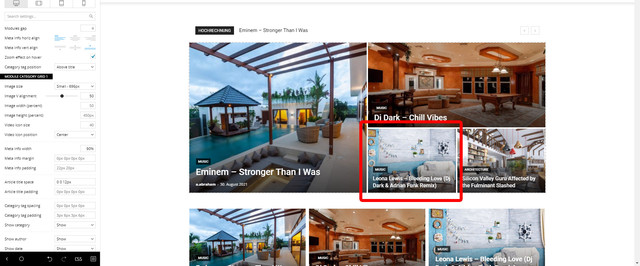
I suppose from the admin panel/composer it’s not possible, so I was checking out the template and shortcode files, but I was not able to find the corresponding code snippet for the Big Grids yet.
Can you give me any hint where I can find what I am searching for? 🙂
Thanks and best regards!
Andrej
Anamaria Hello,
I just checked and now seems to look fine on the pages.
Also, to change the font on block/post you can edit with tagDiv Composer -> https://prnt.sc/10grx77, select the block/post and in Style, you can change the font => https://www.screencast.com/t/sUE7ug4UIAR5
This is a video about how to change the fonts => https://www.youtube.com/watch?v=rbkYVyj1__Q
Also, if you set the homepage like blog => https://www.screencast.com/t/5cPXJp7cb4W you can choose a template from Theme Panel -> Template Settings -> Blog and posts templates => https://www.screencast.com/t/gBNPoQBj
Thank you!
Anamaria Hello,
Please make sure you set the logo with tagDiv composer, not set in Theme Panel => https://www.youtube.com/watch?v=HXQQygkCCJo to have set the width and height.
Also, on the about us page, some images are not uploaded https://i.imgur.com/FldNFya.png -> https://kinsta.com/blog/504-gateway-timeout/
Also, please check this topic https://forum.tagdiv.com/topic/website-speed-issue-2/
Let me know the results!
Thank you!
Bettina Hello!
You can find the code for flex blocks here:
1. To add an option for sort that appears in td composer, you need to go to td-composer/legacy/Newspaper/includes/td_config.php, starting with 39233 line (get_map_filter_array function)
2. To add the functionality for the new function, you need to go to td-composer/legacy/common/wp_booster/td_data_source.php and edit the shortcode_to_args function
Hope that helps you!
Thank you!
Anamaria Hello,
There is a conflict between tagDiv Composer and WP Bakery.
So, I gladly recommend you to shift from WPBakery to Composer, because WPBakery is an old builder plugin.
Please check our guide to know how to shift from WPBakery to Composer: https://forum.tagdiv.com/visual-composer-tagdiv-composer-transition/
tagDiv Composer contains a lot of functions and features, please check our tutorial here: https://forum.tagdiv.com/tagdiv-composer-tutorial/
Thank you for understanding!
Calin Hi noutatearo, This can be done, but for this you need to manually edit the homepage every day and change manually the posts.
Unfortunately, the theme do not have an option for stick but those can be set using tagDiv Composer and adding the post id in blocks/grids -> https://prnt.sc/1qsjd0s
For the moment this is the only solution that can do what you need.
Thank you for your understanding!
Anamaria Hello,
I think you referring to the option the Infinite Loading on the Single Post Template you can disable it with tagDiv Composer -> Show site wide settings => https://www.screencast.com/t/4RnV1CnxiuA
Thank you!



