
- TutorialsFrom WPBakery to tagDiv Composer
- TutorialsDefault Block Settings Guide
- TutorialsOffset Feature
- TutorialstagDiv Social Counter Tutorial
- TutorialsHow to Update the WPBakery Page Builder plugin
 Anthony43
Hello,
I’ve juste updated my theme to 10.4 version, but now my homepage is displaying the source code, as if the tagdiv composer was desactivated, but the others pages are working fine.
Can you help me please ? thank you
https://www.lesclesdelagriculture.com/
 Bettina
 Hello!
First of all, try to do these steps as quickly as possible, so your visitors do not notice the process:
1. disable TagDiv Composer
2. uninstall(delete) TagDiv Composer
3. clear cache (if cache plugin exists)
4. install TagDiv Composer
5. activate TagDiv Composer
6. clear cache (if cache plugin exists)
Also, make sure your WordPress and plugins are up to date.
Sometimes, the issue can be from a plugin conflict, that’s why, please deactivate ALL plugins except tagDiv ones, also if you are using a cache plugin, deactivate it, clear all cache(also from your browser) and try again.
We recommend using WP Super Cache plugin https://forum.tagdiv.com/cache-plugin-install-and-configure/
Thank you!
 byothe
 And another weird thing is that TagDiv composer doesn’t work anymore… while it was working fine yesterday… I cannot add new elements anymore…
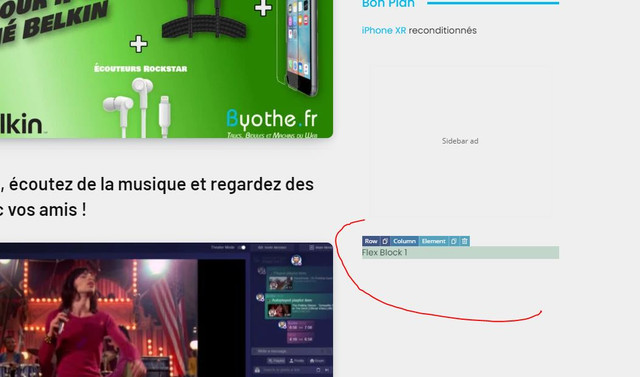
All this was working yesterday since I made some changes on my homepage… I even downloaded a new footer from the cloud library
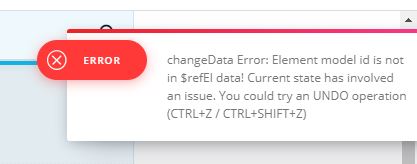
And this error appears when I try to do something
 Bettina
 Hello!
First of all, try to do these steps as quickly as possible, so your visitors do not notice the process:
1. disable TagDiv Composer
2. uninstall(delete) TagDiv Composer
3. clear cache (if cache plugin exists)
4. install TagDiv Composer
5. activate TagDiv Composer
6. clear cache (if cache plugin exists)
Also, make sure your WordPress and plugins are up to date(specially Standard Pack installed and active if you use default templates).
Sometimes, the issue can be from a plugin conflict, that’s why, please deactivate ALL plugins except tagDiv ones, also if you are using a cache plugin, deactivate it, clear all cache(also from your browser) and try again.
We recommend using WP Super Cache plugin https://forum.tagdiv.com/cache-plugin-install-and-configure/
Thank you!
Bettina Hello!
For that demo, there is a SVG code for the logo. Check in the header logo element in SVG tab if it is set it like hide or delete that SVG code, then go to CSS tab and there you can see the color brown in “Background color” and change it.
Do these steps also:
1. disable TagDiv Composer
2. uninstall(delete) TagDiv Composer
3. clear cache (if cache plugin exists)
4. install TagDiv Composer
5. activate TagDiv Composer
6. clear cache (if cache plugin exists)
Make sure your WordPress and plugins are up to date.
Sometimes, the issue can be from a plugin conflict, that’s why, please deactivate ALL plugins except tagDiv ones, also if you are using a cache plugin, deactivate it, clear all cache(also from your browser) and try again.
We recommend using WP Super Cache plugin https://forum.tagdiv.com/cache-plugin-install-and-configure/
Hope that helps you!
Thank you!
 Anamaria
 Hello,
The footer templates do not have the button to be edited with tagDiv Composer in the backend. Please check this guide:https://forum.tagdiv.com/footer-templates/
If you a Pro Prebuilt Website you can edit with tagDiv Composer the footer template can be edited only from the frontend if it is assigned, edit a page/post template with tagDiv Composer and go down to the footer. => https://www.screencast.com/t/rpfNhfyrF
Also, if you have a standard footer template https://www.screencast.com/t/ND7OiqEpPFK ->https://www.screencast.com/t/Z5ZdVYY4wAuP then you need to make changes in Theme Panel -> Footer.
Hope this helps you!
Thank you!
Anamaria Hello,
Only the administrator and editor can do changes with tagDiv Composer and can save it.
The other users can open it, but the changes made are not saved.
We will try in the future to implement the option to hide cloud templates for the rest of the users who do not have access to edit.
Thank you for your understanding!
Bettina Hello!
First of all, try to do these steps as quickly as possible, so your visitors do not notice the process:
1. disable TagDiv Composer
2. uninstall(delete) TagDiv Composer
3. clear cache (if cache plugin exists)
4. install TagDiv Composer
5. activate TagDiv Composer
6. clear cache (if cache plugin exists)
Also, make sure your WordPress and plugins are up to date(specially Standard Pack installed and active if you use default templates).
Sometimes, the issue can be from a plugin conflict, that’s why, please deactivate ALL plugins except tagDiv ones, also if you are using a cache plugin, deactivate it, clear all cache(also from your browser) and try again.
We recommend using WP Super Cache plugin https://forum.tagdiv.com/cache-plugin-install-and-configure/
For the second issue, please provide more information, screenshots and also your website link in order to help you.
Thank you!
 xxxLesy
 I tracked it down by disabling plugins 1 by 1. The cause is compatitability with WooCommerce.
Disabling WooCommerce fixes it, but downgrading to previous versions doesn’t. Tested with:
WC 4.9.2 – not working
WC 5.0.0 – not working
WC 5.1.0 – not working
WC 5.2.0 – not working
WC 5.2.1 – not working
WC 5.2.2 – not working
WC 5.3.0 RC1 – not working
On Newspaper side tested with:
10.4 – not working
10.3.9.1 – not working
10.3.9.0 – not working
10.3.8 – not working
10.3.7 – not working
If Newspaper rollback updater also rolls back TD composer plugin, which is probably the real problem, than that would mean it’s not a recent update thing, but a major compatitability issue (I only recently installed WC, so I wouldn’t know).
Can you take it from here Bettina?
 johnsnow
 I admitted that tagDiv composer is not working with changes. I mean when I want to change the logo, uploading a new one, or change the featured image size and so on.. no changes applying.. its all stays the same
 widesign
Hi,
We are using a newspaper theme for our website.
Tag div composer taking much time to load even after a long time theme not loading on the page. Please let me know the solution for this issue and also please let me know how to make the page title as center and content box to the center alignment?
Thank you,
Anamaria Hello,
If you use a mobile responsive version, then you need to edit with tagDiv Composer, select the viewport on phone, and then you set the logo where you want, the same for the mobile page, but if you have the mobile theme plugin activate then you can’t change the position. https://www.youtube.com/watch?v=HXQQygkCCJo
Hope this helps you!
Thank you!
 Masudul Alam
Hi!
I am a happy user of Newspaper theme. Today, I have faced a issue that latest published post not showing at Homepage when I logout. But, when I logged in, it works perfectly. I faced this kind of issue for very first time.
To solve this issue, I deactivate and delete tagDiv Composer plugin and again reactivate. But it did not works. Then, I deactivate all plugin, except tagDiv plugins. But it also did not works.
My website is https://cscsbd.com/, MY latest post is https://cscsbd.com/3846
Now, how to solve this issue?
 wutti
wutti Hi Bettina, thank you so much for your helpful answers 🙂
1. That works!
But the ad title is still visible on desktop. What can I do?
https://www.villachimfokus.at/wp-content/uploads/2021/04/bezahlte_werbung.jpg
2. I get what you suggest 🙂 But how can I assign another template to a category?
3. Still not working unfortunately… just visible in TagDiv Composer, not frontend.
https://www.villachimfokus.at/wp-content/uploads/2021/04/comments.jpg
4. Super tip!
5. Oh yes, how could that happen 😀
johnsnowInstalled demo “New school pro” with no content. There is brown logo. I tried to change it with tagDiv composer and in dashboard. But no results. It is uploaded and changes saved. But logo still the same. Brown color “news school pro” how to fix it?
https://blacklivesmatter1.org
Anamaria Hello,
I’m very sorry to hear about this.
I just verify your website and seems the images set as featured image no longer set the address (link) => https://www.screencast.com/t/envTUtHsFF
Please make sure you have set the featured images => https://www.screencast.com/t/zgVo7NoaYwu
Also, do they appear then edited with tagDiv Composer?
Also, you can check if you don’t have a plugin conflict.
Also, we start to answer from oldest to newest topics/emails, also, please try not to reply multiple times to the topic/email if possible, this will only delay our response.
Hope this helps you!
Thank you!
 djliamcontact
Hey, I just bought the Newspaper theme and I have I can’t use it.
I download it but after I do the “Fast Start Your Website” part its not allowing me to download the plugins & update them.
Its write:
“tagDiv Composer
Failed
tagDiv Cloud Library
Failed
tagDiv Social Counter
Failed
An error occurred and we could not finish the process.
Please manually update the plugins.
Anamaria Hello,
I just made a test with your ID for Twitter and works well => https://www.screencast.com/t/n7tZThCs1Y, please clear your cache.
Normally without a cache plugin, it should update once per day, with a cache plugin it can take some more time.
Unfortunately, at the moment, our team is working on the Instagram issue, but you can set the Instagram fixed count with tagDiv Composer => https://www.screencast.com/t/In8UL9Q92n until the issue is resolved.
Thank you for your understanding!
 Vlad S
 Hello !
Please provide a link to your website in order to take a look.
You will have to first start looking for a plugin conflict. please deactivate ALL plugins except tagDiv ones, also if you are using child theme or cache plugin, deactivate them, clear all cache and try again.
Also you can try and remove and re-install the tagDiv Composer plugin and please send us a link to your website in order to take a look.
Let us know the results.
Thank you !
Vlad S Hello !
You will have to first start looking for a plugin conflict. please deactivate ALL plugins except tagDiv ones, also if you are using child theme or cache plugin, deactivate them, clear all cache and try again.
Also you can try and remove and re-install the tagDiv Composer plugin and please send us a link to your website in order to take a look.
Let us know the results.
Thank you !
Anamaria Hello,
If you have disabled these theme panel options and use a single post template then the settings will not apply, the theme panel settings apply on standard post template.
To delete the author box and related articles, edit with tagDiv Composer the Single Post Template => https://www.screencast.com/t/KWmBHU5juF6R select the element and with right-click => https://www.screencast.com/t/jcffF5bb87ft or with drag & drop place it into the deleting red zone from the bottom right of the page => https://www.screencast.com/t/DSbFuKBiru
Hope this helps you!
Thank you!
Vlad S Hello !
That can be done by using TagDiv Composer and editing your menu settings as you can see here: https://www.screencast.com/t/rjPQdfirEVoB
Thank you!
 slivertorp
Hi amazing people here,
I started to use facets from wpGridbuilder such as: https://demos.wpgridbuilder.com/map/
Is there any way to modify facets CSS with your theme?
The dev from gridbuilder told me to use Oxygen or Elementor add ons: https://wpgridbuilder.com/add-ons/elementor/
but I am afraid that it might conflict with tagDiv composer and break the website.
So far this the code I use for the facet: https://imgur.com/ryheu0Z unfortunately the “column text” block doesn’t give me the flexibility to change the font and color of the facet.
Thank you very much in advance for your help and advice.
Adrien
 wepublications
Hi:
I’m trying to update my Home Page and tagDiv freezes and doesn’t open, so I can ‘t make any updates. The rest of the website is fine.
What is the latest version of tagdiv I have to have ? I did update mine this past winter and it was working fine.
Can you also tell me this:
In one section of Newspaper, it’s actually the main top section where 5 posts appear, there is a faded smoke/black screen that appears on the front of each image. I need to remove this feature, as it makes images look blurry. On the rest of the sections/ Elements on the home page they are clear, so the same images used look fine. How do I remove the smoke screen in the top main section, home page ?
Please help,
Thanks,
Maureen
 Pukacza
 I have met the requirement of all settings.
http://prntscr.com/127r85q
I checked it once again. And I can reproduce error every time I just enter the “Edit Post” in wordpress.
Whenever I done that I’m receiving alerts like below:
Error Details

=============

An error of type E_ERROR was caused in line 2934 of the file /home/546626.cloudwaysapps.com/muxfghuehd/public_html/wp-content/plugins/td-composer/legacy/common/wp_booster/td_util.php. Error message: Out of memory (allocated 35651584) (tried to allocate 40960 bytes)
And CPU usage is 100% till I restart the server.
If you need any more logs I can gather it.
 [Wed Apr 28 03:19:22.148983 2021] [proxy_fcgi:error] [pid 24049:tid 140277716739840] [client 95.91.76.7:21398] AH01071: Got error 'PHP message: PHP Warning: Attempt to read property "slug" on null in /home/546626.cloudwaysapps.com/muxfghuehd/public_..............ock.php on line 202PHP message: PHP Warning: Attempt to read property "ID" on null in /home/546626.cloudwaysapps.com/muxfghuehd/public_html/wp-content/plugins/td-composer/includes/tdc_composer_block.php on line 202PHP message: PHP Warning: Attempt

[Wed Apr 28 03:19:22.369949 2021] [proxy_fcgi:error] [pid 24049:tid 140277716739840] [client 95.91.76.7:21398] AH01071: Got error 's/tdc_composer_block.php on line 202PHP message: PHP Warning: Attempt to read property "ID" on null in /home/546626.cl..............cy/common/wp_booster/td_block.php on line 1554PHP message: PHP Warning: Attempt to read property "ID" on null in /home/546626.cloudwaysapps.com/muxfghuehd/public_html/wp-content/plugins/td-composer/legacy/common/wp_booster/td_block.php on line 1554'
