
 Anamaria
 Hello,
To change the color of the header, please edit with tagDiv Composer => https://www.screencast.com/t/v8yuNjlETd select the header menu -> Zone => and the tab called “CSS” you can remove the border value, or change the color of border => https://www.screencast.com/t/q9k0nc0lw7x
Hope this helps you!
Thank you!
Anamaria Hello,
This page was created with tagDiv composer or did you use another page builder?
Also, I don’t know exactly what titles you’re referring to, because you didn’t attach the screenshots => https://www.screencast.com/t/8dkC2LYnwa6and I checked the website, but I don’t think there’s anything wrong.
Also if you can tell me which editor you use for posts.
Thank you!
Anamaria Hello,
Our developers are constantly trying to fix the issues, so please disable the tagDiv Composer plugin again, delete it, and reinstall it from the newspaper plugins => https://www.screencast.com/t/WLy01lbc
Unfortunately, we can’t disable the composer for GiveWP custom post type.
Let me know the results!
Thank you!
 fespinal
 I needed to limit the number of authors to display and sort them randomly. It would be nice if it was included as a feature.
I share the code modifications I have made in case they serve as a starting point or serve for someone with the same need.
Enabling order by rand to functions.php
td-composer/legacy/Newspaper/includes/shortcodes/td_block_authors.php
@@ -175,7 +175,8 @@ class td_block_authors extends td_block {

                 'roles' => '',

                 'sort' => '',

                 'exclude' => '',

-                'include' => ''

+                'include' => '',

+                'number' => '',

             ), $atts));
@@ -200,7 +201,7 @@ class td_block_authors extends td_block {
$get_users_array['orderby'] = 'display_name';
//$td_authors = get_users(array('orderby' => 'display_name'));
} else {
- $get_users_array['orderby'] = 'post_count';
+ $get_users_array['orderby'] = $sort;
$get_users_array['order'] = 'DESC';
//$td_authors = get_users(array('orderby' => 'post_count', 'order' => 'DESC'));
}
@@ -216,6 +217,10 @@ class td_block_authors extends td_block {
$get_users_array['role__in'] = $roles_in;
}
+ if (!empty($number)) {
+ $get_users_array['number'] = $number;
+ }
+
$td_authors = get_users($get_users_array);
td-composer/legacy/Newspaper/includes/td_config.php
@@ -30387,7 +30387,7 @@ class td_config {

                         array(

                             "param_name" => "sort",

                             "type" => "dropdown",

-                            "value" => array('- Sort by name -' => '', 'Sort by post count' => 'post_count'),

+                            "value" => array('- Sort by name -' => '', 'Sort by post count' => 'post_count', 'Random' => 'rand'),

                             "heading" => 'Sort authors by:',

                             "description" => "",

                             "holder" => "div",

@@ -30411,6 +30411,15 @@ class td_config {

                             "holder" => "div",

                             "class" => "tdc-textfield-big",

                         ),

+                        array(

+                            "param_name" => "number",

+                            "type" => "textfield",

+                            "value" => '',

+                            "heading" => "Number of users to limit",

+                            "description" => "",

+                            "holder" => "div",

+                            "class" => "tdc-textfield-big",

+                        ),

                         array(

                             "param_name" => "separator",

                             "type" => "horizontal_separator",
 Pukacza
 Also I receive alert from WordPress
Since WordPress 5.2 there is a built-in feature that detects when a plugin or theme causes a fatal error on your site, and notifies you with this automated email.
In this case, WordPress caught an error with one of your plugins, tagDiv Composer.
Error Details
=============
An error of type E_ERROR was caused in line 2937 of the file /home/546626.cloudwaysapps.com/muxfghuehd/public_html/wp-content/plugins/td-composer/legacy/common/wp_booster/td_util.php. Error message: Out of memory (allocated 12582912) (tried to allocate 40960 bytes)
 Bettina
 Hello!
Please make sure that your changes from theme panel are saved.
If you use a cloud/PRO template, then please check when you edit with TagDiv Composer if there is set up another font in the elements.
Please note that if another font is set up in the elements, then your changes from theme panel will be overwritten by the element’s settings.
Thank you!
PukaczaHi,
I see lots of errors with theme in Apache error log:
 [Mon Apr 26 00:18:13.914739 2021] [proxy_fcgi:error] [pid 20394:tid 139993376810752] [client 144.76.60.198:54860] AH01071: Got error 'PHP message: PHP Warning: Undefined variable $prev_class in /home/546626.cloudwaysapps.com/muxfghuehd/public_html/w..............d-cloud-library/state/date/tdb_state_date.php on line 120PHP message: PHP Warning: Undefined variable $next_class in /home/546626.cloudwaysapps.com/muxfghuehd/public_html/wp-content/plugins/td-cloud-library/state/date/tdb_state_date.php on line 121'

[Mon Apr 26 00:18:37.844803 2021] [proxy_fcgi:error] [pid 20394:tid 139993334847232] [client 207.46.13.87:54888] AH01071: Got error 'PHP message: PHP Warning: Attempt to read property "slug" on null in /home/546626.cloudwaysapps.com/muxfghuehd/publi..............block.php on line 202PHP message: PHP Warning: Attempt to read property "ID" on null in /home/546626.cloudwaysapps.com/muxfghuehd/public_html/wp-content/plugins/td-composer/includes/tdc_composer_block.php on line 202PHP message: PHP Warning: Attemp

[Mon Apr 26 00:18:38.072243 2021] [proxy_fcgi:error] [pid 20394:tid 139993334847232] [client 207.46.13.87:54888] AH01071: Got error 's/tdc_composer_block.php on line 202PHP message: PHP Warning: Attempt to read property "ID" on null in /home/546626...............cy/common/wp_booster/td_block.php on line 1554PHP message: PHP Warning: Attempt to read property "ID" on null in /home/546626.cloudwaysapps.com/muxfghuehd/public_html/wp-content/plugins/td-composer/legacy/common/wp_booster/td_block.php on line 1554'

[Mon Apr 26 00:18:44.843007 2021] [proxy_fcgi:error] [pid 20394:tid 139993460737792] [client 40.77.167.107:54888] AH01071: Got error 'PHP message: PHP Warning: Attempt to read property "slug" on null in /home/546626.cloudwaysapps.com/muxfghuehd/publ.............._block.php on line 202PHP message: PHP Warning: Attempt to read property "ID" on null in /home/546626.cloudwaysapps.com/muxfghuehd/public_html/wp-content/plugins/td-composer/includes/tdc_composer_block.php on line 202PHP message: PHP Warning: Attem

[Mon Apr 26 00:18:45.068332 2021] [proxy_fcgi:error] [pid 20394:tid 139993460737792] [client 40.77.167.107:54888] AH01071: Got error 's/tdc_composer_block.php on line 202PHP message: PHP Warning: Attempt to read property "ID" on null in /home/546626..............cy/common/wp_booster/td_block.php on line 1554PHP message: PHP Warning: Attempt to read property "ID" on null in /home/546626.cloudwaysapps.com/muxfghuehd/public_html/wp-content/plugins/td-composer/legacy/common/wp_booster/td_block.php on line 1554'

[Mon Apr 26 00:18:47.924295 2021] [proxy_fcgi:error] [pid 20394:tid 139993410381568] [client 40.77.167.74:54888] AH01071: Got error 'PHP message: PHP Warning: Attempt to read property "slug" on null in /home/546626.cloudwaysapps.com/muxfghuehd/publi..............block.php on line 202PHP message: PHP Warning: Attempt to read property "ID" on null in /home/546626.cloudwaysapps.com/muxfghuehd/public_html/wp-content/plugins/td-composer/includes/tdc_composer_block.php on line 202PHP message: PHP Warning: Attemp

[Mon Apr 26 00:18:48.143685 2021] [proxy_fcgi:error] [pid 20394:tid 139993410381568] [client 40.77.167.74:54888] AH01071: Got error 's/tdc_composer_block.php on line 202PHP message: PHP Warning: Attempt to read property "ID" on null in /home/546626...............cy/common/wp_booster/td_block.php on line 1554PHP message: PHP Warning: Attempt to read property "ID" on null in /home/546626.cloudwaysapps.com/muxfghuehd/public_html/wp-content/plugins/td-composer/legacy/common/wp_booster/td_block.php on line 1554'
Could help me in investigation?
Thank you,
Michal
 Breinblik
 I’m beginning to question if we are fully understanding each other. It seems to me like i’m not asking for something ‘very’ advanced. I’ve created multiple Post types which behave exactly like the default posts. I just want them to have the same layout and be editable with TagDiv composer, that’s it.
Bettina Hello!
1. You should use the element called “Ad box” from TagDiv Composer on your mobile page and there you need to add the ads. You need just drag & drop the element in that place.
2. Yes, you can, but you need to have another template assigned to that category. Note that a category template will have the same design as for all categories, so, you just need to assign another template with another structure, in your case ads for your chosen categories.
3. Because you use a cloud template, then the settings from theme panel are overwritten by the settings from Composer. So, open a post then “Edit with TagDiv Composer”. You need to add the element called “Single Post Comments” in order to have that.
4. If you want the same posts to appear there on top, then you should write the IDs of the posts in the element’s settings(Filter -> Post ID filter). If you don’t mean this, then please provide a screenshot with an example of what you need to achieve?
5. Check in the element’s settings if you have some offset and let the field empty.
Hope that helps you!
Thank you!
Breinblik Your colleague already pointed me to this page: https://forum.tagdiv.com/custom-post-type-support/ and thank you but it doesn’t help me. Also i suspect the info on this page is outdated because i can’t find these files:
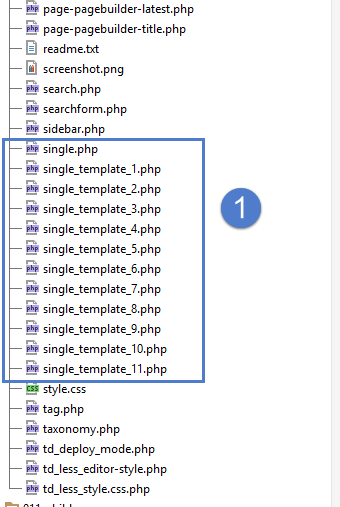
It looks like the root of the Newspaper theme but i don’t see these files in my theme folder, where are the located?
I would like to disable/uninstall WP Bakery pagebuilder but i first need to be sure that TagDiv Composer can offer me the same solutions.
-
This reply was modified 5 years by
Breinblik.
Breinblik Is there a way i can do it by modifying the PHP files? There must be a way right?
I’m being forced now to use the TagDiv composer and it doesn’t offer me a solution for this problem. The WP Bakery PageBuilder does.. but it’s not an option because then i have to rebuild all the pages again..
Bettina Hello!
Do not use both page builders on the same time.
For the moment, the only solution is to shift from WPBakery to Composer.
So, I gladly recommend you to shift from WPBakery to Composer, because WPBakery is an old builder plugin.
Please check our guide to know how to shift from WPBakery to Composer: https://forum.tagdiv.com/visual-composer-tagdiv-composer-transition/
If you will use a cloud template, then you can edit the template and find in Composer an element called ” Team Member ” and some settings for that. For more information about TagDiv Composer plugin, check our documentation here: https://forum.tagdiv.com/tagdiv-composer-tutorial/
Unfortunately, there is no such element(https://test.circulaireconsumptiegoederen.nl/doe-mee-test/) in TagDiv Composer to be able to build exactly the same feature.
You can not edit a default template/CPT with TagDiv Composer plugin.
Check the differences here:
– https://forum.tagdiv.com/design-post-pages-using-cloud-library-templates/
– https://forum.tagdiv.com/design-post-pages-using-default-templates/
If you want to try CPT, then you can take a look here:
https://forum.tagdiv.com/custom-post-type-support/
Hope that helps you!
Thank you!
Bettina Hello!
First of all, try to do these steps as quickly as possible, so your visitors do not notice the process:
1. disable TagDiv Composer
2. uninstall(delete) TagDiv Composer
3. clear cache (if cache plugin exists)
4. install TagDiv Composer
5. activate TagDiv Composer
6. clear cache (if cache plugin exists)
Also, make sure your WordPress and plugins are up to date(specially Standard Pack installed and active if you use default templates).
Sometimes, the issue can be from a plugin conflict, that’s why, please deactivate ALL plugins except tagDiv ones, also if you are using a cache plugin, deactivate it, clear all cache(also from your browser) and try again.
We recommend using WP Super Cache plugin https://forum.tagdiv.com/cache-plugin-install-and-configure/
Let us know about your results!
Thank you!
Bettina Hello!
Please edit this page with TagDiv Composer and check if you set up “Random posts” and also check if you have offset field empty in that element.
Thank you!
Bettina Hello!
This is a strange effect.
First of all, try to do these steps as quickly as possible, so your visitors do not notice the process:
1. disable TagDiv Composer
2. uninstall TagDiv Composer
3. clear cache (if cache plugin exists)
4. install TagDiv Composer
5. activate TagDiv Composer
6. clear cache (if cache plugin exists)
Also, make sure your WordPress and plugins are up to date(specially Standard Pack installed and active if you use default templates).
Sometimes, the issue can be from a plugin conflict, that’s why, please deactivate ALL plugins except tagDiv ones, also if you are using a cache plugin, deactivate it, clear all cache(also from your browser) and try again.
We recommend using WP Super Cache plugin https://forum.tagdiv.com/cache-plugin-install-and-configure/
Let us know about your results!
Thank you!
Anamaria Hello,
If you have the latest theme update, then please do these steps:
1. disable tagDiv Composer
2. uninstall tagDiv Composer
3. clear cache (if cache plugin exists)
4. install tagDiv Composer from Newspaper plugins => https://www.screencast.com/t/WLy01lbc
5. activate tagDiv Composer
6. clear cache (if cache plugin exists)
Let us know the results!
Thank you!
Anamaria Hello, @carolhm,
If you have a standard template, then you can disable the post views from Theme Panel -> Post Settings -> Post and Custom Post Types => https://www.screencast.com/t/LAv90B5eZ, but if you have a Single Post Template from Cloud Library, then you can delete the element called “Single Post Views” with right-click or using the drag and drop -> http://prntscr.com/owlz2r or you can simply click on the row and press the delete button from your keyboard.
If this is not what you mean, please provide more information.
Thank you!
BreinblikHi!
I’ve created multiple Custom Post Types and i’m trying now to make them have the same layout as my default posts. I noticed that my custom post types aren’t editable with TagDiv composer, how do i make them editable and how do i assign them a ‘Single Post Template’ that comes with NewsPaper?
thanks!
Anamaria Hello!
Yoast SEO Premium plugin should work well with our theme and with all demos.
If you have the latest theme update, then please do these steps:
1. disable tagDiv Composer
2. uninstall tagDiv Composer
3. clear cache (if cache plugin exists)
4. install tagDiv Composer from Newspaper plugins => https://www.screencast.com/t/WLy01lbc
5. activate tagDiv Composer
6. clear cache (if cache plugin exists)
Let us know the results!
Thank you!
Bettina Hello!
Please check this topic: https://forum.tagdiv.com/topic/pages-table-of-contents-with-tagdiv-composer/
There I made a video of the same effect based on buttons.
Hope that helps you!
Thank you!
Anamaria Hello,
I saw that you are using flex block 5, and to add that extra parameter you have to edit this file from this path => wp-content/plugins/td-composer/legacy/Newspaper/includes/modules/td_module_flex_5.php => https://www.screencast.com/t/g2Y4ODAemAt
Thank you!
 thelansingjournal
 My developer say, “Ask if they can simply disable composer on the GiveWP custom post type to start with.”
Breinblik I’m trying to modify templates/pages of my custom post types but they are not editable by TagDiv Composer why is that and is there a way of enabling this?
Breinblik When i try to edit a page with TagDiv Composer i get this error:
Error at zones: 6(models) : 5(dom). The model does not match the content Current state has involved an issue. You could try an UNDO operation (CTRL+Z / CTRL+SHIFT+Z)
This is a page i want to use to display custom post types
Bettina Hello!
Yoast SEO plugin should work well with our theme and with all demos.
Please start looking for a plugin conflict, deactivate ALL plugins except tagDiv ones, also if you are using child theme or cache plugin, deactivate them, clear all cache and try again.
If you have the latest theme update, then please do these steps:
1. disable TagDiv Composer
2. uninstall TagDiv Composer
3. clear cache (if cache plugin exists)
4. install TagDiv Composer
5. activate TagDiv Composer
6. clear cache (if cache plugin exists)
Let us know the results!
Thank you!
