
- TutorialsFrom WPBakery to tagDiv Composer
- TutorialsDefault Block Settings Guide
- TutorialsOffset Feature
- TutorialstagDiv Social Counter Tutorial
- TutorialsHow to Update the WPBakery Page Builder plugin
 ddj
ddjI have a site where one category is not loading correctly. No other different categories are displaying this error.
Here is the category: https://www.schoolnewsnetwork.org/category/grand-rapids-community-college/
(It also appears on subsequent pages of the category such as https://www.schoolnewsnetwork.org/category/grand-rapids-community-college/page/2/)
This seems to be a recent issue because in some browsers/computers that have that page cached, it will appear correctly.
When I test it in an incognito browser or mobile browser, the issue is obvious.
I have tried all of these things, and none of them fixed the issue.
– Opening it in Tag Div Composer and saving. The page looks correct all the time.
– Clearing page cache and site cache.
 yeiji shon
Errors at elements: 3(models) : 0(dom). The model does not match the content Current state has involved an issue. You could try an UNDO operation (CTRL+Z / CTRL+SHIFT+Z)
I use the newsletter and WPML together, and when I log on to the newly created language page to modify the theme, I get this error message and I can’t fix it. Is there a way to solve it?
1.Every time I modify the main page, the new Language page can’t be modified because of this problem.
2. If you delete both the main language page and the other language page and recreate it, it will be solved, but if I correct it again, the same problem will occur again.
I wish I could modify each without deleting it, what should I do?
Thank you.
 Anamaria
 Hello,
1. I checked your website and seems to look fine, the titles of the articles are fine. => https://www.screencast.com/t/bae3LxVyj3Qe
2.For change the website width, you need to make sure that you don’t have set a background color/image in Theme Panel, because this makes your website boxed. Make sure this option is disabled => https://www.screencast.com/t/ejiNPCBF
To set a page to full width, you’ll need to edit it with tagDiv Composer like this -> https://i.imgur.com/i5IUJ9E.jpg add or select a row and stretch it after your needs -> https://i.imgur.com/WKYebPX.jpg -> https://i.imgur.com/TO1BZ3M.png -> https://i.imgur.com/Yq8UCv3.jpg
Hope this helps you!
Thank you!
 Calin
Calin Hi, the Text with title element can be set with tagDiv Composer, then it can be edited from here -> https://i.imgur.com/qiUV1z3.jpg -> https://i.imgur.com/v26ipE3.png -> https://i.imgur.com/YlU3BR5.png also the option from theme panel that is apply on that element is the body option https://i.imgur.com/47txKjG.png
Thank you!
 Anonymous
 Hi, Bettina!
One doubt about minifying HTML, that was the culprit of the issue: when I minify it, it brakes the connection with tagdiv servers, but it does not brake my live website functionality.
Is it ok to minify the HTML on my live site and unminify it only when I need to use the TD Composer and TD Cloud Library?
Anamaria Hello,
For anchor ads, you need to have a code from your provider.
The theme has only this for ads => https://i.imgur.com/IBxx4Bt.png https://forum.tagdiv.com/sidebar-ads/ -> https://forum.tagdiv.com/header-ads-adsense/ ,on Cloud Templates and pages you can use the ad box element from tagDiv Composer => https://forum.tagdiv.com/custom-ad-spots/
If you use a Prebuilt Websites Pro you can set ads in the Ad Box from tagDiv Composer
The ad box has 3 sections for ads: using theme panel ads -> https://i.imgur.com/KFa9ibl.png, using images/banners -> https://i.imgur.com/MfAPTaE.png and custom code -> https://i.imgur.com/2rh8SuD.png save it and will appear on the post.
If this is not what you mean, please let me know!
Thank you!
 AasifGanaie
 Here is the link: kashmirpulse.com. Actually, I was using both Tagdiv Composer and WP Bakery, which I have deactivated now.
I am facing a multitude of problems:
1. I edited the homepage and saw the widgets were added to Footer (below NEWS IN VIDEOS section), which I wanted on homepage only. Screenshot: https://snipboard.io/RE0TaS.jpg
2. I can’t change logo and am using text logo only.
3. Theme Panel doesn’t save options, due to which AMP isn’t working.
4. Also, few errors have shot up on Search Console after I installed the Theme.
 Bettina
 Hello!
If you have cloud template, then you can edit the page with TagDiv Composer and drag & drop the element on that side. Otherwise, you can’t do that with default templates.
Thank you!
Bettina Hello!
Please verify with TagDiv Composer that this setting is empty like this:
https://www.screencast.com/t/I6qQ0K12nCyJ
Let me know about your results!
Thank you!
 Vlad S
 Hello !
Unfortunately your website does not seem to work at the moment.ou will have to first start looking for a plugin conflict. please deactivate ALL plugins except tagDiv ones, also if you are using child theme or cache plugin, deactivate them, clear all cache and try again.
Also you can try and remove and re-install the tagDiv Composer plugin and please send us a link to your website in order to take a look.
Let us know the results.
Thank you !
 Redlemon
Hi,
I am on a VPS server with 4 CPU cores, 8 GB of RAM, and 120 GB of SSD (20% used) dedicated to an installation using tagdiv’s Newspaper theme. Ever so often, while editing the theme templates and hit save, the saving seems to be taking for ever to complete. During this time, the front end is also rendered unresponsive. But it is strange that when this happens, the server’s resources are not maxed out; meaning the RAM usage remains as low as 40% with around 100 simultaneous sessions (as reported by Google Analytics). I have the feeling that this should not be the case with a new server and with specs such as the one’s I am currently using.
Is anybody facing similar issues? Please share your tips on how to take some of the load off the installation.
Thank you.
Bettina Hello!
Yes, you can edit the header from desktop version with TagDiv Composer, select Website Mangager, click on main menu and choose a header template from the list.
Let me know about your results!
Thank you!
Anamaria Hi,
I’m not sure I fully understand what are you saying, the pages look different on the desktop as against tagDiv Composer?
Please provide a link to your website or some screenshots.
Thank you!
 abbozdag
Hello friends,
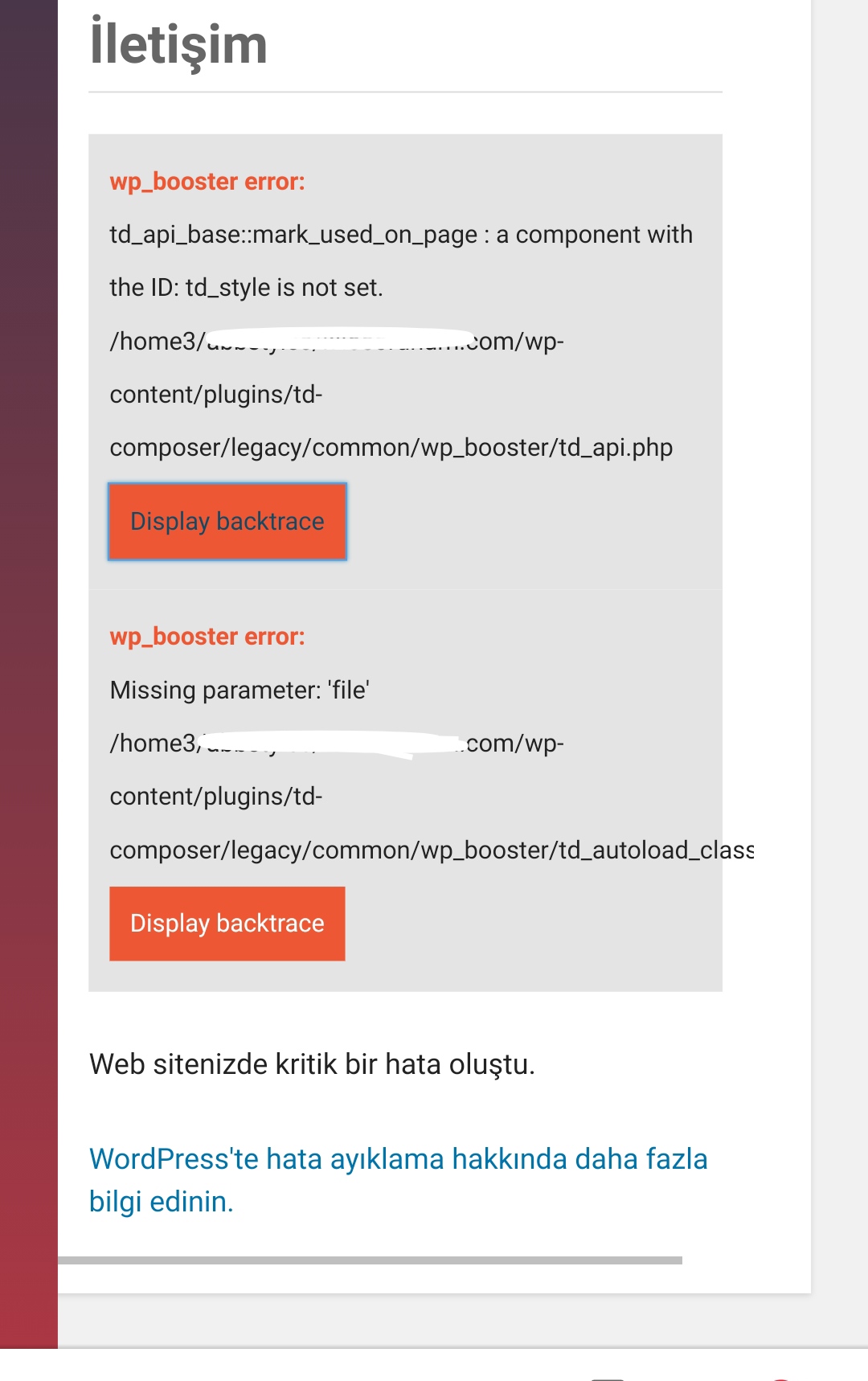
I made a contact page for my site. Using the tagDiv Composer. But this page looks fine in desktop mode. On mobile, the page does not appear at all or gives the error in the picture. I created a separate page for mobile. It turns out the same again. The theme I use is Newspaper.
I would be glad if you help.
Anamaria Hello,
As @sabyp said, tagDiv composer is a page and cloud builder, it can be used only for pages and cloud templates, therefore you can use it on a single post template from tagDiv cloud library to adjust the layout, but not to write the post content, for this you need to use the WordPress editor.
Thank you!
 EQJF
EQJF Thank you! Unfortunately, its concerning a sidebar that is included in a page not a post. Therefore the sidebar is not accessable via TagComposer. Is there a workaround by using the theme panel?
Thx so much
Bettina Hello!
Please look carefully what I was explaining to you above: https://www.screencast.com/t/iAaeJwqZ
What you use is a cloud template, so you have to edit with TagDiv Composer.
Thank you!
Anamaria Hello,
You can change the style of the sidebar with tagDiv Composer => https://www.screencast.com/t/wH9blGwe -> https://www.screencast.com/t/vMr1okxbL
For customizing the sidebar you can take a look on this video => https://www.youtube.com/watch?v=fa7GenCHcBU and check this guides: https://tagdiv.com/multiple-sticky-sidebars/ ->https://forum.tagdiv.com/sidebars-tutorial/
Hope this helps you!
Thank you!
Anamaria Hi,
If you using a single post template from Cloud Library then you need edit with tagDiv Composer,
this is a video what that can help you => https://www.youtube.com/watch?v=fa7GenCHcBU, and a guide => https://forum.tagdiv.com/sidebar-ads/,
or if you have a Standard Post Template, sidebar can be created only with widgets, please follow these guides -> https://forum.tagdiv.com/sidebars-tutorial/ -> https://forum.tagdiv.com/sidebar-ads/
Let me know the results!
Hope this helps you!
Thank you!
Anamaria Hello,
To set the social network URL, you need to go in Theme Panel -> Social Networks and put you URL for your social profile. => https://www.screencast.com/t/RbrrqqGk
There you will find all the links that you set it up.
If you have a Pro Prebuilt Website you can add the social icon with tagDiv Composer => https://www.screencast.com/t/8JOAsFA2rnoN -> https://www.screencast.com/t/YC9driExUC -> you can add an element with drag and drop -> https://www.screencast.com/t/Xp5O9D77nwGw
after you can select the element social icons -> https://www.screencast.com/t/iDUdnl2vOf where you can put to URL to your social profile.
Hope this helps you!
Thank you!
Anamaria Hi,
If I understood correctly, you add the contact form in the footer page.
If you don’t want to have the contact form from all pages/posts you need to import a footer template and set it on the pages/posts where you don’t want the contact form.
You can import a footer edit with tagDiv Composer => https://www.screencast.com/t/KexxEcLF in Manager (Website Manager) -> Footer =>
https://www.screencast.com/t/okJlry1AzY
Hope this helps you!
Thank you!
Bettina Hello!
If you created the mobile pages with TagDiv Composer, then when you install Mobile Theme plugin, your pages will be overwritten by the plugin.
The Mobile Theme is a performance optimized theme included in the Newspaper main theme and it loads only for mobile devices. It comes with it’s own templates for page, post, category, etc so your current templates from the desktop theme will get converted to the mobile theme layout. For more details, please take a look here: https://forum.tagdiv.com/the-mobile-theme/
About AMP version is going well with Mobile Theme activated only.
You can choose the way is suitable for your needs.
Thank you!
 forallatlantis
 So if I’d like to create a new post I should first create a blank page, publish it, view it on public website and then from there to hit the green edit with tagdiv composer button?
Bettina Hello!
1. You need to edit the page with TagDiv Composer and then you should set this filter type: https://www.screencast.com/t/m0BfOFaA
2. In our theme we have a setting when you edit the post template with TagDiv Composer. You need to disable that setting like this: https://www.screencast.com/t/JaSHpq10Y
3. Check also this article from here and give it a try: https://themeisle.com/blog/wordpress-staging-site/
Hope that helps you!
For more information about TagDiv Composer plugin, take a look here: https://forum.tagdiv.com/tagdiv-composer-tutorial/
Thank you!
Bettina Hello!
You can find where the variable is generated in wp-content\plugins\td-composer\legacy\common\wp_booster\td_js_generator.php [line 45]. This variable is used in javascript code.
Unfortunately, all of our javascript get minified and you can not make sense of it in order to modify it.
Thank you for your understanding!



