- NewsmagtagDiv Composer Tutorial
- NewsmagHow to use the Visual Composer plugin
- NewsmagHow to update a plugin
- NewsmagWhat’s included in Newsmag theme package
- NewsmagRequirements for Newsmag
- NewsmagInstall via WordPress
- NewsmagInstall via FTP
- NewsmagBlock settings tutorial
- NewsmagtagDiv Social Counter tutorial
- NewsmagHow to update the WPBakery plugin
- NewsmagPage Menu
- NewsmagCustom ad spots
- NewsmagSmart sidebar
- NewsmagVideo playlist
- NewsmagPage templates
- NewsmagHomepage – How to build and set it
 Calin
Calin Hi,
That menu bar is a snap menu, this can be set/edit from theme panel> header if you are using a standard header -> https://i.imgur.com/Ms7972z.png if you are using a cloud header, then you can edit it using tagDiv Composer as in our tutorial video from here -> https://www.youtube.com/watch?v=HXQQygkCCJo
The second problem is related to a plugin conflict, tagDiv Cloud Library and WPBakery, you can use only one of them, please deactivate the WPBakery and the sidebar should work again.
Let me know the results!
Thank you!
Calin Hi,
Please make sure that you have the latest version of Newspaper, v10.3 and if the problem persist please deactivate the tagDiv Composer and tagDiv Cloud Library, delete them and install again the plugin from Newspaper > Plugins -> https://i.imgur.com/rUum5nb.png
Let me know the results!
Thank you!
Calin Hi,
The dashboard should look like this -> https://i.imgur.com/PKpMpgi.png also the composer should be like this -> https://i.imgur.com/Em1QH30.png
Please make sure that you do not have a plugin conflict, please deactivate ALL plugins except tagDiv Composer, also if you are using child theme or cache plugin, deactivate them, clear all cache and try again.
If there is still a problem, please provide some more details and some screenshots.
Hope this will help!
Thanks.
Calin Hi,
You should be able to edit the homepage using tagDiv Composer also all see ms to be ok on your website, which part do you want to edit? -> https://i.imgur.com/dAIRR8B.png
Please provide some more details and some screenshots.
Thank you!
Calin Hi,
If the homepage was build using tagDiv Composer then you should be able to edit the page and make the right changes, because this can be change only with tagDiv Composer.
In the most cases this is a plugin conflict with untested plugins, please deactivate ALL plugins except tagDiv Composer, also if you are using child theme or cache plugin, deactivate them, clear all cache and try again to see if the login is working.
In order to change the category on the flex block or block, you need to click on it and check the filter tab -> https://i.imgur.com/qwcrk1e.png
If there are still problems with tagDiv Composer, please let us know and provide as more details you can and some screenshots.
Thank you!
 AbeWakama
 Hi
Ive tried deleting the tagDiv Composer plugin and reinstalled it via themes plugin option.
After installing tagDiv Composer plugin still does not give an option for API youtube gives an account option. Ive tried putting the two videos still not showing.
Calin Hi,
In the most cases this is a plugin conflict with untested plugins, please deactivate ALL plugins except tagDiv Composer, also if you are using child theme or cache plugin, deactivate them, clear all cache and try again to see if the login is working.
Let me know the results!
Thank you!
 Vlad S
 Hello !
As you can see here your post template was coming from the cloud library which means that is fully editable using the tagDiv composer: https://www.screencast.com/t/yVsAWiqvw ; For the second problem you will be able to translate them in tagDiv Composer: https://www.screencast.com/t/8sMA7MBfujj
I hope this was helpful !
Thank you !
Calin Hi,
That is way your homepage is not the same as in our demo, if you want you can import a homepage from tagDiv Cloud Library -> https://i.imgur.com/l3vUwmZ.png -> https://i.imgur.com/LvoxrBK.jpg or you can create it using tagDiv Composer.
Also you mast change the latest post from here -> https://i.imgur.com/h1kgbYa.png on static page -> https://i.imgur.com/vckiGun.png
If you choose to import the demos with the content you’ll have imported the homepage too -> https://tagdiv.com/newspaper-theme-installing-demos/
Hope this will help you!
Thank you!
Vlad S Hello !
By using the tagDiv Composer you can setup your looks of the block as you can see here: https://www.screencast.com/t/iBCIAz7nzQT ; Also you can try CTRL + Z but that will revert your whole design.
I hope this was helpful !
Thank you !
Calin Hi,
Yes, the code was set in the single post template on the content in ads tab, these can be change using tagDiv Composer.
If you have other questions, please let us know!
Thank you!
Calin Hi,
Is look that the element overwinters the footer page from tagDiv Composer -> https://i.imgur.com/7xBDgAV.png anothere solution it will be to use a standard footer, your’s look like footer style 13 -> https://i.imgur.com/guMcAjT.png maybe this can fix the problem.
Also you can use this custom css to hide the duplicate content from footer -> https://i.imgur.com/w4RY3Nx.png
.td-footer-page .elementor{

  display: none;

}
The code need to be set in theme panel> custom code> custom css
Hope this will help you!
Thank you!
Calin Hi,
You can achieve this using the tagDiv Composer to edit the cloud header from tagDiv Cloud Library -> https://i.imgur.com/XoliAXC.png
Also you can achieve this using a custom css -> https://i.imgur.com/dqYkLjp.jpg
.td-g-rec-id-header {

  text-align: center;

}
The code need to be set in theme panel> custom code> custom css
Hope this will help you!
Thank you!
Vlad S Hello !
In order to have a sidebar you can use tagDiv Composer on your template and set the ROW layout as you can see here: https://www.screencast.com/t/kIcGMM9Et; after the layout is set you can add sidebar content using tagDiv Composer Elements ; Also please provide a link to your website in order to inspect the scroll issue.
Thank you !
Vlad S Hello !
You can achieve this in tagDiv Composer using images on the pricing table: https://www.screencast.com/t/ESYIT9F9WM as you can see here. Unfortunately using WP-Bakery will conflict and we recommend using the tagDiv Composer for it.
Also the stretch row option will not work unfortunately. We are sorry for the inconvenience !
I hope this was helpful !
Thank you !
Calin Hi,
504 Gateway Time-out is a problem from the server -> https://support.cloudflare.com/hc/en-us/articles/115003011431#502504error
Unfortunately I do not have access to your website -> https://i.imgur.com/mGpXrH0.png
For the header and footer problem, make sure that you do not have a plugin conflict, please deactivate ALL plugins except tagDiv Composer, also if you are using child theme or cache plugin, deactivate them, clear all cache and try again.
Let me know the results!
Thank you!
Calin Hi,
I’m not sure, but I think that you are referring to top bar -> https://i.imgur.com/dJYSiqe.png if yes, then for the l’historie demo you need to add it because this demo do not have the top bar, for this you’ll need to edit the cloud header from tagDiv Cloud Library using tagDiv Composer -> https://i.imgur.com/CYHrIbk.png -> add anew row where you want to have the top bar -> https://i.imgur.com/BBXsGtV.png and set the elements you want in it https://i.imgur.com/j6d4daG.png -> https://i.imgur.com/93NTY1N.png ->
Thank you!
Calin Hi,
I think that you are referring to mega menu , if yes then you have full control over the header menu using tagDiv Composer -> https://i.imgur.com/dL0iW0Z.jpg
If this sis not what you mean, please provide some more details.
Thank you!
Calin Hi,
For mobile version, the the file use for stile is wp-content/plugins/td-composer/mobile/style.css -> https://i.imgur.com/1VnuCbV.png
Hope this will help you!
Thank you!
 apricot0122
Recently I switched my WordPress theme to NewspaperX from ion mag and I’m encountering the issue that images don’t show on my each article post.
I tried to deactivate all my plugins to see what caused this problem and noticed that it happens only when Td composer plugin is active. So I am assuming td composer itself causes this issue not other plugins. And also when td composer is active, the following error messages appear on the bottom of my each post.
Fatal error: Uncaught Error: Call to undefined function get_post_datetime() in /home/newdaysinusa/daysintheusa.com/public_html/wp-content/plugins/td-composer/legacy/common/wp_booster/td_module_single_base.php:671 Stack trace: #0 /home/newdaysinusa/daysintheusa.com/public_html/wp-content/plugins/td-composer/legacy/common/wp_booster/td_module_single_base.php(796): td_module_single_base->get_item_scope_meta() #1 /home/newdaysinusa/daysintheusa.com/public_html/wp-content/plugins/td-standard-pack/Newspaper/loop-single.php(63): td_module_single_base->show_item_scope_meta() #2 /home/newdaysinusa/daysintheusa.com/public_html/wp-content/plugins/td-standard-pack/Newspaper/single.php(26): require_once('/home/newdaysin...') #3 /home/newdaysinusa/daysintheusa.com/public_html/wp-includes/template-loader.php(78): include('/home/newdaysin...') #4 /home/newdaysinusa/daysintheusa.com/public_html/wp-blog-header.php(19): require_once('/home/newdaysin...') #5 /home/newdaysinusa/daysintheusa.com/public_html/index.php(17): require('/home/newday in /home/newdaysinusa/daysintheusa.com/public_html/wp-content/plugins/td-composer/legacy/common/wp_booster/td_module_single_base.php on line 671
I have no idea what they mean and not sure these messages are related to the image issue, but please please please help me! Thanks!!
 mrsuperhost
My TD composer is working but, everything on the right of TD composer is white and the dashboard of WordPress is showing on the left side. how to fix this problem?
 Sourav Ghosh
 I have checked all the things which has given in the link, you send to run the TD Composer and the Newspaper theme preperly. My System requirements are showing green marks in the required boxes. After all this still when I am clicking on edit with TD Composer option, I am getting this message,
“This site can’t be reached
The webpage at https://blogs.professionalbytes.in/wp-admin/post.php?post_id=tdc&tdbTemplateType=page might be temporarily down or it may have moved permanently to a new web address. ERR_HTTP2_PROTOCOL_ERROR” please please it’s a humble request kindly help me to resolve this issue. ????
 italsat
Hello , i need edit the home page of latina.biz but the TAGDIV COMPOSER not work and made error , i go to edit manually the home page via code and not have understand how i can assign a category to one block.
Await your news , thanks
 Satwik
 Yes. I had already sent a detailed report to the developer team. Few tips are:
1. Use the Heartbeat Control Plugin and reduce or disable post editor activity
2. Avoid using td-Composer blocks that use Admin-Ajax such as Load more pagination
3. Live search
4. Megamenu etc.
Use chrome dev. tools to identify which block is using the Admin-ajax.
 vampireprincess
I installed a fresh copy of the Newspaper template
only with the 4 TagDIV plugins, NOTHING else
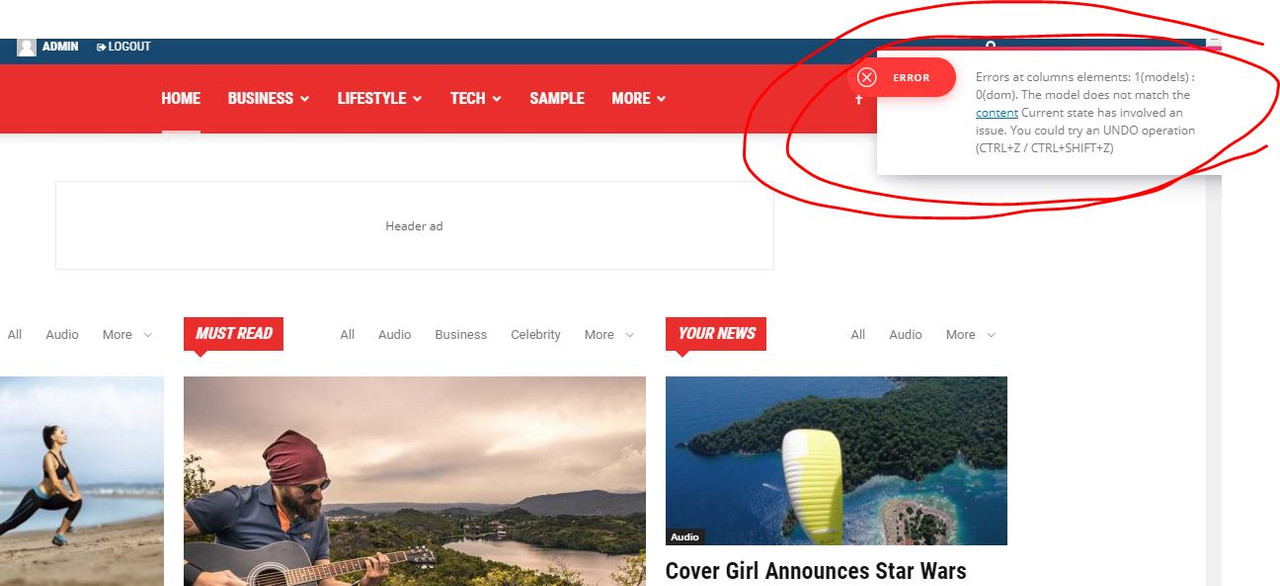
installed a demo City News … try to edit it with TD Composer => Error
https://i.postimg.cc/0QyFM5VG/3.jpg