- NewsmagtagDiv Composer Tutorial
- NewsmagHow to use the Visual Composer plugin
- NewsmagHow to update a plugin
- NewsmagWhat’s included in Newsmag theme package
- NewsmagRequirements for Newsmag
- NewsmagInstall via WordPress
- NewsmagInstall via FTP
- NewsmagBlock settings tutorial
- NewsmagtagDiv Social Counter tutorial
- NewsmagHow to update the WPBakery plugin
- NewsmagPage Menu
- NewsmagCustom ad spots
- NewsmagSmart sidebar
- NewsmagVideo playlist
- NewsmagPage templates
- NewsmagHomepage – How to build and set it
 Calin
Calin Hi,
This option is available only in Newspaper 10.3 if you have this version and the option do not appear in theme panel, please deactivate the tagDiv Composer, delete it and reinstall the tagDiv Composer plugin from Newspaper > Plugins -> https://i.imgur.com/iVuqltC.png after that follow the steps from this documentation -> https://forum.tagdiv.com/youtube-api-key/
Let me know the results!
Thank you!
Calin Hi,
Please make sure that you do not have a plugin conflict, please deactivate ALL plugins except tagDiv Composer, also if you are using child theme or cache plugin, deactivate them, clear all cache and try again.
Please make sure that all the settings are like in our requirements, please follow the guide carefully
– https://forum.tagdiv.com/requirements-for-newspaper/
and please increase all requirements that are lower, and follow all steps.
If there is still a problem, please provide some more details and some screenshots.
Hope this will help!
Thanks.
Calin Hi,
Please make sure that you do not have a plugin conflict, please deactivate ALL plugins except tagDiv Composer, also if you are using child theme or cache plugin, deactivate them, clear all cache and try again.
Please make sure that all the settings are like in our requirements, please follow the guide carefully
– https://forum.tagdiv.com/requirements-for-newspaper/
and please increase all requirements that are lower, and follow all steps.
If there is still a problem, please provide some more details and some screenshots.
Hope this will help!
Thanks.
 vampireprincess
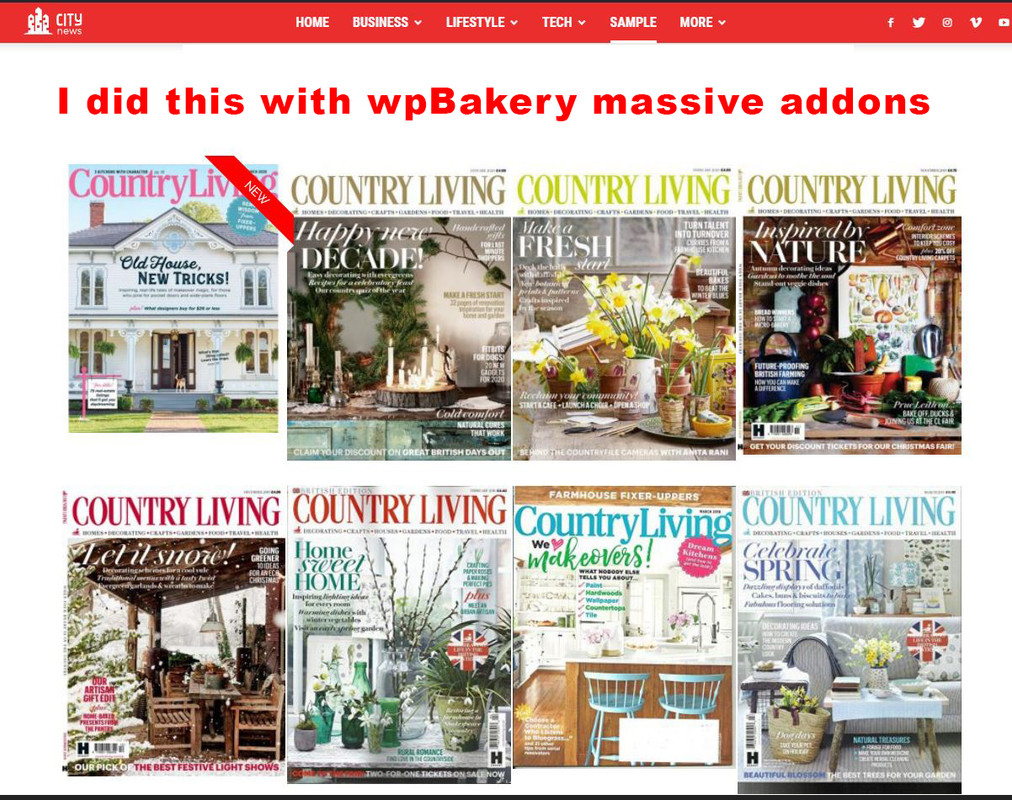
I wish to achieve the same effect for my magazine editions as you achieved on your demo page.
I want that each image direct me to a page or category where are located 30-35 articles only from that issue.
I wish to have on some editions a ribbon, a Title and some hover over effect.
Did you achieved all with the TdComposer, or it was done through wpBakery?
Because I cant get nothing similar with any of the Td codeblocks for images, for images I found a very limited options.
I installed a “massive addons” for wpBakery and I got similar effect but
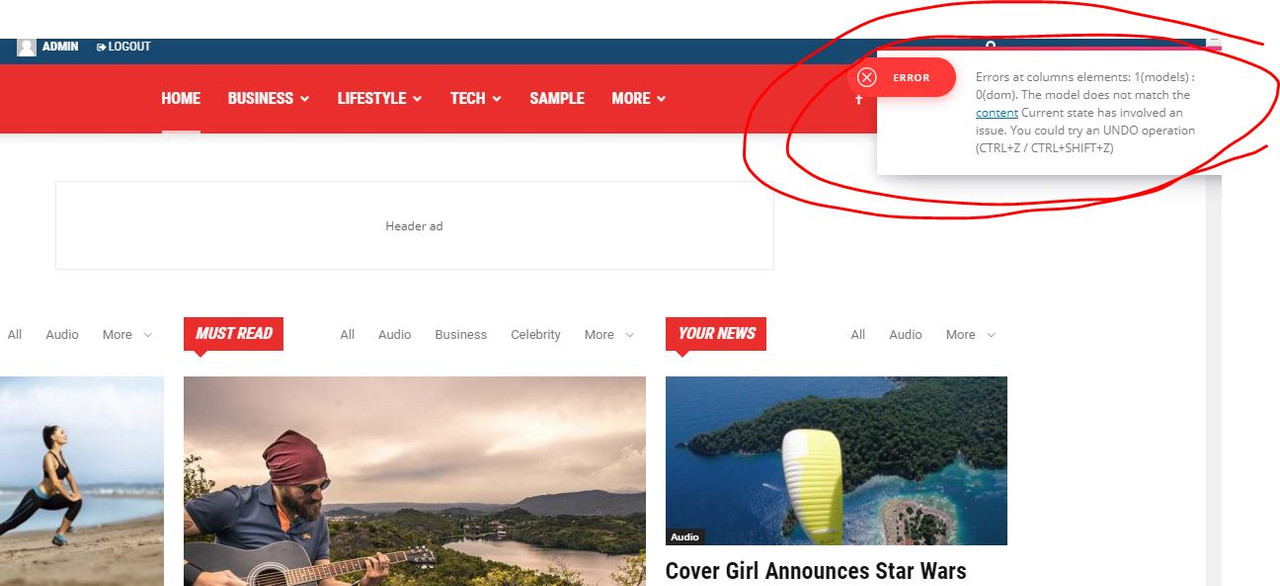
now I cant edit anyomore the pages which was done with TdComposer it gives me some error.
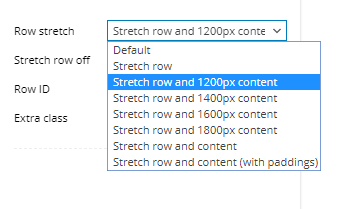
Finally in WpBakery how can I get the stretch row and 1200px content, that is exist in TD?
https://i.postimg.cc/zXVKfm5s/1.jpg
https://i.postimg.cc/SsSVTZ8m/2.jpg
https://i.postimg.cc/0QyFM5VG/3.jpg
https://i.postimg.cc/G23t4Y0M/5.png
Calin Hi,
For footer you can choose one of those standard templates -> https://i.imgur.com/KRw1gmx.png or you can set a footer page that can be edited with tagDiv Composer -> https://i.imgur.com/TUYVfWp.png or you can choose a footer template from tagDiv Cloud Library -> https://i.imgur.com/eBOjQkr.png
Thank you!
 Vlad S
 Hello !
Please make sure that you do not have a plugin conflict, please deactivate ALL plugins except tagDiv ones, also if you are using child theme or cache plugin, deactivate them, clear all cache and try again.
You can create a sidebar using the tagDiv Composer on a ROW layout as you can see here and add column text element in it: https://www.screencast.com/t/trsw6Q5w
Thank you !
Calin Hi,
If you are using the mobile theme plugin that provide you a better speed then responsive version of theme, but in order to achieve that speed you’ll need to create a new content for pages because in the most of cases those were made with builders ( tagDiv Composer, WPBakery ) and you need to use only the mobile editor ( you need to set the content for pages in mobile editor and this content will be display on mobile theme)
-> https://www.screencast.com/t/ebUIzt4se
Since Newspaper v9.7.4 you can show the responsive version on mobile theme -> http://prntscr.com/oh6r2s you can check more details about mobile theme in our documentation -> https://forum.tagdiv.com/the-mobile-theme/ or if you want to have the responsive version only, you can use the amp option from mobile theme -> https://i.imgur.com/n7fEXCy.png (to use the mobile theme template on amp) or you can disable the plugin.
If this is not what you mean, please provide me some more details.
Thank you!
Calin Hi,
In order to remove the view post counter you’ll need to deactivate it from the theme panel -> https://www.screencast.com/t/EbcX1AGuDW
Also if you are using a single post template from tagDiv Cloud library, you need to edit it using tagDiv Composer and remove it from template -> https://i.imgur.com/R20MVqg.png -> https://i.imgur.com/9TJgyv4.png
Hope this will help you!
Thanks.
Calin Hi,
Yes, you can do this by using a different header on these pages, for this you need to use a header cloud from tagDiv Cloud Library, edit it with tagDiv Composer and remove the ads or you can use a custom css to hide the ads on these pages.
Thank you!
Calin Hi,
Please make sure that you do not have a plugin conflict, please deactivate ALL plugins except tagDiv Composer, also if you are using child theme or cache plugin, deactivate them, clear all cache and try again.
Make sure that you have the latest version of the theme, Newspaper 10.3 and WordPress 5.3.2 also make sure that all theme requirements are set as in our guide from here -> https://forum.tagdiv.com/requirements-for-newspaper/
Let me know the results!
Thank you!
Calin Hi,
If you want to have a basic search, then you need to use a cloud header from tagDiv Cloud library, edit it with tagDiv Composer, remove the live search and add the normal search -> https://i.imgur.com/2IzKYuK.png -> https://i.imgur.com/aHer1cG.png
Hope this will help you!
Thank you!
Calin Hi,
Please make sure that all the settings are like in our requirements, please follow the guide carefully
– https://forum.tagdiv.com/requirements-for-newspaper/
and please increase all requirements that are lower, and follow all steps.
As I can see your website is in 500 error -> https://i.imgur.com/nCWa16I.png
In what circumstances do they happen? Generally 500 errors are internal server errors – https://www.wpbeginner.com/wp-tutorials/how-to-fix-the-internal-server-error-in-wordpress/
– https://wordpress.stackexchange.com/questions/312292/how-to-stop-a-500-error-on-the-wordpress-theme-folder
– https://wordpress.org/support/topic/google-search-console-reporting-a-500-error-on-my-theme-folder/
-> https://forum.tagdiv.com/topic/wp-supercache-causes-500-internal-error-and-cannot-deactivate/
Please make sure that you do not have a plugin conflict, please deactivate ALL plugins except tagDiv Composer, also if you are using child theme or cache plugin, deactivate them, clear all cache and try again.
Let me know the results!
Thank you!
Calin Hi Valli,
I think that you are revering to tagDiv Composer, the theme builder, if yes, then just follow the steps from our documentation -> https://forum.tagdiv.com/topic/youtube-playlist-isnt-working/
Thank you!
Calin Hi,
Yes, the problem i solved, you need to deactivate the tagDiv Composer, delete it and reinstall the tagDiv Composer plugin from Newspaper > Plugins -> https://i.imgur.com/iVuqltC.png after that follow the steps from this documentation -> https://forum.tagdiv.com/youtube-api-key/
Thank you!
Vlad S Hello !
Please note that we recommend using tagDiv Composer only on Newspaper Templates. Importing external templates may cause conflicts.
Thank you !
Vlad S Hello !
Please note that we only recommend using TagDiv Composer. JS Composer is not a tested plugin by the Newspaper Team and it is not covered by the support team due to our support policy: https://forum.tagdiv.com/newspaper-theme-support/
Thank you !
Vlad S Hello !
You can use the column text element in order to render shortcodes or use HTML codes. Simply copy the shortcode and insert it in the text area of the column text as you can see here: https://www.screencast.com/t/UEMEsVKog
Column text is an element from tagDiv Composer.
Thank you !
Calin Hi Blo,
You write your problem in the wrong forum, this is for Newsmag theme, this is the forum for Newspaper -> https://forum.tagdiv.com/forum/newspaper/
If you do not made any changes in theme core there should be no problems to deactivate, delete and install again the tagDiv Composer.
Also if you do not want to do it, when will be the next update to the theme, you can make the update and the problems will be solved.
Thank you for your understanding!
Vlad S Hello !
The style option is not longer available in widgets. You can use the tagDiv composer social counter element as you can see here: https://www.screencast.com/t/jOkCo9GXwXtu
Thank you !
 hundredkorea
Hello
I use Newspaper theme, and it was greast.
So I purchased one more account for another website.
and set it AWS lightsale assount.
I can not use tagdiv composer.
If i deleted some row or some element, it is not working and show translucent gray page.
what is happen to my site
if i drag some element
http://newspick.castpick.co.kr/wp-content/uploads/2020/02/error-02.jpg
I can see this gray page
http://newspick.castpick.co.kr/wp-content/uploads/2020/02/error-01.jpg
 rais29
Why I am having this error and my webpage get distorted.
Howdy!
Since WordPress 5.2 there is a built-in feature that detects when a plugin or theme causes a fatal error on your site, and notifies you with this automated email.
In this case, WordPress caught an error with one of your plugins, tagDiv Composer.
First, visit your website (http://www.kimpavitapress.no/) and check for any visible issues. Next, visit the page where the error was caught (http://www.kimpavitapress.no/wp-admin/post.php?post=5010&action=edit) and check for any visible issues.
Please contact your host for assistance with investigating this issue further.
If your site appears broken and you can’t access your dashboard normally, WordPress now has a special “recovery mode”. This lets you safely login to your dashboard and investigate further.
To keep your site safe, this link will expire in 1 day. Don’t worry about that, though: a new link will be emailed to you if the error occurs again after it expires.
When seeking help with this issue, you may be asked for some of the following information:
WordPress version 5.3.2
Current theme: Newspaper (version 10.2)
Current plugin: tagDiv Composer (version 2.5 | built on 11.11.2019 15:07)
PHP version 7.2.27-1+0~20200123.34+debian9~1.gbp63c0bc
Error Details
=============
An error of type E_ERROR was caused in line 181 of the file /home/4/k/kimpavitapress/www/wp-content/plugins/td-composer/legacy/common/wp_booster/td_block.php. Error message: Uncaught Error: Class ” not found in /home/4/k/kimpavitapress/www/wp-content/plugins/td-composer/legacy/common/wp_booster/td_block.php:181
Stack trace:
#0 /home/4/k/kimpavitapress/www/wp-content/plugins/td-composer/legacy/Newspaper/includes/shortcodes/td_block_slide.php(471): td_block->render(Array)
#1 /home/4/k/kimpavitapress/www/wp-content/plugins/td-composer/legacy/common/wp_booster/td_global_blocks.php(27): td_block_slide->render(Array, ”)
#2 /home/4/k/kimpavitapress/www/wp-includes/shortcodes.php(325): td_global_blocks::proxy_function(Array, ”, ‘td_block_slide’)
#3 [internal function]: do_shortcode_tag(Array)
#4 /home/4/k/kimpavitapress/www/wp-includes/shortcodes.php(199): preg_replace_callback(‘/\\[(\\[?)(td_blo…’, ‘do_shortcode_ta…’, ‘[td_block_slide…’)
#5 /home/4/k/kimpavitapress/www/wp-content/plugins/td-composer/includes/tdc_composer_block.php(198): do_shortcode(‘[td_block_slide…’)
#6 /home/4/k/kimpavitap
 Blo
Blo Hello Calin, I have the Newspaper theme, I am afraid to upgrade tagdiv composer so I just used another plugin for the youtube videos and added it using a “column text” block and a shortcode the plugin gives me.
Is the Newspaper theme and its components (composer, etc) going to try to upgrade themselves? Or should I do the upgrades manually?
 shazza
 I have created cloud post template and edited it ok as I desired using TagDiv Composer. I then created a new post and selected my cloud template. Problem is that any content added to that new post using the Gutenberg editor does not show up in the post, no matter what I add I only see the header (also an edited cloud template used in the cloud post template) and the footer, nothing else! Why is this happening?

 KVV101
Hey there,
It seems like the WP editor inside the TagDiv Composer is not working anymore on my website. I don’t see a button in the editor to save the content that I wrote. If I just click somewhere on the page or just exit the editor, it doesn’t change the content. If I click on a block with content inside, the editor is just blank (no text inside).
This happened when I edited a page that I imported from my Divi theme website, so maybe something went wrong there. Though the editor is also not working on other pages anymore.
What could be the problem?
Calin Hi,
So if you are using a standard header you can choose one of those header -> https://i.imgur.com/sTAi9uc.png and set in header ads the ad you want to display -> https://i.imgur.com/EM7x1OR.png
If you are using a cloud header -> https://i.imgur.com/H37hMdw.png from tagDiv Cloud Library, then you need to edit it with tagDiv Composer and add an ad box -> https://i.imgur.com/EZyutnU.jpg
Thank you!