- NewsmagtagDiv Composer Tutorial
- NewsmagHow to use the Visual Composer plugin
- NewsmagHow to update a plugin
- NewsmagWhat’s included in Newsmag theme package
- NewsmagRequirements for Newsmag
- NewsmagInstall via WordPress
- NewsmagInstall via FTP
- NewsmagBlock settings tutorial
- NewsmagtagDiv Social Counter tutorial
- NewsmagHow to update the WPBakery plugin
- NewsmagPage Menu
- NewsmagCustom ad spots
- NewsmagSmart sidebar
- NewsmagVideo playlist
- NewsmagPage templates
- NewsmagHomepage – How to build and set it
 dxtrans
This code My Post Page Error Message
Can you advise how to delete it? Thank you!
Notice: Undefined index: widget_id in /site/www/wp-content/plugins/td-composer/legacy/common/wp_booster/td_wp_booster_functions.php on line 2573
 Mahfuzul Hasan
 Hello Saurav, did you notice that your website is not anymore discover-able by google and other services like Gtmatrix? That is the credit of TD Composer 🙂 I feel great buying this theme lol.
 Uniguide
Hello!
I didn’t find any option to set a single post template for the full site. How can I achieve this? Please see this screenshots http://prntscr.com/r9ts89 http://prntscr.com/r9tqg7
Thank you.
 TonyAks
Hello,
I seem to be regularly receiving a critical error message. The error points to the TagDiv Composer Plugin; i have put an excerpt of the error below.
I have raised a ticket with my hosting provider also, who has told me that the plugin is out of scope of their support, even though the error message seems to point to a memory issue.
Please note that the PHP version has been upgraded to 7.3
Could you please assist me with this?
—-
WordPress version 5.3.2
Current theme: Newspaper (version 10.3)
Current plugin: tagDiv Composer (version 2.5 | built on 05.02.2020 7:28)
PHP version 7.2.25
Error Details
=============
An error of type E_ERROR was caused in line 699 of the file /home/cluster-sites/7/f/xxxx.com/public_html/wp-content/plugins/td-composer/includes/tdc_main.php. Error message: Out of memory (allocated 136814592) (tried to allocate 4032168 bytes)
Mahfuzul Hasan I even tried to change the theme keeping the composer active, and the result is same! So defiantly the composer is messing with my site along with my ads, traffic and everything. What a shame for a theme claims to be the fastest.
Mahfuzul Hasan I have the same problem. I think the composer is the culprit.
Mahfuzul HasanSuddenly from yesterday night the website is loading super slow and services like GTMatrix, Google Site Speed Insight, Google Search console are failing to read the desktop version of the site. The mobile theme is working fine. The site is loading on mobile devices fine. I tried to find out the problem deactivating all of the plugins and I have notice that as soon as I am activating tagdiv composer, the website start’s showing the problem.
My site : https://touchingmoments.ca/
Login: mahfuz111
pass: pavel69bd
PLEASE FIX IT ASAP.
 citymagthess
Hello. I have installed the same footer template like 4-5 times now. Every time i save it its ok. If i need to edit anything, it kinda not recognises it as a template.
Meaning
In the Cloud templates page (wp-admin/edit.php?post_type=tdb_templates#/)
Every other template shows an edit template link. The footer template the specific link is missing.
I have created the plugin from template more than 4-5 times by now. If i press edit so i can edit it brings me to the normal editor and then by pressing the TagDiv composer i get
Error at zones: 6(models) : 0(dom). The model does not match the content Current state has involved an issue. You could try an UNDO operation (CTRL+Z / CTRL+SHIFT+Z)
 pavel_t
Hi, in my cloud template I use element Subcategories (list of subcategories) predefined in TagDiv Composer.
When I switch on option “Show image: Show”, it is not working. Only general “missing image” is shown (td-cloud-library/assets/images/medium_large.png) instead correct Category image even if there is set up image in WP Category edit page. Category title and description are shown correctly.
TonyAks Hello,
I seem to be experiencing the same issue as AbeWakama. I have also attempted to re-install the tagDiv Composer plugin and the theme still does not give an option for API youtube.
I am using version 10.3 too. Could you please advise me on this?
 nealo
nealoI’m new to the TD Composer and I’m trying to add static pages for about us and a contact form. when i publish the pages the page content starts at the top and runs through the header splitting the logo on the left and the menu to the right.
how do i set the header to be static on “pages” so that the page content begins below the header like the home page or posts pages?

 adriyanto
error –> Errors at columns elements: 4(models) : 3(dom). The model does not match the content Current state has involved an issue. You could try an UNDO operation (CTRL+Z / CTRL+SHIFT+Z)
IMAGE–> https://prnt.sc/r94uta
Thanks Very Much
 sastrysk
Why I am getting this error frequently for your theme files
Error Details
=============
An error of type E_ERROR was caused in line 1671 of the file /var/www/html/wp-content/plugins/td-composer/legacy/common/wp_booster/td_util.php. Error message: Out of memory (allocated 33554432) (tried to allocate 36864 bytes)
 altgirlmedia
I’m trying to use shortcodes in TD composer in a raw html block it’s not rendered. How can I use custom shortcode?
Thank you
 Calin
Calin Hi,
For this you’ll need to edit the single post template from tagDiv Cloud Library with tagDiv Composer -> https://i.imgur.com/obOSQWJ.png -> https://i.imgur.com/ZEJ5CoE.png
Hope this will help you!
Thank you!
 Sebastian Escobar
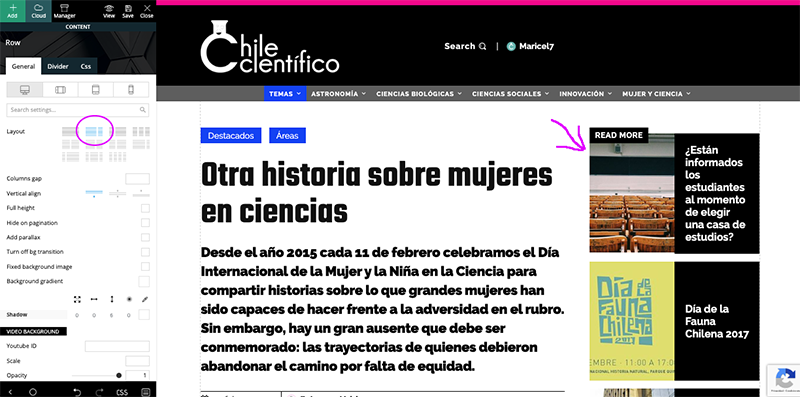
 Hi, my problem is with posts, no with pages, then I have to work with single cloud template with tagDiv Composer, but here the template looks good and I can see the side bar > http://compone.cl/wp-content/uploads/2020/02/sidebar-in-posts-historie.png
but in real view this don’t show > http://compone.cl/wp-content/uploads/2020/02/sidebar-don’t-show.png
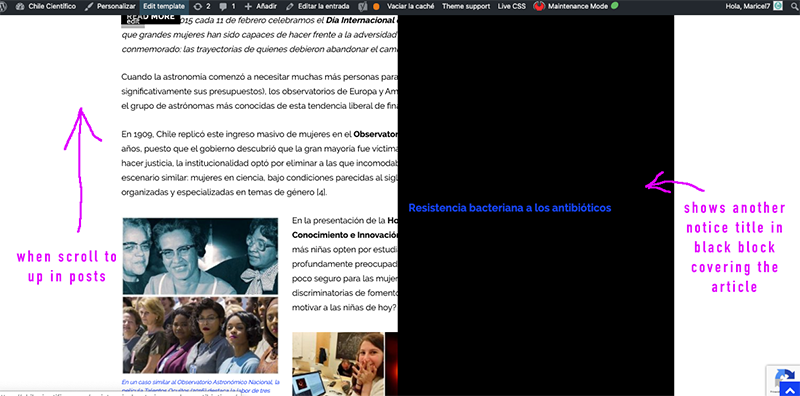
And the black box very similar to the main module of homepage in layout is shown when you scroll the post “up” on the screen > https://www.compone.cl/wp-content/uploads/2020/02/posts-black-block.png
(My site is unpublished because I am configuring these types of errors)
Calin Hi qzconsulting,
I think that when you edited the homepage you set the content in header and main content, please make sue that the header elements are set in header zone because these will be display for the whole website -> https://i.imgur.com/CqsIAMl.jpg -> page content -> https://i.imgur.com/Sywz5hw.jpg
So if you have set a footer cloud like this -> https://i.imgur.com/e9lLIpG.png you need to open the homepage and edit it with tagDiv Composer -> https://i.imgur.com/URD07tP.jpg after the frontend editor is open scroll down to the footer and edit it how you want -> https://i.imgur.com/fNhc8k0.png
If there is still a problem with the footer, just let me know!
Thank you!
Calin Hi,
This problem usually appear on the pages where is set a youtobe plailist, for this is need to set in theme panel an api key.
Please deactivate the tagDiv Composer and tagDiv Cloud Library, delete theme and install theme again from Newspaper > Plugins -> https://i.imgur.com/rUum5nb.png after that follow the steps from this documentation -> https://forum.tagdiv.com/youtube-api-key/ after the api key is set there should be no problems.
Let me know the results!
Thank you!
Calin Hi,
Please note that this plugins -> https://pl.wordpress.org/plugins/newsletter/ is different from this one -> https://i.imgur.com/B9CMket.jpg this is a theme plugin -> https://forum.tagdiv.com/the-newsletter-plugin/
You can achieve that using a single post template from tagDiv CLoud Library, edit the it with tagDiv Composer -> https://www.screencast.com/t/8jLnhZT5
-> https://www.screencast.com/t/jdwF99utfjHS
If you want to set it in sidebar post you can set the code for Mailchimp that you set in newsletter in a custom html https://www.screencast.com/t/L1gXiWkp7n3n -> https://www.screencast.com/t/pIZ7vAb96hIk -> https://www.screencast.com/t/pQft8xFSXI9f
Thank you!
Calin Hi,
Please make sure that you have the latest version of Newspaper, v10.3 and if the problem persist please deactivate the tagDiv Composer and tagDiv Cloud Library, delete theme and install theme again from Newspaper > Plugins -> https://i.imgur.com/rUum5nb.png
Please make sure that you do not have a plugin conflict, please deactivate ALL plugins except tagDiv Composer, also if you are using child theme or cache plugin, deactivate them, clear all cache and try again.
Let me know the results!
Thank you!
 miwiley
 Thanks for the reply – i want no padding/spacing (limited white space) between the header and next block item.
I tried multiple efforts in tagDiv Composer – as currently there is no spacing i.e. [-] [-] [-].


Calin Hi,
Is possible that the code to not be set in the right place, using Newspaper theme there are three headers.php if you are using standard pack and a standard header the code need to be set in this header file -> wp-content/plugins/td-standard-pack/Newspaper/header.php if you are using a cloud header from tagDiv Cloud Library you need to set the code in this header file -> header.php adn if the tagDiv Composer is not enable the theme will use this header file -> wp-content/themes/Newspaper/header.php
Hope this will help you!
Thank you!
Calin Hi,
Please make sure that you do not have a plugin conflict, please deactivate ALL plugins except tagDiv Composer, also if you are using child theme or cache plugin, deactivate them, clear all cache and try again.
Please make sure that all the settings are like in our requirements, please follow the guide carefully
– https://forum.tagdiv.com/requirements-for-newspaper/
and please increase all requirements that are lower, and follow all steps.
If there is still a problem, please provide some more details and some screenshots.
Hope this will help!
Thanks.
Calin Hi,
If the logo from theme panel is not apply, that means that you are not using a standard then you need to edit the header using tagDiv Composer as in our video tutorial from here -> https://www.youtube.com/watch?v=HXQQygkCCJo
Hope this will help you!
Let me know the results!
Thank you!
Calin Hi,
In the most cases this is a plugin conflict with untested plugins, please deactivate ALL plugins except tagDiv Composer, also if you are using child theme or cache plugin, deactivate them, clear all cache and try again to see if the login is working.
Thank you!