- NewsmagtagDiv Composer Tutorial
- NewsmagBlock settings tutorial
- NewsmagLogo & Favicon
- NewsmagFooter templates
- NewsmagUsing other ads
- NewsmagUsing Typekit fonts
 habershamnews
 Here are the settings for the ad box: https://habershamhistory.box.com/s/xp4ohe5lmvsb84bvlyes07tqhdi3i5hl
Here’s a link to the page design: https://habershamhistory.box.com/s/5amfpg6bte5hdhnps4cuowx2h3k54a4p
Here’s the general tab:
https://habershamhistory.box.com/s/913chfice1je9h1xs361ji6e0s2897ur
Custom tab settings:
https://habershamhistory.box.com/s/i8wexizwe01zlqe8w7lzfvp43yvc7uk7
CSS settings:
https://habershamhistory.box.com/s/nd7kdcf7pvxjskx85bequtys17hf0gal
And now that I’ve captured all of this for you, it looks like the ad is showing up. Maybe it was a caching issue? What’s the best way to clear the cache so I can see changes consistently?
 Calin
Calin Hi,
Do you want this option to be constant to a block, for example, in your image, only the block that is in the center to have that live tag? If is so then it can be done by using a custom css:
Here is what you should do:
Edit the page using tagDiv Composer, select the block you want to display the live icon, then add the class cls-live – https://i.imgur.com/l67gVqU.png after that add the raw css element and set the blow css https://i.imgur.com/4rTX1e7.png
.cls-live .td-module-title a::before {

  content: "LIVE";

  position: relative;

  z-index: 999;

  display: inline-block;

  align-items: center;

  color: #ff2b2b;

  font-weight: 600;

  letter-spacing: 1px;

  padding: 6px 8px;

  border-radius: 20px;

}

.cls-live .td-module-title::before {

  content: "";

  position: relative;

  transform: translateY(-40%);

  display: inline-block;

  vertical-align: middle;

  width: 8px;

  height: 8px;

  background: #ff2b2b;

  border-radius: 50%;

  animation: pulse 1.5s infinite;

}

@keyframes pulse {

  0% {

    box-shadow: 0 0 0 0 rgba(255, 43, 43, 0.7);

  }

  70% {

    box-shadow: 0 0 0 10px rgba(255, 43, 43, 0);

  }

  100% {

    box-shadow: 0 0 0 0 rgba(255, 43, 43, 0);

  }

}
Thank you!
Calin Hi,
If I understand correctly, you want to have the background color white, not black, for the lightbox (modal image), right? If so this can be done using this CSS:
body .mfp-bg {

opacity: 1;

background-color: #fff;

}

body .mfp-image-holder .mfp-close,

body .mfp-iframe-holder .mfp-close,

body .mfp-arrow-right:before,

body .mfp-arrow-left:before{

    color: #000;

}
Calin Hi,
The theme includes only one global option to enable or disable lazy loading. Because of this, lazy loading should be controlled from **a single location only**. If you are using a caching plugin or an image optimization plugin, please make sure that lazy loading is enabled in only one place to avoid conflicts.
Additionally, if you are using a separate image optimization plugin, it may offer the option to exclude lazy loading for specific elements. This can usually be done by targeting the element’s CSS class, for example:
.td_block_big_grid_flex_3 .entry-thumb
Using exclusions like this can help fine-tune how lazy loading behaves on your site.
Thank you!
Calin Hi awilbanks,
The tagDiv Mobile Theme plugin no longer provides a fully responsive version. It can be used if you want a simple mobile layout, such as for a blog. However, if you are looking for a responsive version with the same layout and content as the desktop site, this cannot be achieved using the tagDiv Mobile Theme plugin.
The improved speed you are seeing is mainly due to the simpler layout. If you build the site using only one or two blocks similar to how the mobile theme works the performance results will be quite comparable.
A responsive version, however, loads all elements from the desktop layout. To achieve better speed in this case, you need to optimize CSS and JavaScript, use a reliable caching solution, and in some situations, adjust the page content itself. Pages with many blocks, images, and elements will naturally load slower than pages with fewer components.
 laramedia
Hello TagDiv Support Team,
I am building a multilingual news website using the Newspaper theme with Polylang for language management. My site requires support for three languages: Arabic (RTL), French (LTR), English (LTR)
I have created a child theme and need guidance on the best practices for implementing proper RTL/LTR support to ensure the theme layout adapts correctly for each text direction.
Specific questions:
How can i have a header & a footer for each type ? when i update anything it updated for all the website ? and for single post template or category template i cannot change the direction for only rtl languages, how can i achieve that ?
Current Setup:
Newspaper Theme (latest version)
Polylang plugin (for language management)
Child theme active
Languages configured: Arabic (RTL), French (LTR), English (LTR)
Goal:
A seamless experience where the theme automatically adapts its layout and design when users switch between Arabic (RTL) and French/English (LTR), while maintaining the same visual design across all languages.
Any documentation, code snippets, or best practices you can share would be greatly appreciated. If there are specific hooks, filters, or CSS classes I should be aware of, please let me know.
Thank you for your support!
Best regards,
 Ordu Detay Haber
Merhaba,
ordudetayhaber.com web sitemizde yer alan YouTube kanalına yönlendirme / abonelik reklam alanı, masaüstü görünümde hem yönetici (admin) hem de sivil kullanıcılar tarafından görüntülenememektedir.
🔹 Sorunun Detayları:
Masaüstü (desktop) tarayıcılarda ilgili YouTube reklam alanı hiç görünmüyor
Yönetici panelinde giriş yapılmışken de, çıkış yapılıp sivil kullanıcı olarak bakıldığında da sonuç değişmiyor
Mobil görünümde (cep telefonu) ise aynı alan hem yönetici hem sivil kullanıcılar için sorunsuz şekilde çalışıyor
Sorun yalnızca masaüstü görünümle sınırlı
🔹 Yapılan Kontroller:
Önbellek (cache) temizlendi
Farklı tarayıcılarda test edildi
Yönetici ve sivil kullanıcı olarak ayrı ayrı kontrol edildi
Bu nedenle sorunun;
tema masaüstü breakpoint ayarları,
masaüstü için kapatılmış bir reklam/alan ayarı,
ya da CSS / JS kaynaklı görünürlük problemi
olabileceğini düşünüyoruz.
Konu ile ilgili teknik inceleme yapılarak tarafımıza bilgi verilmesini rica ederiz.
İyi çalışmalar.
Berat Yeşilyurt
Ordu Detay Haber
ordudetay452@gmail.com
http://www.ordudetayhaber.com
link 1:
https://app.screencast.com/F3qr78MqE76Pl
Calin Hi,
You can try this custom css:
body .mfp-bg {

    opacity: 1;

}
Set the code in the theme panel > custom code > custom css.
Thank you!
Calin Hi Digital2web,
The Big Grid is added by the tagDiv Standard Pack plugin (it can be installed from Newspaper → Plugins). If you do not already have it installed, we do not recommend installing it, as the plugin loads additional CSS and JavaScript files.
However, if the extra CSS and JS are not a concern for you, then you can go ahead and use it.
Calin Hi,
I can see that you’re experiencing the same issue on desktop as well https://i.imgur.com/448L9qe.pn
Please clear the cache first. If the problem persists, check whether the “Remove Unused CSS” option is enabled. If it is, disable it and then clear the cache again. After that, please check the results.
Calin Hi,
The image from my example is 312×424, the image should be a format 3×4
To hide an element per viewport, you first need to select the viewport – https://prnt.sc/YyMqF9AnImhs after that the element and in css tab, look for the display option – https://prnt.sc/JhtF_D7GUTLJ
Calin Hi VOP,
There may be a misunderstanding, so I’d like to clarify my point.
I never assumed that issues could not originate from theme settings or specific elements, especially with a theme as extensive as Newsapper, where its wide range of dimensions and options can naturally lead to configuration-related problems.
What I intended to emphasize in my previous email was not a request to modify the demo or prebuilt website. Rather, I was referring to the confirmation you provided when the footer was replaced with a different one and the issue appeared to be resolved. This indicates that the root cause is likely one or more elements used within the footer section.
Most likely, the extra CSS being displayed is generated by the settings applied to those elements (such as color, size, and similar styling options).
As a next step, this can be addressed by using the option available in the theme panel under Block Settings > Inline CSS:
 SBC
SBC I think I solved it by inserting the script only in Advanced CSS in desktop
Calin Hi,
The issue you’re experiencing on mobile seems to be caused by the custom code provided for the background plugin. This code should only be applied to the desktop version.
Please go to Theme → Custom Code → Custom CSS, and move the code under Advanced CSS → Desktop.
Thank you!
Calin Hi,
It appears this issue with the plugin is related to how the image is set in the post content and the post content width setting.
Please try this css:
#td-outer-wrap {

    width: 1021px;

    margin: 0 auto;

}
Set the code in the theme panel > custom code > custom css and the click will work on the background banner.
Thank you!
Calin Hi VOP, if the problem was resolved after replacing the footer, it means the previous footer used elements that generated extra CSS compared to the other footer templates.
Calin Him,
In case you are referring to the avatar from the comment section – https://i.imgur.com/e7lWNgk.png, then you can hide it using a css:
.comment .avatar {

    display: none;

}
The css can be set on the single post template in raw css element or under the theme panel > custom code> custom css.
Calin Hi,
I saw similar cases when the situation was caused by an extra plugin, usually a cache plugin. Please do a test and see if this situation persists when you are logged in or only when you are not logged in. If it is working when you are logged in, then you need to check the settings from your cache plugin, especially for CSS and JS.
Thank you!
 VOP
VOP Also, I did configure the settings to remove unused CSS. At first, I thought you might suspect that WP Rocket was over-optimizing something — my apologies for the confusion. But I’ve double-checked, and all the settings are correct.
VOP Still, I believe the issue lies elsewhere. I use WP Rocket across all my projects — including several websites built with the Newspaper theme — and I’ve never encountered this problem before. So I don’t think WP Rocket is the cause.
What I’ve noticed is that these extra CSS elements don’t appear everywhere — only in modules taken from the Cloud Library. On a test site, I replaced the footer with one from a different demo layout, and the issue was gone.
This leads me to conclude that the problem is specifically related to the ECHOVERSE demo.
Calin Hi,
WP Rocket is one of the best cache plugins that can do this https://wp-rocket.me/google-core-web-vitals-wordpress/remove-unused-css/#section-1. Unfortunately, there is no free version. Here are othere cache plugins that can do this – https://wordpress.org/plugins/search/Unused+CSS/
Calin Hi,
A large amount of CSS and JS is added by the tagDiv Standard Pack plugin. If it were disabled, the issues with CSS and JS would likely be resolved. However, many elements on the page and in the templates come from the tagDiv Standard Pack, so disabling it is not an option.
You should first try to address the image-related issues, as these are simpler to fix. If the score is still not satisfactory after that, you will need to consider more powerful solutions for handling CSS and JS, possibly by using another optimization plugin.
Calin Hi,
The tool you are using is reading all the code from the source page, and the theme has some comments and the needed CSS for each element in the part that is used; this is what you see. What you can do to reduce this code is to use a good cache plugin. I see that you have WP Rocket; please check the settings from file optimization.
Settings that we recommend – https://forum.tagdiv.com/wp-rocket-and-newspaper-theme-optimization-guide/
 da zuoshou
 I’ve used Autoptimize, WP Super Cache, and Cloudflare, but not image compression! However, I’m still seeing JS and CSS issues on mobile devices, so this isn’t related to image compression! The main problem seems to be resolving the JS and CSS issues!
 wertikoo
Hello,
I’d like to greet your wonderful team of developers behind the Newspaper theme. Unfortunately, I have encountered a small issue that I hope you can help me resolve.
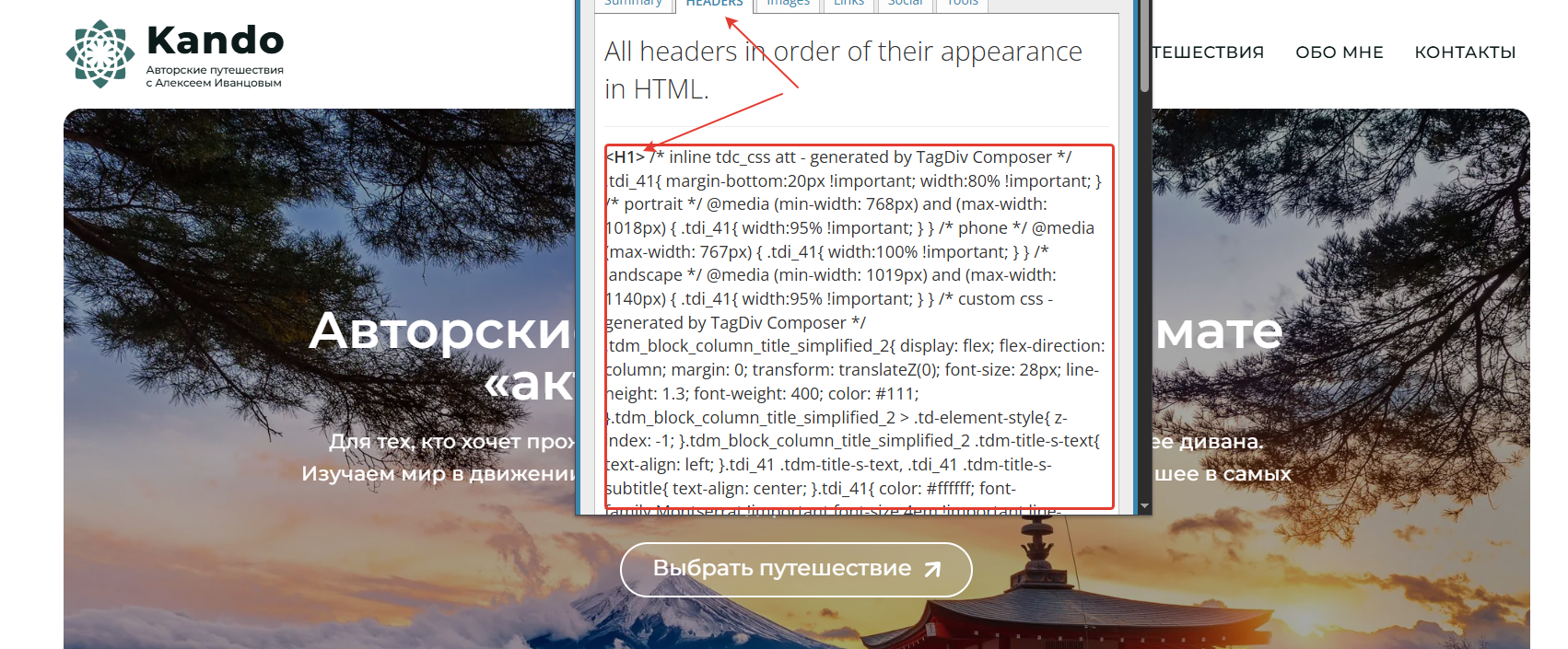
I installed the Newspaper theme along with the pre-built website “ECHOVERSE”. In some places, I’m using ready-made blocks from Cloud Templates. Visually, everything looks fine, but when I inspect the HTML, I notice that the headings are rendered with extra CSS coming from the templates.
I’m attaching a screenshot from the browser’s SEO inspection tool, where you can see that the headings are “cluttered” with unnecessary code. I suspect this might be due to unclosed tags in the templates.
Could you please take a look? If you need anything from me, just let me know — I’ll be happy to provide it.
Thank you!
https://kando.md/wp-content/uploads/2026/01/2026-01-12_16-24-17.png” alt=”” />