
- NewsmagtagDiv Composer Tutorial
- NewsmagBlock settings tutorial
- NewsmagLogo & Favicon
- NewsmagFooter templates
- NewsmagUsing other ads
- NewsmagUsing Typekit fonts
 Calin
Calin Hi,
I just checked your website https://www.sdbj.com/ and the login button from the top bar is loading after a few seconds https://i.imgur.com/XrEW0UN.png so it’s possible that initially it is hidden and only after that is displayed – https://i.imgur.com/m7zoRlx.png. This seems to be a custom css set by someone how is or was working to the website – https://i.imgur.com/k9CvHUZ.png
Calin Hi,
Only the “Single Post Bg Featured Image” element can be adjusted per height; the element “Single Post Featured Image” uses auto height so the image can be displayed completely. If you try to use a custom css to adjust it, the image will be stretched.
Thank you!
Calin Hello,
This is not directly related to the theme, but I will do my best to help you!
If the counter initially works and then after editing it no longer displays, the problem is probably related to the changes you made. I recommend that you carefully review the code you modified to make sure it is correct.
The counter code uses certain classes that apply to all instances where the counter is set. So, if you make a CSS change to one of these classes, it will affect all counters. To fix this, you should add a unique class to the specific counter you are working on. Then, use that additional class to target the subclasses of the counter and apply the CSS to only that counter.
Thank you!
Calin Hi,
For merging and padding, you can use the CSS tab from any element in the tagDiv Composer:
If you want to add shortcodes, you can insert them in the “Column Text” or “Text with Title” elements. To display widgets, you can use the “Sidebar Widget” element:
This can be positioned anywhere using tagDiv Composer. Just choose the sidebar source you want to display:
Let me know if you need more help!
 adityabansal
I want to add shortcodes in the topbar, currently I’m using “Title with text” element and in content section I’m adding these shortcodes to reflect here. I’m using inline-block or inline-table for css padding but it only works left and right padding. As these topbar are extremely small I want to know how can I add more shortcodes widget here without “Title with text element” so that I can move it easily using css padding. Any other option to add shortcodes here?
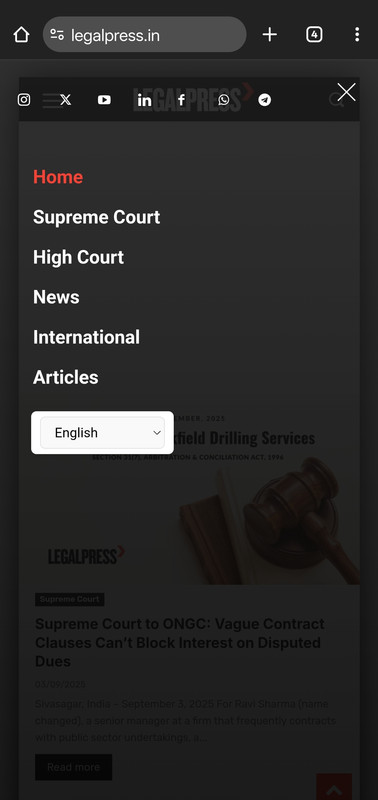
adityabansalI want to customise mobile menu, I was able to reorder social icons using css, and customise gtranslate widget in this menu. But I couldn’t add more items in the list.
1. For example, I want to add short code of darkify plugin (gtranslate widget appeared automatically after activation of plugin) but for darkify plugin icon – how should I add it? I have the widget shortcode. Where should I do the changes to reflect it here?
2. Please can you also provide the same menu mobile AMP page location. AMP menu customisation.
Calin Hello,
For review to be set to the right use this code
body.woocommerce .woocommerce-tabs .panel {

    text-align: right;

}
For the Woo Product Block you can use the settings from the block – https://i.imgur.com/j4iB67f.png
For block title if you want you can use a global css like this one
.td-block-title {

text-align: right;

}
Thank you!
Calin Hi,
The scroll animation can only be achieved using a combination of CSS and JavaScript.
Regarding the theme functionality: it provides both a main header and a sticky header. These are separate, so you can assign different elements to each one. You also have the option to make the main header row sticky. However, if you do this, the same content will appear in both the main and sticky headers (which is expected behavior, as it’s essentially the same header).
To achieve the desired animation effect, you can use JavaScript along with specific CSS classes. By detecting the user’s scroll position, JavaScript can be used to trigger certain actions—like showing or hiding elements based on scroll behavior.
Thank you!
Calin Hi,
This can be done, but it’s not easy, as it requires some custom code.
To achieve a similar effect, the best approach is to make the row sticky and position the logo where you want it to appear. After that, you’ll need to apply custom CSS and JavaScript to replicate the effect shown in the image.
Calin Hi,
The classic blocks have only a few options. If you need to have control over each option of a block, then please try the flex block 1; this one can be edited as you want.
1. It can be done only with css, the classes for the element are:
.td_block_template_7 .td-block-title:before {

   // your css here

}
2. What you can try are the style options in especially the line-height – https://i.imgur.com/m7u1oQ8.png
3. For block 2 what can be done is to use some custom css for the excerpt and date color, for excerpt length, you can use the options from the block – https://i.imgur.com/DSgZQsA.png
.td_block_2  .td-post-date {

    color: red;

}

.td_block_2  .td-excerpt {

    color: darkgreen;

}
Thank you!
Calin Hi,
Please do not share the website login on the form, only in private.
The options that are provided from the theme for my accounts do not have an option to add/edit or remove the elements, but what can be done is to use the acf plugin and add some extra custom fields for the extra details you want to display https://forum.tagdiv.com/introduction-cpt-acf-newspaper-theme/
To remove the Billing Details section, the only solution at this moment is a custom css to hide it:
.tds-s-page-acc-billing {

    display: none;

}
The css can be set in the theme panel > custom code> custom css.
Thank you!
Calin Hello,
1. This can be done by using tagDiv Composer and checking if there is any extra element in that space. If there are no elements, then you can select the row and check in css tab and set the margin top/bottom (depending on the element selected) and a number for example, 0 or 10
2.3. The author and counter from the lock can be disabled from the theme panel > block settings> meta info on modules/blocks – https://i.imgur.com/sWziYdZ.png
Thank you!
Calin Hi,
Just set the css in the theme panel > custom code > custom css – https://i.imgur.com/lVCRx3l.png
Thank you!
Calin Hi,
This option is only for description; if you want to do it for the title, then you can use this custom css:
.td_block_image_box .td-custom-title {

    top: 90%;

}
The css can be set in the theme panel, custom code, custom css or you can set the css directly in the page with the tagDiv Composer in raw css.
Thank you!
Calin Hi,
You can use the editor to set the content, select that text, and set the color on it; it should apply the color you choose. Also, if you want to change it only the link for the page content for that page, then you can also use a css:
.page-id-2487 .td-page-content a {

    color: #4db2ec;

}
 sarah-2
I’m trying to align the image box text to the bottom of the image but can’t find any settings to do that. Any tips?
I’ve also tried to use my own css with class .td-custom-title to adjust top but it doesn’t work.
 Anonymous Dev
Hi,
Link 1- https://indiaeducationdiary.in/monthly-production-and-dispatch-from-captive-and-commercial-mines-in-august-2025/
Link 2 – https://indiaeducationdiary.in/prime-minister-narendra-modi-inaugurates-semicon-india-2025-in-new-delhi/
Please check the above links. Link 1 appears perfectly as designed. But link 2 breaks(sidebar comes down). I checked source of the link 2.
The structure should be like
td-pb-row
├── td-pb-span8
└── td-pb-span4
<div class="td-pb-row">

  <div class="td-pb-span8">

    <!-- Content for span8 -->

  </div>

  <div class="td-pb-span4">

    <!-- Content for span4 -->

  </div>

</div>
But the structure shows like below
td-pb-row
└── td-pb-span8
└── td-pb-span4
<div class="td-pb-row">

  <div class="td-pb-span8">

    <!-- Content for span8 -->

    <div class="td-pb-span4">

      <!-- Content for span4 -->

    </div>

  </div>

</div>
The td-pb-span4 is showing inside the td-pb-span8 which is breaking the layout. This is not happening to the above stories only, it’s happening with many articles. Please check and let me know how to sort this out. Worked with newspaper more than in 50+ sites till now and nowhere seen this kind of issue.
Tried:
1. Cache cleared (both CF, WPSupercache) – not working
2. Browser cache cleared – not working
3. Post content checked with tinymce code mode for any css code injection – not working
4. Created a new single post template and assigned – not working
Calin Hi,
I will recommend using a flex block; this can be edited how you want using tagDiv Composer and the settings from it. The old blocks, like the one mentioned, have only a few options and need to be adjusted with css if an option doesn’t exist.
A css that can be used for yor your
.td_block_15  .td-module-title a {

    color: #fff;

}
Thank you!
Calin Hi,
The orange color is a global color on the demo you are using, so what you can do is to use tagDiv Composer, edit a page, select the manager and in colors, change the color from orange to the new color you want https://imgur.com/lwb7sNv
The situation with the menu on mobile can be resolved by using tagDiv Composer, slect the mobile view port, then select the top row, the one holding the logo and check the css tab – https://i.imgur.com/DNsPpin.png that -10 margin should be remvoed and the problem will be resolved.
Calin Hi,
This can be done by setting the theme background color https://forum.tagdiv.com/background-introduction/
If you are using a cloud header and footer, then you need to edit them, select the row from the header https://i.imgur.com/3yW4cIA.png select a row from header/footer then select the header menu and in zine css set margin left and right auto and set a fixed width – https://i.imgur.com/2XKpqgO.png when adjust it for each viewport in part.
 BMBDigital
 No I was changed the layout! You can see on the right sidebar some css not working. I guess the theme update and has some issues.
https://usanewsnext.com/wp-content/uploads/2025/08/Screenshot-2025-08-29-at-15.51.38.png
https://usanewsnext.com/wp-content/uploads/2025/08/Screenshot-2025-08-29-at-15.51.47.jpg
Thanks!
 modbias
 I watched a tutorial where I use ACF to make a secondary image class, then edit the Woo Loop layout and add some custom CSS, but there’s no way to edit the actual thumbnails or image assets within the Woo Loop element. So, pretty legit dead end…
modbiasHi all, been slamming my head against the wall to get a secondary image of my product to show on hover / mouseover. The amount of CSS selectors to parse on the product thumbnails is a little daunting, I’ve been using ChatGPT to help with some code approaches but obviously not working out too well.
Site: https://www.modularbias.com/shop/?orderby=date
So many of my shirt designs look the same from the front, feel like getting the alternate (back) view will help out with some sales.
Is there any advanced setting I’m missing in TagDiv Shop or on the Woo Loop element? Would appreciate any direction, cheers.
Calin Hi,
This can be a situation caused by some extra plugins. Please do a test using only tagDiv plugins and make sure no cache is applied. If it is working, it can be related to some settings from a plugin and possibly optimize or cache the plugin. Please clear the cache and see if the problem persists. If it persists, please disable the cache plugin and see if the problem persists, is resolved, then enable the cache plugin and check the settings one by one. It is possible to be related to the cache option for the unused css.
Calin Hi for the error in showing Big Grid on website. This can be a situation caused by some settings from the cache plugin, please clear the cache and see if the problem persists. If it persists, please disable the cache plugin and see if the problem persists, is resolved, then enable the cache plugin and check the settings one by one. It is possible to be related to the cache option for the unused css.



