
No search results were found in Documentation!
 Anamaria
 Hello,
If using the standard templates for header/footer, please make sure you have activated the Standard Pack plugin.
Thank you!
 raebild
I have a problem, hope you can solve for me. When opening my category page live, header, footer and content looks strange
See example: https://prnt.sc/11pijeb
Here is live link: https://www.altomautocamperen.dk/category/pladstips/
Header and footer should be same as: https://www.altomautocamperen.dk/
When opening the category template from Cloud templates – it looks perfect.
I assume its something i do wrong in the panel setup.
Is it possible you can have a look at it?
Anamaria Hello,
The footer templates do not have the button to be edited with tagDiv Composer in the backend. Please check this guide:https://forum.tagdiv.com/footer-templates/
If you a Pro Prebuilt Website you can edit with tagDiv Composer the footer template can be edited only from the frontend if it is assigned, edit a page/post template with tagDiv Composer and go down to the footer. => https://www.screencast.com/t/rpfNhfyrF
Also, if you have a standard footer template https://www.screencast.com/t/ND7OiqEpPFK ->https://www.screencast.com/t/Z5ZdVYY4wAuP then you need to make changes in Theme Panel -> Footer.
Hope this helps you!
Thank you!
 quest4knowledge
The default header styles are not appearing even after I select the no template and save the option. Can anyone help as to how it will work. I followed the exact step given in the header style section of the support. But, it is not working. Same is the case for footer and categories also. Only option remaining is to go with importing the templates, which seems a bit too tedious.
Anamaria Hello,
If using the standard templates for header/footer then please make sure you have activated the Standard Pack plugin.
Also, please does a test using only tagDiv plugins, and if you have a child theme, please use the main theme and clear all cache(also from your browser) and see if the tagDiv Composer works.
Thank you!
Anamaria Hello,
Please make sure that the update procedure is done correctly: https://forum.tagdiv.com/how-to-update-the-theme-2/
Also, for header/footer style/templates, you need to have the tagDiv Standard Pack plugin activate.
If this is not what you mean, please provide more information as screenshots.
Thank you!
 affnads
Hey, I have updated my newspaper theme after that I am not getting header and footer templates and even footer and sidebar is removed from widget section in my WordPress.
affnads I have updated the newspaper theme and the problem has resolved but the templates option of header and footer is removed from there
Anamaria Hello,
The footer templates do not have the button to be edited with tagDiv Composer in the backend. Please check this guide:https://forum.tagdiv.com/footer-templates/
If you a Pro Prebuilt Website you can edit with tagDiv Composer the footer template can be edited only from the frontend if it is assigned, edit a page/post template with tagDiv Composer and go down to the footer. => https://www.screencast.com/t/rpfNhfyrF
Also, if you have a standard footer template https://www.screencast.com/t/ND7OiqEpPFK ->https://www.screencast.com/t/Z5ZdVYY4wAuP then you need to make changes in Theme Panel -> Footer.
Hope this helps you!
Thank you!
Anamaria Hi,
The footer templates from Cloud Library do not have the button to be edited with tagDiv Composer in the backend. Please check this guide:https://forum.tagdiv.com/footer-templates/
The footer template can be edited only from the frontend if it is assigned, edit a page/post template with tagDiv Composer and go down to the footer. => https://www.screencast.com/t/rpfNhfyrF
Hope this helps you!
Thank you!
 Patrick93
 Thanks for the quick reply.
So if I disable the default pack plugin block 1-25 modules no longer work?
For example here >> https://nimb.ws/N1Cshq
I am working with cloud templates for header, footer and posts. But not for Pages. I use e.g. block 14 on pages. Do i have Change all Block Elements to Flex-Modules if i want to deaktivate the Standard-Pak.?
Can I just disable the plugin and see? Will the settings be saved so I can just reactivate the plugin after testing? I do not want to deactivate the plugin and later rebuild my whole site again 😉
-
This reply was modified 5 years by
Patrick93.
Anamaria Hello,
Standard Pack is used only for default templates and not for cloud/PRO templates. Also, when you install this plugin, you can see in the theme panel the settings for default templates(header/footer/post).
For example, block 1-25 are removed, these blocks are created by default and you can not change/customize their design with tagDiv Composer. If you will need more options to customize your templates, we recommend using a cloud/PRO template.
Thank you!
Patrick93Hello,
I am using the tagDiv Mobile Theme Plugin for my posts.
Unfortunately the posts are not as customizable as I would like (e.g. header & footer).
For this reason I wanted to use Mobile Cloud Templates >> https://drive.google.com/file/d/1MJTe5sTmIqvAuaRqFfr7SFFG5PM6VlTw/view?usp=sharing
So far everything fits. The page looks good and I reduced the elements a lot, so there are only a few elements.
But the Pagespeed Insights result is very very bad. Have a look at the lab data:
Mobile Theme Enable >> https://drive.google.com/file/d/1Wt03kmaeJl7P-3SEgMED1BYI4ouWS-uH/view?usp=sharing
Mobile Theme Disable >> https://drive.google.com/file/d/1o8imOj1lPIgkgdX0FDmYMJpRKMZsTtuI/view?usp=sharing
How can this be? Did I do something wrong?
I have adjusted the posts so that they are exactly identical in content. Only the footer is different. And then such a big difference? 🙁
Info:
Yes, I have disabled and enabled caching and tested all possibilities. Unfortunately nothing helps.
Anamaria Hello,
I think you referring to edit the footer with tagDiv Composer if you go to a page where it is assigned (from Cloud Library) and edit that page with tagDiv Composer, and then you will have access to the footer also. For example, edit your homepage with tagDiv Composer, scroll till footer, click on footer zone and you can edit it.
If it is not what you mean, then please provide me with an example or maybe a screenshot with exactly what you need to achieve.
Thank you!
 jessica24
Hello.
I´m using the Magazin Pro Prebuilt Website and in the Theme Panel I cannot see the footer for the template, so I cannot make modifications.
I used other templates and it wasn´t a problem, I have problems only with this one.
Anamaria Hello,
If you have installed a Pro Prebuilt Website, then these settings are for Standard Prebuilt Websites, create without Cloud Templates.
These changes apply for example only when you use the standard header/footer templates (and other standard templates) from Theme Panel (not a cloud template) => https://www.screencast.com/t/4gApdblBu8 -> https://www.screencast.com/t/m1vrJsvHM
You need to edit the page with tagDiv Composer to make changes.
This is a video about how to Upload a Logo https://www.youtube.com/watch?v=HXQQygkCCJo
Also, for the favicon, please make sure you have the image in the media library and the link is correct.
Thank you!
 patrickschua
 Whenever I try to edit the mobile footer in the cloud templates it shows this error message – https://imgur.com/wAsyjT0 I want to remove the two ads showing in the footer. Thank you.
patrickschua Whenever I try to edit the mobile footer in the cloud templates it shows this error message – https://imgur.com/wAsyjT0 I want to remove the two ads showing in the footer. Thank you.
 NesBmore
 So it looks like you have to go back into your website theme settings and assign the header, footer and page templates again. It resets to zero so it makes the site appear to be gone. Try that and it should correct @doocmandoo
 rima144
 Hi
Thanks but none of that helps.
I use AmberLight PRO Templates.
The problem is with the BBPress forum pages. There is an error with Header and Footer and only on the forum home page. While on forum topics everything is fine.
A little confusing !?
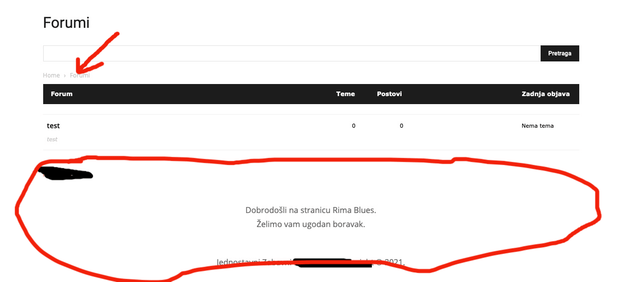
This is what it looks like on the home page of the forum: /forums
Header and Footer with error.

This is what the forum topic looks like and everything is fine here: /forums/forum /test
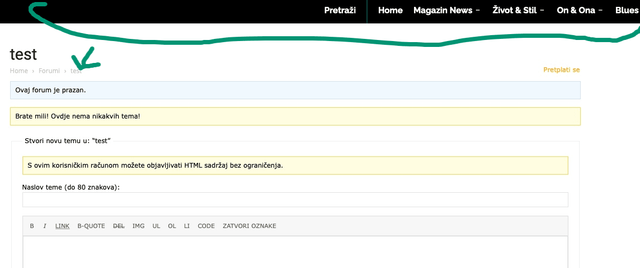
So the problem only appears on the forum home page.
It’s not urgent for me 🙂
Thanks for the good service.
 cluvsion
My 404 page is not styled correctly. The footer uses another font and some elements of the content and the footer like the buttons or the icons use the default color instead of using the color defined in the theme panel.
What it should look like: https://yoyostore.ch/tdb_templates/404-page/ (direct access to the page)
What it looks like: https://yoyostore.ch/wrong-path
What should I do ?
Anamaria Hello,
These settings are for Standard Prebuilt Websites, create without Cloud Templates.
These changes apply for example only when you use the standard header/footer templates (and other standard templates) from Theme Panel (not a cloud template) => https://www.screencast.com/t/4gApdblBu8 -> https://www.screencast.com/t/m1vrJsvHM
Thank you!
Anamaria Hello,
Because you import a footer from Cloud Template, the background image need to be set with tagDiv Composer, on the row on the footer section in the tab called “CSS”=> https://www.screencast.com/t/icgswNVnEwOY
Hope this helps you!
Thank you!
 Bettina
 Hello!
You can search by accessing Dashboard -> Cloud Templates -> ADD NEW. If there is no footer template, then it means the demo maybe use another template and not a cloud one.
Thank you!
 corriereborbonico
I have imported a footer from the cloud templates and customized it, and in the end wanted to change the background image. According to the documentation, I should be able to find it in Theme panel > Footer. Unfortunately, there are no settings there!
Check this screenshot: https://imgur.com/a/5hg9ZaG
