
No search results were found in Documentation!
 Alin [tagDiv]
 Hi,
I see that you also email us please provide wp-admin and ftp access so we can take a look.
Please make sure you have made a full backup.
Thanks!
Alin [tagDiv] Hi,
Newspaper 6 is practically a new theme, the whole code was rewritten so you have do a clean update and make sure that no old files remain, check this guide(try FTP method or wordpress) – https://forum.tagdiv.com/how-to-update-the-theme-2/ also please disable all your plugins and always make a full backup of your site.
After you update the theme, please run the script, like it is specified in the documentation(it will import old settings, rename the shortcodes..) and update also the theme’s plugins.
Please note that the old custom modifications to the files or custom css will not work, you will have to adjust and re-add them. Unfortunately you have to re-add the widgets to your sidebars(the custom sidebars will be imported – you don’t have to create them again) as they will become inactive or doesn’t exist in version 6.
Let me know how it goes!
Thanks!
 Emil G
Hi,
We receive several messages stating that some antivirus/malicious code scanners are detecting a TDS Malware in the theme. This is a false positive, we carefully check each release before we upload it and Envato officials are also checking the files before they go public.
The theme includes many classes which start with tds_… , this may trigger the false positive report some of you received.
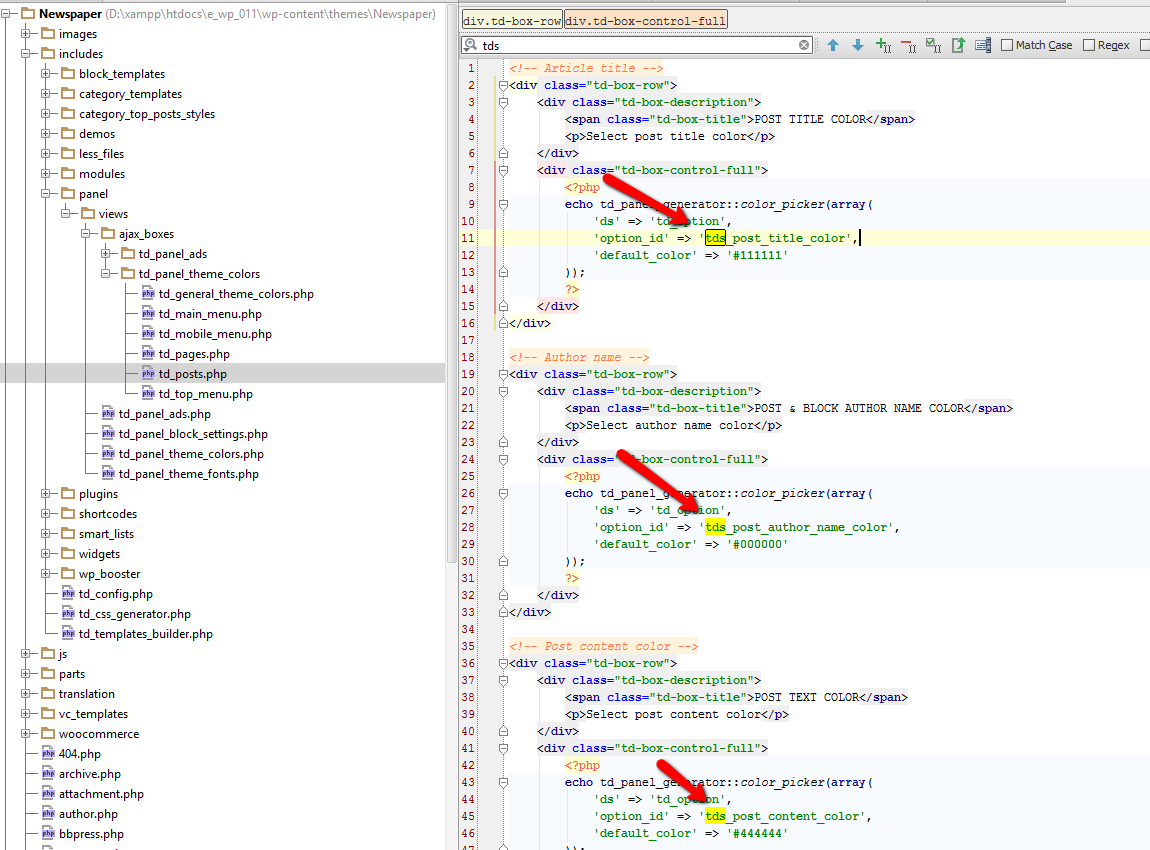
To check if the warning is real or not try to scan it with multiple scanners and see if the results are the same, also check the code on the file which is reported to be infected:
– download the theme again on your personal computer
– log in via ftp and open the reported file
– compare the file with the one from your personal computer and see if the code is identical or it was changed
Thank you!
Emil GHi,
We receive several messages stating that some antivirus/malicious code scanners are detecting a TDS Malware in the theme. This is a false positive, we carefully check each release before we upload it and Envato officials are also checking the files before they go public.
The theme includes many classes which start with tds_… , this may trigger the false positive report some of you received.
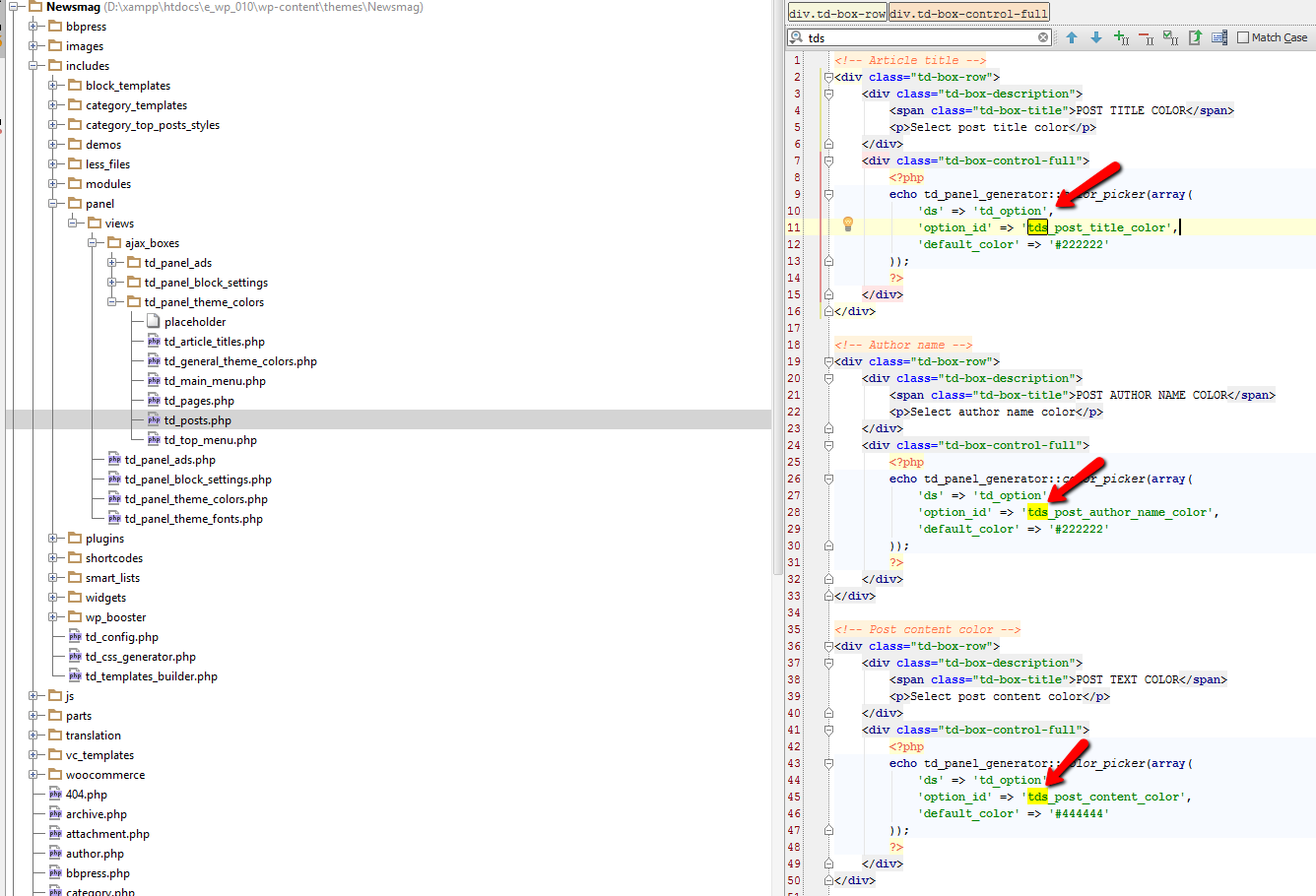
To check if the warning is real or not try to scan it with multiple scanners and see if the results are the same, also check the code on the file which is reported to be infected:
– download the theme again on your personal computer
– log in via ftp and open the reported file
– compare the file with the one from your personal computer and see if the code is identical or it was changed
Thank you!
 Michel67
 Hmmm,
I’m afraid it’s broken again, and worse this time…
I tried to install a different caching plug-in, W3 Total Cache and the same ‘white screen’ appeared after trying to access my dashboard. The trick with FTP and renaming the plugin worked, but after deleting the plugin (from the dashboard) I got a white screen again. Although the plugin directory was removed (as checked with the FTP client), I’m afraid it left some code.
So, now I’m stuck with a white screen when trying to enter the dashboard?!?
Please help again?
Thanks!
Michel67
 Ing Geek
 Enter via FTP and locate folder wp-content/plugins/wp-cache folder. and rename for wp-2
Now wp cache are disabled and you can enter into your dashboard.
Alin [tagDiv] Hi,
In the Newspaper ver 6.5.1 we already provided latest version of Visual Composer.
@paulberrow The latest version of Visual Composer was not tested with Newspaper 4 and some issues could appear. I suggest to update to the latest theme version using this guide – https://forum.tagdiv.com/how-to-update-the-theme-2/ to make sure that Visual Composer will work properly.
@zeus Please make sure you update the theme properly(try via ftp) – https://forum.tagdiv.com/how-to-update-the-theme-2/ then disable all the plugins except of Visual Composer, clear cache and check if you still have this issue.
You should not have any issues as we tested this before release.
@Peter Replied here – https://forum.tagdiv.com/topic/update-to-visual-composer-4-7-4-breaks-back-end/
Thanks!
Alin [tagDiv] Hi,
Please make sure you update the theme properly via ftp, make sure all the files were uploaded. Then clear cache and purge your files if you use CDN and also disable all the plugins except of Visual Composer and check if you still have this issue. Also disable any css/js minification.
The latest version of Visual Composer was tested with the theme and we did not found any issues.
Thanks!
 Peter
PeterHi there,
After updating the theme and Visual Composer to 4.7.4 I get an unusual deprecated Visual Composer message and collection of icons at the base of every article and page. I am also prevented from editing or adding any block.
My page building has completely stopped. This does not seem to effect the front end performance or structure.
I upgraded the theme via FTP as the envato updater has not been working for some time. I deleted visual composer then added via FTP. The site is: http://coconutoilpost.com/ Can you please advise on how to restore the Visual Composer functionality?
I currently have a sub domain for testing a new version and it has no issues after the update with the same plugins. I have also tested all the plugins on both sites which did not resolve the issue. I have also deactivated and deleted then reinstalled and activated the plugin but still the bug persists?
Can anyone please advise. Here is a Link to a screenshot
Regards
Peter
Peter Hi there,
After updating the theme and Visual Composer to 4.7.4 I get an unusual deprecated Visual Composer message and collection of icons at the base of every article and page. I am also prevented from editing or adding any block.
My page building has completely stopped. This does not seem to effect the front end performance or structure.
I upgraded the theme via FTP as the envato updater has not been working for some time. I deleted visual composer then added via FTP. The site is: http://coconutoilpost.com/ Can you please advise on how to restore the Visual Composer functionality?
I am going through plugin conflict testing but all looks OK so far.
Regards
Peter
 salocharly
hi guys and thanks in advance for your great work.
I got this mail from enbato
We are getting in touch to let you know about multiple XSS security vulnerabilities in the Visual Composer WordPress plugin versions prior to 4.7.4 (releases prior to October 2, 2015). This plugin was included in items you’ve purchased (listed below).
We have been working with WP Bakery, the creators of Visual Composer, who have addressed all identified vulnerabilities and undertaken a code audit to ensure that it is as secure as possible. Theme authors whose items include Visual Composer have been instructed to make sure their items accommodate this upgrade. Items that include older versions of Visual Composer will be disabled from the market until this change is made.
Affected Items
Your items that include Visual Composer:
What You Should Do
In order to secure your item from these vulnerabilities we strongly encourage you to update to version 4.7.4 or later as soon as possible. We recommend you take the following steps to secure your sites immediately, after first backing up your WordPress site.
Visual Composer Plugin Update Steps
Log in to codecanyon.net and proceed to download the latest version of Visual Composer to your computer from this URL: http://codecanyon.net/item/visual-composer-page-builder-for-wordpress/242431
Locate and unzip the downloaded plugin file.
Connect to your server using an FTP client and upload the js_composer directory (from the downloaded zip file) to the wp-content/plugins/ directory. (Note: This will overwrite the old Visual Composer files with the secure versions.)
Log into WordPress and navigate to the Plugins page to confirm the Visual Composer plugin is version 4.7.4
The link to the latest version, provided above, will be live for 3 weeks from the time this email was sent. After this period, you will need to access the latest version via your theme zip file.
Please note: This replaces the existing plugin under the licensing of the theme(s) you’ve purchased and is only licensed for use in these themes.
Your Security is Our Priority
We take security seriously at Envato. When we receive security vulnerability reports for items sold on our marketplaces, we work as quickly as possible to validate the report, investigate risk and determine the best course of action for the security of our community.
On behalf of the plugin creator and Envato, we’d like to apologize for this inconvenience and assure you that security is and always will be our priority.
Regards,
The Envato Team
when will the theme be updated? do we need to update? should be wait for you?
Thanks in advance!
S
 simchris
 a) use the WP admin > tools > export
b) use the theme panel > export /copy-paste settings to text file
c) if your host supports it, use phpadmin to clone/copy your existing dbase as backup
d) use a plugin that makes local back-up of site
http://downloads.wordpress.org/plugin/my-wp-backup.latest-stable.zip
e) download all files from your site via FTP.
 Bogdan B.
 Hello Andi,
When you create your sidebar (or edit the existing one) you can edit the block settings: http://screencast.com/t/UVnEfOftp0Ds
You can filter categories by ID. You can see the category id here: http://screencast.com/t/MqtXVVBg
Thanks.
Bogdan B. Hello Thierry,
In order to place a title above the photo, you need to create a spanclass image-header element and h2 element inside the divcontaining the image like so:
http://screencast.com/t/9bU4XkbfTp
Then use this custom css. I added the whole bunch in here so replace what you have in the theme panel with this one
Here is the whole bunch:
.full-image{position:relative!important;}
@media(min-width: 1141px) {
.td-page-wrap .full-image {
left: -37%;
position: relative;
transform: translateX (20%);}
.full-image img {
max-width: none !important;}}
@media(min-width: 1141px) {
.td-post-content .full-image {
left: -20%;
position: relative;
transform: translateX (30%);}
.full-image img {
max-width: none !important;}}
.image-header h2{
color:white;
position: absolute;
bottom: 80px;
left: 200px;}
You can edit the title position here at the bottom of the code. There are 2 parameters: left and bottom. Change these values to re-position your title.
result: http://screencast.com/t/J391Xx48aPH
Thanks
simchris The script update is AFTER you install the new version of the theme.
Again, see the docs on how to upgrade.
I always upgrade via FTP myself … normal practice is delete old theme and plugin folders, as per usual; upload new theme folder and new plugins.
 dwcp
dwcp Hi Chris,
Thanks for the quick reply, sorry if you had to repeat the same things again.
1) So in my case, is it recommended that I run the import script, which is also known as the update script?
2) Where do I find the import/update script? (I’m in the theme panel and I can’t find the link, help)
3) Is the import/update script method no longer constitutes a clean install?
4) What is the correct sequence of events to start my update?
– Back-up entire site, database (done)
– Don’t use FTP as “there may be issues” (I have always updated using FTP method, so which is the safer method to update?)
– Please make sure that you delete the following files from Newspaper 4:
page-homepage-bg.php
page-homepage-bg-loop.php
page-homepage-blank.php
page-homepage-loop.php
page-homepage-timeline.php
(do I delete the above files via FTP first?)
– Update Visual Composer and Social Counter when updating from V4 (so do I update them before or after updating the theme?
5) Do I still need to export my current theme settings if I’m using the import/update script?
6) Can I use the 6.5.1 pack to update from 4.6.3?
Thanks again for your help.
 simchris
 1) see the theme docs >> right side of page on how to upgrade from 4x to 6x — and YES! 🙂
https://forum.tagdiv.com/how-to-update-the-theme-2/
2) I think that is covered in the docs … or was …
Updating from Newspaper 4:
Newspaper 6 is a whole new theme that we release for free to our existing customers. The old version of the theme can be found in the /old_version folder.
We recommend that you do a clean update, meaning that we recommend that you delete the old version of the theme before uploading the new one. If you do a ftp update over the existing theme there may be issues. Please make sure that you delete the following files from Newspaper 4:
•page-homepage-bg.php
•page-homepage-bg-loop.php
•page-homepage-blank.php
•page-homepage-loop.php
•page-homepage-timeline.php
Please update Visual Composer and Social Counter when updating from V4
Updating from Newspaper 4: Please run the import script if you want to update from an older version of newspaper but only after you backed up your settings. After running the import script it may be impossible to roll back to the older version of the theme without a backup of the database!
The import script does the following operations:
•Imports the old settings to the new theme
•Renames all the shortcodes from your pages to the new names
•Imports all the sidebars
•Renames all the widgets from the sidebars to the new names
3) TagDiv does not do the upgrades for you; but you can hire folks to do that if you don’t know how.
 Andrei L.
 Hi
Have you added any tracking code in added in theme spot: http://screencast.com/t/xEfkrTiL2R If so please make sure that the code is is correct. Also try this with a default WordPress theme, clear all caches, deactivate all plugins and test again.
If you still have this issue send an email at contact@tagdiv.com and provide wp-admin and ftp access so we can inspect this closer.
Thanks!
simchris Most themes which auto update in WP use either a theme foundry plugin; or can be updated due to being in the WordPress theme repository (e.g., free themes).
Most commercial themes on ThemeForest and commercial plugins don’t have an “auto update” feature, and generally this is a BAD idea — for example, if people had done auto update from NP4 to NP6, and woken up to find their site broken, that would not have been good.
Similarly some plugins may change settings and require workarounds and/or a perfect example is Yoast who “updated” their old wp meta plugin, by disabling it without telling people it would disable it, even though it still worked. Then printed message on screen – “we’ve discontinued this plugin, please upgrade to Yoast SEO” — well, on one site we didn’t want to do that and had to revert to the original meta plugin. Ouch!
Envato tried to build a theme updater for their themes and you can certainly try that. But often it’s best to review the changelog and see what changed so that you don’t wipe your child theme changes if there is major child theme update, or reset your home page if VC changes, etc.
For example an auto updater today might update the entire theme by deleting old folder and any customizations, and upload new one; when only thing changed was Visual Composer update for security issue. So, today only update it the VC plugin which can be done manually via FTP.
So, while it sounds like a good idea — in practice, it’s really not that advisable.
Hope that made sense — not trying to be contrary, just some feedback from using WP for 10 years and having a lot of cock ups from “auto updates” — we turn them ALL off for our sites due to too many site crashes in middle of the night without warning, or CPU spikes crashing entire box due to a bad plugin (e.g., YOAST, often has major bugs every damn dot upgrade then rushes out 3 rounds of “oops” fixes…. seriously… never install that on “new dot upgrade” — it’s a bad bad idea!). 🙂
simchris I put images for ads into my root directory via FTP, and then call the ad banners from my plugin or widgets as mysite.vvv/pix/mybanner-460×60.png
avoid using the words “ad” from now on due to adblockers …
so /pix/ would be good directory to add manually via FTP — downside you have to upload your image via FTP.
I do that for most stuff anyway, so no big deal for me.
WordPress does not support multiple upload directories itself.
There used to be a image limit size setting in the wp admin panel; but now I think you have to set that in either wp-config.php … hmmm…. nope.
I think it’s now set on the server in your hosting panel in the php settings:
upload_max_filesize = 2M
in theory, if your server is running apache and is running scripts as fastcgi, then you can try this:
create a php.ini file and upload it into your /wp-admin folder. Then add the following:
memory_limit = 120M

 upload_max_filesize = 1M

 post_max_size = 32M

 file_uploads = On
Emil G Hi,
@gfm1978 – what version of the theme and Visual Composer do you use? If possible please send an email at contact@tagdiv.com , include a link to this conversation and provide wp-admin and ftp access. We will take a look at your configuration, maybe the issue comes from something else.
@meremetia – some of the old problems were solved in the newer versions of VC, please try the latest version and see if the issue is still there.
Thank you!
Emil G Hi,
Try the following code – http://screencast.com/t/OonNlk8gK
$custom_field_img = get_post_meta( $this->post->ID), 'custom_field_key', true );
if ( ! empty( $custom_field_img ) ) {
$featured_image_info['src'] = $custom_field_img;
}
Replace custom_field_key with the name of your custom field.
If it doesn’t work please send an email and provide wp-admin and ftp access so we can take a look.
Thank you!
Alin [tagDiv] Hi littleo,
Glad that you managed to make it!
You can send and email at contact@tagdiv.com or write here on the forum about this.
If you have added more image size in the config file you will have to edit the modules to use a specific size(they cannot be edited from WP Editor, you have to do this via ftp). Please note that your custom modifications to the files will be overwritten when you’ll update the theme.
Thanks!
Andrei L. Hi
Please send an email at contact@tagdiv.com and provide wp-admin and ftp access and we will inspect this issue as soon as possible, also paste a link to this topic.
Thanks!
 pmats777
Trying to install Newsmag, but when I go to Live Preview I just get a spinning wheel (loading) icon. If I try to activate it, I get this error message:
The request was not completed. The server met an unexpected condition.
Things I’ve tried
downloaded a new zip file of just the theme
uploaded the theme directly via ftp
deleted and re-installed the theme several times
deactivated all plugins
thanks
