
- NewsmagHeader styles
- NewsmagHeader ads
- NewsmagtagDiv Composer Tutorial
- NewsmagCategory templates
- NewsmagSmart list ads
- NewsmagWeather Widget
- NewsmagInstagram widget
- NewsmagPage Menu
- NewsmagMain menu
- NewsmagTop bar templates
- NewsmagLogin – how to enable the user registration
- NewsmagLogo & Favicon
- NewsmagFooter templates
- NewsmagCategory grid styles
- NewsmagCategory top post styles
- NewsmagHow category settings work
- NewsmagTheme colors introduction
 viilevent
 Hi Colin
I solved this by adding this script code in header part.
wp-content/plugins/jetpack/_inc/blocks/tiled-gallery/view.js?minify=false&ver=15.3.1″ id=”jetpack-block-tiled-gallery-js
-
This reply was modified 9 months by
viilevent.
 averimedia
I’ve updated everything on the website, turned off all plugins except the theme and the tagdiv and I’m getting this error:
Notice: Function _load_textdomain_just_in_time was called incorrectly. Translation loading for the Newsmag domain was triggered too early. This is usually an indicator for some code in the plugin or theme running too early. Translations should be loaded at the init action or later. Please see Debugging in WordPress for more information. (This message was added in version 6.7.0.) in /home/byline/public_html/wp-includes/functions.php on line 6131
Warning: Cannot modify header information – headers already sent by (output started at /home/byline/public_html/wp-includes/functions.php:6131) in /home/byline/public_html/wp-includes/functions.php on line 7182
Warning: Cannot modify header information – headers already sent by (output started at /home/byline/public_html/wp-includes/functions.php:6131) in /home/byline/public_html/wp-admin/admin-header.php on line 14
 Calin
Calin Hi Kate,
Yes, you can set individual and global headers per pages and cloud templates. This means if you have more cloud templates per categories, you can choose to use the global header or you can assign an individual header. So you need to have a cloud category template, you can duplicate it and assign each one you want on different categories, then on each duplicate category template use tagDiv Composer, access the Manager and click on the header name you want to have on that category, the header category will be green like this https://i.imgur.com/5Sk3wR7.png
Thank you!
 CapturedTravelMediaWWTR
Hello,
I was wondering if it is possible to have a different header to the main site for all posts appearing under a specific category? For example, I have a category Cruise News, and I want this header to be different to posts under all the other categories. I have made the header different on different pages and hoping to do the same for categories. Is this possible?
Thanks,
Kate
 andros1983
I’ve tried a thousand ways but I can’t get the registration or login in the header to work. It does absolutely nothing; when I click on “login” nothing happens, and when I click on “register” it changes the URL to this: https://audioadictos.com/?signup but it still does nothing and nothing changes.
Calin Hello,
This issue is very unlikely to be caused directly by the Newsmag theme. In most cases, it’s related to leftover cache, generated files, or plugins from the previous Kubio setup.
I recommend checking the following:
Cache cleanup beyond WP-Optimize
WP-Optimize doesn’t always remove theme-generated or server-level cache. If possible, please clear cache from the hosting panel and remove any generated /cache/ or minified asset folders (after backup).
Kubio leftovers
Make sure there are no Kubio-related plugins, mu-plugins, or injected CSS still active (Customizer, global styles, header/footer scripts).
CSS affecting the body layout
The overflow issue on the homepage strongly suggests a leftover global CSS rule, likely added by Kubio, which also explains the admin bar behavior.
Quick core check
Re-save permalinks and, if needed, temporarily disable plugins to rule out conflicts.
Your CSS fix is a valid temporary workaround, but the goal should be to remove the source of the conflicting styles so the site stays clean and stable.
Thank you!
Calin Hi,
Ok, on demo you have, click on the row and the click on header menu – https://i.imgur.com/QUIE5qj.png and the Zone will be selected there select the css tab and remove or adjust the bottom css https://i.imgur.com/DwZQqxn.png
For title on banners, could you please let me know how those have been set in ad box element? a screenshot and how will help.
Thank you!
 rwl1234
I updated to the latest version of newspaper theme and after i lost my header. Opening the website using Chrome browser the header is just html text. If I open on Firefox there is not html but also no header.
How can i get the header/menu back?
 zgdk2273
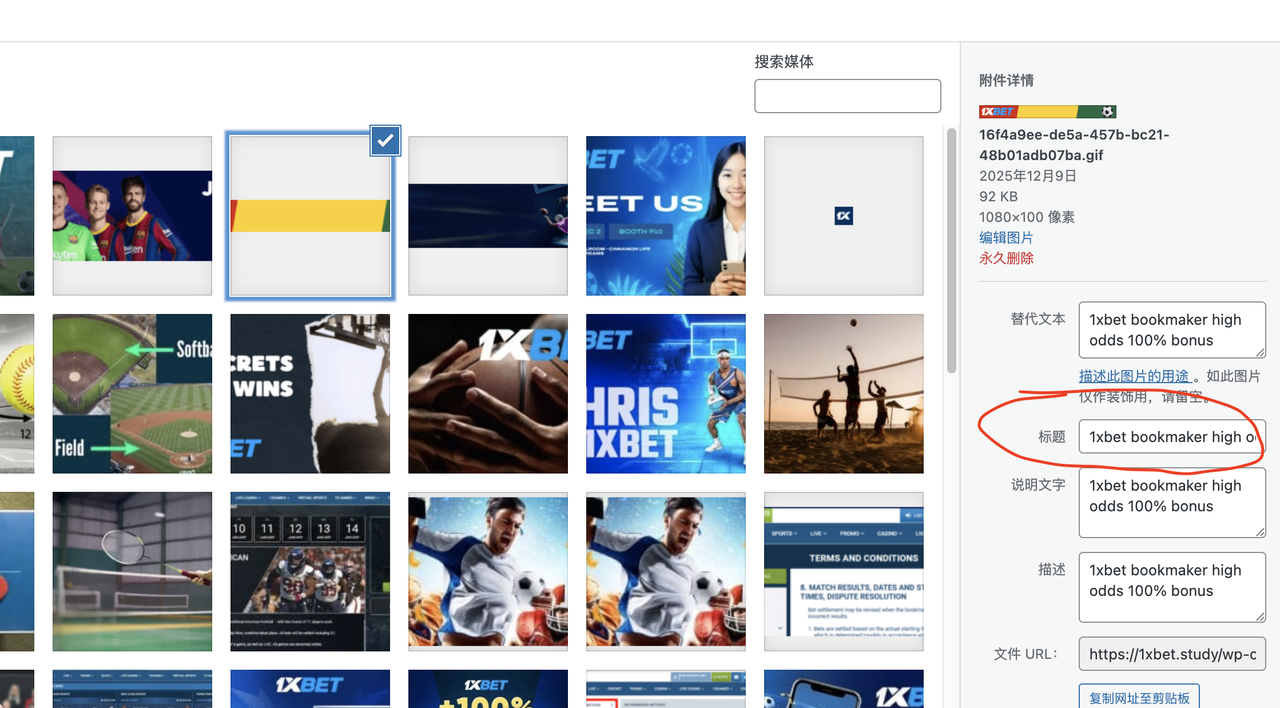
 I followed your instructions, but it still doesn’t work; the blank space is still very large and can’t be reduced. I want to point out that the theme template in your example is different from mine. I suggest you look at the blog’s classic template; the header and footer CSS in that template are definitely different from the example you gave me. Could you please help me import the blog’s classic template and see where the settings are located? Thank you. Also, the title of the ad image is still “home 1.” I’ve already set it in the “Title in Image Media Settings” as you instructed, but the HTML displayed on the front end hasn’t changed. Please check it again, thank you!
 Portalinjo
I cant make any changes to my mobile newspaper theme. Changing things like header color work only when changed from theme panel.
I basically see one site when im editing on tagdiv and than a totally different looking site when I save and open from mobile phone.
Calin Hello,
You need to use tagDiv Composer, edit the homepage and select row from the header, that one has in the css tab set a margin bottom 90px https://i.imgur.com/LJpGX5E.png https://i.imgur.com/6LvPo7B.png in case that is not on that row check teh one below.
The title on the banners is teh one set in media for image – https://i.imgur.com/LRPgdCq.png
Thank you!
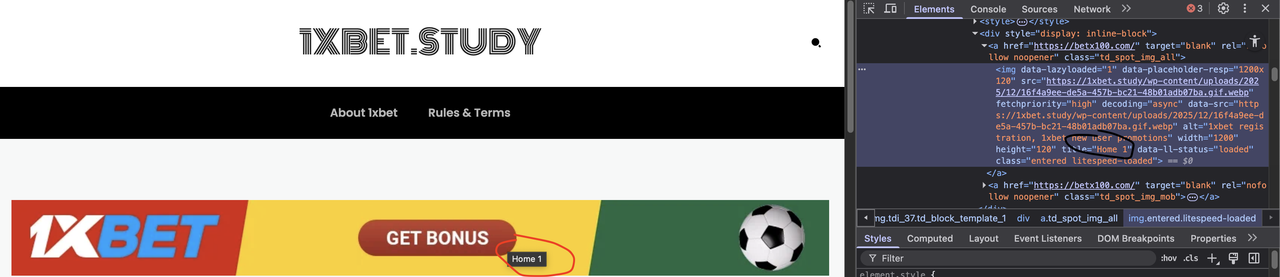
zgdk2273 Another question: I have two ad images on my website, one in the header and one in the footer. I checked the HTML code with a browser and found that the titles are set incorrectly, but I don’t know where to set the titles. The title of the top image is “home 1”, and the title of the bottom image is “home 2”. Where can I change them?
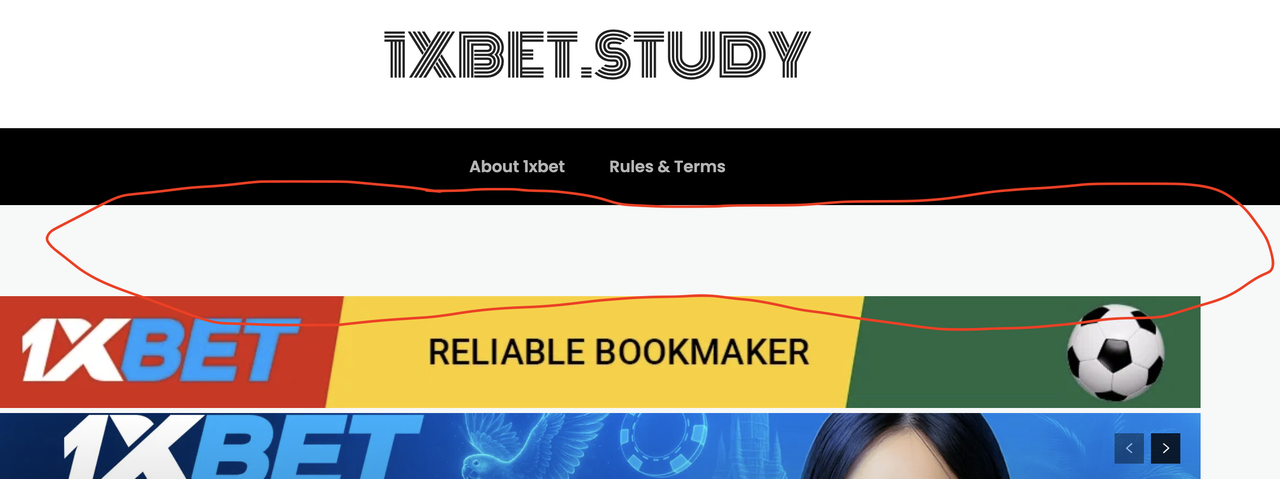
zgdk2273I encountered a problem, please help me solve it! My website is https://1xbet.study/, using the Newspaper theme’s Blog Classic style. I added two ad positions in the header and footer, but there is a large blank area between the header/footer menu bars and the ad positions (as shown in the image), which greatly affects the aesthetics. How can I configure this to make the layout between the menu bars and ad positions more compact, so the overall appearance looks better?

 mgraban
 Thanks. I’d still like to adjust the headers in the sidebar to the Poppins font.
Calin Hi,
Please edit the homepage using tagDiv Composer and select manage, then see if the header applied to the page is set as individual or global. Usually, the situation mentioned by you appears when it is set as an individual header.
https://i.imgur.com/tJkC8xk.png if it is like this https://i.imgur.com/LtgrzWb.png is using the global template, but if it is like this https://i.imgur.com/EkXEZf3.png has the header assigned as individual, so it is no longer changed if the global header is changed.
mgrabanHi –
I cannot figure out how to select / adjust the fonts used in my site sidebar…
https://www.leanblog.org/2024/12/visual-management-gone-wrong-christmas-grocery-store/
I’d like the header and copy fonts to match the site defaults that I recently changed.
Thanks,
Mark
 Ericky
I’m changing the header template from the Cloud Templates section, but it doesn’t apply to the homepage. I keep seeing the old header on the homepage.
It works without any issues on all other pages. The problem only occurs on the homepage. What could be the reason for this?
We’re transitioning to a brand-new design, so we’re activating things gradually by designing them piece by piece. However, we haven’t been able to figure this out yet.
Site link: https://www.atarita.com/ (The classic old header is currently selected so the issue doesn’t appear right now.)
Hi Mick,
I just checked the website using my mobile, and for me, it’s happeing that the problem with the header is like this, the logo is over the mobile menu – https://i.imgur.com/6WCLGzs.png, so maybe in your case it’s ok, on mobile, but it appears to be a more global problem. Could you please check the settings from teh cache plugin?
 hrhq2020
 Hi Calin,
Thanks for getting back to me.
The Links page is created using the TagDiv Composer. It page inherits the Header and Footer from the Newspaper Theme.
In mobile Chrome and Safari the menu and logo work properly – no layout shifting.
In the Instagram mobile app (iPhone & Android) the layout shifts, moving the Logo over the menu. The layout shift moves the content of the page up and stops the user selecting the most recent article.
Link: https://www.hrheadquarters.ie/wp-content/uploads/2025/12/IMG_1617DD712B27-1.jpeg
All the best,
Mick
Calin Hi,
If you are using the headers from tagDiv Standard Pack and not cloud templates, then you can change the color from theme panel > theme colors > mobile menu https://i.imgur.com/0AsFBNM.png. Now if you have the plugin tagDiv mobile theme plugin installed, then you need to check the settings mentioned in this guide – https://forum.tagdiv.com/the-mobile-theme/
Thank you!
 Maneek
Hi there.. I seem to have a problem on my home page on https://shippingandfreightresource.com..
So the way I have set it up is
1) I have used the header cloud template
2) under header template it shows “global header”
3) in custom ad I have added “[the_ad id=”135690″]”
I expect this “header template” to follow in article (https://www.shippingandfreightresource.com/articles/) and single page template (https://www.shippingandfreightresource.com/freight-industry-moving-in-shock-waves-than-cyclical-waves-dimerco-panel-discussion/)..
But this ad doesn’t work on the homepage (https://shippingandfreightresource.com) alone.. But if I try the ad code “[the_ad id=”134182”] it works fine.. Only this ad code is working on the home page, others are NOT working but are working on the article and single pages..
How do I sort this out..??
Now the problem is that this ad is displaying in the
 Archerix
 example from ngnix
2025/12/13 13:13:53 [error] 1428#1428: *356575 FastCGI sent in stderr: "PHP message: PHP Warning: Attempt to read property "ID" on null in /var/www/otakupt.com/wp-includes/comment-template.php on line 1791; PHP message: PHP Warning: Attempt to read property "ID" on null in /var/www/otakupt.com/wp-includes/comment-template.php on line 1791" while reading response header from upstream, client: ****, server: otakupt.com, request: "GET /anime/episodio-19-de-uma-musume-cinderella-gray-foi-adiado/ HTTP/2.0", upstream: "fastcgi://unix:/run/php/php8.3-fpm.sock:", host: "www.otakupt.com"
hrhq2020Hi,
I created a links page for articles I want to make available from Instagram. This is a replacement for the LinkTree service, to keep my own branding and traffic directly to my own website, rather than through a third party.
The Links page inherits the Header from my site and displays the header, logo, and menu. When I interact with the rendered page, the layout of the header shifts.
I include a link to an image showing the problem: https://www.hrheadquarters.ie/wp-content/uploads/2025/12/Instagram-logo-shift.jpg
Link to the Instagram account: https://www.instagram.com/hr.headquarters/#
All the best,
Mick
 HiConnacht
Hi,
I am using the default Theme Header (no Cloud Template assigned), but in:
Theme Panel → Header → Mobile Header
there is no option to change the mobile header background color.
The mobile header is stuck as black, and:
The panel does not show a background color picker
Custom CSS does not override the black background
It seems like my installation is using a header style without mobile color controls, or the CSS is hard-coded and overriding everything.
Can you please tell me:
How to change the mobile header background color (I need it to be #1e40b0)
Whether my header style should have a color option
Which selector controls the mobile header background in my version
Whether this is a bug in the Newspaper header system
Thank you.
 przybylg
I have a header on the dev.kulinarnyblog.pl website with an image from your demo. What size image should I insert at the top to make it look good? Now, when I insert my own image, it’s very distorted.



