- NewspaperHeader Builder
- NewsmagHeader styles
- NewsmagHeader ads
- NewspaperHeader ads
- NewspaperHeader styles
- Apitd_api_header_style::delete
- Apitd_api_header_style::update_key
- Apitd_api_header_style::update
- Apitd_api_header_style::add
- ApiAPI – Header style – Introduction
- NewspaperSearch setup for custom post type
- NewspapertagDiv Composer – Website Manager
- NewspaperBookmark – Save For Later
- NewspaperWooCommerce: Happy “Add to Favorites!”
- NewspaperModal Popup
- NewspaperFlex Block Settings Guide
- NewspaperPosts Loop Element
- NewspaperHow to Add a Logo in Newspaper
- NewspaperDefault Category Settings
- NewspaperWhen tagDiv Composer is Not Working
 herbal
Please let me know how to hide the website readerhorizon.com header at the very top row where it displays Monday, March 27, 2023 Sign in/Join Buy now! and all the social media on the right side. Thanks
 bobwei
 Hi Bettina,
Maybe the problem is with template cloud, because there are many bugs on it, I had already installed several headers and footers, but its not apear on cloud templates pages. And there a bug with install any template, I need to use command tab + enter to make it complete install, other way, it stocked on install screen.
 hadharm
I recently noticed I can’t save changes to my website anymore after moving from one host to another on my website https://hiideemedia.com/
I am trying to add effects to the tagdiv builder using a custom CSS and javascript code I wrote. But any changes I make in theme panel is not saved it just keeps rolling. Also in tagdiv composer, any changes made only save the header and footer the body of the content is not saved. Pls, what is the way out???
 alessandro_tpp
 Hi Anamaria,
Somehow we managed to solve this, I will let you know if the issue comes back.
While I’ve got you, we have three more issues:
– In our template there is a subscribe button on the top right of the header which is clickable and opens a popup. We couldn’t find the popup page in our pages, however, when adding the page id linked to the popup in a browser link, it opens a page that says “Sorry, you are not allowed to edit posts in this post type.” – is there a way to edit that page so we can work on the popup?
– Yesterday we have added Google Adsense ads in the article template, but today the adverts and the amendments we made are only showing in one article, not all of them. How can we make sure these are consistent across all articles/posts?
– We want to be able to edit the style of the title of the inline article adverts like we do on the rest of the website but we couldn’t find a setting for it. Can you please let us know how we can do that?
Thank you
Alessandro
 Bettina
 Hello!
There is a special field for Google Analytics (theme panel>analitics/js code) and you do not need to add the code in the multiple fields. Make sure it is not a plugin conflict issue. Please make a test and deactivate ALL plugins except tagDiv ones, also if you are using a cache plugin, deactivate it, clear all cache and try again.
Every template has its own settings and it shouldn’t interfere if you edit a different template.
“J’ai beau essayé, mais à chaque fois que j’effectue un changement dans la page d’une catégorie, le même changement s’effectue sur le reste des catégories. ” -> If the categories use the same template, then of course every setting will reflect on all your categories. If the category template has the same header, and you add a new element to it, then it will reflect on all pages that have been assigned that header template.
The responsive version should be the same as the desktop ( PC version ). Do not confuse the mobile pages with the responsive version. Some settings should be the same also, the elements should coincide with the desktop version and others could be set regarding the size of the screen. These are not bugs, but the way they are working.
Please provide an example, a screenshot or a video with the issue ( modification d’une page “catégorie” qu’on apporte sur TagDiV Composer ne se verra sur mobile ! ), so I can better understand and explain everything.
You have the right to ask everything, and I will always reply and try to help you as much as I can. Every “issue” or “bug” should be solved and clarified.
Thank you!
 Anamaria
 Hello,
Maybe you have a header template from Cloud Library, you can edit the logo and header with tagDiv Composer => https://www.screencast.com/t/zuhG8uGZe, select the header and you can remove the logo image/text and add a new logo => https://www.screencast.com/t/WSquHPNqT https://www.youtube.com/watch?v=HXQQygkCCJo https://forum.tagdiv.com/add-logo-newspaper/
Please provide more details with screenshots to be able to help you.
Please note that support is Monday -> Friday -> 8:00 AM – 5:00 PM
Thank you!
 nasirnadeem628
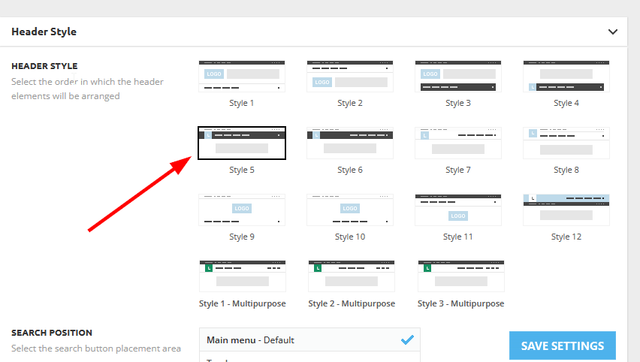
I’m trying to change header style 6 but not working none of the things are showing.
Help me to fix this even I upload logo it also didn’t work theme panel is bugged I want refund help me
 ngotuannghia
 I think this is critical issue because I cannot use Tagdiv Composer any more to design Header, Footer, Page…
 imkimc
 OK there is a problem with Woody Snippets and your header ad now.
If I run the above edit to your theme, I can no longer create new snippets in Woody Snippets.
If I change it BACK to showing, the new snippets drop down is INSIDE of your ad and is interacting with your code. So somehow either your ad or Woody Snippets isn’t respecting each other’s space.
Your non-dismissable ad is now breaking my website… so frustrating.
Kim
 imkimc
 OK I found a way to block the ad, though I fear I am also blocking all admin header messages as well:
NOTE: Editing these files is DANGEROUS and can disable your website! Do so ONLY if you know CSS, HTML and general WordPress web development. You have been warned.
Normally instead of editing the CSS of the installed theme, you’d install a child theme, but TagDiv’s child theme doesn’t allow you to edit the wp-admin CSS… so you’ll need to edit the actual wp-admin.css file!
I also tried custom CSS but that is all front end facing and doesn’t affect the wp-admin section of your site. I probably could have found another
You should make sure you have a backup of this file handy. Either download copy your existing wp-admin.css file from your website or go to ThemeForrest and download a fresh copy of the theme which has the original file in it.
If anything goes wrong, make sure you have the ability to use FTP in some form to upload the unedited wp-admin.css file to your website.
OK – here’s how I blocked the ad:
In Appearance->Theme File Editor:
In the Theme Files: window, open up includes >
Then open up wp-booster >
Then open up wp-admin >
Then open up css >
Click on wp-admin.css
Now scroll down to line 380
Line 380 should show as display:flex;
Change the word flex to none so it now looks like this display:none
Scroll to the bottom of the page and click the Update File button.
I see no ill effects from this and I was able to restore the ad by changing the code from display: none; back to display: flex;
Until TagDiv sees the way to make this ad optional or dismissible, I guess I’m just going to block ALL of their admin area notifications and hope I don’t miss anything important!!
Kim
imkimcHey guys, you do know that people like me, who provide web development services, use your theme right?
And you do know that running an ad across the top of every screen in the WP-ADmin area is super irritating, right?
I’ve tried to block this ad using CSS but I haven’t found the magic combination yet.
This is what I have so far:
.td-admin-web-services .td-wp-admin-header .td-admin-web-services-txt .td-wp-admin-top {

    display: none;

}
I’d prefer a dismiss option be built into the ad or better yet that the ad run once only upon install and then never seen again. I have enough competition as it is with devs in my home town! Now the theme I’m using with one of my clients is advertising to my client?
I don’t like this at all.
Kim
alessandro_tppHello everyone,
We are having a problem with the header and footer on our website. On certain pages there seems to be two header/footer templates one over the other, however this isn’t the case for every page. NB these are category pages which have been setup with a universal category template, so it’s weird that it’s only affecting just two out of four.
Please see images below and I hope someone can help us soon.
Thank you
Alessandro


 libertylens
 I think we can regard this thread as resolved. Working on the header / menu issue on a different thread.
Thanks!
Ken
 Hamid Fekhart
 Bonjour,
Je crois que vous n’avez pas compris ma question.je ne parle pas de la pub (je n’en suis pas encore là !), mais de Google Analytics. Je vous prie de relire mon message que voici :
J’ai un souci avec Google Analytics. Je reçois la notification suivante : “la propriété Hamid Fekhart n’enregistre aucun appel”. J’ai déjà inséré le bout de code de Google Analytics dans les trois espaces de ANALYTICS/JS CODES dans le theme panel (HEADER SCRIPT CODE, AFTER BODY SCRIPT CODE et FOOTER SCRIPT CODE). Je vous prie de noter que dans les débuts, ça a marché et que je recevais les statistiques de Google Analytics. Après, ça a cessé de marcher. J’ai supprimé le bout de code et je l’ai réinstallé, mais toujours en vain. Notez que mon site est un site d’actualités. Je poste quelque 5 à 6 articles par jour (est-ce de là le souci ?). Fin du message.
L’autre problème que j’ai rencontré, c’est avec les pages. J’ai téléchargé des templates cloud différentes pour quatre pages (à propos, politique de confidentialité, contact et mentions légales) pour que je puisse créer à chacune une template mobile. Mais dès que je porte une modification sur une page, les autres pages – à part la page contact – subissent la modification, ce qui n’est pas, à mon sens, normal. J’ai pensé à créer d’abord les pages sur l’interface de WordPress, mais, dans ce cas, il ne sera pas possible de créer des templates mobile. Est-ce un beug ? En tout cas, ça en a bien l’air.
Merci infiniment.
 nickmde
Hey everyone,
Hope you’re doing great.
There are some sections from the Real Estate Pro demo I’d like to use in my website. Why aren’t any elements from that demo inside of TagDiv’s cloud?
Tried recreating some of the header/hero sections myself but they’re not coming out the same.
Hamid Fekhart Bonjour,
Voilà, j’ai un souci avec google analytics. Je reçois la notification “la propriété Hamid Fekhart ne reçoit pas d’appel”. J’ai déjà inséré le bout de code de google analytics dans les trois espaces de ANALYTICS/JS CODES dans le thème panel (HEADER SCRIPT CODE, AFTER BODY SCRIPT CODE et FOOTER SCRIPT CODE). Je vous prie de noter que dans les débuts, ça a marché et que je recevais les statistiques de google analytics. Aussi, j’ai supprimé les codes et je les ai réinstallés, mais toujours en vain.
Notez que mon site est un site d’actualités. Je poste quelque 5 à 6 articles par jour (est-ce de là le souci ?).
L’autre question qui n’a pas un grand rapport avec Newspaper, mais il se peut que vous ayez la réponse : pour l’indexation des sites d’actualités sur Google serach console, ai-je besoin d’un pluging spécial ? La version payante de Rank math qui a une option “News”, par exemple, ou un quelconque autre pluging ? Car, mes articles sont indexés très tardivement.
Merci infiniment.
Bettina Hello @ngotuannghia!
You should look up headers and see which ones you like; you can also build it from scratch if necessary. There you won’t find a default style number. They have names from the demos. Please check out this video about how to create a website from scratch: https://www.youtube.com/watch?v=SoGQ0d5kIBg
We recommend using cloud/PRO templates in order to have the possibility to edit them with the TagDiv Composer, which contains a lot of functions and features, Please check our tutorial here: https://forum.tagdiv.com/tagdiv-composer-tutorial/
More documentation about the cloud templates is here:
– https://forum.tagdiv.com/cloud-library-templates/
– https://forum.tagdiv.com/design-post-pages-using-cloud-library-templates/
– https://forum.tagdiv.com/cloud-library-category-templates/
Thank you!
ngotuannghiaDear Admin,
I very happy with your theme.
Currently, we are doing migrate to tagDiv Cloud Library to make website faster.
We are following this guide: https://tagdiv.com/newspaper-theme-update-standard-pack-or-tagdiv-cloud-templates/
But we still have confusions when removing dependencies.
As guide notice: ” Almost every template from the theme panel already exists in the tagDiv Cloud Library. …”
But I cannot find any same name block in tagdiv Cloud Library
Example:
Current Header: https://i.ibb.co/W63g421/current-header.png
Current Theme import: https://i.ibb.co/j5npD5w/current-import-theme.png
Tagdiv Cloud Template search: https://i.ibb.co/QfWS2yc/Header-tag-Div-Cloud-templates.png
Please kindly guide me or let me know document which help me migrate to Cloud Library smoothly from Standart Pack plugin
Thanks
Bettina Hello!
If you assign them to the post template, you can have a different header and footer for each post.
Edit a post template with the TagDiv Composer, click on Website Manager, and select the right header and footer (do not select global).
Thank you!
Anamaria Hi,
You can import a page, design it with tagdiv Composer, and you can disable the header and footer -> https://imgur.com/yWx8ZRR
Thank you!
 zlobica
hi guys 🙂
I want to make simple landing pages with Newspaper theme elements (landing page only with title + image + text)…
how do I create a blank page template that has no header and footer and create it again and again for all my landing pages?
thank you 🙂
 syed2023
The webpage at https://g-technews.com/wp-admin/post.php?post_id=313&td_action=tdc&tdbTemplateType=footer&prev_url=https%3A%2F%2Fg-technews.com%2Fwp-admin%2Fadmin.php%3Fpage%3Dtdb_cloud_templates might be temporarily down or it may have moved permanently to a new web address.
ERR_HTTP2_PROTOCOL_ERROR
The theme is not editing with the plugin tagdiv composer. We encounter same error while editing header footer and whole theme
bobwei I want to make a different project page inside my website with other template, like https://www.china.org.br/zh/ccdibc/, but when I click on any post on it, it will open a post in a website template, and I wanna open it with landingpage template for post too, like ( header + single template post + footer).
Anamaria Hello,
To remove the sign-in/join from the header you can do it with tagDiv Composer => https://www.screencast.com/t/Y5j6ArY8Ug , select the element and with right-click, you can delete it => https://www.screencast.com/t/GshM3Q3nwDv
Thank you!
Anamaria Hi,
To change the logo please edit with tagDiv Composer,select the header logo and change it => https://i.imgur.com/cR7F0v4.png -> https://www.youtube.com/watch?v=HXQQygkCCJo -> https://forum.tagdiv.com/add-logo-newspaper/
Thank you!