
- NewspaperHeader Builder
- NewsmagHeader styles
- NewsmagHeader ads
- NewspaperHeader ads
- NewspaperHeader styles
- Apitd_api_header_style::delete
- Apitd_api_header_style::update_key
- Apitd_api_header_style::update
- Apitd_api_header_style::add
- ApiAPI – Header style – Introduction
- NewspaperSearch setup for custom post type
- NewspapertagDiv Composer – Website Manager
- NewspaperBookmark – Save For Later
- NewspaperWooCommerce: Happy “Add to Favorites!”
- NewspaperModal Popup
- NewspaperFlex Block Settings Guide
- NewspaperPosts Loop Element
- NewspaperHow to Add a Logo in Newspaper
- NewspaperDefault Category Settings
- NewspaperWhen tagDiv Composer is Not Working
 Renzo123
 Hi there,
Luckily the page isn’t really slow, but I was more concerned about the code to text ratio, but maybe that isn’t really a problem.
I am using:
Header Template 43 – Tech News PRO
Footer – Aramis
Default newspaper theme
Kind regards,
Renzo
 Sali Crab
 No, maybe I was not so clear!
I want to have the these designs fot header and footer.
Header:https://dev.saligari.net/wp-content/uploads/2023/02/Screenshot-2023-02-26-at-11.46.06.jpg
Footer: https://dev.saligari.net/wp-content/uploads/2023/02/Screenshot-2023-02-26-at-11.46.36.jpg
How can I select the appearance?
 mongooz
 hello. The top bar you showed covers the pinned menu, making it nearly half invisible. We need to make the entire fixed header menu visible.
 hidorid
 Now the header display is messy, the logo is missing. Please help resolve this.
hidoridHi Tagdiv
I have a problem. I edit the front page https://hidayatullah.or.id/ using the “Edit with Tagdiv Composer” feature. I made changes to the header logo/ sticky logo, and there was information successfully saved, but when the website was opened on the new page there was no change change.
Please help me overcome this problem, because I have made changes many times but have never been successfully saved.
 Anamaria
 Hi,
To change the logo please edit with tagDiv Composer, select the viewport on phone, select the header logo and change it => https://i.imgur.com/cR7F0v4.png -> https://www.youtube.com/watch?v=HXQQygkCCJo -> https://forum.tagdiv.com/add-logo-newspaper/
Thank you!
mongoozThe admin menu (admin bar) covers the fixed header menu. how can i solve it?
 Bettina
 Hello!
Are you sure you assign this header on your mobile page?
If you can not handle it, then I could help you via email.
Contact us via email at contact@tagdiv.com and provide the following:
– admin url and credentials
– a link to this topic in order to identify you
Thank you!
 Minoumax1967
Hi, in this site: https://www.cruisesnews.es/ the header ad is not visible on mobile page.
everything is configured to be seen on all devices, but it is not seen.
Thanks
Screenshoot: 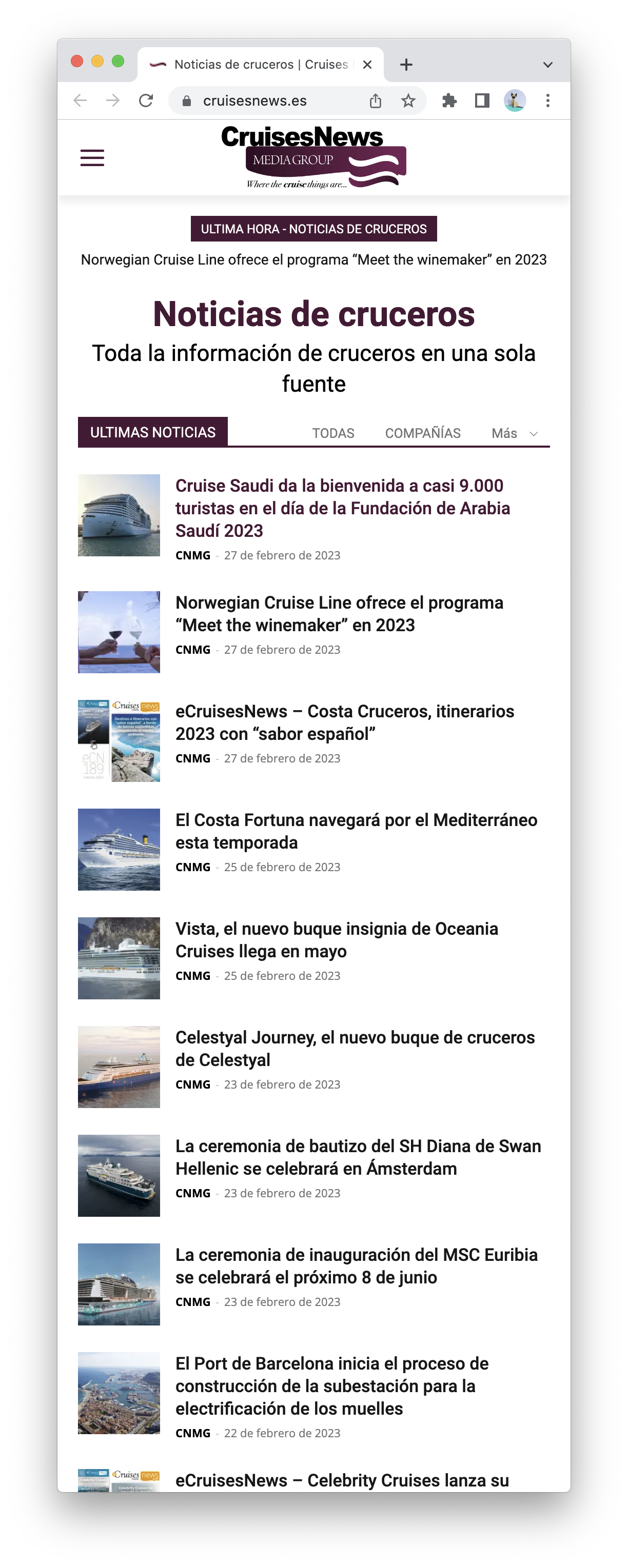
Anamaria Hello,
So, if you want to change the color for each category, you need to duplicate the category template for each category. Check this topic: https://forum.tagdiv.com/topic/different-logo-in-categorypage/ ; Here it explained how to duplicate a header template correctly the same steps are for all templates.
Thank you!
 anonymous anonymous
I want to remove the vimeo icon from thee botton of the footer, and I am unable to fit in the subcribe button which is above the footer inside the footer.
On the Header How can I change Muzic Times text to Home.
Also how can I add a secondary footer where I can privacy Policy, advertise and contact us
Anamaria Hello,
Please let me know what header style you use.
If you have a cloud header, then you need to edit the page with tagDiv Composer => https://www.screencast.com/t/MIhm17tgIJeX select the logo and disable H1 on the logo => https://www.screencast.com/t/T6pvm7wR9 -> https://www.screencast.com/t/P7DuA9su from header and footer => https://www.screencast.com/t/31zJzmsS also if you use a sticky header.
The H1 must appear only once on the page/post and must be applied to an important element for SEO, usually placed on the logo.
Thank you!
 chrisfoxatx
Since I’m new to Newspaper I’ve set up a demo domain where I played around with all the features.
I’ve created the headers and footers I want, as well as highly stylized pages.
I am now setting up a new domain with a new licenses where I will launch the sites.
How do I copy the templates that I’ve created the past week to the new site, not just the theme settings?
Sali Crab the designed layouts
Header:https://dev.saligari.net/wp-content/uploads/2023/02/Screenshot-2023-02-26-at-11.46.06.jpg
Footer: https://dev.saligari.net/wp-content/uploads/2023/02/Screenshot-2023-02-26-at-11.46.36.jpg
The real on devices:
Header:https://dev.saligari.net/wp-content/uploads/2023/02/viber_image_2023-02-26_11-42-45-131.jpg
Footer:https://dev.saligari.net/wp-content/uploads/2023/02/viber_image_2023-02-26_11-42-44-872.jpg
Sali CrabHello,
Good evening, I have created the desired appearance for the mobile header and footer, but not in the mobile version they do not appear.
Custom appearances have been created for all pages for responsive devices.
Please for your help.
thank you
 camilaalves_jetss
 Hi, I need to insert back on main header menu the “My Account” and “Subscribe” button aligned to the Menu – https://www.screencast.com/t/SHpJbfwfDpHY
 gruvii
 Ok so I am having the same problem on https://airambulanceguides.com/ now. I noticed it happened when I uploaded my logos to the header. That is legitimately the only thing that was changed on a fresh install.
camilaalves_jetss HI, I need to know how to prevent the header Menu icons (modal pop up and categories) from get off line while on tablets and smaller desktop screens resolutions – https://www.screencast.com/t/Xm6E6LYmA3E
 dansteeby
Hi there,
I’ve got a client using the Newspaper theme at chicagoskooled.com, and they notified me that their site’s header and footer navigation menus had disappeared. I verified that this was the case and then switched the theme from the Newspaper child theme to the main Newspaper theme as a first step in fixing things. I updated the Newspaper theme and the site’s plugins, and then disabled the site plugins after finding the problem still persisted. At this point, I think I have a plugin-less site with the latest Newspaper theme, but I cannot get the menus to display. In my Dashboard > Appearance > Menus page I have 2 menus, a primary and a footer menu. The Primary menu is set to display in the “Header Menu” Display location, and the Footer menu is set to display in the Footer menu display location. I see that there is markup for a mobile nav that does include the menu, but it seems to be hidden (look for ul#mobile-menu), and there doesn’t seem to be any html markup at all for the footer nav. Can you help me get these menus to show?
 agatay
Hello everyone! TagDiv Composer Dont save Pages in Cloud Template. For example, I make changes on the main page, click save and only the footer and header are saved. And the content is not saved. I searched the forum, some had problems with protection plugins. And I don’t have any
anonymous anonymousOn my website https://londonsjournal.com/
I am unable to change the logo, I have added the logo to theme panel and via header settings also but no changes can be seen
 dahlnewpage
I am using a cloud library header template. I thought I had done this before in Theme Panel – Theme Fonts, but can’t find it..
 prvchs
Hello,
I’m using the Newspaper Theme and recently updated to v12.3. When creating pages, I had been using DivTag Composer to build out a page. Usually after some changes, I would hit the save button and all changes would only appear on that page. Since I updated to 12.3, I’ve noticed TagDiv Composer (v3.9) now gives me multiple save options. Rather than just a static save button, now it’s a save button with four options: Save All, Save Header, Save Content and Save Footer.
When hitting “Save All” – there are pieces of content that I had solely added to just that one page. But it’s showing on ALL pages….not just one custom page. I’ve never had this happen before.
Usually when creating a new Page, it would show the header (but not editable) and footer (also not editable). Sandwiched between those two would be one empty row container which I would add content to. Now when I start a new page, it shows FOUR empty rows and anything I add and save, magically appears across the boards in every page on our site.
I’ve tried to go back to previous versions of Newspaper, but this new way of saving content isn’t working for me. What has changed?
 chip303
Hello,
I have rebuilt the Eastcoast Check template as a normal page. Now I’ve noticed that the search doesn’t show the posts in the order newest-oldest, but is jumbled up.
I have tried all the settings found here in the forum. How can I restore this? There doesn’t seem to be an option to exclude pages from the search either. Probably in the header search, but not in the normal search on the page.
Can you help me please?
Anamaria Hello,
Normally, our templates do not rewrite the 404 option from WordPress, they just change its layout. You can try to use a standard header from the theme panel, to see if the problem still occurs.
Also, please provide the link to your website.
Thank you!



