- TutorialsDefault Block Settings Guide
 Adi
Adi Hi,
Everything was going fine so far. Then I opened one page, went into “Edit with Composer,” and added an ad code under the header — and later removed it. I think I accidentally deleted something else too, because ever since then, extra ads are showing in the header and footer on the pages, category, and author pages — ads for which I haven’t placed any ad code anywhere.
Also, these are not showing because of AdSense Auto Ads. They’re only appearing due to some changes I made in the design of that page.
Check live pages:
https://techunpaid.com/privacy-policy/
https://techunpaid.com/category/instagram/
The 2 ads showing above and below (in the header and footer) — I haven’t placed them, nor are they from Auto Ads. There’s something wrong in the theme settings somewhere.
And what page template should I select here in Cloud Template:
https://share.zight.com/wbudq0kb
Only these options are showing in my theme:
https://share.zight.com/7KulN0R7
And if a wrong option is selected by mistake, how can I rollback or recover it?
I want to restore the pages section back to how it was earlier so that these 2 extra ads don’t show up.
These options are currently appearing when editing any page in Composer:
https://share.zight.com/BluePZ1L
Help me to remove the extra header and footer ads. I want it to be like it was before.
 Calin
Calin Hi,
Ok, it appears that the website is blocked for a part of countries, so I us a VPN to check it out.
Now, I see that on homepage you have a different header, so I believe that maybe one of the theme plugins is no longer installed? Please go to Newspaper plugins and make sure that you have installed and activate the tagDiv Composer, tagDiv Cloud Library and tagDiv Standard Pack (I believe that you do not have the standard pack that brings the old templates).
Thank you!
Calin Hi,
If you are using a cloud header, then you can use tagDiv Composer to remove the popup login (Header login element) then create a page that you want for login and make sure that tagDiv op-in builder is installed (from Newspaper > plugins), add in that page the page login element – https://i.imgur.com/vPrsKZi.png and set the menu login element in header section. Doing this you’ll get a login page like this one – https://i.imgur.com/hlGEVcN.png – https://demo.tagdiv.com/newspaper_downtown_pro/tds-login-register/
Thank you!
 lamayer
Hello,
Our website, http://www.ltl.lu, uses a megamenu that is based on pages. Currently, the megamenu appears under the main menu.
What I would like to achieve is for the megamenu to start at the top edge of the screen, placing itself behind the main menu and other header elements — in effect, making the megamenu flush with the top of the viewport, but layered beneath the header.
Here’s how the menu currently looks:
https://www.ltl.lu/menuquestion/ltl.gif (animated GIF)
And here’s an example of the effect I’m aiming for:
https://www.ltl.lu/menuquestion/lcd.gif (animated GIF)
I tried adjusting the z-index values, setting the menu and other header elements to z-index: 999, and the megamenu to z-index: 0 using the following CSS, but that didn’t work:
.tdb-mega-menu .sub-menu > li {

  z-index: 0;

}
I hope my explanation is clear — but please let me know if anything is unclear or if you need additional information.
Best regards,
Calin Hi,
Ok, I see that the menus are the same, so I will recommend to use the set the cloud header template as global, this can be done from Cloud templates – https://i.imgur.com/LDowYyZ.png this will apply the cloud header on entire website and the problem will be resolved.
Also, if you want to have a different cloud header on a page, on category or single template you can assign an individual template directly from the page/template from manager – https://i.imgur.com/9gmvt0o.png – https://i.imgur.com/bOLq46Y.png
Thank you!
 benj0612
 Hi,
Wow, that’s smart! It worked!
I still have an issue with the menu, though.
I don’t have a “Cloud Template” menu set for my entire website (no one selected). However, when I tried to modify the header menu, I noticed that I couldn’t do so on the article pages.
For some reason, the header menu is different on those pages (you can see it on http://www.dr-detailing.com).
The error message I’m getting is:
“This type of header is not editable with TagDiv Composer. Please use a cloud header template!”
The home page works fine both on desktop and mobile, but the article pages have a different header.
I hope that’s clear. It’s a bit tricky to explain, but I’d appreciate any guidance on this issue.
Thanks in advance!
Calin Ok, I reverted the mobile menu from the original header.
 plotwit-team
 Okay then i will create separate installation for web stories with different theme. For now Can you please revert back to original header, I am not able to do that.
Calin Hi,
This can be done if you are using a cloud header, this can be edited using tagDiv Composer
There are more ways to do this, one of the solutions is to use a row or inner row and set it in 2 columns – https://i.imgur.com/5MrjXC2.png one for menu and one for live search element, anther solution is to set the elements in the same column and make sure that both element have the option for “make inline” enabled – https://i.imgur.com/MKgXe2u.png – https://i.imgur.com/UKhq8FM.png
Thank you!
Calin Hi,
Unfortunately there are no options to do this. It can be done only if you change or overwrite the css from the theme (here is a similar topic – https://forum.tagdiv.com/topic/modify-breakpoints/) but if is all about the navigation menu, then you can set it and use it on each view port you want and hide it from those you do not want. This can be done on cloud header with tagDiv Composer.
Thank you!
 dataconurbano
Hello,
I’d like to ask how I can modify the breakpoint at which the mobile and desktop headers switch.
Currently, the layout changes at 768px, but due to a long navigation menu, I’d prefer the switch to occur at 1400px.
Could you please let me know how to adjust this setting?
My test website is: https://dataconurbano.net/test/
Thank you in advance.
 David
David Hi Calin,
Thanks for the clarification!
I’m using a Cloud Header but with the standard mobile menu, and your suggested CSS for the expanded subcategories works perfectly in this setup.
Also, your explanation regarding the social icons makes sense. Since I want to keep them on desktop but remove them on mobile, the CSS approach is exactly what I needed.
Appreciate the quick and helpful support!
Calin Hi,
Please follow the steps below to troubleshoot the issue:
Start by checking this guide: – https://forum.tagdiv.com/tagdiv-composer-not-working/
If the issue appears on only one specific page, try restoring a previous version using WordPress revisions: – https://www.wpbeginner.com/beginners-guide/complete-guide-to-wordpress-post-revisions/ Also, check if the problem is not on cloud template or footer template (replace theme or set no header no footer from the theme panel).
If the problem still persists, please contact us at contact@tagdiv.com. When reaching out:
Make sure you have a full backup of your website.
Provide temporary wp-admin and cPanel access.
Include the link to this topic in your message so we can easily identify your case.
Thank you!
 jorronchi
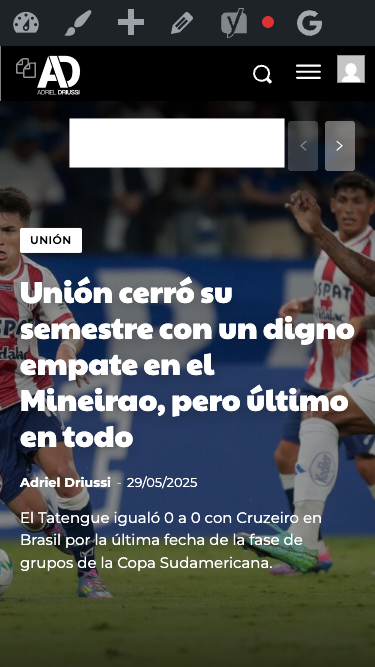
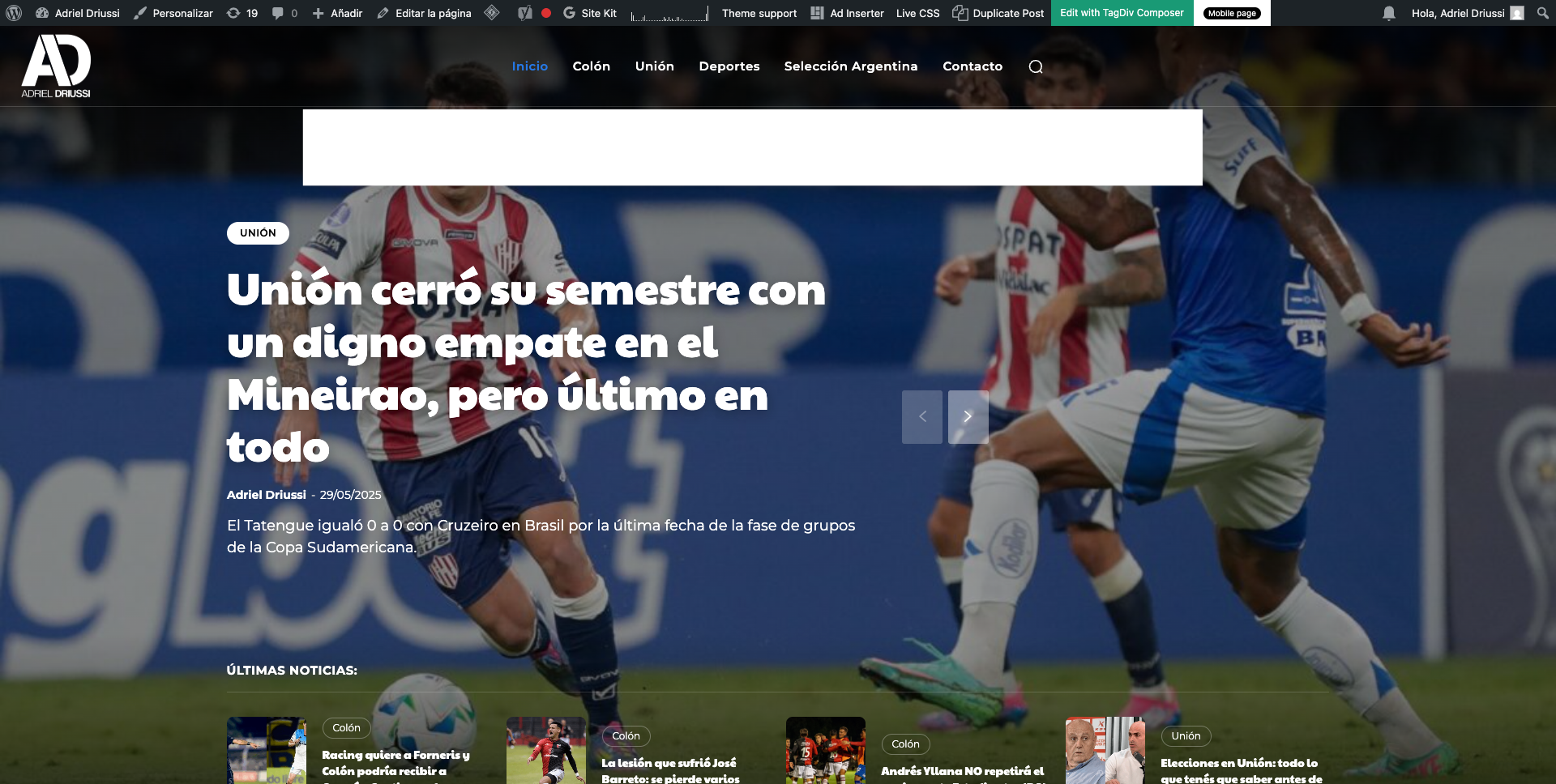
Hello, we would like to insert a banner that appears immediately after the header on https://adrieldriussi.com.ar/. Ideally, the banner should be placed above the featured image, both on desktop and mobile. I’m attaching images showing where we’d like to place the banner.
http://imgfz.com/i/4hW0nIe.png
http://imgfz.com/i/6c4byZN.png
We tried doing this through the Ad Inserter plugin but couldn’t find a way to insert the banner in the correct spot (I tested with different divs). Could you help me with this?
Thanks!
 midtcnick
 Hi, it’s not a multisite, it’s just a site that has different headers on some pages.
We are getting errors like “Cannot find source for file 37556<-(the header ID) in path/to/page/with/messed/up/header.
It could be cache, but I disabled caching on those pages to try to diagnose the issue and it didn’t work.
Thanks for your help.
Calin Hi,
It will be need to use a cloud header and use tagDiv Composer to drag the news ticker in the place you want -https://i.imgur.com/8I8PeBg.png
Thank you!
Calin Hi,
Most of the time the problem is from a shortcode that is not compatible with our theme or a plugin conflict, therefore after you set it with tagDiv Composer and save the page/cloud template, the next time when you try to edit it, you’ll get that error.
If is only for one page or a cloud template (it can be on the header or footer, you can change them for tests and see if the problem persists), this is from some settings/shortcodes set on it and it can be fixed using the page revision -https://wordpress.com/support/page-post-revisions/
I hope this will help you!
plotwit-teamHow to add news ticker in header topbar?
 mdcproduction
Hi tagDiv Support Team,
I’m currently using the Newspaper theme (version 12.7.1) on my website https://djhaber.com. I’m trying to replace the default header advertisement banner that comes with the theme (the “Newspaper – Buy Now” banner), but even after removing the image from my Media Library and updating the header ad settings, the old banner is still showing.
Can you please help me locate where this image is being pulled from and how I can safely replace it with my own banner?
Thank you in advance for your support.
 giampablo1
Subject: Persistent Issue with Custom Header Configuration Resetting to Default – Newspaper Theme
Dear tagDiv Support Team,
We are experiencing a recurring issue with the Newspaper theme on our WordPress website.
At random intervals, the theme loses the custom header configuration and reverts to the default layout. This also affects individual post pages and category pages, which suddenly switch back to default templates instead of maintaining our customized design.
We have tried disabling plugins one by one to identify potential conflicts, but unfortunately, this did not resolve the issue. Each time this happens, we are forced to manually reassign the correct header and templates via the front end, which is both time-consuming and unsustainable.
If you need to access the WordPress admin area to investigate further, you may use the following temporary login credentials:
• Username: ****
• Password: ****
If necessary we will send in private message.
We would greatly appreciate your help in identifying the root cause and providing a stable solution to prevent the loss of custom settings.
Thank you in advance for your support.
Best regards,
– lortica.it
Calin Hi,
From the theme panel > social networks you need to remove the social networks and this will remove theme from standard headers and mobile menu. But in case that you are using a standard header template and not a cloud then this method will remove the socials from both (desktop and mobile) versions. So, if you are using a standard header and footer then you’ll need to use the above css.
The expanded subcategories on mobile menu can be achieve on cloud header were you can use a popup element as mobile menu and you can create the mobile menu in a page using tagDiv Composer and you can use the element list menu, that one can be configurate to display by default the menu expanded. This can be done only if you are using a cloud header.
If you are using the standard header then you can try this custom css:
.td-mobile-main-menu .sub-menu {

  max-height: max-content;

  opacity: 1;

}

.td-mobile-content .td_mobile_submenu > a .td-icon-menu-right {

    display: none;

}
Thank you!
 Maneek
Hi there.. I downloaded a homepage template and was working with it for the past 7 days.. It was fine.. The default font style was NOT ITALIC.. But today all of a sudden the Default Font Style seems to have changed to Italic.. I didn’t make any change anywhere and actually as far as I have seen, there is no way to change default font style everywhere at once.. But when I add a text box or try to create something, the header, body, all texts are showing Default Font Style – Italic..
Could you pls advise how to get past this..?? I don’t want to keep changing the Font Style to Normal (Not Italic) each time..
Calin Hi,
This can be done if you are using a cloud header, edit it with tagDiv Composer and use the mobile horizontal menu element – https://i.imgur.com/oOdrVwU.png
Thank you!
Calin Hi,
Most of the time the problem is from a shortcode that is not compatible with our theme, therefore after you set it with tagDiv Composer and save the page, the next time when you try to edit it, you’ll get that error. The most simple and fast way to resolve it is to use a page revision – https://wordpress.com/support/page-post-revisions/ now if the problem is on all pages most of the time this problem is related to the cloud header and cloud footer (set a default one in the theme panel – https://i.imgur.com/VKTq62w.png and check if the problem persist, if not, then the problem is related after the last changes to the header or footer)
For this error, you can check our guide from here at point 5 -> https://forum.tagdiv.com/tagdiv-composer-not-working/ also after trying the steps from our guide you do not get any good results, You can send us an email at contact@tagdiv.com and provide wp-admin login, as well as cPanel and credentials. We will take a look. Include a link to this topic in the email.
Thank you!
Calin Hi,
This is a multisite where you are facing this situation? Can you please let us know if you are using cache, object cache …? If you have cache, is possible that after a period of time the wrong cache version to be delivered and after the cache is cleared to display the correct header.
Thank you!