
- NewspaperHeader Builder
- NewsmagHeader styles
- NewsmagHeader ads
- NewspaperHeader ads
- NewspaperHeader styles
- Apitd_api_header_style::delete
- Apitd_api_header_style::update_key
- Apitd_api_header_style::update
- Apitd_api_header_style::add
- ApiAPI – Header style – Introduction
- NewspaperSearch setup for custom post type
- NewspapertagDiv Composer – Website Manager
- NewspaperBookmark – Save For Later
- NewspaperWooCommerce: Happy “Add to Favorites!”
- NewspaperModal Popup
- NewspaperFlex Block Settings Guide
- NewspaperPosts Loop Element
- NewspaperHow to Add a Logo in Newspaper
- NewspaperDefault Category Settings
- NewspaperWhen tagDiv Composer is Not Working
 Catalin
 Hello n26rail,
If you want to add there an Ad, please notice that you should change the header style to another one, like Header Style 10 and the result you should see here -> http://screencast.com/t/LQJPLpji6IEw For more information about our range of Ads, please consult the documentation here -> http://screencast.com/t/LQJPLpji6IEw
For your second request, please notice that if you want to make your main container being wider, also you will have to change the width of the theme and please notice that our product does not have such an option for dynamic width and we do not recommend to do that through the custom CSS code because the layout of the theme will be damaged. If you want to change the width of the theme to be in full-width mode, please notice that is not a simple task and you will have to adjust the entire theme to the new width for better results.
If you want to display more levels in our theme and you are not aware of the steps in this regard, please consider hiring a freelancer/developer to do this for you because we cannot provide customization services at the moment, sorry!
Thanks for your understanding!
 Bogdan B.
 Hello,
Our theme has no such option unfortunately. The menu cannot be removed from the page using the theme settings. If you want to create a new menu you will have to use a plugin or create it in revolution slider as the site you mention. The main header area can be hidden from the homepage using a simple css trick:
.home .td-header-wrap{

display:none!important;

}
Thank you!
 datomnz
Hi
I’m wanting the header block to stretch out (not the actual content but rather just the coloured bars) to 100% width of the screen. See arrows here: http://prnt.sc/czh1qa
The content can stay the current width, but the coloured bars could do with stretching out.
Is this easily done?
Thanks
 Twolle
 Hi Catalin,
Thanks for helping – however it is not that simple. Before writing this post, I tried almost everything to change the words – also including the translation part of the theme panel.
The header on author.php doesn’t seem to be connected to the translations.
/Twolle
 AndroidKosmos
Hey,
i need a special header stlye, so is it possible to have the “Top Menu” with my logo?
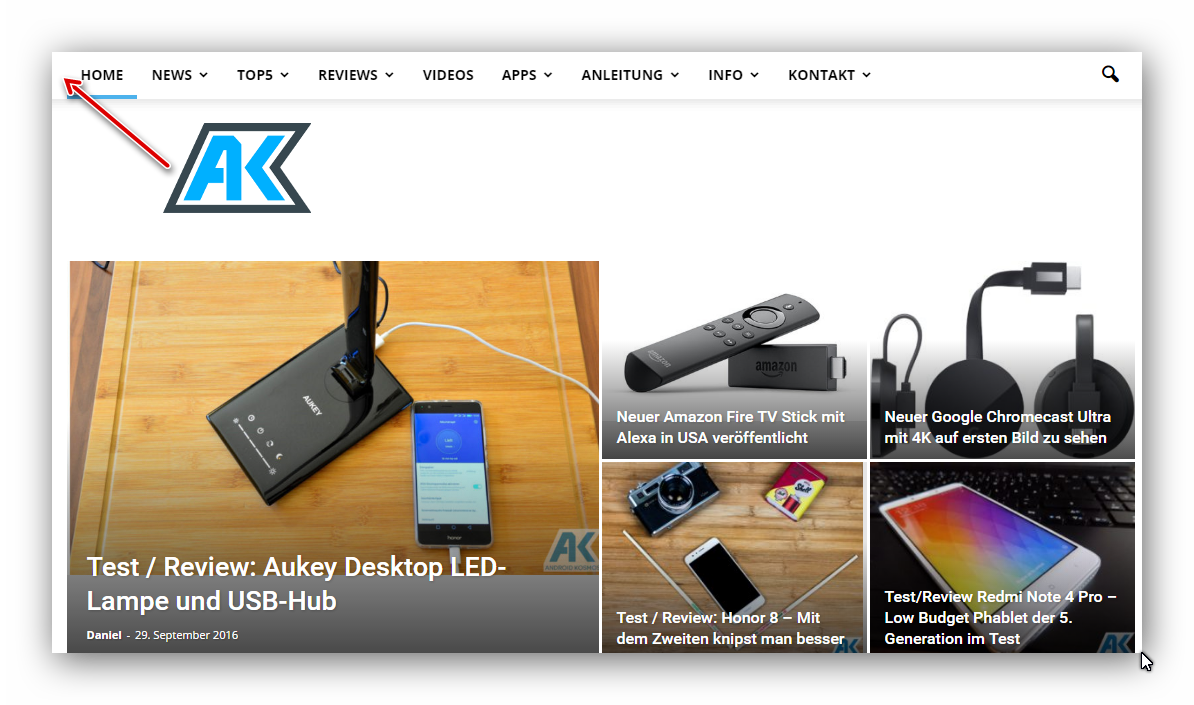
Like the Hybrid Menu but i dont like the color style.
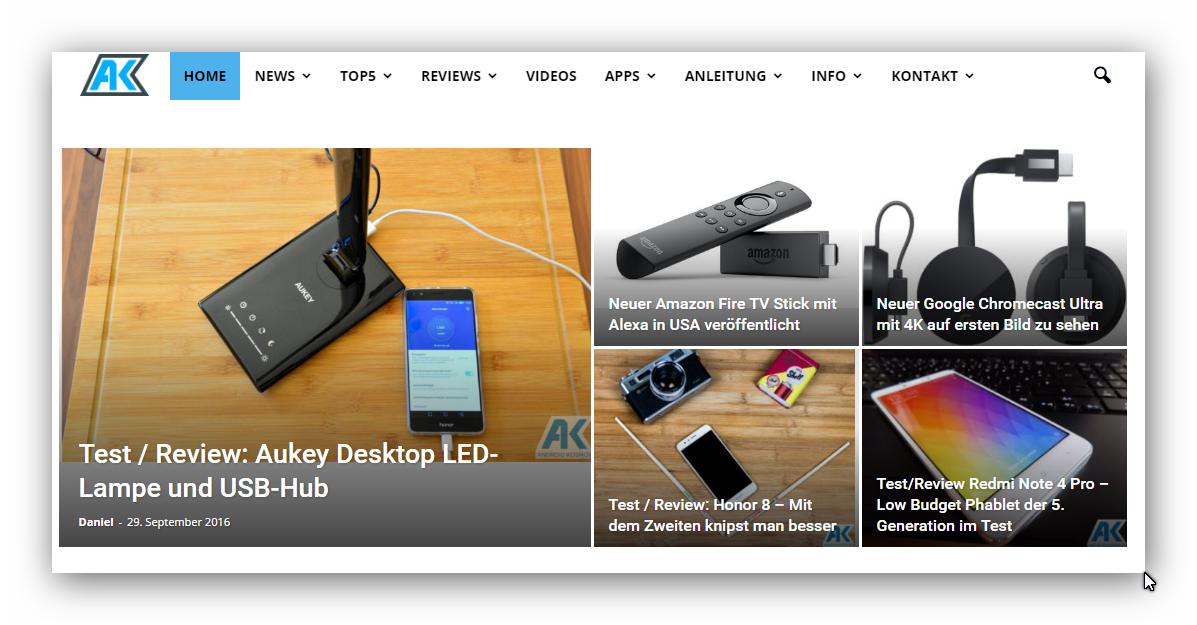
best
 weezyworld
 Hi Catalin,
Now all is perfect. Thanks!
I want to ask also for image gallery, how can I change color of header? Default is black, but in widget options I didnt see area for change color.
This color I need to change: http://www.screencast.com/t/fCWeJwMt1Ia4
 n26rail
 HI,
Thanks for getting back.
Here is the screenshot where I want it to be. I just need at this location and not in header (which I think what Post Template Style 12,13,does).
http://www.screencast.com/t/VjlAHhwtNU
I plan to put a 720×90 Ad at this location.
I have also posted another query on how do i increase the width of the website. Request you to have a look at that too.
Regards,

 chandra sehar
When I actavated Newtheme I am getting following issues.
1) My mobile Aps are down ‘Aps still showing loading icon only’;
2) We are able to expose all API calls.
3) If I activate previous my them All aps are working file.
4) My API call = http://www.alertinfo.in/api/list/mylist/?cat=latest-news
5) IOS developer says below issue there are facing..
{ URL: http://www.alertinfo.in/api/list/mylist/?cat=home } { status code: 404, headers {
Age = 0;
“Content-Encoding” = gzip;
“Content-Length” = 69;
“Content-Type” = “application/json; charset=UTF-8”;
Date = “Wed, 26 Oct 2016 09:56:26 GMT”;
Server = “Apache Phusion_Passenger/4.0.10 mod_bwlimited/1.4 mod_fcgid/2.3.9”;
“Set-Cookie” = “PHPSESSID=s5ulnbean9a4vnnf8m1ii0e5c3; path=/”;
Vary = “Accept-Encoding,Cookie,User-Agent”;
Via = “1.1 varnish-v4”;
“X-Powered-By” = “PHP/5.4.45”;
“X-Varnish” = 37261005;
} },
Note :- When we activate my old them all mobiles aps working fine. Currently we are activated Newstheme only can you look on this issue.
Big wonder is :- All api calls working… Can you guide us to fix this issue ASAP….
 neoprofit
Hello,
After the latest theme update, we’ve run into problems with up & down arrows. They just stopped working as you can see at: http://uzr.com.ua/test-drayv/supertest-novaya-kia-optima-protiv-treh-konkurentov/
The “Down” arrow in the middle of the header graphics and the “Up” arrow on the bottom right-hand corner.
Please assist.
Thank you
Bogdan B. Hello,
Yes, this is true. Our theme elements have common functions. They do not have separate functions for each element. The get_header function works on all modules and blocks in our theme. If you change this, it will affect multiple parts of the site, not just the related articles section. It can be done but you will need coding skills to pull it off.
An easy way to do it is to duplicate the function in td_module.php and name it get_title_custom and then replace the h tag to the one that you want.
Make sure to call the get_title from the td_module_related_post.php to the get_title_custom function.
Thanks.
Bogdan B. Hello,
The logo will get re-sized on post styles that do not use the full logo. If you want the full logo to show we suggest using the 3 post styles that display the logo in it;s full size without altering it. These are headers 9, 10 and 11
Thank you!
Bogdan B. If you want a customization badly, the correct path to take is to hire a freelancer to help out, but since we are good guys I will show you how to do it 🙂 keep in mind though that customization is not part of the theme support; we try to help out where we can.
OK, for the headers to be like on the cars demo you will have to use this css:
.block-title{

background-color: #f77b33!important;

}

.block-title > span{

background-color: #f77b33!important;

}

.td-subcat-filter .td-subcat-list a {

    color: #fff;
This should bring you pretty close to the cars blog headers.
Thank you!
Bogdan B. Hello,
The header seems to get a fixed height: http://screencast.com/t/LyUp6ueaotYB
Please check your custom code or disable the plugins to get rid of this fixed height. That is where the extra space is coming from.
Thank you!
Catalin Hello simplypotter,
Please notice that the size of the logo cannot be changed from Theme panel and we do not recommend doing this because you can damage the layout of the theme. Please keep in mind that our theme has a lot of header style which uses a lot of logo sizes. Please consult our documentation here -> https://forum.tagdiv.com/header-styles/
Hope this helps!
Thanks for the message!
 nelsonlive
Hi
How do i get two slider ads both 510×93 side by side in the ads header.
I have used the code below but does not work
<div class=”td-all-devices”>
<table style=”width:100%”>
<tr>
<th>[wds id=”7″]</th>
<th colspan=”2″>[wds id=”8″]
</th>
</tr>
</table>
</div>
Bogdan B. Hello,
Unfortunately the mobile version of the site was never meant to show the top menu. It can be added with a bit of custom css but only at the top of the main page, not inside the hamburger menu. Try this code:
@media (max-width: 767px){

.td-header-top-menu-full {

display: block!important;

}

div.td-header-sp-top-menu {

display:block !important;

float:none!important;;

}

.td-header-top-menu-full {

display: block!important;

}

.td-header-sp-top-widget{

display:none!important;

}

.menu-top-container {

    display: table!important;

    margin-left: auto;

    margin-right: auto

}}
Add the code in the theme panel->custom css box.
Thank you!
Bogdan B. Hello,
Unfortunately as this is a custom modification I cannot say for sure why this happens. Your code seems to go outside of the content borders. We only recommend using the theme default ad system, not custom code added to the theme files. On pages we suggest using the ad box element present in the visual composer element drop[down and for the rest of the theme we recommend the theme ad spots: https://forum.tagdiv.com/header-ads-adsense/
If you do not plan on using the default theme implementation, we suggest hiring some help on this as this represents customization and it falls beyond what the theme support can offer you.
Thank you!
 blk709
I have a question about whether the theme can create landing pages. I moved from Genesis themes to yours. Genesis theme frameworks allow creation of landing pages where the header/footer, menus and title can be removed.
I have figured out how to obviously remove the sidebar. But I cannot figure out how to remove the header/footer or the menus to build a landing page.
Is this possible? In the alternative, I have Thrive and Clickfunnels, but I wanted to see how it could work.
 josinc
 Hello Bogdan,
What if I wanted that change very badly.
What CSS selectors I need to change for ‘Sidebar Widget Headers’ and ‘Next’ and ‘Previous’ article links in post page.
Josin
 simplypotter
How do I change the size of the logo in my header? Currently mine is way too small! http://www.simplypotter.com
n26railHi,
Is it possible to position an Ad in any of these locations :
1) Below header but above breadcrumbs
If the above is not possible – is this possible 2) below breadcrumbs but above post / page title?
I have tried using Post Template Style 12, 13 but none of them show Ads.
I do not want an Ad in header.
Thanks in advance for help!
TwolleI have tried to find the words in the header of author.php with Loco Translate in order to change them, but without any luck.. :-/
I am using author.php without sidebars.
Right now is says: “author-slug, author on website-name”
Thanks.
TwolleI am getting this error:
[25-Oct-2016 11:07:16 Europe/Copenhagen] PHP Fatal error: Uncaught Error: Call to undefined function get_header() in /xxxx/xxxxx/public_html/wp-content/themes/Newspaper/index.php:6
Stack trace:
#0 {main}
thrown in /xxxx/xxxxx/public_html/wp-content/themes/Newspaper/index.php on line 6
What can I do about it?
 Gaurav
Hi,
I am setting an image in the header area of the page. I want to know the optimum width and height of that area. I will be sending a mail with the screenshot, so that its easy for you to understand.
Gaurav
Catalin Hello saggel,
I guess that I understand to what you are referring to. So, by default, the theme will crop the image center to top and that’s why will appear that image cut. Please try to use the code below and place it in Theme panel->Custom CSS area.
The code is ->
.td-image-gradient-style7:after {

top: -68px;

}

.td-post-template-7 #td-full-screen-header-image{

margin-top: 68px;

}
The result you should see here -> http://screencast.com/t/NXy6TZhwb11
Also, please notice that you can adjust all of these values as you wish.
Thanks for your understanding!
