- NewsmagHomepage – How to build and set it
- NewsmagtagDiv Composer Tutorial
- NewsmagNewsmag documentation
- NewsmagMain menu
- NewsmagLogo & Favicon
- NewsmagPage templates
 IslandAndrew
 How would I put that plugin onto the homepage?
 vimalgopal
https://concentratedwisdom.com/
Hi team, I want to move the homepage to blog page with the current layout. And have a separate homepage layout.
When changing the pages in Settings->Reading-> And assign homepage to a new page that I created and posts page to the existing page.
It’s not working. I want to know where can I configure the posts template?
 TecnA Magazines
Hello,
Yesterday I updated the Newspaper theme to version 12 from version 9 on my company’s website http://www.tecnaplastics.com.
It took some time to update the pages layout because some of the older blocks did not work in the recent version. Everything seems fine from the pages (homepage and other pages of the website) but when I click on a single post I get a screen that reports several errors:
wp_booster error:
td_api_base::mark_used_on_page : a component with the ID: single_template_1 is not set.
/web/htdocs/www.tecnaplastics.com/home/wp-content/plugins/td-composer/legacy/common/wp_booster/td_api.php
wp_booster error:
td_api_base::get_key : a component with the ID: single_template_1 Key: file is not set.
/web/htdocs/www.tecnaplastics.com/home/wp-content/plugins/td-composer/legacy/common/wp_booster/td_api.php
wp_booster error:
The path of the single_template_1 template not found. Did you disable a tagDiv plugin?
/web/htdocs/www.tecnaplastics.com/home/wp-content/plugins/td-composer/legacy/common/wp_booster/td_api.php
wp_booster error:
td_api_base::get_key : a component with the ID: single_template_1 Key: bg_use_featured_image_as_background is not set.
/web/htdocs/www.tecnaplastics.com/home/wp-content/plugins/td-composer/legacy/common/wp_booster/td_api.php
I also tried to add a completely new post (created with the new version of the theme already installed, while the rest of the) but I get the errors also in this case.
The site is now in “under construction mode”.
Thank you in advance,
Claudia Bosco
 Anamaria
 Hi,
The homepage is the same, but only the logo has been changed.
Thank you!
 charles123
 I didn’t understand, My question is very simple. In the main homepage banner, I want to exclude one particular category,
Where is the exclude option, How should I do that. I have checked the document which you shared it quiet difficult to understand.
 DashDesigns
 No, I had to start again with a new page and assign it as the homepage. The logo works on everything apart from the Gadgets Template Home page that it creates. That will not change and hence why I just started a new page completely.
With regards to the categories page showing my home page at the base, I just opened the category page to edit it and hovered over the homepage that appears at the bottom, and sure enough, it says “Footer” in the Zone. Why has the whole page been assigned to the footer area of the category template? All I did was create a new page and assign it as home page. Where did it pick it up and make it the footer? I have just assigned a new footer for the global footer to get rid of it, but I would still like to know why this happened without me knowing?
 leeallen
 I have the latest version of the theme, however, when I go into the cloud templates to download just the homepage for Newspaper12 I do not see 12, I see 10 and 11?
charles123This is the single post, https://www.southmoviez.com/tamil/tamil-tv/february-2-special-movies-tamil-tv-channels/
1) what is the best featured image size for this post
2) in the homepage,no featured image corner( top, bottom, right, left) it should crop down. Homepage layout thumbnail also should show the same image as shown in the featured image.
 forgepress.website
 Hi Anamaria,
Thanks for that, I have fixed the extra recommended articles with the jetpack plugin. I have also changed some other settings in there related to the cornerstone page as I’m wondering if it has caused the glitch with the homepage as well. I’ll keep you updated if that hasn’t sorted it.
Thanks!
 imcamg
There’s a WordPress plugin called widget logic that apparently lets you control what pages you want your widgets to appear on. I think the Newspaper theme has something called id filter in tagDiv Composer for the tag filter and there’s custom sidebars also. I’m trying to find the best implementation for showing certain tags on certain pages in the sidebars of specific archive pages.
For example, in my sidebar on huntcode.com on the homepage, if someone clicks Linux in the sidebar it will open the Linux tag archive page and it should show different tags than what shows on the homepage in the sidebar such as the different flavors of Linux like CentOS and Ubuntu instead it’s displaying Linux in the sidebar of every page even pages that aren’t related to the Linux topic like on the JavaScript tag archive page or something else.
 Proposition Media
Hello,
I’m wondering how I can make the website load the desktop version when someone is browsing on an iPad. Currently, the website is loading the mobile version, which is causing issues. Is there any way to fix this?
All the images were taken from the homepage, but with different devices. As you can see, the iPad ends up displaying a sort of in-between version. It doesn’t load the desktop “smaller screen” mode, but instead chooses the mobile page. Since the mobile page is only for phones, it ends up looking like what you see in the picture.
Best regards,
Jakob
Anamaria Hello,
So you have made the change for the homepage and logo and are working? Related to the issue with the page at the bottom of the template maybe you added rows in footer zone that is why you have it on the homepage, so please check the rows where are set and move them to the content zone on the page
-> https://i.imgur.com/381J9qm.jpg
-> https://i.imgur.com/wVGxYeg.jpg
-> https://i.imgur.com/0O3iGEg.jpg
Thank you!
 nycinsider
 hi – as usual with this theme, all is fine through 10-20 different saves, all green on saving home page. Then, a few days/weeks later with zero changes to anything, the error forms again and I can’t edit my homepage.
What tool(s) do you use to find the code errors your theme is generating? There’s so much random weird code on the back end, there’s no regular html tool to find open/missing divs. How do you recommend we troubleshoot the code errors generated randomly by your theme?
 leeallen77
I do not see the newest Newspaper version available for download in Cloud Templates, is it available for download? Is the version 12 homepage another version, like 11, that has not changed?
Thanks
Lee
Anamaria Hello,
You have the mobile theme plugin activated; please deactivate it and clear the cache.
Using our theme, you can choose from 3 mobile versions
-> mobile responsive => https://www.screencast.com/t/oJ2ShOp47
-> mobile theme plugin => https://forum.tagdiv.com/the-mobile-theme/
-> mobile page => https://tagdiv.com/newspaper-10-3-7-update-brings-customizable-and-fast-mobile-pages/ The option that you need to use.
Suppose you created the mobile pages with tagDiv Composer. In that case, when you install the Mobile Theme plugin, your pages will be overwritten by the plugin (the mobile theme comes with its templates for page, post, category, etc, so your current templates from the desktop theme will get converted to the mobile theme layout, the page content is made without builders in mobile editor => https://www.screencast.com/t/xbgZG8kH also, the options that are provided to edit the mobile theme version are limited (this keeps the things simple)).
This is a video about Responsive Newspaper Theme, AMP & Mobile Theme, Mobile Pages & Templates -> https://www.youtube.com/watch?v=SpGkOnJeNZY.
So, the mobile responsive is what you see when that you select the viewport on phone => https://www.screencast.com/t/matV17hH, so some settings may apply for each viewport(where is the border blue), and others are not(where the border is black).
The mobile page has the mobile templates from Cloud Library => https://www.screencast.com/t/YCcZ8rL8
The Mobile responsive version of the theme and the mobile page editor can be edit with tagDiv Composer, the mobile theme plugin cannot.
For example, you can have the mobile theme plugin activated and use the mobile page/mobile responsive version for the homepage/pages, but for the categories pages/404 page, you can’t use the mobile page/mobile responsive version if you have the mobile theme plugin activated.
So, if you want to design the pages with tagDiv Composer, you can use the mobile page or mobile responsive version.
Thank you!
Anamaria Hello,
You have the mobile theme plugin activated; please deactivate it and clear the cache.
Using our theme, you can choose from 3 mobile versions
-> mobile responsive => https://www.screencast.com/t/oJ2ShOp47
-> mobile theme plugin => https://forum.tagdiv.com/the-mobile-theme/
-> mobile page => https://tagdiv.com/newspaper-10-3-7-update-brings-customizable-and-fast-mobile-pages/ The option that you need to use.
Suppose you created the mobile pages with tagDiv Composer. In that case, when you install the Mobile Theme plugin, your pages will be overwritten by the plugin (the mobile theme comes with its templates for page, post, category, etc, so your current templates from the desktop theme will get converted to the mobile theme layout, the page content is made without builders in mobile editor => https://www.screencast.com/t/xbgZG8kH also, the options that are provided to edit the mobile theme version are limited (this keeps the things simple)).
This is a video about Responsive Newspaper Theme, AMP & Mobile Theme, Mobile Pages & Templates -> https://www.youtube.com/watch?v=SpGkOnJeNZY.
So, the mobile responsive is what you see when that you select the viewport on phone => https://www.screencast.com/t/matV17hH, so some settings may apply for each viewport(where is the border blue), and others are not(where the border is black).
The mobile page has the mobile templates from Cloud Library => https://www.screencast.com/t/YCcZ8rL8
The Mobile responsive version of the theme and the mobile page editor can be edit with tagDiv Composer, the mobile theme plugin cannot.
For example, you can have the mobile theme plugin activated and use the mobile page/mobile responsive version for the homepage/pages, but for the categories pages/404 page, you can’t use the mobile page/mobile responsive version if you have the mobile theme plugin activated.
So, if you want to design the pages with tagDiv Composer, you can use the mobile page or mobile responsive version.
Thank you!
 peters1964
Hello there, I need your help once again:
On my home page I would like to delete the gray separator under the header or in white color. Where can I change this?
Thank you very much for your efforts.
Christiane
Screenshot: https://mawi-westfalen.de/wp-content/uploads/2025/01/Screenshot-Homepage-Header.png
 jsup
jsupHey there, I have a regular “shortcode” from the ngg plugin I wish to add as I can’t find a way to create the style of gallery NGG offers using this awesome theme.
If I add it raw on the page it works (outside of the editor), but if I add through the Tag Div Editor on my homepage it just comes up as regular text – presumably it does not process [shortcodes in this format inside the editor]
 Castu
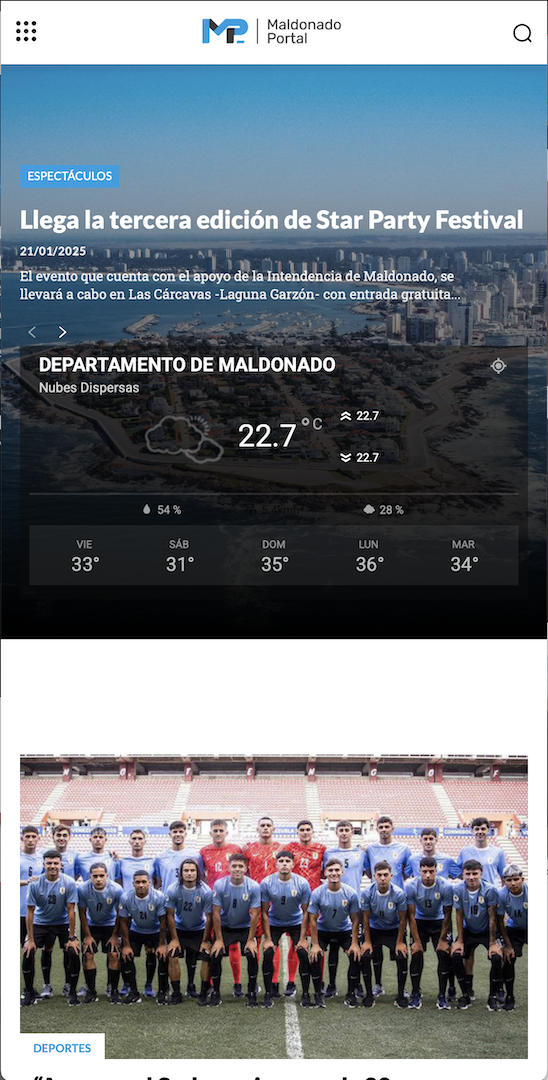
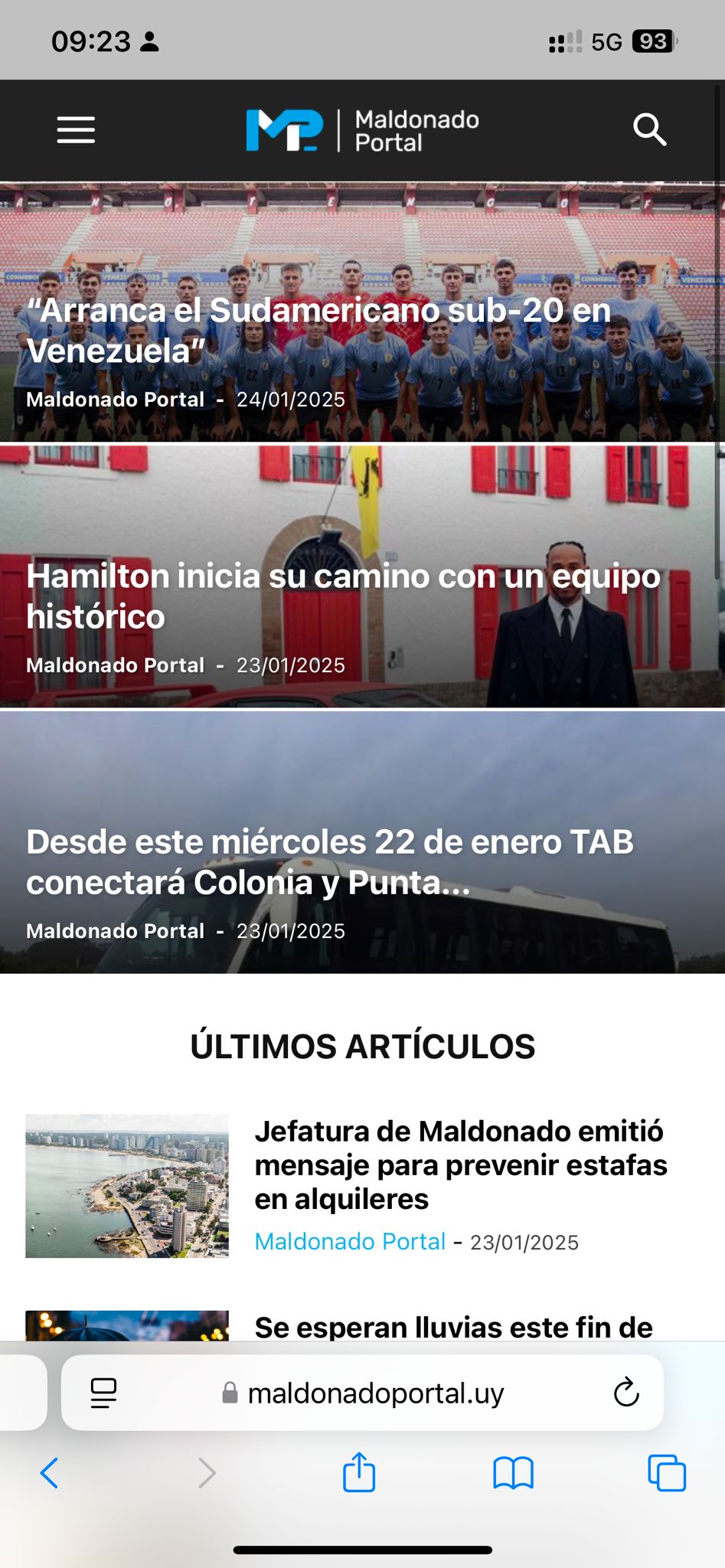
CastuHi, I went live with my website yesterday and the homepage on mobile looked beautiful, then out of nowhere the style changed.
This is how it looked yesterday and how it should look now:
https://maldonadoportal.uy/wp-content/uploads/2025/01/Captura-de-pantalla-2025-01-24-a-las-09.29.51.png
and this is how it actually looks:
https://maldonadoportal.uy/wp-content/uploads/2025/01/WhatsApp-Image-2025-01-24-at-09.23.51.jpeg
If you could assist me with this please.
charles123In this, all the categories are showing, But I want to exclude some categories. Please let me know how to that, Because I don’t want to show some categories on the homepage.
Escpecially I want to remove category, “Actor” Give me an idea
 rafo04
Hello,
In the theme panel’s category settings, there is a very useful feature: “HIDE CATEGORY ON POST AND ON CATEGORY PAGES” (Show or hide category on single post page and on category pages. Useful if you want to have hidden categories to sort things up).
I would like to use this functionality for the homepage of my site. Some categories are necessary for organizing content, but I don’t want them to be displayed on the homepage or publicly visible.
How can I achieve this? Is there a built-in way to hide specific categories from the homepage while still using them for sorting?
Thank you!
forgepress.websiteOur website seems to have a glitch on the homepage where it reverts back to an old version without any of the articles every so often. It seems to be ok most of the time and it seems to function fine apart from that. It is happening relatively often but seems to return to normal in under 20 minutes.
 Greg
GregDear Support Team,
I attempted to create a mobile homepage as there was no existing mobile homepage linked to the top button. I created a new one, named it “Mobile Homepage,” and checked the box to copy content.
After that, I clicked on the top button and used the pencil icon to edit it. However, when the page opens, I see all the content displayed twice. Could you please advise where I can adjust the settings to prevent the duplicate content from appearing?
Thank you for your assistance!
Best regards,
Greg
 lorenacookie
 UPDATE – it looks like the site works on desktop/laptop. But on the mobile, all internal pages and posts don’t work. Only the homepage appears to be working. This is so frustrating.
 tongyfilardi
 @bettina, I´m asking about having this for Section pages.
The guide is about pages (homepage) but once I publish a template for section the de-duplication doesn´t work at all.
Please I need answers about this topic not other.
Thanks