- NewsmagHomepage – How to build and set it
- NewsmagtagDiv Composer Tutorial
- NewsmagNewsmag documentation
- NewsmagMain menu
- NewsmagLogo & Favicon
- NewsmagPage templates
 MaximePavie
Hey guys
I’m using newspaper for a travel blog and when i’m uploading a nice featured image for a blog post, the quality for the thumbail ( using bloc post 2 ) is very poor … i’ve tried to regenerate thumbnail and delete cache, also compress the quality but nothing works.
I’ve been looking on google but can’t find the solution.
Could you help me please ? My homepage doesn’t look good with that problem
Thank you
 faridabbasi
Hello there
I’ve got a problem with this: when I tend to edit the homepage, half of the composer panel at the left side disappears! and there’s no horizental scroll to see in in full.
strange problem!
http://faridpolyglot.ir/wp-content/uploads/Capture.jpg
I don’t know if you get what I’m saying!
 Frédéric Bénot
Hi
My images are stretching in homepage carrousel : https://www.frequenceterre.com
But not in category / tags carrousel : https://www.frequenceterre.com/radio-nature/podcast/
A way to solve that ?
Thanks
 roywealth
any one who can help me ? i have a news website, there are some categories which not related to my website , like gadget,WRC RACING , HEALTH & FITNESS,BUSINESS,HOUSE DESIGn etc , i want to remove this categories entirely from home page, it hell for me pleas how do i do
 GusV
GusV Thanks for the screencast image, I am able to place the side bar images and posts in my post pages like this: http://vards.net/2019/01/09/local-lord-gifted-1-8m/ but I cannot get the side bar ads or posts to show on my homepage, when I use the Tagdiv Composer and I add Widget sidebar it go`s to the top of the page, how can i get the side bar images or adds or posts to show in each block on my homepage, example: the tiles Coin News, Coin Values, Rare Coins, and Ancient Coins, I would like to show the side bars in the different title headings please go to my homepage: http://vards.net
Many Thanks.
Gus
 beachrats
According to the little information I have found about it, I would have to create a page and give the attributes Pagebuilder – latest articles + pagination. The problem comes when publishing such a page has a url type https://****.net/homepage/ but of course what I want is for it to be in the domain index.
How do I make the page the index of the web?
 wdziedzic
Hello,
my homepage is generating an additional version with parameter:
https://www.example.de/?l=de&static=1
I redirected this url to home but it should not be the case that thid page is generated. How can I prevent this?
 silvikolumcaj
Hello,
I have setup a page and wanted to add a background image as full width to the homepage news grid
 Calin
Calin Hi,
Unfortunately I can not check your link ->https://www.screencast.com/t/zN0oppv7o
But I think you are referring to the latest arterioles loop from homepage, if is so please check our documentation for page template -> https://forum.tagdiv.com/page-templates-2/
Also please check what you have set for homepage, the post loop or the static homepage -> https://www.screencast.com/t/KbG8sG3My2 -> https://forum.tagdiv.com/homepage-how-to-build-and-set-it/
Thanks.
 Simion C.
 Hi,
Maybe the author archives are disabled in the Yoast plugin, if they are author links will be redirected to the homepage. Check if that is the case – http://prntscr.com/mbwwuk
Thanks
 reddisl
 Thank you so much for your help
I have one additional question, which I couldnt figure out the solution
take an example here :
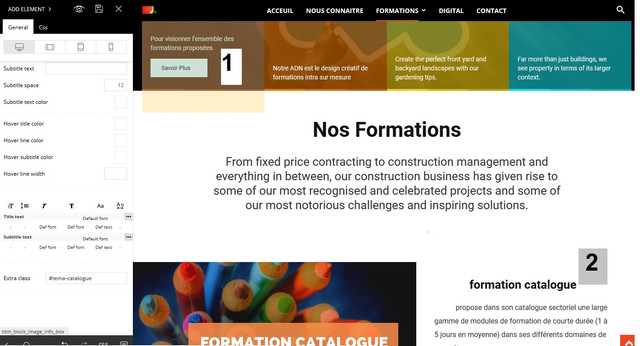
This is what I want :
When someone click on button (number1) …… the page scroll down to Title (Number2) = same as construction demo homepage when you click on something the page scroll down
I couldn’t make it function while I’m creating a page by my own.
Thank you again.
 mesut
mesutHello there ,
picture link : https://i.hizliresim.com/gr94BN.jpg
I need to adjust the homepage. this area does not appear to me
There is no longer this field?
 marketinglexdir
Hello,
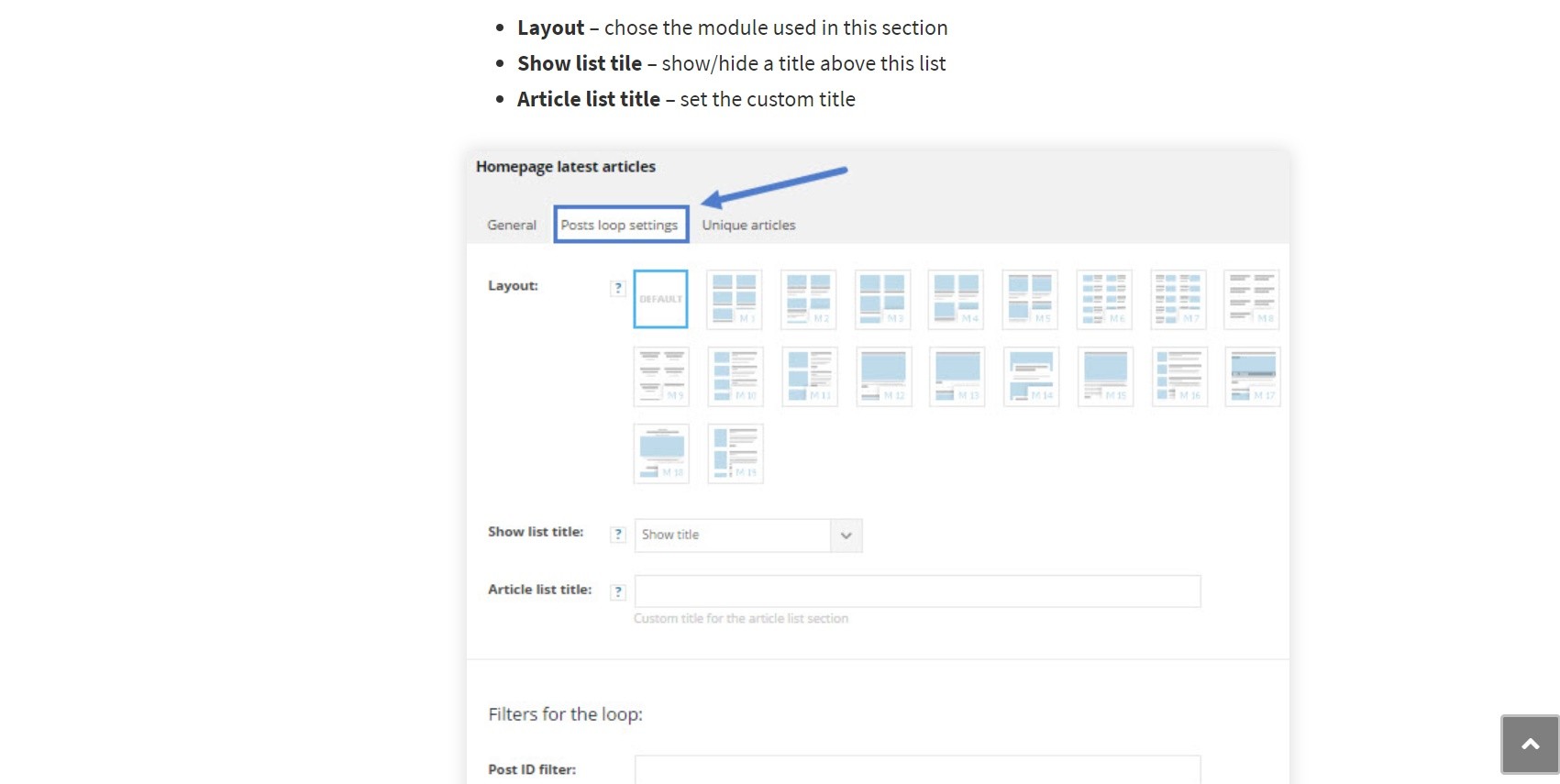
The “homepage latest articles” setting on the page does not appear. I’ve already tried using Classic Editor, Gutenberg, WP Bakery Builder and TAGDIV Composer.
I’m also using Newsmag Version 4.2 in another project and it works perfectly. Could you send me that version to try, please?
How can I fix this?
Thanks
 shtap
shtapHi,
I have recently updated the Newspaper theme with the latest version 9. The previous version of the website was built with WPBakery and after trying to use the new TagDiv Composer i haven’t been able to make it work properly (slow, cannot delete rows etc.) I read the instructions on how to setup PHP.ini and Htacess (default values) and still it doesn’t work. After disabling TagDiv Composer i was able to get the homepage running like it used to be and decided not to use TagDiv Composer for now.
Could you help me with activating TagDiv Composer?
Secondly, I’m not able to visually edit tables like i used to before the update. What seems to be the problem? If you need the credentials to access the website and cpanel please let me know how could i send you this information.
Many Thanks,
Dejan
 SAdesigns
When either plugin is activated, the author page link doesn’t work and goes to homepage.
 jubeljoy
Dear Team,
For displaying adx ads I have added specific script on Google Analytics session with “HEADER SCRIPT CODE” session.
However I wouldn’t want this set code to be executed on my Homepage.
Is there any way to exclude the same.
Hope this will improve my home page load time.
Awaiting response.
Regards,
Jubel
Simion C. The top grid in the homepage displays posts included in the featured category
– https://forum.tagdiv.com/featured-posts-2/
If there are no posts in the featured category the grid will not be displayed.
You don’t have to enter content in the mobile editor for the homepage, if you don’t want to. Then only the top grid and latest articles sections will appear, if there are no featured posts only the latest articles section will appear.
Calin Hi,
If you made a sidebar with tagdiv Composer on homepage, than this will be only on that page because it set like a block on that page if you want to set the same sidebar on more pages/post please check our documentation -> Sidebars tutorial – https://www.screencast.com/t/XyG0a6kAnzBo – https://forum.tagdiv.com/sidebars-tutorial/
Hope this will help you!
Thank you for your understanding.
 hakimtea
I don’t know how but sudenly my web homepage show at bottom of post and page and it covered the footer of homepage.
can you tell me what the problem? what I missing ?
thanks in advance.
you can see my web at https://raisahakim.com/
and see the once of post or page
post: https://raisahakim.com/prucritical-benefit-88-resmi-diluncurkan-apa-saja-keunggulannya/
page: https://raisahakim.com/portofolio/
 mchammy75
 Thanks for the reply. If I choose the default Post Template as Style 2, how can I figure out what is the recommended thumbnail size used here?
Also, on my homepage, I’m using Big Grid 2. So when I go to Block Settings to reference the resolutions, I notice that Big Grid 2 is references in multiple places with 324 X 160 and 741 X 486. What does this mean?
In a situation where I have a featured image on a post also showing up in the homepage Big Grid 2 and/or Block 11, how do I optimize the single image I am uploading?
Thanks,
Matt
 fabaff
Hi there,
I’m using the latest version of Newspaper and I’d like to use the same sideabar of the home page for the others pages and articles.
How can I set this?
Please note that the home page was edit withe the tagdiv composer. No sidebar name was associated to the home page sidebar.
Thanks
fabio
GusVHello I want to reduce the size of my homepage sidbar images the top one is ok, but the other two below have been reduced in size. Here is my homepage: http://vards.net
Thanks.
Gus
 trepcom
 Simon. Thanks for the response.
The page i wanto to edit is this demo homepage. https://demo.tagdiv.com/newspaper_gaming/
I want to delete one row. I edit with tagdiv composer and crashes. Do you have the same issue?
Thanks
Simion C. Hi,
The weather widget in that demo contains a customization for displays larger than a certain width, this will make the text lowercase. For example
Desktop – http://prntscr.com/majsao
Mobile – http://prntscr.com/majsho
You could use some CSS to make it capitalize it permanently
– http://prntscr.com/maju1k
This is the code for it, you can enter it in theme panel custom code CSS section
.td-business.home .td-business-home-row .td_block_weather .td-weather-header .td-weather-city {

text-transform: capitalize!important;

}
The issue you are having with the footer is quite unusual. The footer should be same as in the homepage, and how it is in the demo
– https://demo.tagdiv.com/newspaper_business/brexit-would-trigger-economic-and-financial-shock-to-uk/
In your case it looks like the footer section is part of the main content for some reason. Did you make any modification tom the post template files? or maybe enter ad codes in the theme panel (check them if you did, check the tags to be closed properly or test without them). Let me know.
Thanks
Calin Hi,
That the pages ( homepages ) are save in page and templates are saved in Cloud template -> https://www.screencast.com/t/SmbXA1hi -> https://www.screencast.com/t/M04gqfI94Ipa
Thanks.