
No search results were found in Documentation!
 Akhmatovich
- 1. How to show post view count on Blocks?
- 2. How to change Weather widget translation?
- 3. How to change post publish time (real time: 1 april, 2017 12:40)
<br/> 1 april, 2017 12:35 > 5 min ago
<br/> 31 march, 2017 20:50 > Yesterday, 20:50
<br/> 30 march, 2017 20:50 > 30 march, 20:50
 techpaced
Are you guys coming with more shortcodes ?. I see the theme lacks basic shortcodes and I believe more shortcodes should be added. I have reported this lot of times but till now it’s not implemented. My whole idea is to use visual composer only for building homepage, in the posts I am using tinymce editor but that doesn’t include shortcodes like buttons, style icon lists, alerts etc. Whenever I have raised a question about shortcodes, I wasn’t given proper answer at all. I was told that it is added to future update list. I don’t know when will it come but I am tired of waiting. I hope someone from support team replies with positive response.
 screengeek
 Interesting, it never occurred to me to read your post before. Thanks for the heads up on that!
But Yeah, every time I do that, it makes the bottom of the homepage all messed up and has ads everywhere. I don’t mind the ‘even more news’, I’d just like to remove popular categories. Every time I do that, it messes things up. I can’t attach a picture to show what I mean and I can’t leave my site like that for hours before i get a reply.
I….guess…I….can……wait…..for…..tag….div…..to….answer…..my….
…..question…..
……….
 kenny17995
How can you hide the header, menus and footer on a specific page? (homepage). I just want it to be content. Thanks
 Jfthai2015
 Actually, this solution is not really exactly the best one.
It doesn’t not really ignore the Featured category
Let’s say I have an article in the category “Kitchen”
This article happens to be one of the featured articles, so it therefore gets this fake “Featured” category to be promoted on the homepage.
The article now has “Kitchen” and “Featured” as category.
With the solution given, this article will never appear in any “Kitchen” related posts, even though it’s in the “Kitchen” category
Any other realistic option?
 utzgurx
When I edit the sidebar from Theme Panel>Categories>Custom Side bar+position happens this strange thing (after saving, of course).
When I open the page I don’t see any change. Always the side bar is on the right position with a widget I have in the main homepage at the bottom (at the right of latest news).
But if I try to customize this page in this same page, I mean clicking customize on the top menu at the left, just to try to get out this widget (there is no option because I can’t see the widget zone, only footer 1, 2 and 3), then I see the bar as I customized from Theme Panel. But if I close the customize window automatically the side bar appear again on the right side.
I have no idea what to do.
 dinkymonkey
Dear tagdiv-Support theme,
I am using the Newspaper 7 theme and now I have encountered this problem with category page:
I noticed that for the homepage, you can change the number of articles under “Limit post number”, so that the page would display, say, 20 or 30 articles instead of the default 10 articles, before the reader has to navigate to the next page/next article list.
But it’s not the same with category page. There, only 10 articles/posts are displayed as a default and there’s no way to change this in Theme panel (or at least I haven’t found where to change this settings).
So please help me, where can Ih change this? 🙁
screengeekAt the bottom of my homepage (ScreenGeek.net) – just before the footer with the contact info and whatnot, there’s a block that says ‘Even More News’ and has my logo as well as ‘popular categories’ – how do I remove that?
And also, the links abruptly stop before it – how can I get them to continue?
 tayo
tayoGood day friends,
1. I was wondering if it is possible to customize the newsmag theme homepage to look like the tagdiv.com homepage. The way the menus, logo, and the “more” buttons appears there like a lading page? SEE: https://www.screencast.com/t/UWQzApSKZI
2. I will also like to combine thrives content builder plugin with the newsmag theme, is this a possibility as well?
Thanks for your kind answers.
utzgurxHi, I want to edit the title or even remove the “Latest Post” default section in my homepage. I can’t edit it editing the homepage selected. I only can change the number of posts (10 by default) to see in “Settings > Lecture” but I want to edit it and customize it.
Is there any option to remove it also? Thank you very much.
 Simion C.
 Hi,
1. You can create as many sidebars as you want, and can have one personalized sidebar only for the homepage and use it in the widgetised sidebar element.
2. Please correct me if I misunderstand, but I do not see a block 9 on your homepage, except from the one in the sidebar. Basically you have to stretch the row containing the block – https://www.screencast.com/t/FTsbXN4Qz6XP and set a background color – https://www.screencast.com/t/TPgVYvICJ
Thanks
 dennis
 1. I would like to add ‘wordpress popular posts’ widget only under widgetised sidebar on the homepage, https://snag.gy/K9UIa1.jpg
2. I have choosen blog 9 to ‘stretch row’ so as the blue color can fill both on the right and left side bt that is not showing up. website:http://kenyannews.co.ke
utzgurxI was creating a new page and when I published it and preview it I see this error:
_____________________________________________________________
Not Found
The requested URL /lifestyle2/ was not found on this server.
Additionally, a 404 Not Found error was encountered while trying to use an ErrorDocument to handle the request.
____________________________________________________________
Then I tried to open any post or page of my website and is only working the homepage.
¿Any idea? Thank you very much!
 gili
giliHey,
Google has started testing out Native InFeed ads (https://support.google.com/adsense/answer/7171765?hl=en).
Is it possible to implement them in between the theme’s feed (homepage, category page, etc.).
Thanks
Simion C. Hi,
The theme does not have such an option. You can have only one unique homepage – https://forum.tagdiv.com/homepage-how-to-build-and-set-it/ that you can create with the help of the Visual composer editor. Maybe what you are looking for can be achieved through a plugin that switches between pages, if something like this exists but I can not make any recommendations in this matter. Also there are chances that some plugins may not be compatible with the theme.
Thank you for understanding!
 Catalin
 Hello
I have inspected your homepage and I did not saw any Breadcrumbs through it, as you can see here -> https://www.screencast.com/t/kIW1HtfefAq If is not what you mean, please provide more details so I will be able to provide a more accurate response.
Thanks for your understanding!
 jhnthn
So I created a new page and titled it “Home”. Now I went into the WordPress settings and created that as a static page. However, when I click on the Home button for my website, it now shows “Home > Home” on the breadcrumbs. Also, it shows the page name just below it, and the page is also called “Home”. Ideally, I just want it to say the word Home only one time in the breadcrumbs and no where else on the page.
 fenomeno0chris
Hello to the whole Newspaper/Newsmag team!
First I want to say, thank you very much for creating such great themes.
After 3 years I decided with my team to change the overall design of my homepage, by buying Newspaper7. The reaction of our readers and users are mostly positive. So thats a good sign.
Of course such a huge change is not that easy to handle and thats why I still have some problems and question, which should be solved.
All problems occur on the latest version of Newspaper 7.8
1) On my MacBook with the default Safari browser, I often get this annoying and bad looking line through the whole header section. How can I solve the problem?
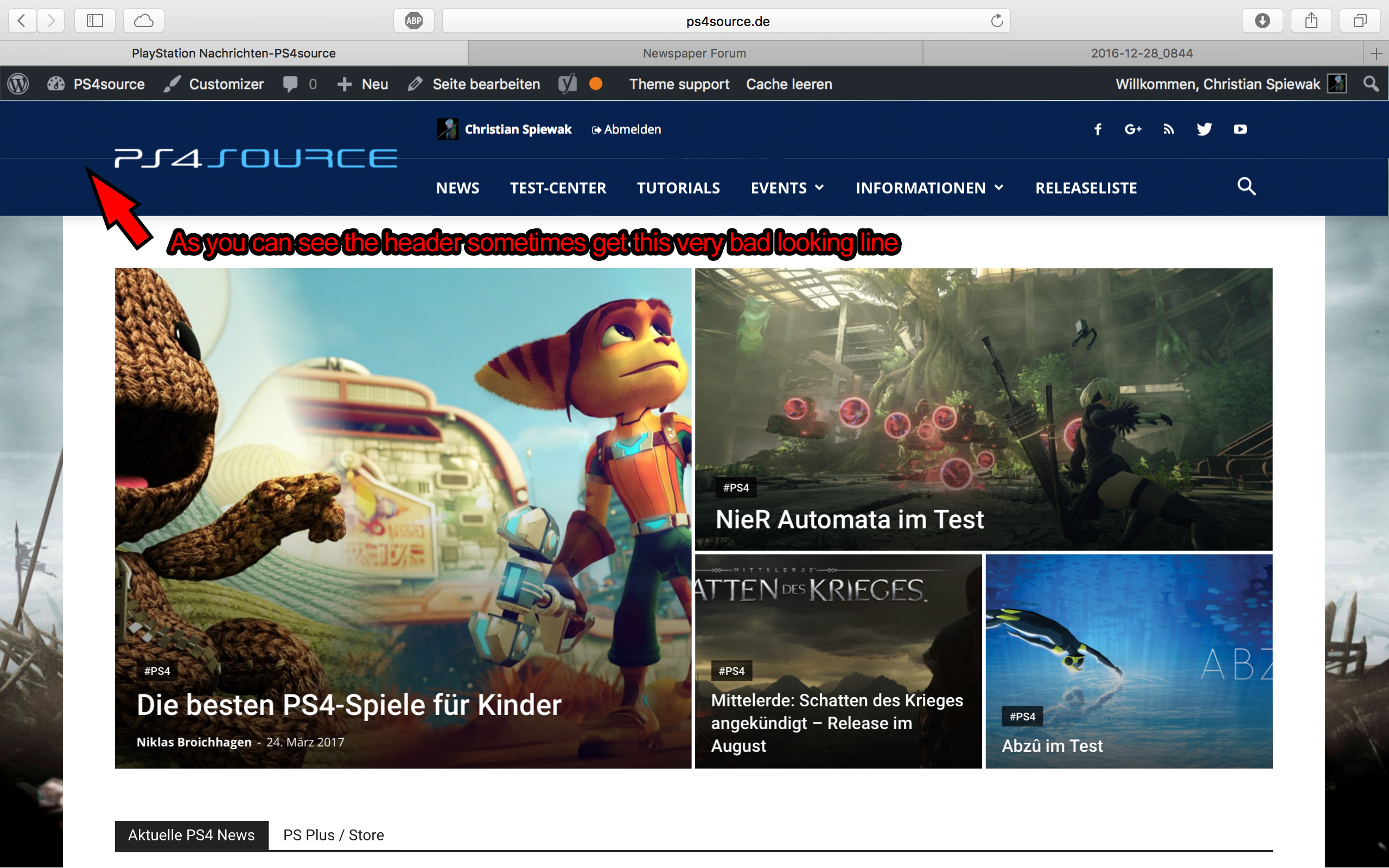
2) Which register plugin should I use? I don’t want to let new users to set a new password on the bad looking interface of WordPress. Im sure you guys know what I mean and have a good recommendation for that. Beside that, what should I use to prevent registrations from bots?
3) Is it possible to have a gradient header and footer, instead of just one color? It looks a bit boring.
4) How can I change the menu just for the mobile page, without using td-mobile-plugin?
5) How can I change the the font style and size of quotes? At default settings it looks way too big (see here)
6) Is it ok too use the responsive options, to create one site with different blocks and grids for mobile and desktop? Im asking cause I don’t know if my site will load much longer, if it has to load information even though there are not displayed. (see details here)
7) My current page speed is a disaster (see here). Why is it so bad, since Im using kraken.io image optimizer and WP Super Cache? How can I improve the score?
8) How can I use td-speed-booster, without uninstalling my plugins? (Disqus Comment System, TablePress, TotalPoll…) I really need those plugins, but I still want to have a fast homepage!
9) If I set [Template Setting->Force Full width->Header Menu] to “No Stretch”, the logo of my site is not at the correct position.

10) validator.w3.org shows, that my page has 33 errors (see here). How can I fix them?
Simion C. Hi,
If you wanted to know how to remove the page title from the homepage, you can do that by selecting a different page template – https://www.screencast.com/t/dpPqXQFc
More about the available page templates here – https://forum.tagdiv.com/page-templates-2/
Thanks
Simion C. Hi,
Unfortunately there is no tutorial or documentation for installing the demos that way. The demos are meant to be installed through the theme panel automatically. Trying to install a demo by parts could be more difficult then the one click default installation.
Just to get an idea, inside the demo folders you can find the homepage layout for example – https://www.screencast.com/t/BPtQEcII that can be used in Visual composer, the demo css and less files – https://www.screencast.com/t/NAiSRWIjn or the settings from theme panel – https://www.screencast.com/t/A754eoeyLT that are imported when you install a demo. But there are more elements that can not be added in a different way, only by installation process through the import feature.
Thanks
 Bogdan B.
 Hello,
You use the mobile theme plugin and that will cause the homepage to get a predefined style that shows 3 top articles showing featured posts and a list of all your posts below. Right now you have the 3 top posts and 6 posts below. Please read this guide: https://forum.tagdiv.com/the-mobile-theme/
Thank you!
Bogdan B. Hello,
No, they are not unusual and there are only 2 x home not 3. This happens because you use the name home for your homepage. The first is the site home page link and the second is the page title. If you change the page title it will say: home > page title
You can remove the home link if you want from this setting: https://www.screencast.com/t/fNXkSkePAA
Thank you!
Simion C. Hi,
The elements on the page can be edited/removed/added by opening your page in Visual composer and make the modifications to each of them – https://www.screencast.com/t/cjJSC6CrIiy but I see that you have already managed to remove or modify the respective section from your homepage.
More information about block settings here – https://forum.tagdiv.com/block-settings-guide/
Thanks
 STEFEN1
Hello!
i need to put an empty space between the slider and the main content on the homepage.
Is there a way to make it?
And if this is not possible is it possible to set the slider before the header?
Thank you in advance.
Stefano
 smrtr
smrtr
