
- TutorialsFrom WPBakery to tagDiv Composer
 Calin
Calin Hello,
1. This can be done using the theme panel settings. For background – https://i.imgur.com/CVCZ9kk.png and for color – https://i.imgur.com/wMB97WO.png
2. You need to use tagDiv Composer, edit the homepage and select the mobile view port, then select the mobile menu and choose the menu you want to use – https://i.imgur.com/HCR42PU.png
Thank you!
 Anamaria
 Hello,
I just checked now and it seems that you use the latest posts as homepage, and to a page made with composer -> https://i.imgur.com/fLnxcWW.png
Please let me know what error you have and what is not working.
Thank you!
 hospitality-school
This is my website: https://www.hospitality-school.com/
This is how Cloud Templates are: https://www.awesomescreenshot.com/image/49239871?key=82e206b628116684513978f962c01ec8
This is how I designed it and want to look like: https://www.awesomescreenshot.com/image/49239883?key=46e37f28dd3b71447a33192458c9ca79
BUT WHEN I TEST IT IN DIFFERENT BROWSWER AFTER DELETING CACHE FROM SERVER SIDE AND BROWSER SIDE, IN PINGDOM AND OTHER TOOLS IT LOOKS LIKE THIS:
https://www.awesomescreenshot.com/image/49239890?key=a9a247c5314c3da07ce95db74a8b59ba
As I am not an expert I am really feeling helpless. Why is it happening? Why it is not showing exactly how I designed it from Cloud Templates and TD Composer?
 Pavol
PavolHi,
please, can you tell me why the smart sidebar on my website (on homepage) does not work?
Thank you!
Pavol
 pradeeppathak07
Our website URL – http://www.uttaranchaltoday.com
We are facing issue with tagCloud Library Plugin and tagDivComposor plugin. They are crasshing our website since couple of days. We have deleted them and tried to open our website. We found it is perfactly opening homepage and other story pages. Please look into this and let us know to the wayout to resolve this issue. It is hammpering our user base very badly. We have been using NewPaper Theme for more then 5 years now. Please help us.
 EDtimes1234
Hello Team,
This is a very serious issue , in the TAG DIV PAGE BLOCK , there is an filter to select CATEGPRIES from which u need to show the post.
For example: If i select Entertainment as post categories – then only posts from entertainment should show and not anything else
But if you see now on our URL : https://edtimes.in/tagdiv-composer-draft/
In this page for example there is a BLOCK named POLITICS : In that post from fashion, social opinions and other categories are showing – it should have only shown posts from POLITICS CATEGORY – we have set this POLITICS CATEGORY in the filter also in block.
Same issue in all blocks – the category filter is not working
This is a basic feature of the theme and it should have work
Please help and solve this – this is super urgent – if this feature dont work – we have to shift to a new theme because we want this feature
Also one more important thing – a plugin named – https://wordpress.org/plugins/whp-hide-posts/
This is a very good plugin to hide all post only on homepage from a particular category – we have noticed that – on your theme this plugin dont work – the theme should be capable to work with all plugins – please solve this also
We will wait for urgent reply
 brockpress_
Hi there!
The mobile version of our website (brockpress.com) has a major problem. When the mobile version is first loaded, the mobile menu button on the upper left does not display when clicked. The photos below show what happens when the menu button is clicked.
mobile version of brockpress.com
hm that’s not right
However, when a different page other than the home page is loaded, the menu button does work as it should.
how it should look
After a lot of debugging, a solution I came up with was to redirect users from the mobile version of the homepage (brockpress.com) to the actual URL of the mobile version of the page (brockpress.com/home-mobile) if the homepage (brockpress.com) is loaded on a device using a mobile OS. To avoid any issues, I also added a redirect so that if the mobile page URL (brockpress.com/home-mobile) is loaded on a desktop OS, it will redirect to the normal homepage (brockpress.com). Images below show the redirect plug-in I used and the essentials of how I did it.
Now you may think that should work fine, in fact images loaded much faster on brockpress.com/home-mobile than brockpress.com on mobile as well, however the redirect plug-in I’m using is buggy and not optimized for redirecting based on mobile or desktop. So sometimes it works and sometimes it doesn’t.
I’ve found no other plug-in that does the same thing or works as well.
TL;DR: I need help either fixing the mobile menu button so it works every time or finding a way to redirect to the mobile homepage URL on mobiles only every time.
 iamsergiomarin
Hello! I have problems with the mobile version of my website. I have created a mobile template for each page and the homepage. Also for the single template and other WordPress templates.
Each one has a yes in the Mobile Template column.
The fact is that when I enter the mobile it doesn’t look like it should, but rather the latest news appears in a row and the design is not the same.
The same thing happens with the menu on the mobile, since when I click on a page from the mobile it does not appear and only the title of said page appears.
All of this, except the mobile menu, is done in the ‘Cloud Templates’ option.
How can I solve that?
I don’t know if something needs to be installed or not. I have the AMP plugin installed and the AMP option activated in the Mobile Theme of the Theme Panel.
Additionally, the menu for the mobile version is with the mobile pages created.
I also forgot to mention that when I’m on the mobile below I get the option ‘exit the mobile version’ and there it appears correctly, but I don’t know how to make the header logo look smaller.
I leave you the website so you can see it https://valladoliddeportivo.es/
 nephei
I have been using Nepali date converter plugins on my website for converting English dates to Nepali dates. These plugins have been working perfectly on previously installed older sites. However, for the past week, whenever I try to create new sites and add any date converter plugin, I experience a recurring problem with the Nepali date converter plugins.
Whenever I try to use any Nepali date converter plugin, a critical error message appears on the site. I have attempted to resolve the issue by installing and reinstalling various other plugins, thinking it might be a conflict with other plugins, but the problem persists only with the Nepali date converter plugins. This issue seems to be isolated to the post templates, as the homepage and other pages are functioning perfectly fine.
If I remove the converter plugin, the site works perfectly fine, but the problem is that I need Nepali dates.
I have tried all possible solutions over the past week but have not been able to find a resolution. Could you please help?
 gqjesus
I did a theme and WordPress update and now my homepage looks like this.
Anamaria Hello,
You need to add the link as you did the first time: https://www.facebook.com/gabuniadavid. If the settings are not saved, you can inspect them by right-clicking -> inspect -> console -> select the error in the tab network -> preview, and you can see the cause.
Please check this topic https://forum.tagdiv.com/topic/tagdiv-composer-does-not-save-only-content-of-homepage/
Thank you!
 crazydrake
Hi – We’re having some trouble editing our homepage. Using the UrbanObserver Template.
WE’re getting – Error at zones: 6(models) : 0(dom). The model does not match the content Current state has involved an issue. You could try an UNDO operation (CTRL+Z / CTRL+SHIFT+Z)
Right now – we have maintenance on it – So you’ll need to login to view.
 bogdan.martiniuc
 Yea,
Except from the SALE tag, i want to show other tags such as: NEW, BESTSELLER.
There are some plugins that does this such as: Product Labels For Woocommerce.
I’ve tested some plugins and none of them are working. This means there is no compatibility between the plugin and the theme.
I want to show the tags in few places such as: homepage, product category, product page.
Thank you
Anamaria Hello,
Navigate to the Settings > Reading section and tick the “static page” option for “Your homepage displays.” and set the homepage you want.
Thank you!
 diegocoru
Hi
After changing from Astra to Magazine Pro, now I see that I have 2 identical homepages published. One with the url elmejorblogdeviajes.com and other with url elmejorblogdeviajes.com/home. I don’t want to mess it up. Is this important? Should I delete one?
 swnprwr
 my teacher, I already uploaded it, but the pre-built website is also a normal page, except for the homepage. but when I upload the demo pre-built website , every old page becomes like the homepage. nothing like this happens in other pre-built website, this is the first time something like this has happened
swnprwrhello, I found a very nice Prebuilt Website. when looking at the demo, for example, 3. 4.he lists the news as he scrolls through the pages . but I’m uploading the demo to my own site in the same way as the old 3. 4. 5. when browsing the pages, it shows the old pages in a very small section all the way to the bottom, as if I were still on the homepage. please help me!
 volkanunal
 this code effected social counter blok. just because of this, footer and header part crashed too. I deactived social counter and solved the problem.
Are there any other way to show top bar on mobile? without adding code? I dont want to add this code again! I spent many hours to fix the problem.
And one more question: when I click a news on homepage, the new article opens in a new window. How I can set this, too?
Thank you.
 leagcooks
Hi, I have used the hide date in the theme panel but it removes the date on everything.
Is it possible with some CSS that it hides the date on categorys/modules but still shows the date on my home page like below?
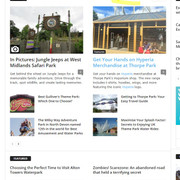
I would like the dates still to be shown on Block 2 on my homepage..
thanks
 janeybird
I have tried repeatedly to show an ad on my homepage and it seems to kick out the code no matter how I do it. I have tried adding an ad spot under Theme Panel/Ads, and then in tagDiv added an Ad Box and selected the proper adspot for this ad. All I get is the title; Advertisement.
I have tried an Image Ad, by adding the image and then the url I want the visitor to go to when the ad is clicked, open in new window and nofollow. It shows with this but does not go to the url, it simply reloads my homepage in a new window.
I have tried adding the custom code to the custom code box (code that I got off of tagDiv documentation). This code will not stay where I put it using the tagDiv editor. I save it (save all), close, then refresh the page, and nothing. I go back into tagDiv editor, click on this ad box and under custom code it is now blank. I have deleted the cache of the page numerous times. I have deleted the entire cache numerous times.
What am I doing wrong? I did get it to work at one point, but I don’t know how. When I came back to work on my site today, it is gone again. Very frustrating. If any one has any suggestions I would appreciate.
 Bettina
 Hello @kevinstolz!
You can create a new page and edit it with the tagdiv Composer. You can customize the pages as you want. You need to edit the logo when you edit the homepage for example with the tagdiv Composer. We have 3 options available for mobile versions that you can use:
1. Responsive version: A responsive version of your website looks similar to the desktop version. TagDiv Composer is used to edit the page. Click on the mobile viewport: https://www.screencast.com/t/XDQJedlggSB. There, you can see your mobile version and edit or adjust the elements to look better.
2. Mobile pages: https://tagdiv.com/newspaper-10-3-7-update-brings-customizable-and-fast-mobile-pages
3. Mobile theme plugin: The Mobile Theme is a performance-optimized theme included in the main Newspaper theme that only loads on mobile devices. It comes with its own templates and designs for pages, posts, categories, etc., so your current templates from the desktop theme will get converted to the mobile theme layout. Please see https://forum.tagdiv.com/the-mobile-theme/ and https://forum.tagdiv.com/mobile-theme-introduction/ for more information.
A full explanation is here: https://www.youtube.com/watch?v=SpGkOnJeNZY
If you need to use mobile version 1 or 2, then you need to uninstall the Mobile Theme plugin and AMP.
Thank you!
 DaveKinetic
Hello,
I recently used a featured video for the first time. Playing the video from the featured video position on a single post works fine. The video plays as expected with the volume turned on. If I press play from one of the blocks on the homepage, the popup modal opens and the video autoplays, but it is always muted.
Is there a setting I am missing to enable sound when the video autoplays?
Anamaria Hi,
Please disable the mobile theme plugin, clear the cache and check after.
Using our theme, you can choose from 3 mobile versions
-> mobile responsive => https://www.screencast.com/t/oJ2ShOp47
-> mobile theme plugin => https://forum.tagdiv.com/the-mobile-theme/
-> mobile page => https://tagdiv.com/newspaper-10-3-7-update-brings-customizable-and-fast-mobile-pages/ The option that you need to use.
Suppose you created the mobile pages with tagDiv Composer. In that case, when you install the Mobile Theme plugin, your pages will be overwritten by the plugin (the mobile theme comes with its templates for page, post, category, etc, so your current templates from the desktop theme will get converted to the mobile theme layout, the page content is made without builders in mobile editor => https://www.screencast.com/t/xbgZG8kH also, the options that are provided to edit the mobile theme version are limited (this keeps the things simple)).
This is a video about Responsive Newspaper Theme, AMP & Mobile Theme, Mobile Pages & Templates -> https://www.youtube.com/watch?v=SpGkOnJeNZY.
So, the mobile responsive is what you see when that you select the viewport on phone => https://www.screencast.com/t/matV17hH, so some settings may apply for each viewport(where is the border blue), and others are not(where the border is black).
The mobile page has the mobile templates from Cloud Library => https://www.screencast.com/t/YCcZ8rL8
The Mobile responsive version of the theme and the mobile page editor can be edit with tagDiv Composer, the mobile theme plugin cannot.
For example, you can have the mobile theme plugin activated and use the mobile page/mobile responsive version for the homepage/pages, but for the categories pages/404 page, you can’t use the mobile page/mobile responsive version if you have the mobile theme plugin activated.
So, if you want to design the pages with tagDiv Composer, you can use the mobile page or mobile responsive version.
Thank you!
Anamaria Hi,
For the problem with the author links, maybe the author archives are disabled in the Yoast plugin; if they are, author links will be redirected to the homepage. Check if that is the case: http://prntscr.com/mbwwuk -> https://forum.tagdiv.com/general-options-may-interfere-newspaper-theme/ after that clear all cache, purge CDN(if you are using) and check the results.
For author template, please make sure that the cloud template is set global -> https://i.imgur.com/BhXV265.png
Thank you!
diegocoruHi
I changed from Astra to Magazine and had troubles with the authors. I want that every time someone clicks in the article author’s name it links to the author’s page but I don’t succeed. Now, when clicking, it goes to the Homepage. Can you please help?



