
No search results were found in Documentation!
 diegocoru
Hi
I am showing a Flex Block 3 at the homepage and filtered a particular category. All good. However, I ve just published a new article of this category and this one is not displaying in the Flex Block 3. Any idea why?
 Bettina
 Hello @thanhtan09!
Go to the Cloud Templates -> Modules: https://app.screencast.com/SYbTBMFjmo9Dw and add the module template – World Matters Standard: https://app.screencast.com/77u9XbVvmlf3T
Edit the homepage with the tagdiv Composer, click on that block message and choose the module from here: https://app.screencast.com/LuuBf7MzIuU6o in order to display the block design with your own content.
Thank you!
 Calin
Calin Hi mnunezve, for this you’ll need to use tagDiv Composer to edit the homepage – https://i.imgur.com/TyGlqLN.png then select the blocks and search for background in search field, after that check in Style tab – https://i.imgur.com/0lY4avc.png the color should be on meta info background – https://i.imgur.com/GezMKak.png and it is also possible to be on category background.
I hope this will help you!
 Rasinski1986
Hello, I’m having problems with the article page on the blog. For the blog post I don’t have the ability to work with the DIV Composer. I can only edit pages with the DIV composer but not blog articles. I then used Elemator to display it, but the article is now displayed poorly on the homepage meister-job.blog/pl
 Joe
JoeHello. I’m having a problem adding a video template from the cloud library to my homepage.
Some notes. I’m using the Tagdiv Composer instead of wpbakery. I load up my homepage in the editor, I click the ‘Load Template’ button from the left side menu, and select the option “Latest Videos Section – Town Talk” and click the green ‘Import Section’ button. Nothing happens. I’ve tried this repeatedly on several different computers, browsers, etc.
If I use X to get off the Load Template screen, I very briefly see a pop-under window that says Load Template with a Yes or No choice on it. However, that disappears as quickly as ‘Load Template’ screen when I close it.
Your help would be greatly appreciated.
 filippocatania
I use WordPress 6.5.4 with Newsmag theme version 5.4.3
The homepage is visualize correctly, but While each individual article has a bad visualization.
The homepage https://www.pedalognigiorno.it/
An article https://www.pedalognigiorno.it/lanpi-assegna-la-tessera-onoraria-a-fiab-laquila/
What could be the problem?
Thanks
Filippo
 reloaded
Hi,
since yesterday i noticed a problem with my website mytechnology:
initially i though could be some plugin error td_011_remote_cache which is something i’m fighting with and that slows down everything… so i did the same database clear i’ve been doing since weeks/months which is:
DELETE FROM wp_options` WHERE option_name LIKE 'td_011_remote_cache';
DELETE FROM <code>wp_options` WHERE option_name LIKE '_transient_wp_cloudflare_page_cache_all_languages';
(i've problem pasting code up here wtf)
followed by table optimisation...
but the website still was looking broken so i went in admin page to see available plugins and i notices a weird behavior in newspaper admin panel with says "registered" as always but than it says no updates available because no license is associated...
Whats?? Any idea why is telling me this? I didn't do any recent update, and it was a couple of days i was not posting new articles.
Thanks...
 Mero Notice media
 Maybe this is the same error on my Site also. problem on opening through a mobile browser.
The problem is when I open my website through desktop browsers, it opens properly and loads properly, but when I try to direct my website link through mobile it is not open, and download some tmp files. how can I find an error?
After That when I deactivate all plugins after activating and trying to load it works properly.
and again after some hours same Issue.
maybe some bugs on the mobile slug/homepage or somewhere. because when I open through mobile other content links open but the main website link is going to download some TMP file like this image.
Rasinski1986Maybe you can help me. My site is in two languages and there are two different homepages. Can I set the advertising in the header differently on the two pages?
 Anamaria
 Hello,
This usually happens with cache plugins. If the cache plugin does not have mobile support, the mobile theme version can be delivered instead. Please check the setting to enable mobile cache https://docs.litespeedtech.com/lscache/lscwp/cache/
Also, you need to edit with tagdiv Composer the cloud template to change color, fonts, and so on-> https://forum.tagdiv.com/tagdiv-composer-tutorial/
Using our theme, you can choose from 3 mobile versions
-> mobile responsive => https://www.screencast.com/t/oJ2ShOp47
-> mobile theme plugin => https://forum.tagdiv.com/the-mobile-theme/
-> mobile page => https://tagdiv.com/newspaper-10-3-7-update-brings-customizable-and-fast-mobile-pages/ The option that you need to use.
Suppose you created the mobile pages with tagDiv Composer. In that case, when you install the Mobile Theme plugin, your pages will be overwritten by the plugin (the mobile theme comes with its templates for page, post, category, etc, so your current templates from the desktop theme will get converted to the mobile theme layout, the page content is made without builders in mobile editor => https://www.screencast.com/t/xbgZG8kH also, the options that are provided to edit the mobile theme version are limited (this keeps the things simple)).
This is a video about Responsive Newspaper Theme, AMP & Mobile Theme, Mobile Pages & Templates -> https://www.youtube.com/watch?v=SpGkOnJeNZY.
So, the mobile responsive is what you see when that you select the viewport on phone => https://www.screencast.com/t/matV17hH, so some settings may apply for each viewport(where is the border blue), and others are not(where the border is black).
The mobile page has the mobile templates from Cloud Library => https://www.screencast.com/t/YCcZ8rL8
The Mobile responsive version of the theme and the mobile page editor can be edit with tagDiv Composer, the mobile theme plugin cannot.
For example, you can have the mobile theme plugin activated and use the mobile page/mobile responsive version for the homepage/pages, but for the categories pages/404 page, you can’t use the mobile page/mobile responsive version if you have the mobile theme plugin activated.
So, if you want to design the pages with tagDiv Composer, you can use the mobile page or mobile responsive version.
Thank you!
Anamaria Hi,
Please don’t use blocks 1 to 25, big grid,or standard templates for header, footer, etc. Use cloud templates and flex blocks and big grids flex, as the demo was made.
The issue with the homepage was resolved after I disable the mobile theme plugin as I said to you to do.
Thank you!
 Aimee
Aimee Sorry, how to attach images here? If you use your mobile phone to access esl-news.com you can see the homepage is not working. Thanks
Aimee Thank you so much for the detailed response.
After I deactivated my mobile AMP plugins and used my web homepage for the mobile it worked.
My mobile page functioned beautifully for months so I wanted to get it back. After re-installing the mobile and AMP plugins except the homepage is not working, other pages are back to normal. I wonder if there is a bug of some sort. Can you please help me to fix my Mobile Home Page.
Many Thanks!
Bettina Hello @amnaymag !
In the single cloud template, please use the element called ” Single Post Modified Date “.
In the homepage for example, you can use the flex block builder element using a custom module that have the element called “Module Date” -> https://app.screencast.com/zVWMZcnLiaaZW
Documentation here:
– https://forum.tagdiv.com/how-use-tagdiv-cloud-library-templates/
– https://forum.tagdiv.com/modules-builder-newspaper-theme/
– https://forum.tagdiv.com/flex-block-builder-flex-loop-builder/
Thank you!
Anamaria Hi,
Please disable the mobile theme plugin and check after. Also, please check for a plugin coflict.
Using our theme, you can choose from 3 mobile versions
-> mobile responsive => https://www.screencast.com/t/oJ2ShOp47
-> mobile theme plugin => https://forum.tagdiv.com/the-mobile-theme/
-> mobile page => https://tagdiv.com/newspaper-10-3-7-update-brings-customizable-and-fast-mobile-pages/ The option that you need to use.
Suppose you created the mobile pages with tagDiv Composer. In that case, when you install the Mobile Theme plugin, your pages will be overwritten by the plugin (the mobile theme comes with its templates for page, post, category, etc, so your current templates from the desktop theme will get converted to the mobile theme layout, the page content is made without builders in mobile editor => https://www.screencast.com/t/xbgZG8kH also, the options that are provided to edit the mobile theme version are limited (this keeps the things simple)).
This is a video about Responsive Newspaper Theme, AMP & Mobile Theme, Mobile Pages & Templates -> https://www.youtube.com/watch?v=SpGkOnJeNZY.
So, the mobile responsive is what you see when that you select the viewport on phone => https://www.screencast.com/t/matV17hH, so some settings may apply for each viewport(where is the border blue), and others are not(where the border is black).
The mobile page has the mobile templates from Cloud Library => https://www.screencast.com/t/YCcZ8rL8
The Mobile responsive version of the theme and the mobile page editor can be edit with tagDiv Composer, the mobile theme plugin cannot.
For example, you can have the mobile theme plugin activated and use the mobile page/mobile responsive version for the homepage/pages, but for the categories pages/404 page, you can’t use the mobile page/mobile responsive version if you have the mobile theme plugin activated.
So, if you want to design the pages with tagDiv Composer, you can use the mobile page or mobile responsive version.
Thank you!
Bettina Hello Steph!
In homepage, you should add a flex block with the latest and sort after a category. In the category template, you can use a flex block with the special filter current category.
Check the guide here: https://forum.tagdiv.com/flex-block-settings-guide/
Thank you!
 Stephan
Hello,
I am currently setting up a news website with various categories. One category is for posting news about my city, another for news about my state, and a third for international news. When I create a new post in WordPress, I want the post to appear on the homepage, which works fine. However, the problem I am encountering is ensuring that the post also appears automatically in the appropriate category and only in that category.
For example, if I have 20 posts, with 5 dedicated to my city and 15 to international news, I want each category to display only the relevant posts. I am struggling with setting this up correctly in WordPress so that when I create a post, it automatically appears in the designated category. Could you please help me with this?
Thank you!
Steph
Anamaria Hi,
Please disable the mobile theme and amp plugins.
Using our theme, you can choose from 3 mobile versions
-> mobile responsive => https://www.screencast.com/t/oJ2ShOp47
-> mobile theme plugin => https://forum.tagdiv.com/the-mobile-theme/
-> mobile page => https://tagdiv.com/newspaper-10-3-7-update-brings-customizable-and-fast-mobile-pages/ The option that you need to use.
Suppose you created the mobile pages with tagDiv Composer. In that case, when you install the Mobile Theme plugin, your pages will be overwritten by the plugin (the mobile theme comes with its templates for page, post, category, etc, so your current templates from the desktop theme will get converted to the mobile theme layout, the page content is made without builders in mobile editor => https://www.screencast.com/t/xbgZG8kH also, the options that are provided to edit the mobile theme version are limited (this keeps the things simple)).
This is a video about Responsive Newspaper Theme, AMP & Mobile Theme, Mobile Pages & Templates -> https://www.youtube.com/watch?v=SpGkOnJeNZY.
So, the mobile responsive is what you see when that you select the viewport on phone => https://www.screencast.com/t/matV17hH, so some settings may apply for each viewport(where is the border blue), and others are not(where the border is black).
The mobile page has the mobile templates from Cloud Library => https://www.screencast.com/t/YCcZ8rL8
The Mobile responsive version of the theme and the mobile page editor can be edit with tagDiv Composer, the mobile theme plugin cannot.
For example, you can have the mobile theme plugin activated and use the mobile page/mobile responsive version for the homepage/pages, but for the categories pages/404 page, you can’t use the mobile page/mobile responsive version if you have the mobile theme plugin activated.
So, if you want to design the pages with tagDiv Composer, you can use the mobile page or mobile responsive version.
Thank you!
 nolandolce
Is there a way to include a page into the blocks that round up our posts? For example, we created a reader survey which lives on a page. I would like to feature it on the homepage, but it seems all the options only pull in posts, not pages. Thanks!
 Beaniesta
First of all Video Playlist is awesome product on our video site https://ridingon.com/. Thank you!
We have two playlists on our homepage. Everything was working well until yesterday when one videoplaylist keeps giving us the following error message “Playlist does not exist or does not have videos”. The playlist (https://www.youtube.com/watch?v=PDeG1AOWTks&list=PL-g0HUClWPRpzKPwaV_9QU8UELJSa3HH0) has 126 videos.
Any suggestions how to fix the problem?
Thank you.
 Bolongo
 Hello Ana Maria,
Thank you for your feedback, but it still doesn’t work. For your information:
I have installed and activated all the required plugins
I have also deactivated the tagdiv Standard pack plugin as you recommended.
I have followed all the configuration information for “tagDiv Opt-In Builder – Paywall/Subscription”.
I have consulted the topic “https://forum.tagdiv.com/topic/tagdiv-composer-does-not-save-only-content-of-homepage/” which apparently does not concern me as I do not have any save issues or 40x errors.
I have uninstalled and reinstalled the theme, but I still have the same problem on this page “https://www.pressebits.com/checkout-week_pro/?plan_id=1”.
The Issues
The action button does not work.
The menu is also not functional.
I have not installed any extensions other than those required for the theme.
Request
I really bought your theme for paid article subscriptions. Could you please let me know if there is a refund program in my case? I really need this module. Please help me. Below is the “Newspaper system status” and everything is okay on that side. Thank you for your understanding.
heme config
Registration key i 828a4626 – **** – **** – **** – 1a21327f3673 Reset key
Theme name i Newspaper
Theme version i 12.6.6
Theme database version i 12.6.6
HTTP channel test wordpress
Installed demo i Newsweek PRO – demo ID: week_pro | install type: full
tagDiv advertisement i
Theme Mobile Newspaper mobile version
php.ini configuration
Server software i Apache
PHP Version i 7.4.33
post_max_size i 512M – You cannot upload images, themes and plugins that have a size bigger than this value. To see how you can change this please check our guide here.
max_execution_time 360
max_input_vars 250000
SUHOSIN installed false
PHP extensions
mbstring available
GD library available
WordPress and plugins
WP Home URL i https://www.pressebits.com
WP Site URL i https://www.pressebits.com
WP version i 6.5.4
WP multisite enabled i No
WP Language i fr_FR
WP Memory Limit 256 Mo/request
WP_DEBUG False
Caching plugin WP super cache – for best performance please check the plugin configuration guide here.
Anamaria Hi,
I answered to you in this topic https://forum.tagdiv.com/topic/unable-to-configure-checkout-page/. Did you check it?
Please check the console when you hit the save button and see if there is an error. With right-click -> inspect -> console -> select the error in the tab network -> preview, you can see the cause.
Please check this topic https://forum.tagdiv.com/topic/tagdiv-composer-does-not-save-only-content-of-homepage/
Thank you!
 thanhbui
I am installing the theme Tech News PHP Version 8.3.2, Newspaper Version: 12.6.6. After I imported the template, I displayed the content like the template on the homepage, but when I click on it, the content of that page cannot be displayed. , which only shows category, can you tell me why?
site: https://rankingpark.net
nolandolce Hi just to follow up, the plug-in is actually crashing the site. It was working for about an hour but then the homepage (where it lives) crashed, and went blank. When I deactivated the social counter the page worked again. I then deleted the plug-in, re-installed, and same thing happened. When it’s activated the homepage goes blank. Any ideas? Thanks!
 smarthomeadvies
Hi,
I would like to have the header within the image.
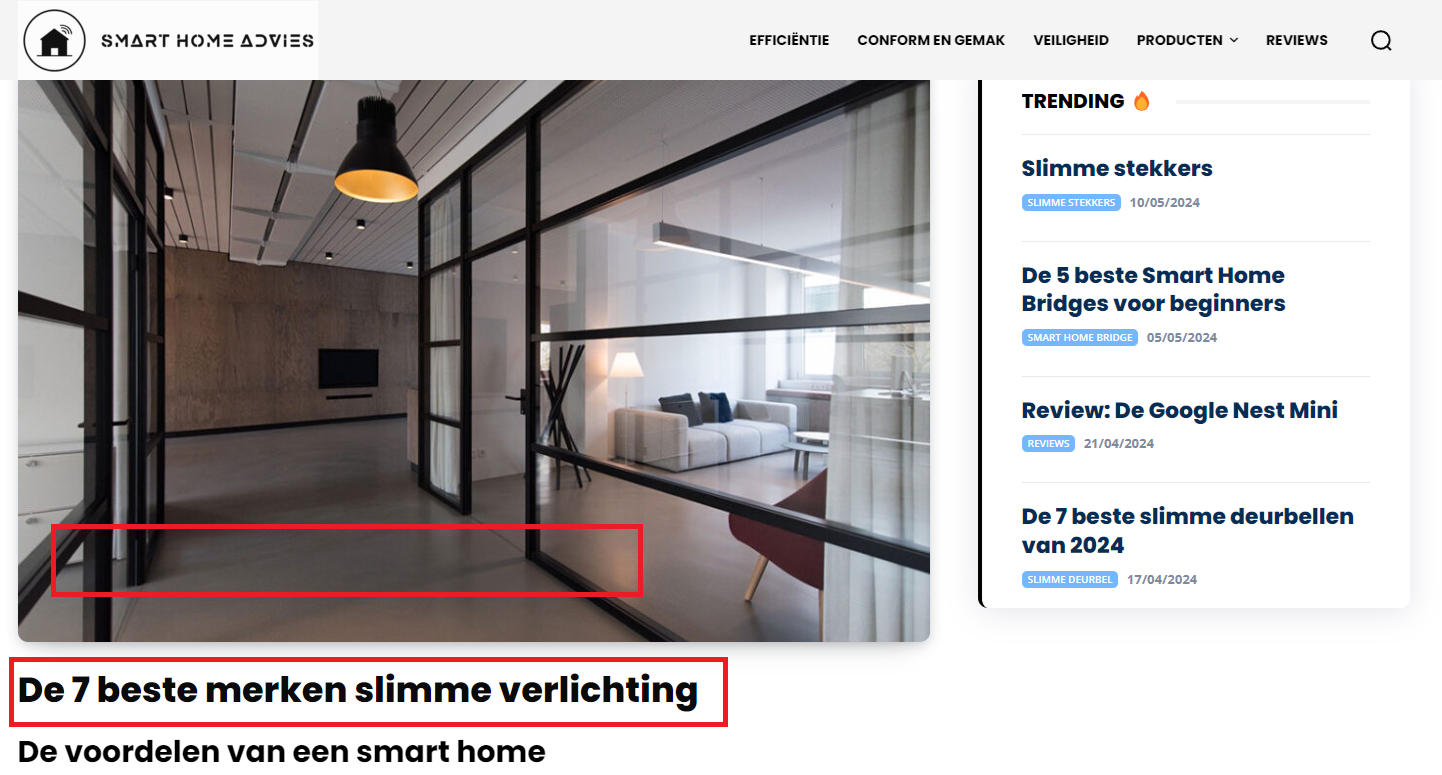
I’ve seen it somewhere before but can’t find it.
How do I do this?
Thanks!



