- NewsmagHomepage – How to build and set it
- NewsmagtagDiv Composer Tutorial
- NewsmagNewsmag documentation
- NewsmagMain menu
- NewsmagLogo & Favicon
- NewsmagPage templates
 bzeegers
 Hi,
Here’s some more detailed information. please have a look at the site as it is now set up: http://wp.bgmagazine.nl/
We have several categories (arbo en verzuim, Duurzame inzetbaarheid and so on these being block 1 en 2 on the homepage). On the right side of every block you see a submenu that we created with ajax (Labels are ‘Artikel” article), Nieuws (news) and Opinie (blogpost).
These will display all post from that specific category. So for the first block it’s only from category ‘Arbo en verzuim’. This could be articles, blogpost, events, jobs etc.)
However the block Arbo en verzuim should only display the specific articles, blogpost, events etc from that specific category, so in the first block it should display all posts, events, jobs only from category ‘Arbo en verzuim’. If a user clicks on a submenu eg Artikel (article) all the articles (or number we’ve set up) of that category should be shown in that Block.
 bt012008
Hello, resident website destroyer here. This is my website: http://www.thechaff.co
I removed a line of code that a developer friend added for me to the ‘Newspaper: Homepage – blank Page Template (page-homepage-blank.php)’. The code that he had added was this:
<h2 class=”fancy”><span><?php echo date(‘F j, Y’); ?></span></h2>
He helped me add that because earlier I wanted the date to display at the top of my homepage. I no longer want this, so I thought I could just remove it.
Now however, if you take a look at my site, things aren’t looking so hot, and I’m not exactly sure how to fix it. In between the dashes below is what the code currently looks like:
—
<?php
/* Template Name: Homepage – blank */
if (have_posts()) { ?>
<?php while ( have_posts() ) : the_post(); ?>
<div class=”container td-page-wrap”>
<div class=”row”>
<div class=”span12″>
<div class=”td-grid-wrap”>
<div class=”container-fluid”>
<?php the_content(); ?>
</div>
</div>
</div>
</div>
</div>
<?php endwhile; ?>
<?php } else {
echo td_page_generator::no_posts();
get_footer();
}
—
Any assistance would be greatly appreciated. Thanks!
 cbur2107
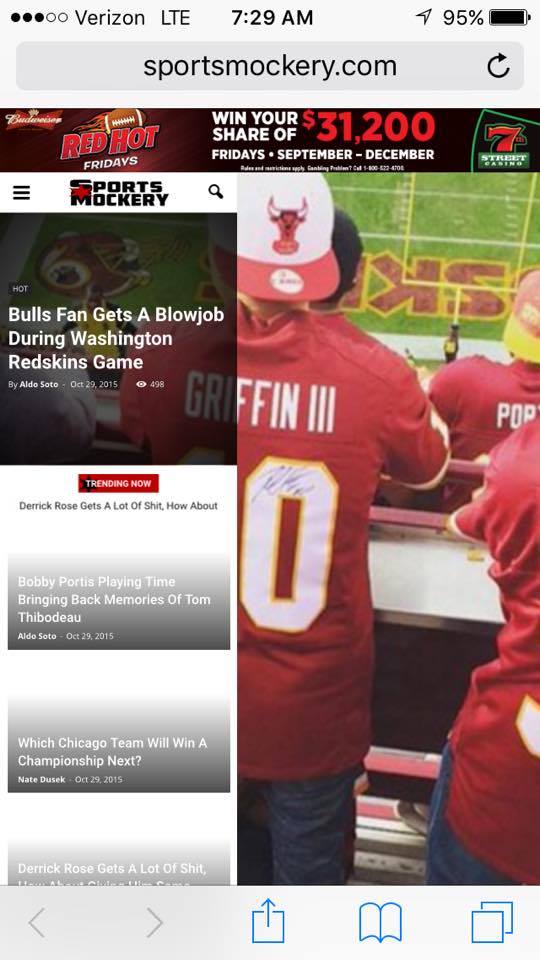
The homepage post widget for the homepage is great, only problem is it totally messes up my mobile.
Example: http://sportsmockery.com/wp-content/uploads/2015/10/12204794_905692468634_52261014_n.jpg
Do you know why this happens? I really want to use the homepage post on my site.
Thanks in advance.
bzeegersHello we’re currently investigating the possible use of your newspaper theme.
We’ve added about 25 article and have tried to divide them over several categories in the homepage.
you can view our progress so far at http://wp.bgmagazine.nl/
What we would like to achieve is a structure with blocks named Arbo en verzuim, Duurzame inzetbaarheid and Preventie and so on. That we have achieved.
However we have several post type, such as Article, opinion, news, event, Jobs etc.
What we would like to achieve is to have these post types as subcategories for every block, as a horizontal submenu. So every block would have all articles of eg. category Arbo en verzuim, and have a horizontal menu in that block displaying all article, columns, events for that category ‘Arbo and Verzuim’
We thought the Ajax drop down would do that trick. However if we use the ajax dropdown and use category ID, it is displaying all articles of all categories instead of articles only from that specific maincategory.
 Bogdan B.
 Hi,
Unfortunately the big grid you are pointing comes from the Newsmag theme. You can chose a different big grid for your homepage. Here you can try them out and there styles: http://demo.tagdiv.com/newspaper/big-grid-1/
As an alternative you can use the big grid slide block which resembles the one ion newsmag on the mobile version: http://demo.tagdiv.com/newspaper/big-grid-slide/ (it needs to be set to at least 8 posts)
You can force the slide to display like the one on newsmag but it is no easy task. You can follow this topic if you want to tackle this challenge: https://forum.tagdiv.com/topic/big-grid-on-the-mobile/
Thank you!
 Andrei L.
 Hi
When you install the demo without content only the settings are loaded, colors, fonts etc. The content must be created by the user. You can add the grid or any other block from Visual Composer pagebuilder: http://screencast.com/t/yVhd0YuLkOl More details about page customizations can be found in our documentation: https://forum.tagdiv.com/homepage-how-to-build-and-set-it/ – https://forum.tagdiv.com/how-to-use-visual-composer/ – https://forum.tagdiv.com/block-settings-tutorial/
Hope this help.
Thanks!
cbur2107 Video format.
Play button on homepage.
No featured image.
cbur2107 I like using the VIDEO format so the play button gets added to the homepage, but I don’t like embedding my video in the top. I want the video to be in the body, with a feature image and the play button show on the front page.
Make sense?
cbur2107 Let me clarify.
If I select the FORMAT as VIDEO (so it will show a play button on the homepage), it does not show the featured image.
 George
Hi there,
Is there a way to remove my forum posts coz I see its reflects in google when my homepage url is being searched.
Kindly advice.
Thanks,
George
 GWhite23
I am having problems with my site after updating to the latest version of the newspaper theme. (I updated from version 3 to 6 yesterday)
I think the problems are related to the visual composer plugin not working correctly.
I want to use one of the pre-defined homepage templates for my homepage but I cannot access the templates as the backend editor of visual composer does not work or show up.
I spoke to my ‘WordPress guy’ and after taking a look he reckons that it seems like a theme bug and it was best to contact the theme dev.
What should I do? Thanks in advance.
 Gwen
GwenHi,
I am using the block 15 here: gwenos.com/videos
and I would like to align the title in the center of the post images (like on grid 1 on the homepage).
Same with the Top Menu images.
Thank you for any advice 🙂
Andrei L. Hi
I’ve checked your site and noticed that you’re using page builder + title as a page template, that’s why the page title and Breadcrumbs appear on top of the page. To remove it you need to chose a different page template for the homepage in Visual Composer page builder: http://screencast.com/t/b1Xenwnrsy You can find more information about page templates in our documentation: https://forum.tagdiv.com/newsmag-page-templates/
Hope this help.
Thanks!
 Filipe
I’m using “Tech Demo”. I’d like to change the categories in the slider in the homepage. How can I do that? I didn’t find in the documentation.
 stuckx
Hi,
I just installed your theme on badbeatmonster.com , a brand new domain, with a fresh install of wordpress 4.3.1
The sub-pages and articles look great, but i have weird code on the homepage. The column dont work also.
[vc_row][vc_column width=”1/1″]
[/vc_column][/vc_row][vc_row el_class=”td-ss-row”][vc_column width=”2/3″]
Please help me to fix this.
Thanks
Bogdan B. Hi,
I assume you are talking about the margins of different containers on your homepage. You can edit these out with the browser inspector: http://screencast.com/t/DdqD2nbNAn – http://screencast.com/t/dTVLBD4p and then use the code in the theme panel->custom CSS
Unfortunately there is no general white space removal code.
Thank you!
 Le Claqueur de Doigts
 Hey Bogdan,
Yeah I understand this is hard coding. I’m just stuck with this last but not least touch to my blog and quite embarrassed to hire a freelance for a one shot coding where I could have hire him/her to do my whole site without having to buy the Newspaper theme ( which is great don’t get me wrong 🙂 ).
Do you know anyone who can do this category display template for me ? Maybe you ?
You also talked about the masonry grid from VC, which I used to built my homepage. Is it possible to use it with categories ?
Thanks in advance.
 dizajn
Hi, does any of the users have maybe custom css code for white space removal on homepage?
Thanks
 JorgeDDW
this is what i got in my homepage:
[vc_row][vc_column][td_block_trending_now navigation="manual" sort="random_posts"][td_block_big_grid sort="featured"][/vc_column][/vc_row][vc_row el_class="td-ss-row"][vc_column width="2/3"][td_block_1 custom_title="" header_color="#e29c04" border_top="no_border_top" td_ajax_filter_type="td_category_ids_filter" ajax_pagination="next_prev"][td_block_15 custom_title="" header_color="#0b8d5d" sort="random_posts" limit="8" td_ajax_filter_type="td_category_ids_filter" ajax_pagination="next_prev"][vc_row_inner][vc_column_inner width="1/2"][td_block_2 custom_title="" header_color="#4db2ec" sort="random_posts" limit="1" ajax_pagination="next_prev"][/vc_column_inner][vc_column_inner width="1/2"][td_block_10 custom_title="" sort="random_posts" limit="4"][/vc_column_inner][/vc_row_inner][/vc_column][vc_column width="1/3"][td_block_ad_box spot_id="sidebar"][td_block_6 custom_title="" header_color="#ed581c" sort="random_posts" limit="1"][td_block_8 custom_title="" header_color="#0152a9" sort="random_posts" limit="2"][/vc_column][/vc_row][vc_row][vc_column][td_block_14 custom_title="" header_color="#288abf" tag_slug="more news" sort="random_posts" limit="3" ajax_pagination="next_prev"][/vc_column][/vc_row]
And is not showing anything on my homepage: http://robertnoticias.com/
 thelastpoet
Hi, I like newspaper theme and the kind of support I receive here. I am modifying my homepage to showcase like a corporate theme and really liked the Travel Demo.
I have 2 questions:
1. Is it possible to remove the dates on the block 5 that appears ontop? (Screenshot Attached)
2. How can I filter to show specific pages instead of the normal posts to appear on the block 5? I have tried but only managed to show recent pages on the block 5. (I would like to achieve something like, About Us, Services, Contact us). On the top of the Travel Demo.
Any help will be highly appreciated.
Link to screenshot http://www.screencast.com/users/thelastpoet/folders/Default/media/b569a457-fcdc-4ccb-97eb-31eefb1aed53
 gmaio
gmaioHi there,
I’ve a problem with the correct sidebar selection while I’m on the search results page. Everywhere in my site I’ve set the same default sidebar as you can see from the homepage http://43b.60a.myftpupload.com but, if I do a search (i.e. http://43b.60a.myftpupload.com/?s=campoli) the sidebar changes: why? I need to keep everywhere the same home sidebar: how I can get it?
Thanks a lot in advance for any help.
Giuseppe Maio
Andrei L. Hi
I’ve checked your site and noticed that the links from homepage pagination have a 301 Moved Permanently status: http://screencast.com/t/nsAGcSu8TON4 That means that either you have set a redirect for these links and if is the case try to remove it, or a plugin make this redirect automatically. If you didn’t set the redirection try to deactivate all plugins except Visual Composer, clear all caches including browser’s cache and test the site again.
Thanks!
 MAndrew
Hi,
On my website http://www.sikh24.com, the featured homepage block is not showing properly. In addition, whenever I post something in featured category, it doesn’t show up in the blocks.
Thanks
 aleister
Hello,
Our homepage pagination is returning to homepage when anyone clicks the page numbers. https://www.technopat.net/ This happens when we use a page created in visual composer as homepage. Pagination works normally in blogroll.
Kind Regards,
Andrei L. Hi
You can’t use a category page as a homepage. The homepage can be set from Settings > Readings: http://screencast.com/t/nSBO2rJkln Also you can check our documentation for more details regarding the page customizations: https://forum.tagdiv.com/newsmag-homepage-how-to-build-and-set-it/
Hope this help.
Thanks!