
- NewsmagHomepage – How to build and set it
- NewsmagtagDiv Composer Tutorial
- NewsmagNewsmag documentation
- NewsmagMain menu
- NewsmagLogo & Favicon
- NewsmagPage templates
 llaporte
 Hello,
No unfortunately the problem with the block [td_block_homepage_full_1] is still there and is not displayed when we display the website on the HD screen of my three laptops as well as my Desktop. The browsers used are Microsoft Edge and Chrome.
This is my main issue.
As for Twitter icons, not displaying the same version between Desktop and smartphones, I don’t really care, even if I find it irritating. We have the new ones on Desktop and the old ones on Smartphones.
At first glance, it looks like the template doesn’t use the same code, depending on the display.
I don’t want the display of my website to be the one used by the code used in the release 12.6.1 for the Desktop but the one used by smartphones, like it was with release 12.5.1, except the X icons.
Now, how do we make the [td_block_homepage_full_1] block work, as it was on version 12.5.1
Thanks in advance,
Luc Laporte
 Anamaria
 Hello,
Please provide more details, with the link to your website and screenshots.
Using our theme you can choose from 3 mobile versions
-> mobile responsive => https://www.screencast.com/t/oJ2ShOp47
-> mobile theme plugin => https://forum.tagdiv.com/the-mobile-theme/
-> mobile page => https://tagdiv.com/newspaper-10-3-7-update-brings-customizable-and-fast-mobile-pages/
If you created the mobile pages with tagDiv Composer, then when you install the Mobile Theme plugin, your pages will be overwritten by the plugin (the mobile theme comes with its templates for page, post, category, etc so your current templates from the desktop theme will get converted to the mobile theme layout, the page content is made without builders in mobile editor => https://www.screencast.com/t/xbgZG8kH also, the options that are provided to edit the mobile theme version are limited (this keeps the things simple)).
This is a video about Responsive Newspaper Theme, AMP & Mobile Theme, Mobile Pages & Templates -> https://www.youtube.com/watch?v=SpGkOnJeNZY
So, the mobile responsive is what you see then that you select the viewport on phone => https://www.screencast.com/t/matV17hH, so some settings may apply for each viewport(where is the border blue), and others are not(where the border is black).
The mobile page has the mobile templates from Cloud Library => https://www.screencast.com/t/YCcZ8rL8
The Mobile responsive version of the theme and the mobile page editor can be edit with tagDiv Composer, the mobile theme plugin cannot.
For example, you can have the mobile theme plugin activated and use the mobile page/mobile responsive version for the homepage/pages, but for the categories pages/404 page, you can’t use the mobile page/mobile responsive version if you have the mobile theme plugin activated.
So, if you want to design the pages with tagDiv Composer, you can use the mobile page or mobile responsive version.
Thank you!
 rahuldas
Dear Tag Div Support Team,
I hope this message finds you well. I recently purchased and installed your NEWSPAPER 12 WordPress theme, and for the most part, I’ve been extremely pleased with its performance and customization options. However, I have encountered an issue that I need assistance with.
The problem I am facing is related to the display of post pages. While the majority of my website is working perfectly, I have noticed that some post pages are rendering differently, particularly with changes in the header section, including the logo.
Here are the specific issues I’ve encountered:
Inconsistent Logo Display: On certain post pages, the logo in the header section appears differently than on the rest of the website. It either changes in size, or alignment, or sometimes even the image itself seems to be replaced with a default logo.
Header Section Elements: In addition to the logo inconsistency, I’ve observed that other elements in the header section, such as navigation menus or the site title, may also behave strangely on these post pages.
I have thoroughly reviewed my theme settings and customization options, but I have been unable to identify a solution to this issue. It appears to be specific to post pages, as the homepage and other pages remain unaffected.
Could you please provide guidance on how to resolve this issue and ensure a consistent appearance throughout my website, especially on post pages?
Here are some additional details that might be helpful:
Website URL: [https://trendofox.com/]
Normal Post Pages: [https://drive.google.com/file/d/1hN6f8P9fCWVBftRtPEcInw5h0BC62thE/view?usp=drive_link
https://drive.google.com/file/d/1gOH6scVgWzwIBvjpCaiHiqewOhxg9yEs/view?usp=drive_link
https://drive.google.com/file/d/1LEmJFGPESLLflvnlDEyh042bv68Nsn6K/view?usp=drive_link%5D
Affected Post Pages: [https://drive.google.com/file/d/1WQaSDPjiPCVtCPjXsETgxkk1BCgru9aJ/view?usp=drive_link
https://drive.google.com/file/d/1yjL9KpWRm1mboS01E0nkPE2_UoUJ0C-P/view?usp=drive_link
https://drive.google.com/file/d/1aUYLo7gtRXW3vGVPz-HUZ0Hl-tFcXUDC/view?usp=drive_link
https://drive.google.com/file/d/1QmLzTU4pL0kzlvMrgqnC28FUBfttHpfE/view?usp=drive_link ]
llaporte Hello again,
I did other checks, the Homepage post block,[td_block_homepage_full_1], no longer works when displaying the website in Desktop mode with version 12.6.1, unlike version 12.5.1.Even disabling all plugins other than yours.
I did not edit my main page with WPBakery but rather with TagDiv Composer. The preview works well, but immediately live, the block does not appear. Only viewed from a smartphone.
From there, I don’t know what to do to get my main page back with the display as I had defined it before unless I return to version 12.5.1.
Please find a solution, thanks in advance,
Luc Laporte
llaporteGood morning,
Since updating from version 12.5.1 to version 12.6.1 there is a problem with the layout of the home page. I designed my home page with WPBakery. On the version viewed on a mobile everything is fine but on the Desktop version the HomePage Post block does not appear.
Also, the X share icon, formerly Twitter, is different on the Desktop version than on the mobile version. The new icon is corrected on the Desktop version but not on the version viewed from a phone. I don’t use the mobile plugin.
Also, the Social counter plugin still displays the old Twitter logo and not X. When are you going to update?
My website is mesplaisirs.com
I cleared all caches and nothing works like before. I really want to go back to version 12.5.1 even if the X logos are not up to date, at least everything else worked very well.
Please take my comments into consideration to improve the situation and your product.
Thank you in advance,
Luc Laporte
 giotas1
i want help.
how can i delete categories and make my own?and how connect each category in homepage to show news?
 nolandolce
Hi,
I’ve seen Anamaria’s response to multiple people with this problem:
“You can to add the favicon, in Theme Panel -> Header -> Logo and Favicon => https://www.screencast.com/t/H4ucPC2wwz
Also, on the homepage there’s an option Customize icon => https://www.screencast.com/t/I2uVvP4b -> Site identity -> Site icon -> Change image -> publish => https://www.screencast.com/t/lY9WEOZEj
Also, you can check this article https://developers.google.com/search/docs/advanced/appearance/favicon-in-search”
Our favicon is already in these places though, yet in google search it is not displaying. Website is http://www.rareparenting.com. Any ideas? Note the tagdiv support is still an admin if you need to look inside. Thank you!
 seanie2k
 Hi Anamaria,
Thank you for coming back to me. I’m still having an issue. I’m able to import the xml file and it is importing templates such as Header Template, Footer Template, 404 Templates, etc (see screenshot attached https://imgur.com/a/oNUWKeq) but not the Homepage.
It is this customized homepage (with blocks/fonts/colours) that I need to import to the updated staging site. Am I missing a step or is there a workaround?
Thanks for your help.
 rohan36sri
Hi, this is my website – http://www.thesubsequent.com
This is a NEWS WEBSITE and for SEO purposes, I wish to set the logo as the H1 tag or something like that so that H1 should be there on the homepage. Is there a way to do it?
Anamaria Hi,
I think that the settings are not saved. Please check the console when you hit the save button. Please check this topic https://forum.tagdiv.com/topic/tagdiv-composer-does-not-save-only-content-of-homepage/
Thank you!
 Jimmy_X
 How can I do that?
I find another… unofficial way to edit homepage thru Cloud Templates – Homepage Templates – and select Prebuild Template that I like and edit from there with Composer, and but I don’t know how to import that modifications in prebuild demo…it is possible? One possibility is, after I make modifications I like in that metod, edit de prebuild demo, and, somehow, step by step, apply them from prebuild template to prebuild demo… I know, it is weird and complicated… well, yeah…
If it is another simple possibility please tell me.
Thank you again.
Anamaria Hi,
When you import a prebuilt website, this will apply to the entire website, including the homepage. You can import only the cloud templates from Cloud Library and design them after you can apply them.
Thank you!
 Bettina
 Hello @newshindi24!
You can only modify the footer with TagDiv Composer if you go to a page where it is assigned and edit that page with TagDiv Composer, and then you will have access to the footer also. For example, edit your homepage with TagDiv Composer, scroll till footer, click on footer zone and you can edit it.
Thank you!
 dxx26379
Hi, I just have one header template in the cloud templates, but it looks like the homepage has two ways to interpret this header.
1. version (on pages): https://www.behoerden-spiegel.de/
2. version (on articles): https://www.behoerden-spiegel.de/2023/09/29/digitalisierung-souveraen-und-sicher-gestalten/
The ad should be on the right side like on the start page. I do not know why the ad is under our logo at the article pages.
Thanks
Dennis
 Otaku
OtakuI’m unable to copy exact header for my website even after importing the prebuilt website(newspaper default pro). I’m not able to see my homepage button and when I’m hovering to categories section some kind of glitch I’m seeing this is not exactly same as the newspaper default pro pre built website. also when I’m using footer section in theme pannel there is no option is visible to me so that i can edit i’m just seeing two options no template and default pre built template.
Please Help I don’t know how to attach screenshot. Please help me i want to correct it as soon as possible
 santa159
few months ago, my website was hacked. After hacking, research for 5 days of every wordpress plugin and all, and discovered that website was hacked through theme. Then i uninstall theme and re-uploaded all the things but problem not solved. Then contacted with support team, they lastly helped me out. But i still doubt there are some bad codes still exist in my website. Today i have seen my half post gone to drafts and my homepage redirection address pointed out to tagdiv.com official site. How is it possible. and what should i do now , how i overcome with this hacking problem. Please dear friends help me out. Thanks in advance.
 genfinity
 I was able to get the theme installed and activated with all of the plugins installed, but when I go to edit my newly created homepage the edit page the “edit with tagdiv” and cloud library buttons along the top do not show. It appears that I can only edit the raw code of the page. Any suggestions?
 cotamix
I installed “Coronavirus Total Pro” skin but our home page is loading too slowly. All other pages load fine.
Also, I can’t make changes in “Flex Block 1”. There is not taken post picture.
thanks for your help.
Anamaria Hi,
I said only to use cloud templates; you can create as you want the template. You can create your modules and use the flex block builder to display it -> https://forum.tagdiv.com/modules-builder-newspaper-theme/ -> https://forum.tagdiv.com/flex-block-builder-flex-loop-builder/
If you import only a template, then the colors and settings are applied only on that template; I said to change the blocks and the template to be able to turn off the tagdiv standard pack plugin because this plugin will be deprecated. You already have a cloud template for posts, authors, and categories. Maybe you have only cloud templates and don’t use elements from the standard pack plugin.
From what you said, I understood that you have more widgets displayed only a few days before the event. Is this correct?
You can add a page on the homepage, but this can be done in an iframe, and the content will load from both pages; what I can suggest is to use modal popup -> https://forum.tagdiv.com/modal-popup/ and set the page there. Then, the content will be loaded only where the button is pushed, depending on what trigger you set.
For optimization, please set the height and width of the logo https://pagespeed.web.dev/analysis/https-www-cinefilia-ro/lys3ldwyle?form_factor=desktop, and you can use the option from Theme Panel – Block Settings -> inline css. You can enable the options and do a page speed test to see if it will improve. If you want, you can contact us via email at contact@tagdiv.com, and there, we can communicate in Romanian.
For the jetpack newsletter, https://i.imgur.com/dsCY1BV.png please use this code
.wp-block-jetpack-subscriptions__container .wp-block-button__link {

padding: 8px 12px;

margin-top: 20px;

background-color: #561D5E;

}
Thank you!
Anamaria Hello,
You can create a different homepage for each language, and only the posts from that language will be displayed.
You can check those guides:
-> https://forum.tagdiv.com/newsmag-is-wpml-compatible-using-theme-translations/
-> https://wpml.org/forums/topic/different-page-template-for-different-language-page/
-> https://wpml.org/documentation/
Thank you!
 Kari7
Kari7Hi,
The header overlay 32 do not work properly.
Sorry, I Can’t post the link of my website as I’m offline to work on this site.
I created the homepage. Added the header template. made it global. but it only works on the blog post(showing the feature image of the blog post) but on the website it doesn’t work at all. The website header doesn’t work.
I tried with a different template and everything works fine so the problem is definetly from the header 32 (I think)
Can you help please?
thank you in advance,
Kari
 Cinefilia.ro
 The tutorial I followed (https://www.theblogmarket.co/how-to-customize-the-jetpack-subscribe-opt-in-form/) was aiming for this look that i liked and i copied the code exactly how it was here, but it didn’t completely changed.
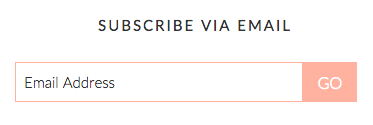
So i actually got that exact code as a start… but it doesn’t change… it still looks like the default widget that i added before the custom code. 
I don’t use a shortcode, it’s just the jetpack widget. I tried one found online but it looked horrible so i deleted it. I usually use Shortcodes Ultimate as a plugin for basic shortcodes I need on posts.
I tried browsing the cloud, but it doesn’t actually fit the estetic I wanted for the website so I worked with what I could actually edit as I wanted to look, i wanted the custom blocks that have only 16/9 images, because i’m not interested in mixed image dimensions as I don’t want to worry about them being cut or stretched and this format almost fit my old website featured image dimension. I only use Flex Blocks. I really don’t get why are you asking to make my website like other website, with those not movies related templates. I bought a theme so I can make it custom, If i wanted predefined designs I would’ve stuck to wordpress.com themes. When I got the theme I uploaded a custom design from cloud (as it was suggested) that I edited to fit my needs. Every time I imported something from the cloud all my global settings, content and colours went all over the place and I had to redo everything and lost a lot of time deleting and recolour things. I still find things that I’m pretty sure I fixed before and now they are wrong again. I’m not anymore on the staging website, I’m on the live one so I cannot remake everything again from scratch. Please explain why are you suggesting this. What have I done wrong by working with these settings that I choose?
You are quite confusing and it seems you merged two separate questions in one answer and I don’t really understand what do you ask me. You mean that my website can be slow because I placed the widget with the jetpack subscription box? Or you mean the column text block is making the website slow? Or you mean other part is doing that?
I only used column text block in only three places. The Popcorn section and with the two sliders because the two kind of sliders the theme provided were useless for what I wanted (actually one was useless and other too complex to handle). The one I’m using is called MetaSlider and it is really simple and it has a shortcode that i added in the text box… so that is who i find it quite lite.
The Popcorn section is the one with the shortcodes that is worrying me in the future. I initially wanted to make a separate page with it but the content to be shown on the homepage as it can be seen now… but to keep the whole code on the page, not on the homepage, and just load it the homepage. But it didn’t work so I uploaded the whole content on a column text block

(that might affect the page speed in the FUTURE if it will get full of images in all of the days, even if those pictures are not shown – I now clean slots while I’m updating it with new ones). I made the separate page with the shortcodes here: https://www.cinefilia.ro/10963-2/ but I want to show the content of the page on the homepage, as you can see on the homepage (but with some kind of a display shortcode so it wouldn’t have all the code on the homepage as now). I tried to do that with a block that shows the meta of the page, but it only gets the code that should not be seen. 
So the questions is if there is a way to display other page shown content in a box on the homepage so I would not worry about adding too much content on the homepage at least with this big text. I don’t want to keep all this content on the homepage, but i can’t display it automatically on homepage from a separate page. Maybe it would’ve been just easier to explain in Romanian…
Thank you for the optimisations resources. I will check them to see what I can make better.
Have a nice day!
-
This reply was modified 3 years by
Cinefilia.ro.
nolandolce Ah no, this issue isn’t solved. This is a separate issue, where the homepage isn’t rendering on mobile, per google. The solved issue was regarding a specific post that wasn’t rendering in mobile or desktop.
 newspatron
Hello there
With regards to a news website that can be found here – https://newspatron.com I am trying to create a unique homepage for readers of different language.
Here please suggest me two options.
1. Creating a (2nd) unique home page with unique content only limited to a said language. [For Example page name (Home-Language)]
Every post on this page here will have different content and the posts on this page will not appear in any other language or pages.
My aim is to create unique posts in a different language. The posts written in a different language will not appear on the main home page as the main home page will be in English.
Please let me know how this can be achieved.
2. Option translation
Entire website translation to another language
I do not prefer this as it slows down the site and the posts translated from the main language may not be of interest to readers of different language. Yet please let me know if there is a simple way to achive the option 2.
Cinefilia.roHello. I have Newspaper theme on https://www.cinefilia.ro/ and I wanted to add a jetpack subscription box. I really hoped that i could’ve looked something like the social media count box i used on the page so they would blend in better, but when i added the widget it turned like a mess. So I searched and found a CSS custom code that I can edit. I added it in the place and it didn’t changed that much. It got some features at the email box (is now pink as the template code, i will change the colour, but first I want to make it work well), but not all the changes (the subscribe button is still rounded and gray and ugly) and I’m concerned that it might be in a conflict with other stuff… somewhere… I really don’t know. I even tried to add a direct code to a subscription box in a text directly in the homepage design… but if i add the custom code it doesn’t change at all and it looks even worse. I feel really lost… as I am going in circle… I don’t know where to start looking for any setting that may conflict that CSS custom features.
The code I used is this one:
.widget-title {
font-size: 15px;
margin-bottom: 20px;
text-transform: uppercase;
letter-spacing: 2px;
text-align: center;
}
.jetpack_subscription_widget .widget-title {
font-size: 15px;
margin-bottom: 20px;
text-transform: uppercase;
letter-spacing: 2px;
text-align: center;
}
#subscribe-email input {
width: 85%;
height: 40px;
padding: 10px 8px;
font-size: 15px;
float: left;
border: 1px solid #ffb2a0;
}
#subscribe-submit input {
background: #ffb2a0;
width: 15%;
padding: 0;
border: 1px solid #ffb2a0;
height: 40px;
}
I think you may came across it as there are not that many custom subscribe button tutorials online. So… do you have any recommendations?
2. Oh… and another question. I added a custom text with a really long shortcode as a calendar that automatically displays only that day events with photos and links despite the fact I set more days in advance. I’m really emerged by this feature for the homepage, but I’m concerned that when I will add more images and stuff (even is they are not on display in that day) the homepage might feel heavy and have speed issues as it is already a busy page so I made a page with the same content, but i can’t get it to show exactly like the one from the popcorn section. I added a test just above the popcorn section and it displays all of the code. I will let it there until you will answer. Any idea how to externalize this in a page? In other themes I used Content views plugin, but I disabled it as I didn’t know if it worked well or might work (in this instance I just forgot if i tested it with your theme), but I actually want to make more without that many plugins so I would like to find a more practic way to do this. I’m still concerned that I have to many plugins.
That’s all for now,
Thank you in advance!
Have a nice day!

