fiatmedia
I’m including all of these issues at once because I have a feeling they are all related, and maybe seeing them all together will give you some clues as to what’s going on.
1. When I pull in a contact form from the cloud library, from any theme, only the shortcode displays. No form shows up, and the short code is not parsed when viewing the page live either; I only see the short code.
2. With some modules I can’t change the background image in the template. When I try to, the image doesn’t change. In other modules I AM able to change the background image. One module that consistently never let me replace the image is the fancy text and picture module. It has a game console as the default image. I’m never able to replace it. And when image replacement DOES work on some module, the image placement doesn’t work the normal way; I have to do a workaround (see next point)
3. I can’t add an image the normal way, in any module, because when I choose an image and click “insert into post” nothing happens. I have to instead copy the URL of the image in my library, paste it within the “Add by URL” field, and only then will the image load.
4. Something that consistently fails, apart from contact forms, is that I can’t load the “Hero” image module. When I drag it into the page I just get a status wheel spinning and spinning and nothing happens.
I’m running the latest wordpress build. Everything looks good in the theme panels status menu. I have read the themes minimum technical requirements and everything looks good there too. All the required plugins are installed. I don’t have any other page building/editing plugins installed. So I can’t see any obvious reason for why the theme is so buggy and temperamental.
Thanks for your help
 varre
varre Hi,
Thank you for responding. I removed the theme and all its plugins and reinstalled it. It works fine now, no any issue. Thanks.
 Anamaria
 Hi,
You can disable the tagdiv Standard Pack.
If you’re seeing only those social icons please make this adjustment in the tagDiv Composer plugin -> wp-content/plugins/td-composer/legacy/common/wp_booster/td_first_install.php
=> https://www.screencast.com/t/yO3iU8E5JhH
Then hit a save in the theme panel and then revert the code back to the original, this will make the social icons appear properly again -> https://forum.tagdiv.com/design-post-pages-using-default-templates/.
If you don’t have success you can send us an email at contact@tagdiv.com and provide
– wp-admin URL and credentials
– cPanel URL and credentials
We will fix the problem. Include a link to this topic in the email.
Let me know the results!
Thank you!
Anamaria Hello,
Please check this guide should work without any problem https://forum.tagdiv.com/autoptimize-install-configuration/
Thank you!
 Maxyct
Hi all,
I’m trying to restrict the access to some pages only to logged users. I installed a plugin called “content control” to do it.
When an user try lo access those pages they are redirec to the default wp-login.php (not the popup login of newspaper theme I have activated).
So, I was wandering if Newspaper gives the possibility to create an URL that allow redirecting to the “popup login”.
Thanks,
Max
 Bettina
 Hello!
Make sure you have the latest update of the theme and plugins, too. Check if all the necessary tagdiv plugins are active in Newspaper -> Plugins. Install the Standard Pack plugin if you use the default templates.
Thank you!
 limitlessv
Hello,
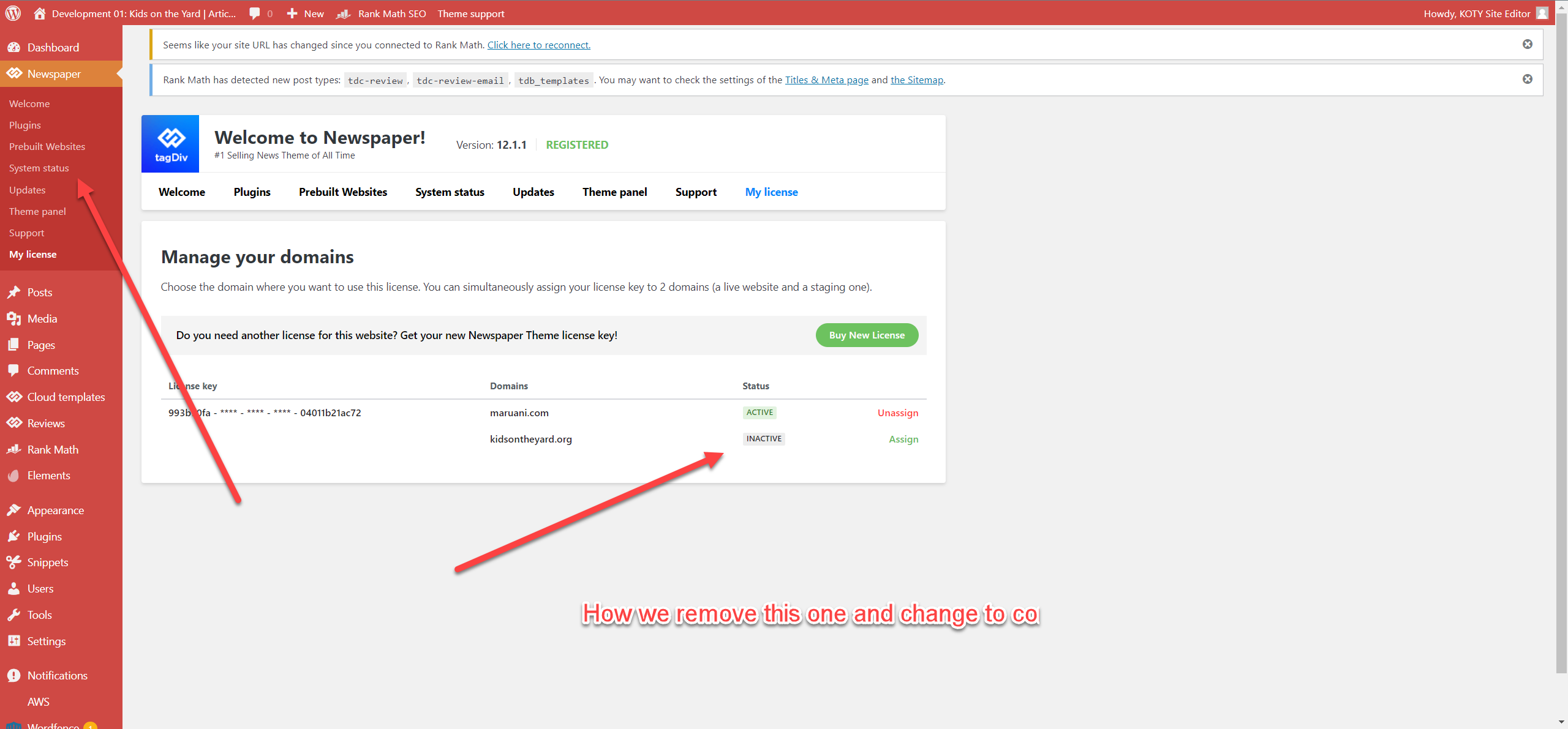
We have about 5 or 6 licenses for Newspaper.
We install a dev site, probably with the wrong licenses
How we replace it
https://media02.cdn.kidsontheyard.com/articles/wp-content/uploads/2022/11/23073544/2022-11-23_7-33-27.png
 bizudaniel
after updating, all core plugins was uninstalled I have to re-install them back cause website was not working anymore, after activating all plugins I still have an error with the forms and I don’t know if I did something wrong. Chainwitcher.com
Bettina Hello @ezioboy!
A code in your frontend is appearing only when you have a plugin uninstalled when it should be installed, so instead of the code, it will display the element from that plugin.
Make sure you have the latest update of the theme and plugins, too. Check if all the necessary tagdiv plugins are active in Newspaper -> Plugins.
Yes, but wait until the new update comes because there was a problem with the social login. You can only log in with Facebook.
The TagDiv Composer contains a lot of functions and features; please check our tutorial here: https://forum.tagdiv.com/tagdiv-composer-tutorial/
More documentation about the cloud templates is here:
– https://forum.tagdiv.com/cloud-library-templates/
– https://forum.tagdiv.com/design-post-pages-using-cloud-library-templates/
– https://forum.tagdiv.com/cloud-library-category-templates/
Also, check out our video tutorials at https://www.youtube.com/c/tagdivThemes/videos
Yes, with cloud templates, you can import sections and various templates. You can assign a different template for each page. Access the page and choose from the list : https://prnt.sc/aDWGj9oH3ZIO
In the Cloud Templates, you can see a “+” sign, and there you can have access in order to add all the templates you want. Also, you can build it from scratch by importing a blank template. Please check out this video about how to create a website from scratch: https://www.youtube.com/watch?v=SoGQ0d5kIBg
If you don’t find a template from a demo, then it means that demo’s templates have not been uploaded yet.
I hope that helps you!
Thank you!
 dra_proba
 I don’t have the Jetpack plugin installed. Is the theme La Historia updated to the latest version of WordPress?
Anamaria Hello,
Everything depends a lot on which plugins you use, if you have security plugins like Wordfence, Sucuri, WP Rocket, they can block the update process and then the plugins remain un-updated, they don’t install and activate.
@Caseylee Please check the console and check if you have errors.
Thank you!
Bettina Hello @Caseylee!
If you use default elements, then you need to have this plugin installed and active.
Thank you!
 ezioboy
Where can I install child themes?
 TSS
TSSJust installed a complete layout and its driving me crazy that the URL path has the “tdcpt_ or tdtax_ etc” in everything.
Examples:
https://business.floridasmart.com/tdcpt_directories/cafe-de-la-piesa/
https://business.floridasmart.com/tdtax_services/cafe/
https://business.floridasmart.com/tdtax_locations/pennsylvania/
How do I change these path settings?
Like this:
https://business.floridasmart.com/listings/cafe-de-la-piesa/
https://business.floridasmart.com/category/cafe/
https://business.floridasmart.com/local/pennsylvania/
 tampro92
 Hi,
i installed correctly. but system show the error messages.
https://prnt.sc/QK3MUQRO2IAC
Thank you.
 Hofrey2
 Same issue here Hero component brakes page layout.
Tried installing the plugin as recommended, cannot install it back again.
Any update on this fix?
 Caseylee
 Installing and activating tagDiv Standard Pack resolved my issue. Is this a new requirement? Thanks for your help.
 Calin
Calin Hi,
Please install the tagDiv Standard Pack plugin from Newspaper > plugins, this should resolve the problem.
Thank you!
Calin N.
CaseyleeHomepage shows the following shortcode instead of content:
[td_block_big_grid_3 category_id=”61″]
[td_block_12 td_ajax_filter_type=”” category_ids=”102,69, 115, 70,111, 125, 116″ header_color=”#1e73be” custom_title=”LATEST ARTICLES” category_id=”111″ td_filter_default_txt=””]
Visually, site doesn’t look quite right.
Initially, tagDiv Composer and tagDiv Cloud Library didn’t show up under appearance > install plugins, or standard plugins menu. I deactivated all plugins, then the newspaper menu took me through installation of both plugins. They now show up in the standard plugins library, but do not seem to be working as I have shortcode on front end of site instead of expected content.
Site is https://www.countrylines.com/. Any advice?
Thanks
Caseylee I have this issue too. Very frustrating, cannot manage this site through my usual tools. Today, my site is a mess of shortcode, and tagdiv composer shows to be active but not installed. Any ideas?
 salocharly
hi there,
I have been trying to use the custom post types/taxonomies to create a structure for my website.
what I am looking to create is the following structure:
https://replacecarkeys.com/toyota/ (with a template for all brands)
https://replacecarkeys.com/toyota/corolla (additional template for models)
so I am really having a hard time making this reality. I don’t understand if the brand should be a taxonomy or a custom post type and what the model should be. I installed CPT UI and created a custom post type called brands.
The idea is to have a post template for the brands and for the models and fill it up manually.
I did try to create a template but is not connecting to the custom post type template (I added it to brands in CPT/taxonomies section)
https://replacecarkeys.com/brand/ford/ (still structure is incorrect)
https://www.screencast.com/t/f7MIB1MztN
https://www.screencast.com/t/Eu2K73erOrQ cpt setting
https://www.screencast.com/t/GjdWQat4U0S5 template a created
Thanks for any assistance on his matter.
Calin Hi, please go to Newspaper > plugins and install the tagDiv Cloud template https://i.imgur.com/UOrBCik.png
Thank you!
 shoaibarif6468
 What should I do to change things from the theme panel? As Tagdiv Composer will only allow me to edit pages separately. Please guide me to reinstallation so I can use the theme panel to do changes in design, or is there any other way?
Anamaria Hello,
Maybe you have installed a Prebuilt Website Pro, and the changes from Theme Panel will not apply to the Pro Prebuilt Website.
You can edit the pages and templates from the front end using tagdiv Composer.
Also, on our channel https://www.youtube.com/channel/UCOT1RiNysIPCTPSnVZskwtQ, you can find more videos that can help you and documentation https://forum.tagdiv.com/newspaper-theme-documentation/ and you can ask us here on the forum if you have any questions
Thank you!
Anamaria Hello,
You are probably uploading the whole theme package. You have to upload only the theme zip file, not the whole package which contains other items
– https://help.market.envato.com/hc/en-us/articles/202821510-Theme-is-missing-the-style-css-stylesheet-error
Install via WordPress -> https://forum.tagdiv.com/install-via-wordpress/
Install via FTP -> https://forum.tagdiv.com/install-via-ftp/
Requirements for Newspaper => https://forum.tagdiv.com/requirements-for-newspaper/
After installing the theme and activating it you will find in the Prebuilt websites all the theme demos and you can import whatever demo you want => https://www.screencast.com/t/6rf5g0Dxc0K
Thank you!