Jaddy1219
 Thank you, be2name!
I still have a copy of the last version, and the child theme was perfectly working with my site, I’ll reinstall that for now.
Hope they fix it very soon.
 2076nb2019
Hi,
I would like to display my site’s footer as in your City News Demo: https://demo.tagdiv.com/newspaper_city_news/.
I tried to replicate the Footer Settings in the Theme Panel as per your demo installation but in vain! One of my developer seems to have made the change, and now neither he seems to know how to revert the footer the way its in the Newspaper City News Demo.
I know how to make the change with CSS; but just wanted to know if the same is possible by making some changes in the Theme Panel instead.
Here’s the a link to my dev site: http://wordpress-238021-851975.cloudwaysapps.com/?lang=en.
Thanks!
 Nikolcho
Hi,
I installed Mobile plugin and AMP on my test site and I intend to implement it on my live site https://worldoffloweringplants.com/. I have encountered some problems with it an can you look at it.
I have entered tag div newsletter short code to be shown on the end of the of the post true plugin Quick Ad-sense. It is working just fine on the site, but when Mobile plugin + AMP is activated I get error:
Fatal error: Class ‘td_style’ not found in /srv/disk4/233069/www/wofp.atwebpages.com/wp-content/plugins/td-newsletter/styles/tds_newsletter/tds_newsletter1.php on line 9
Also on the post view previous and next post are in lower footer area.
Also on the home page there is some problem with my social plugin and it is shown at the top of the page, and when the page is scrolled down, it gets the position it should.
Since the test site is password protected, please write to me where to send you the user and password, so you can look at it.
Thanks
 alicanli
  realnets
 Hi Simion,
We are installing them on the whole network. I just tested something and was able to get it to work. I got it working by uploading the plugins contained within the zip file of the theme from the Network Admin panel. I’ll keep on testing out the theme and let you know if I run into any more issues. Thank you very much for your help here.
– Jim
 Jose
JoseHello team,
I’m really excited about the new updates. I just installed the latest version of newspaper, but I’m a little clumsy about this.
I want to use my home page responssive. I want to use the categories in a responssive way. I want to use the contact page, in a responssive way.
And I want all post/publications to use the mobile plugin. Because this way you get a better score on Google pagespeed.
I know this should be possible with the new update of Newspaper, but I do not see the way Can you help me?
 Sitebysite
 There are no other plugin except the default ones (TagDiv) installed with the theme, so it can’t be a conflict. Anyway i tried to exclude one to one but i didn’t solve my problem.
With child theme active i can’t change layoute of pages and it’very strange.
In the “Post setting” area the selection of layout in the “Post template” area does not work.
I change template but the page in frontend does not change.
Why? It’s a big problem i can’t start develop my site.
Can you help me please?
 Vlad S
 Hello !
Thank you @Edward !
As edward suggested. Please make sure that your system status is up to date:https://tagdiv.com/newspaper-theme-requirements/ If is not please do all the modification needed to get it up to date.
Also make sure that all the required plugins are installed. Find out more about it here: https://forum.tagdiv.com/install-via-wordpress/
Thank you !
 Simion C.
 Hi,
Are you installing them for the whole network of websites? I see that when activating multisite the plugins can be installed per website, or per network
– https://www.wpbeginner.com/beginners-guide/why-do-you-not-see-all-plugins-on-wordpress-multisite-installs/
– https://wordpress.org/support/article/multisite-network-administration/#plugins
Vlad S Hello !
Please make sure that you have followed all the steps that are found here: https://forum.tagdiv.com/how-to-update-the-theme-2/ Also you have to update all the plugins and make sure that the the required plugins are installed : https://forum.tagdiv.com/newspaper-how-to-update-a-plugin/
Let me know if this worked out after you have followed all of our steps !
Thank you !
 maximus
 my issue is need to install js compser plugin although we already activate tagDiv Composer?
and what the function for js composer vs tagDiv Composer?
 andrew@tmrwtday.com
I have installed Newspaper but I don’t know how to install the specific Nature Theme > https://demo.tagdiv.com/newspaper_nature/
I am searching for it after selecting:
> Appearance
> Add New Theme
> Searching for Nature theme but it’s not showing up
Or is the Nature them within Newspaper which has already been installed? If so how do I find the Nature theme to install it exactly as the demo?
 tapstone
 Hi Simon,
Thanks for getting back to me.
I’m extremely concerned and upset that this theme was allowed to release updates that included such a crippling and significant step backward in functionality. There are companies that have built entire lines of business around this product, and such big (negative) changes can have tragic results. We depend heavily on this, the most basic of theme functionality. To discover that it was overlooked is quite shocking. I’ve never encountered a theme that took away the ability to modify posts templates as part of an “update.”
I don’t want to go into specifics, but a large scale project that has been in development for months that was scheduled to launch this week was just completely derailed by this oversight. This is far more than an inconvenience.
We’ve already built multiple products around your theme, and so far we have loved it. But this significant change really bit us.
So the big question is what are our next steps?
We are not able to wait for future versions of the theme to address this oversight, as we need to release on time or risk significant losses.
We are not able to roll back to an older version of the theme, as that would set us back days and undo a lot of hard work, which we don’t have time for.
I don’t want to hack a custom solution that will prevent us from updating to future versions of the theme, since we need to keep it up to date for security reasons. So whatever we come up with ideally needs to be future-proof.
Here are our basic needs:
We need to be able to identify posts of a certain category, and then modify the post to do the following (based on Custom Fields values inside the post)
Enable/disable the following post elements:
Title, Date Display, Featured Image, Social Links, Related Posts. These can not just be toggled via CSS as we need to optimize load times.
We also need to inject unique custom html (which will contain meta data, CSS, javascript, tracking codes, pixels, etc) into each post for a specific category. This HTML is also sourced via Custom Fields values.
Without those abilities we can’t launch. This was something we could easily tackle in our other Newspaper theme installs.
I’m looking into using the “add_filter” method to process the posts to strip out HTML elements based on the Custom Fields values, but have yet to find a way to make this work. I’m also looking to do the same for injecting the HTML.
Further complicating things is the fact that we did not budget (from a time, resource, or financial perspective) adding additional development to this project, since we are basically re-instancing an existing product build.
I’m hoping you can help advise us here.
I do appreciate your feedback, and hope we can find a solution to this issue.
Thanks again!
 webjump
Hi there,
I’ve installed the latest version (100% fresh) but VC won’t allow changes to it’s modules. I can add – but not edit.
Any ideas?
 agadsden
 This is a clean install of Newspaper 9 on a brand new updated WP installation
realnets Hi Simion,
Thanks for your response. We installed Newspaper on a Multisite instance, but we are unable to install the required plugins. Every time we try to do so, we get an error that the plugins have failed to install. Any thoughts on what could be going on?
Here are the plugins that we cannot install.
tagDiv Composer
tagDiv Cloud Library
tagDiv Social Counter
I can confirm that plugins like Contact Form 7 do install fine on our Multisite instance.
 Edward
 @huma1985 Try to install Yoast SEO plugin (free): https://wordpress.org/plugins/wordpress-seo/
For each post and categories you can set any titles and variables by yourself.
SitebysiteDear support,
i installed Newspaper theme in my new wordpress site and i imported “Fast news” demo.
I want to use child theme and so i installed the one i found in the theme package.
There i s a problem with layout of single post: with child theme ther is a different sidebar and with a different header style and i can’t understand why.
If you want to check it you have to set yuor file .host as it:
34.90.157.27 http://www.donne.it donne.it
Comapre this page: http://donne.it/2019/07/16/boxtrade-lands-50-million-in-another-new-funding-round-with-ibm/
with this one (as my NONchidl installation): https://demo.tagdiv.com/newspaper_fast/2018/08/16/td-post-boxtrade-lands-50-million-in-another-new-funding-round-with-ibm/
I wait for your answer.
Thank in advance.
Regards
Vlad S Hello !
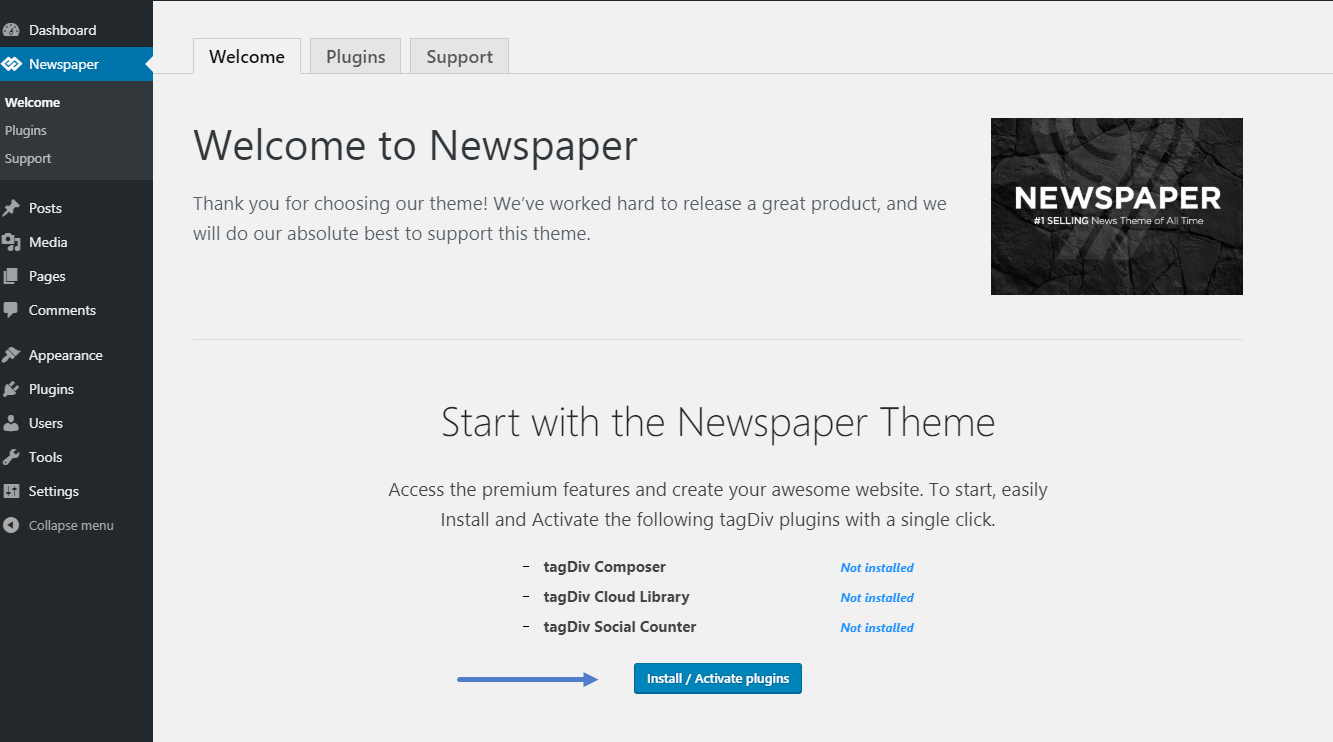
Please make sure to install the required plugins after installing the theme: https://forum.tagdiv.com/wp-content/uploads/2015/05/welcome_screen.png
Let me know this fixed your issue !
Thank you !
 zeteoxos
Hey
After installing theme, i have white page. All system status seems to be ok.
the code of the homepage looks that way: code
Simion C. Hi,
What WordPress version are you using? The super cache plugin is compatible with the latest version, should work fine with older as well – https://wordpress.org/plugins/wp-super-cache/
I tried activating it, it works fine it seems – http://prntscr.com/ofnjhx with the latest theme and WordPress.
Note that some hosting providers have their own caching however, so they could disable or block users from installing specific caching plugins. You could contact them and ask if this is the case.
Best to ask them to make modifications as mentioned in the requirements guide, if possible. There could be a preferred method of doing it, or a specific setting/location that has to be used.
Thanks
 Calin
Calin Hi,
Please make sure that the theme was install conform to our documentation -> https://tagdiv.com/how-to-install-newspaper-theme/
Please make sure that you do not have a plugin conflict with untested plugins, please deactivate all non theme, also if you are using child theme, clear all cache and try again.
Please make sure that all the settings are like in our requirements, please follow the guide carefully
– https://forum.tagdiv.com/requirements-for-newspaper/
and please increase all requirements that are lower, and follow all steps.
Let us know the results!
Thanks.
Simion C. Hi,
So it used to work initially, but now it does not anymore. Did you maybe install a plugin before this happened? if you temporarily deactivate all non-theme plugins does the composer work correctly?
Please also check the requirements guide for a proper theme and plugins functionality
– https://tagdiv.com/newspaper-theme-requirements/
It is important that these are respected, especially the wp-memory (we recommend 256M). Notice the code provided at the end of the guide, it has to be entered in the htaccess file. You could contact the hosting provider to make the changes for you where needed.
In case the issue remains, we can take a closer look at it. Please send us an email at contact@tagdiv.com and provide the website and admin login. Also cPanel so we can check the settings there. Include a link to this topic in the email.
Let us know.
Thanks
tapstoneGreetings,
We have been running multiple sites using Newspaper and love it, but we are in the process of building out a new site in Newspaper version 9.7.3 and have noticed that the templates we depend upon to customize individual posts are not there. I can’t find the location to make customizations to specific post templates.
For example we used to modify “single_template_2.php” to add in custom support to turn on and off different elements on a post by post basis using Custom Fields.
Browsing all the files for this latest install I am unable to find any php files for the various post templates.
Any help would be greatly appreciated!
 leemus
When I first installed the Newspaper theme I was able to access the TD composer and edit pages with it.
Now the composer doesnt seem to load. Whenever I click on edit page and then the edit with TD Composer button I just get grey screen that says failed to load the page.
I uninstalled the theme and plugins, deleted browser cache and reinstalled everything. Now I dont even see the edit with TD composer button anymore.
The other thing is all my plugins say outdated in the Newspaper control panel and trying to update them continually fails.