No search results were found in Documentation!
 baris41
the logo is very beautiful. what is a font
 Bettina
 Hello @markyj2000!
For this, you should use cloud templates. You can have different ads in every post/article if you use different template for each post/article. If you want the same design, you can duplicate the templates.
Check this topic: https://forum.tagdiv.com/topic/different-logo-in-categorypage/ ; Here I explained step by step how you can duplicate a template.
We recommend to use cloud/PRO templates in order to have the possibility to edit them with the TagDiv Composer which contains a lot of functions and features, please check our tutorial here: https://forum.tagdiv.com/tagdiv-composer-tutorial/
Documentation here:
– https://forum.tagdiv.com/cloud-library-templates/
– https://forum.tagdiv.com/design-post-pages-using-cloud-library-templates/
– https://forum.tagdiv.com/cloud-library-category-templates/
Check also our video tutorials here: https://www.youtube.com/c/tagdivThemes/videos and more theme documentation on the left side: https://forum.tagdiv.com/newspaper-theme-documentation/
Thank you!
 TerraZetzz
Hello,
Every time I update Newspaper it resets my theme to the default Newspaper theme. I have to go back into the theme panel and redo all my settings and upload all of my logo, background, favicon images again. This is such a pain. How do I update without the settings reverting back to default?
 ekraft
 Bettina, you can see it live from the above URL. You just need to go to the page and with Chrome’s developer toolbar (F12), you can switch to responsive mode and see the images being cropped. You can also just resize your browser window and make it smaller – and there you will see the images/logos on the screen begin to get cut off.
Thanks.
 sylentears
 can you please compare the logo with desktop version? if you dont get the meaning. Pls update to explain in details.
 Anamaria
 Hello @terahlynn,
I’m sorry to hear that, but can you give me more details on what problems you encountered when trying to install a prebuilt website?
Also, for the logo please let me know if you have installed the mobile theme plugin, if yes, then you need to add the logo in Theme Panel -> Mobile Theme -> Header https://i.imgur.com/xLy7CWY.png
Also, if you use a responsive or mobile page, please check those articles
-> https://forum.tagdiv.com/add-logo-newspaper/
-> https://tagdiv.com/newspaper-10-3-7-update-brings-customizable-and-fast-mobile-pages/
This is a video about Responsive Newspaper Theme, AMP & Mobile Theme, Mobile Pages & Templates -> https://www.youtube.com/watch?v=SpGkOnJeNZY
Also, please us know what plugins you have installed.
Also, please provide some screenshots/video and the link to your website.
Please note the Support team is not 24/7 available. We answer the topics from Latest to Newest Monday – Friday from 08:00 AM to 05:00 PM GMT+2
Thank you!
Anamaria Hello,
That tutorial is old, but we have new ones, for example, this one where a demo is made from scratch -> https://www.youtube.com/watch?v=SoGQ0d5kIBg
The new pre-built websites use cloud templates from tagDiv Cloud Library and can be edited with tagDiv Composer.
So, to edit the header, please check this documentation
-> https://forum.tagdiv.com/add-logo-newspaper/
-> https://forum.tagdiv.com/header-manager/
-> https://tagdiv.com/how-to-use-the-header-builder-and-tagdiv-cloud-header-templates/
-> https://tagdiv.com/how-to-use-footer-builder-and-tagdiv-cloud-footer-templates/
Please check the documentation https://forum.tagdiv.com/newspaper-theme-documentation/ and you can ask us here on the forum if you have any questions.
Thank you!
Anamaria Hello,
Please let me know where you add the logo, in Theme Panel or you made the changes with tagDiv Composer.
Also, please check the SVG section and delete the code for the logo, after purge all the cache.
Thank you!
 Tomasz Trasztok
I am very sad because the theme pannel in version: 11.4 does not have the same functions as in tutorial on YT (9.4).
Features such as:
– !!!! Header Style
– TOP BAR
– MAIN MENU
– LOGO FOR MOBILES
And much more…
Is it ok? is there any other way to change eg the header style?
 blawrimore
On my new site https://anewsco.com, I am using The Rimont header template. I have uploaded my own logo for both the standard and retina images, and marked them “Show”. I want “The Rimont” template logo to disappear so my own logo will show. I have spent hours on this and cannot figure out a solution. Please help. Thanks
 terahlynn
I apologize for my ignorance here but I can’t get support to email me back and my site has been down and losing money for half of the day.
I successfully installed the pre-built site (not the one I wanted, just the only one that worked) and I was able to upload my logo, but when in mobile view it still shows the default site name from the theme.
I have tried to go into the cloud template editor, but it doesn’t even show that it’s there when I toggle to mobile view.
WP says this is a theme issue. I’m desperate for help here.
 Jose
Jose Thanks, I understand, thank you for the video.
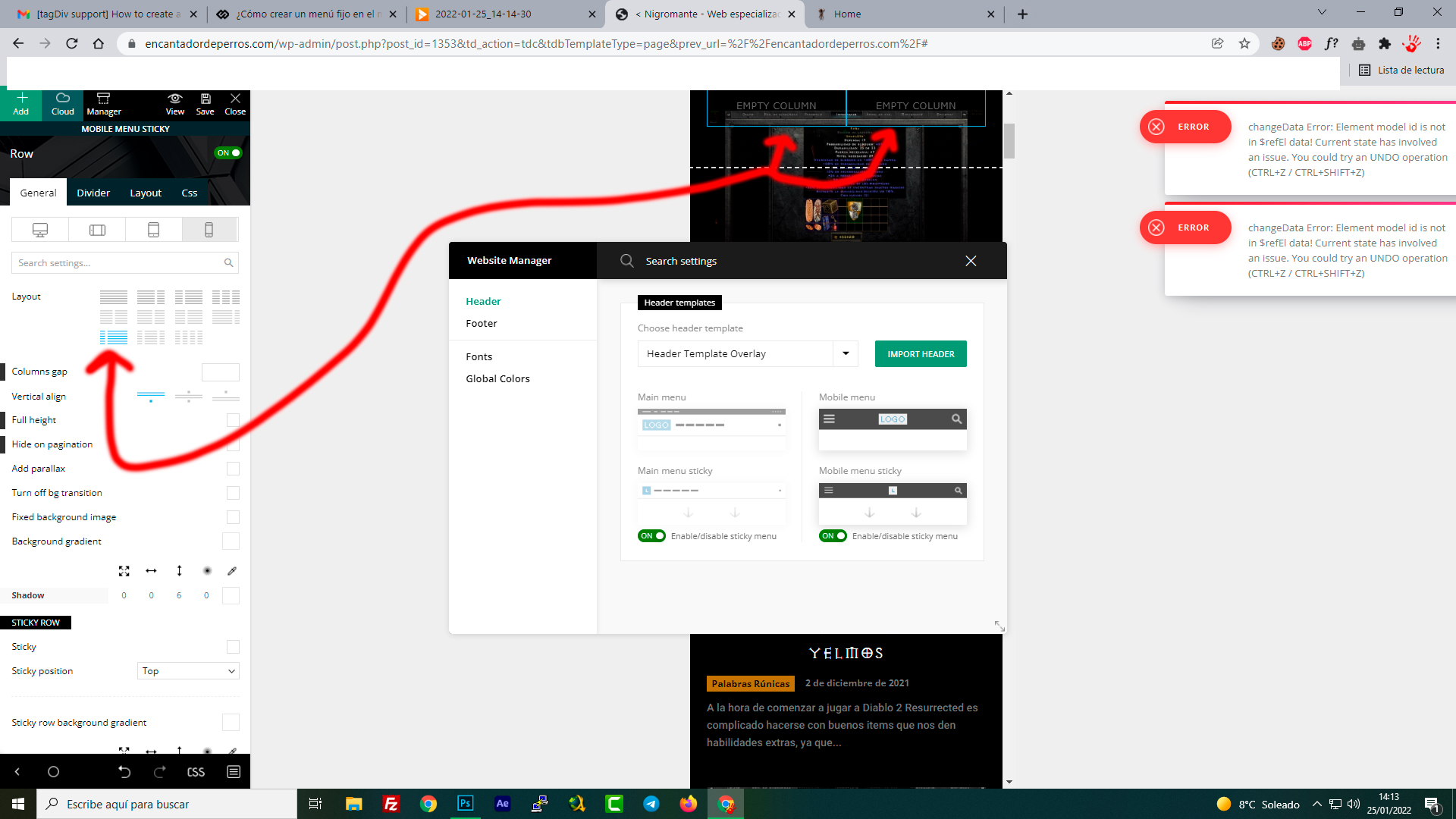
However, something is not right. I am trying to emulate the top menu (column in two, with mobile menu and logo). But it is impossible, there is no way to do it, what am I doing wrong?
The column always gives me 50%+50%, but I want 25% + 75%, just like the original mobile menu. Is it possible?
-
This reply was modified 4 years by
Jose.
Anamaria Hi,
I checked and the logo seems to be SVG -> https://i.imgur.com/neGGLyW.png, please provide a screenshot of what the logo should look like.
Thank you!
sylentears Hi
thanks for you late reply.
the logo display on the desktop version is not showing. even the same svg code is added and width is set to 280.
Kindly check
 easherri
Hi, I have searched everywhere to find an answer to this question. I have the newspaper theme, and share my posts on different platforms. I have no problem with the preview photo showing up at Linked In, nor in the preview of a post at Facebook, then when the post is published at Facebook it turns into a 10×10 thumb of a horizontal logo from the header of my site. Facebook says its my sites template doing this but I am not believing this explanation. If it is a setting at my site, what is the fix for this frustrating problem?
Thanks in advance, and keep up the great work!
Anamaria Hello,
1. If you have a global header template, the change will apply for all pages -> https://forum.tagdiv.com/add-logo-newspaper/
2. and 3. You can remove the Single Post Author and Single Post Date select with tagDiv Composer with a right-click you can delete => https://i.imgur.com/GNzcGmJ.jpg , or selecting the element and with drag & drop place into the deleting red zone from the bottom right of the page => https://i.imgur.com/vkQVCjn.jpg
4 and 5 You need to do the same as for 3 and 4 -> https://i.imgur.com/gnPj50q.png -> https://i.imgur.com/d53L8eV.png and after you need to set the layout of the row to 1/1 on the footer -> https://i.imgur.com/UAoIWlj.png and from tab CSS you can remove the background image.
Thank you!
 howmanywon
Theme: Royal pub
Wesbite URL: howmanywon.com
1. Global logo
Using edit with tagdiv composer, if I update the ‘Logo text’ and ‘Logo text tagline’ it only applies to the page on which I edit it. How can I get this to apply to every page?
2. Hide author
E.g. first article ‘Strawberry Daiquiri’, author is showing as ‘Howmanywon@gmail.com’. Can I hide this?
3. Hide post date
Similar to aboe, want to hide the date
4 and 5. remove sections
On the homepage, I would like to remove the entire ‘Video recipes’ section, and the entire ‘Subscribe to our newsletter’ section so that the footer is just the left half of the current footer.
Thank you!
Anamaria Hi,
You can set the URL on the logo with tagDiv composer, select the logo and put the URL https://i.imgur.com/2wmUKJD.jpg -> https://www.youtube.com/watch?v=HXQQygkCCJo
Thank you!
Anamaria Hello,
I verified your website and now the logo is showing -> https://i.imgur.com/R7tigIe.png, maybe was a problem related to the cache.
Also, you can set the width for SVG logo -> https://i.imgur.com/ddiA3RU.png
Please note the Support team is not 24/7 available. We answer the topics from Latest to Newest Monday – Friday from 08:00 AM to 05:00 PM GMT+2
Thank you!
Anamaria Hello,
1. If you referring to logo image, you can set the width -> https://i.imgur.com/L7Wph6H.png -> https://forum.tagdiv.com/add-logo-newspaper/
2. You can stretch the row -> https://i.imgur.com/cv4dE8C.jpg ->
-> https://tagdiv.com/how-to-add-delete-and-duplicate-row-newspaper-theme/
-> https://tagdiv.com/flexibility-rows-columns-newspaper-theme/
3. Please check this topic about you can remove the row -> https://forum.tagdiv.com/topic/how-to-remove-empty-columns-on-website/?view=all#post-429202
Hope this helps you!
Thank you!
Anamaria Hello,
Please let me know to how you add the logo.
You can check this topic https://forum.tagdiv.com/topic/header-logo-upload-problem/
Hope this helps you!
Thank you!
 joyce_emerson
HOW TO CUSTOM THE URL LINK OF HEADER LOGO?
 kjervert
Hi all,
I’ve created a very simple header with header logo and menu/search from a blank header cloud template. I’m pretty good at code, but often bumble around until I find with CSS.
I’m having a lot of trouble centering it. I have it set to 1200px (to match the page content) and centered horizontally. The zone is centered and set at 100% as well. I’ve tried margins being auto, etc, but can’t find the magic setting.
Since it’s in the works in the tag div cloud editor I can’t share a link but have this image.

I’m grateful for any help!
Karin
ekraftHey All,
I’m trying to use the image widget to place images/logos, but I can’t change the gray background color, in any of the panel settings. I’ve changed everything to “white” but gray is still displaying, as shown here:
https://fatbikechallenge.com/sponsors/
Any idea what I’m missing?
Thanks.
 aleoni
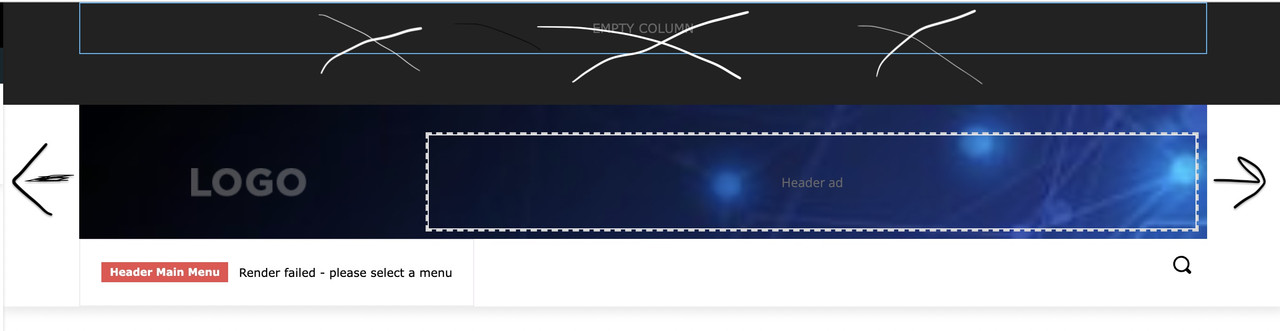
Hi, i am new to Newspaper. I am trying to customize the header, starting from that of Default Pro, and i have some questions. I also attach an image with cross and arrows painted by me to try to explain better 🙂
1. i don’t understand why images are always sfocated, i have tried with images of every dimension.
2. how can i enlarge to the right and left, to touch the margin, the “logo block”? (i think it’s called inner row). I’d like background image from side to side but not on the below menu
3. How do i eliminate the black section up there?
thank you!