No search results were found in Documentation!
 Calin
Calin Hi,
Most important, please be sure to check the updated theme requirements guide
– https://forum.tagdiv.com/requirements-for-newspaper/
Increase all the parameters if it’s the case.
WP_MEMORY_LIMIT try to increase it to a value of double you already have if possible.
Let me know the results.
Thank you.
 QI RUI
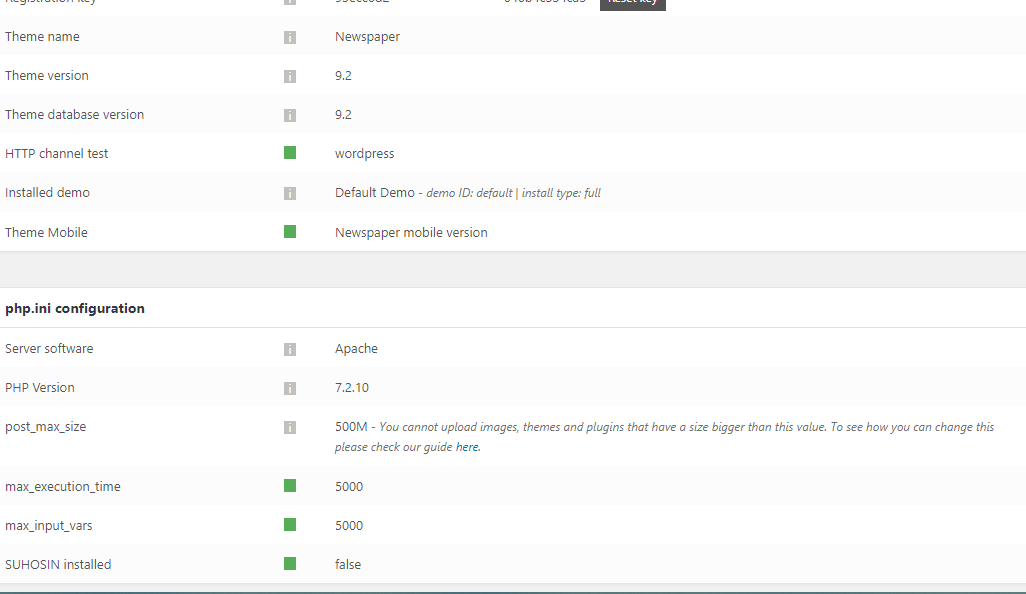
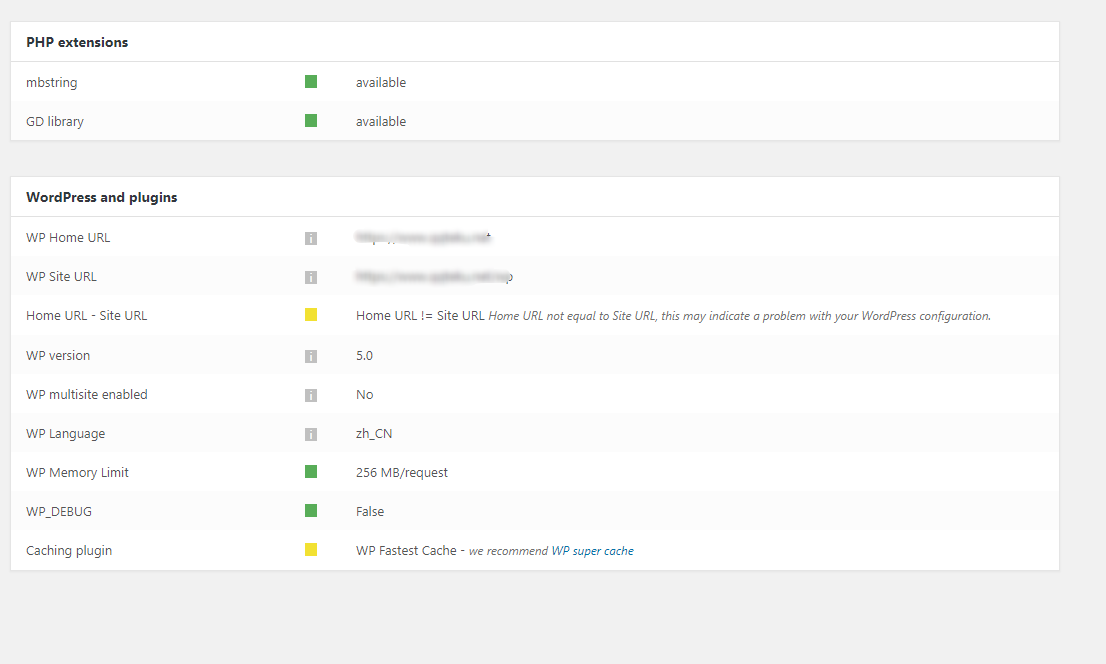
All settings of 「 Newspaper – Theme panel 」 cannot be saved.save settings just seeing icon rotation forever,This is the current state
please help me
https://s1.ax1x.com/2018/12/07/F1hhXn.png
https://s1.ax1x.com/2018/12/07/F1hWlj.png
https://s1.ax1x.com/2018/12/07/F1hRpQ.png
php.ini
max_input_vars = 5000
max_execution_time = 300
post_max_size = 50M
upload_max_filesize = 50M
.hthaccess
php_value max_input_vars 5000
php_value max_execution_time 300
php_value post_max_size 50M
php_value upload_max_filesize 50M
define(’WP_MEMORY_LIMIT’,’256M’);
is all ok
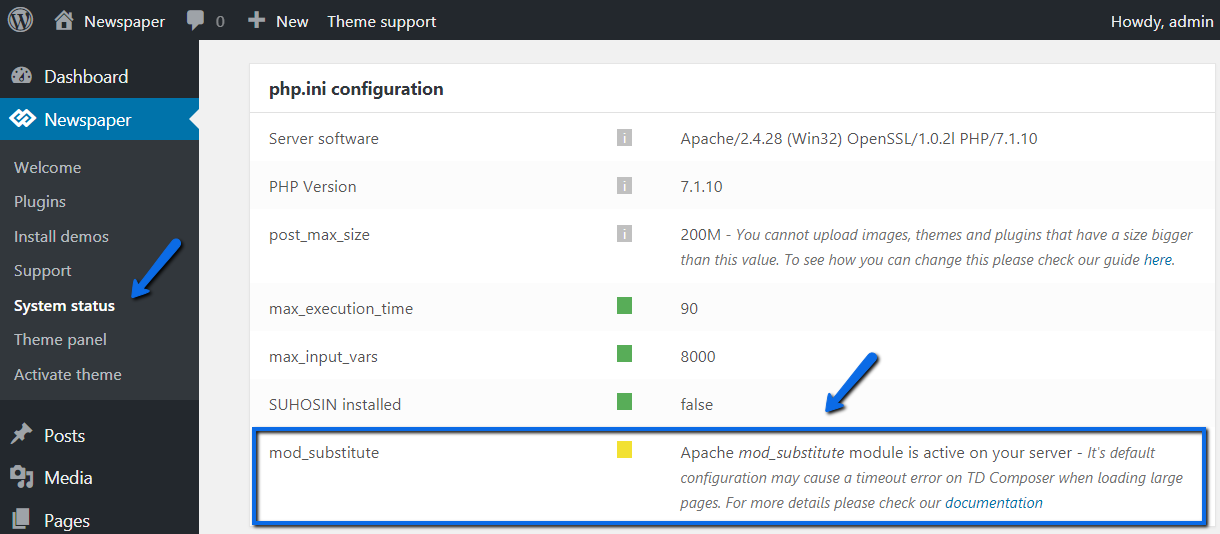
But I can’t find mod_substitute. Where is this? ↓
https://forum.tagdiv.com/wp-content/uploads/2015/05/td_mod_substitute.png
Calin Hi,
Most important, please be sure to check the updated theme requirements guide
– https://forum.tagdiv.com/requirements-for-newspaper/
Increase all the parameters if it’s the case.
WP_MEMORY_LIMIT try to increase it to a value of double you already have if possible.
Also please deactivate all plugins that are non theme, clear all cache and try again.
Thank you.
Calin Hi adwenchure,
Most important, please be sure to check the updated theme requirements guide
– https://forum.tagdiv.com/requirements-for-newspaper/
Increase all the parameters if it’s the case.
WP_MEMORY_LIMIT try to increase it to a value of double you already have if possible.
https://www.screencast.com/t/sQswe1SWR
Thank you.
-
This reply was modified 7 years by
 Calin.
 embarcado
Good morning TagDiv team,
I have the Newsmag theme installed on my site. I updated it to the latest available version 4.6; however after the installation revolution slider stopped working. I tried to uninstall and reinstall it, but unfortunately now the site goes on fatal error with the following message: Fatal error: Out of memory (allocated 116129792) (tried to allocate 786432 bytes) in /home2/adepton/public_html/wp-content/plugins/revslider/includes/googlefonts.php on line 2053
Please check site http://www.embarcado.net
Is it something I am doing wrong or anything else?
Thanks for the feedback.
Cristyan
Calin Hi,
Most important, please be sure to check the updated theme requirements guide
– https://forum.tagdiv.com/requirements-for-newspaper/
Increase all the parameters if it’s the case.
WP_MEMORY_LIMIT try to increase it to a value of double you already have if possible.
https://www.screencast.com/t/sQswe1SWR
https://www.screencast.com/t/k4DnhgVBJ
Thank you for your understanding.
 Joe Boro
 I’ve got the same problem after clean install. I’ve used both installation methods. Memory_limit set to 256M
I’ve just bought theme and I’m very upset, guys
-
This reply was modified 7 years by
Joe Boro.
 AdrianoMediserve
Hi
I recently installed Newspaper 9 on a site, but several errors happened. I changed many parameters in php and wp-config to meet the theme parameters and now in System Status looks everything ok, but still problems occurred.
System status: https://ibb.co/rF2PgkC
1) The site is often slow.
2) Sometimes, after a slow loading (both front-end and back-end), the Error 404 page is shown.
3) Sometimes, after a slow loading, a blank page with this wording appears instead:
Service Unavailable
The server is temporarily unable to service your request due to maintenance downtime or capacity problems. Please try again later.
Additionally, a 503 Service Unavailable error was encountered while trying to use an ErrorDocument to handle the request.
The site is hosted on GoDaddy. I checked the error log in my cPanel and i always find this type of error (the number of bytes allocated are variable, while the line may be 1382, 1385 or 1351):
PHP Fatal error: Allowed memory size of 134217728 bytes exhausted (tried to allocate 8192 bytes) in /home/uedocs32/public_html/wp-content/themes/Newspaper/includes/wp_booster/td_util.php on line 1382
Do you have any ideas of what else should i try to make it work? It’s going to be very frustrating…
Thank you.
Calin Hi,
Most important, please be sure to check the updated theme requirements guide
– https://forum.tagdiv.com/requirements-for-newspaper/
Increase all the parameters if it’s the case.
WP_MEMORY_LIMIT try to increase it to a value of double you already have if possible.
Thank you for your understanding.
 damador
Hi, Friends, recentrly I ve renew support by your great item.
Please, I need your help to find a solution for a recent troubles in my site.
First. I can not find a way to change the color of the main menu bar. In view of the comments in the support area, this is a recurrent problem. Actually is a red bar with a purple color gradient at the ends. I need to change this for a solid color like #533e95.
Second. My site is taking too long to load. Too long..
My site is esalud.com.mx
Please, can you help me with this?
I think I have the most recent version. But, i will apreciate if you help me to check this. Because, I can see you have an upgrade al 28 november. But accordin to my panel information im working with version 9.1
I have to say, according my panel information im working with all parameters fine. I have enougt memory in wordpress and server. Then, an aumentation of memory will not to be the solution for my troubles.
Thanks a lot in advanced
Damador
 Simion C.
 Hi,
@Frédéric Bénot Maybe one of your plugins is causing the problem. Enable them one at a time and keep checking if the problem returns.
Also check the WP-memory parameter, when multiple plugins are active it may be insufficient
– https://forum.tagdiv.com/requirements-for-newspaper/
For most users a value of 256M is enough, we recommend that value if possible. Maybe it is not a plugin conflict, but insufficient memory.
Thanks
Calin Hi,
Most important, please be sure to check the updated theme requirements guide
– https://forum.tagdiv.com/requirements-for-newspaper/
Increase all the parameters if it’s the case.
WP_MEMORY_LIMIT try to increase it to a value of double you already have if possible.
Thank you for your understanding.
 mark-3
 I’m experiencing high load on my server, and I’m unable to identify the issue (I’ve optimised all the sites, ensured they are on cloudflare with good caching etc, limited plugins). Could it be that there is actually an imposed memory limit for these two sites that causing this load?
mark-3Hi there, this now shows the correct value after our hosting support edited the wp config file, but the php info file should have set the correct value. For two of my websites it was showing at 40 MB…
Anyway here’s our hosting supports response:
“I could not locate why the theme’s checker indicates lower limits. Upon setting the WordPress memory limit in the websites wp-config.php file, the check showed the correct value as you can confirm on your side as well.
I advise you to contact the theme provider and show them the PHP info file as the “post_max_size” limit is set to 768M, but it is not detected by the theme. I reviewed the applications and plugins as well, but could not locate if anything else is limiting the variable.
Server wise, the limits are set to 768M, but it seems that something in the application is either preventing the theme to fetch the limit or applying an application level limit which we cannot locate. Due to that, it would be best to consult with the theme provider of possible causes for the issue since they may have encountered it previously and have a solution.
Best Regards,”
Calin Hi nutrirev,
Most important, please be sure to check the updated theme requirements guide
– https://forum.tagdiv.com/requirements-for-newspaper/
Increase all the parameters if it’s the case.
WP_MEMORY_LIMIT try to increase it to a value of double you already have if possible.
Thank you.
Calin Hi,
Did you increase the wp_memory? some time is need to be more then we suggest in requirements, also did you add this in .htaccess https://www.screencast.com/t/cctQtcNjxff ?
Please provide some screenshots with the error that TagDiv Composer give you.
Thank you.
 ocupado
 It was solved increasing MEMORY LIMITS until 256
 roberto.srelz
 Hello! We verified, however all status is green, and also the memory results as already increased and in green too. All minimal requirements you set in your guide are satisfied, we have WP Super Cache as suggested by you and also – we didn’t have any issue before the upgrade. So alas no result by now and we still need your support.
392 MB/request
Calin Hi,
That could be caused by limited or insufficient resources, the theme has these requirements
– https://forum.tagdiv.com/requirements-for-newspaper/
In some cases 500 errors were solved by increasing the WP memory, for most users 256M would be enough.
Install via WordPress -> https://forum.tagdiv.com/install-via-wordpress/
Install via FTP -> https://forum.tagdiv.com/install-via-ftp/
Thank you.
Calin Hi,
Most important, please be sure to check the updated theme requirements guide
– https://forum.tagdiv.com/requirements-for-newspaper/
Increase all the parameters if it’s the case.
In similar cases with HTTP 500 errors the issue was caused by insufficient memory(WP_MEMORY_LIMIT). Try to increase it to a value of double you already have if possible. Contact the hosting provider to do it for you if needed.
Thank you .
 Bogdan B.
 Hello,
Usually it is a memory allocation issue. Please read this guide carefully and make the proper adjustments to your website:
https://forum.tagdiv.com/requirements-for-newspaper/
Another possible cause would be the file permissions: https://www.wpbeginner.com/beginners-guide/how-to-fix-file-and-folder-permissions-error-in-wordpress/
Thank you!
 alanshangguan
Whenever I use TD composer, it gives me the error, my website didn’t send any data. Here is the screenshot: http://prntscr.com/lo70jq
My wp-memory limit has been set to 356 MB: http://prntscr.com/lo712k
Calin Hi,
Please provide some more details with the problem you have, and some screenshots would be very helpful.
Please try to deactivate all plugins that are non theme, clear all cache and try again.
Also make sure that the theme system status is configured as mentioned in the requirements guide. Please follow the guide carefully
– https://forum.tagdiv.com/requirements-for-newspaper/
Is possible tat you need to increase wp memory
Let me know the results.
Thank you for your understanding.
Calin Hi,
Please make sure that the theme system status is configured as mentioned in the requirements guide. Please follow the guide carefully
– https://forum.tagdiv.com/requirements-for-newspaper/
Please increase the wp_memory
Let me know the results.
Thank you.
 agracjan
 Thanks for answer, i spoke with hosting provider, their support told me that we have WP memory of 512M and PHP 7.3 but i still got problem. What to do right now? Look at screen, i got 4 templates but see only one and with error