
- TutorialsFrom WPBakery to tagDiv Composer
- TutorialsWhat is Ajax preloading?
 Atithya
Hi Team,
I want to show separate amp ads which are not related to ads that are running on desktop and mobile. I am adding amp codes in the theme panel>>mobile/AMP section, but ads are not getting active. The associated mobile and desktop versions of ads are showing on the website but not on the amp. Can you help?
 caminoel
Dear team,
I encountered the problem that the slider is not shown on the mobile device, otherwise are fine both desktop and tablet version. I tried to read all the previous post but it was not similar to my case. My website run on WP 5.7 and Newspaper theme 10.4. Caching plugin is WP Supercache. The page I need help with: https://www.siamclinicphuket.com
You can see the appearance shown on three platform here.
Desktop > https://ibb.co/kq7hWbf
Tablet > https://ibb.co/1QGwt1Z
Mobile > https://ibb.co/YX4yyS1
I contacted to the Smart Slider 3 developer and I got reply that
(https://wordpress.org/support/topic/slide-not-showing-on-mobile-theme/#post-14450827)
The reason the slider doesn’t show is that there is a JavaScript error on your site And was recommended to contact to theme developer to the best way to solve this problem.
You can check like this:
https://smartslider.helpscoutdocs.com/article/1935-troubleshooting-with-your-browser#jserror
JavaScript errors stop every other JavaScript code on the page and prevent them from working, so they need to be solved.
The error on your site is:
Uncaught TypeError: fbq.getState is not a function
and it points to the following file:
https://www.siamclinicphuket.com/wp-content/plugins/td-composer/legacy/Newspaper/js/tagdiv_theme.min.js?ver=10.4
 vikris
 Just to add a bit more context.
I have 3 Posts Loop modules on the same page. Each of them have a Limit post number set to 4. First module has the Offset posts field empty. The second module has it set to 5 and the third module has it set to 9. However they all show the same 4 articles.
Newspaper version 10.4; Prebuilt Website: Gadget Pro; Mobile Theme and AMP are not installed; WP version 5.7.2; PHP: 7.4.18
 crodexter
What is suggestion to use for mobile pages?
Does mobile theme or mobile cloud template use same method to load?
What I want to know is there a potential difference in load speed and server load.
I believe that cloud template gives more customization but I am of course more interested in speed and SEO optimization.
Thank you
 alexfairtex
 I want to say thank you!
1.It was a plugin conflict (weird because these are your plugins). I disabled tagDiv Mobile Theme – the mobile version is working.
2.tagDiv Composer started working well when I removed the caching plugin files (hosting leftovers).
3.Your support team has updated the template and subordinated Instagram.
Strength and patience in your work!
Thank you!
 Sud
SudFirst of all let me tell you that I had liked this theme in its Demo on Themeforest, so much that I immediately purchased it.
But real trauma starts now…This Tagdiv MObile theme needs many ‘Ifs’ & ‘Buts’ to run smoothly. However, I am still in love with this theme.
My Website- https://discovervibe.blog
Earlier my Homepage was not working, somehow I managed to make this work after so much diligence in the previous 60+ hours. Now it is not working on my posts , I have seen on Forum that this is the most common problem of the Website owners and this question has been raised consistently multiple times.
It is advised to may that they can disable the mobile theme on specic posts, But pls note I have around 200 Posts, how can I manage this?
In order to keep AMP Plugin activated, I have to use MObile Theme too. As AMP helps Publishers & Bloggers. Is there any way to either all of these posts work on Mobile Theme or is there any way to disable mobile theme on a Large numbers of posts.
Still I welcome if you can help me making this possible to make Posts appear with TagDiv Mobile Theme.
Pls revert.
Thanks
Sudhir
vikrisHi,
looks like Offset posts is not working for Posts loop in mobile template (not mobile theme) for Newspaper (I have only tried it there). The feature is working fine on the front page but for different type of block.
Is that a known issue or am I doing something wrong?
 calinonet
My old logo still shows up, although I changed it from the Theme Panel and it’s very visible especially on mobile devices. I tried today to delete the old logo files from the database and now I it loads a large placeholder.
My site is: https://www.myaffordableluxury.com/
Please advise.
Thanks!
 Anamaria
 Hello,
Unfortunately, as I said above you can’t achieve that page with a mobile editor, using the mobile editor(from the mobile theme plugin ) you need to create a contact page using only the elements only from the mobile editor and the shortcode for the contact form (if you copy-paste the code will not work). Another method is to use the amp plugin without the mobile theme plugin (disable the mobile theme plugin) and on AMP selected the reader option=> https://www.screencast.com/t/unoRDdf9Q
Thank you!
 namnamir
Hi there,
I have installed AMP as it is instructed but I cannot select the template, it shows the default one.

 Bettina
 Hello!
Yes, with cloud templates and mobile pages also you have those element Raw HTML and Raw CSS and you can add them with TagDiv Composer.
No, Standard Pack is used only for default templates and not for a cloud/PRO templates.
Related to the page speed, this is our limit score, check this topic: https://forum.tagdiv.com/topic/guys-it-is-possible-to-get-good-speed-with-newspaper-theme/
Unfortunately, there is no button to hit and your score is high or your page speed is very high. You need to try to optimize your website.
If you follow the steps which are presented in this tutorial here: https://tagdiv.com/how-to-increase-page-loading-speed/ you’ll be able to increase the speed of your website.
Also, to increase the page speed you can check these similar topics for more solutions:
– https://forum.tagdiv.com/topic/optimize-script-to-improve-site-speed/
– https://forum.tagdiv.com/topic/a-few-tips-for-newspaper-x-speed-high-cpu-usage-issues/
– https://tagdiv.com/how-to-increase-page-loading-speed/
Please note that page speed is not covered by the support team: https://forum.tagdiv.com/newspaper-theme-support/
Please give it a try and follow the steps which I presented above about page speed.
Also, check our guide from here: https://forum.tagdiv.com/how-to-make-the-site-faster/
Please make sure to use our newest tool called tagDiv CSS Analyzer which comes in handy to resolve some of your issues. Take a look at the video guide here: https://www.youtube.com/watch?v=tnkVapqhIHc
“This custom tool performs an automatic test to find missing CSS rules applied by user interaction. Moreover, you can manually interact with a chosen section/component from the page while the tool records all the involved CSS. It will generate the final CSS file for this page and also will split the rules in Critical CSS to be loaded in the website’s header.” ( https://tagdiv.com/whats-new-in-the-newspaper-theme-10-4-update/ )
Our tool is running only on normal pages and not for posts or categories for example.
We tested our tool on our demos, and we have such great results!
Take a look in this topic because it could help you: https://forum.tagdiv.com/topic/css-analyzer-step-by-step-and-doubts/
Thank you!
Bettina Hello!
If you want to use a mobile page, then you need to assign it to your homepage. For more information about this mobile version please take a look in this article: https://tagdiv.com/newspaper-10-3-7-update-brings-customizable-and-fast-mobile-pages/
A full explanation you can find here: https://www.youtube.com/watch?v=SpGkOnJeNZY
We tested with our theme the WP Super Cache and with the settings from our guide this is working correctly: https://forum.tagdiv.com/cache-plugin-install-and-configure/
There is no tag visible on your website. Please delete your cache and also from your browser.
Thank you!
Bettina Hello!
Please note that you need to add the ads for Mobile Theme and AMP in Newspaper -> Theme panel -> Mobile theme -> Mobile ads.
Thank you!
Bettina Hello!
Please check if you have Mobile Theme plugin installed and active.
Also, edit the homepage normally and set the Mobile Theme enabled as here: https://www.screencast.com/t/ngAJjhRlgQ6o
Hope that helps you!
Thank you!
 Vlad S
 Hello,
The page speed is not related only to the theme that you are using, this is affected by plugins/content/ads/ external resources, etc.
To increase the page speed you can check these similar topics for more solutions:
– https://forum.tagdiv.com/topic/optimize-script-to-improve-site-speed/
– https://www.infophilic.com/get-almost-100-pagespeed-newspaper-theme/
– https://forum.tagdiv.com/topic/a-few-tips-for-newspaper-x-speed-high-cpu-usage-issues/
– https://tagdiv.com/how-to-increase-page-loading-speed/
However, page loading speed can depend on many factors, and each website is unique from this point of view.
Let me explain some of these factors and maybe they give you some starting points for optimizing your website.
External factors: server speed, if you are using CDN or not, the external resources loaded by your website like ads, fonts, tracking scripts like Facebook Pixel, Google Analytics, Twitter analytics, Hotjar and so on.
Internal factors: the number of elements on the page, image size, image formats, if you are using mobile optimized layouts, console errors, if you are using the Standard Pack plugin on not if you are using PRO demo or a standard one.
Hope this helps you!
Thank you!
 Yuri Mason
Hi,
I’m trying to customise my mobile home page. I’ve disabled amp/mobile theme plugins and went make my own.
I create a mobile page and remove some extra blocks etc that I don’t fee are necessary on the mobile page… However, after editing the mobile page, the desktop page looks fine when I view it from WordPress. But when viewing in incognito mode or from another PC my desktop page is mirrored to the mobile one with the removed blocks.
Why is my mobile page opening on desktops? Any tutorials or tips as to what I’m doing wrong here? Or do both the desktop and mobile pages mirror from each other?
Bonus question – my google analytics tag is showing in the top right. How can i remove/hide this?
 VisualSuspect
 I used exactly what the video said to do. I create a mobile page from the front page, then i imported a header template for mobile and i edited it to fit my website. Then in the manager i selected and pressed to be global. i don’t use mobile theme or AMP. i didn’t even installed them. I took the way for mobile template.
playsiders.com
-
This reply was modified 5 years by
VisualSuspect.
Bettina Hello!
If you use a cloud/PRO template, then you should add the ads when you edit the page with TagDiv Composer.
For a default template you should add the ads in theme panel.
If you have Mobile Theme plugin installed and active, then you should add the ads in Newspaper -> Theme panel -> Mobile Theme -> Mobile ads.
Please check if you set them up correctly.
Thank you!
 Micha
MichaThe comments are not displayed in the mobile version of the website (I don’t use the mobile theme). They are there in the desktop version.
I have already checked the settings and the tips in the forum already tried (and also whether I was stupid enough to hide the comments in the mobile version), but no matter what I try, there is still no comment field on the mobile version.
is there another trick i can do to show the comments section?
SudHi,
Thanks for this wonderful theme.
After almost 1.5 years, again I have to switch back to Newspaper day before.
While implementing the MObile Theme on my website (URL – https://discovervibe.blog ) mobile theme Home page is not appearing with message – No matching template found
– Pls find the screenshot – http://prntscr.com/12zmk9a
– While I have prepared the Home page through Tagdiv Builder, as advised in front end panel, the URL of the mobile theme page is – https://discovervibe.blog/home-mobile/
My all other posts are also not appearing in their AMP version.
Pls guide me to solve this issue.
Best Regards,
Sudhir
 Tinystepsbabyclub
 I just wanted to add to this. When I am logged into my WordPress site on my mobile the mobile theme homepage looks perfect. Everything is exactly as it should be. But if I go to an incognito browser and check the site….it shows a non-mobile homepage theme version of my site? Other people also see this weird version on the homepage. It only appears to be the home page that is wrong, because all the posts and other pages seem to be in the mobile theme.
Very odd and i’d like to return the homepage to the normal mobile theme that appears to look great when I view the site logged into my WordPress on my mobile handset please.
Thanks
Sarah
TinystepsbabyclubHi Guys
I’ve noticed that all of a sudden my mobile theme is not being displayed on mobiles anymore. Its been working fine for a long time. I’ve not installed any recent plugins. Weirdly, the mobile theme option under theme panel, mobile theme, mobile settings is now greyed out and I can’t select any option 9mobile, mobile +amp, Amp – these are all greyed out).
My website is tinystepsbabyclub.co.uk
I’d be grateful if you could help.
Thanks
Tiny Steps
 jaswinder singh
Hi, I have been using the Newspaper theme from last many years. However, off lately i am facing trouble with the responsive tables especially for mobile device view. I was earlier using Tablepress plugin but later tried the WP NInja Tables Pro also but still of no use.
My basic problem is the tables appears like image 1 ( ) on mobile devices while I am looking to appear like image 2.(
 )
)
Pl let me know what I need to do to get the expected view for tables on Mobile devices.
My site is https://cricangel.com
 satperi
Hello all and thanks for the amazing Newspaper theme.
Is it in your plans to offer another AMP theme with more modules than the current mobile theme plugin (too limited)? I discovered another AMP theme called “Newspaper for AMP” but i think it’s not built by TagDiv, although it refers to your brand. Moreover it uses the “AMP for WP” plugin and not the official.
Thanking you in advance
 danna
dannaHello,
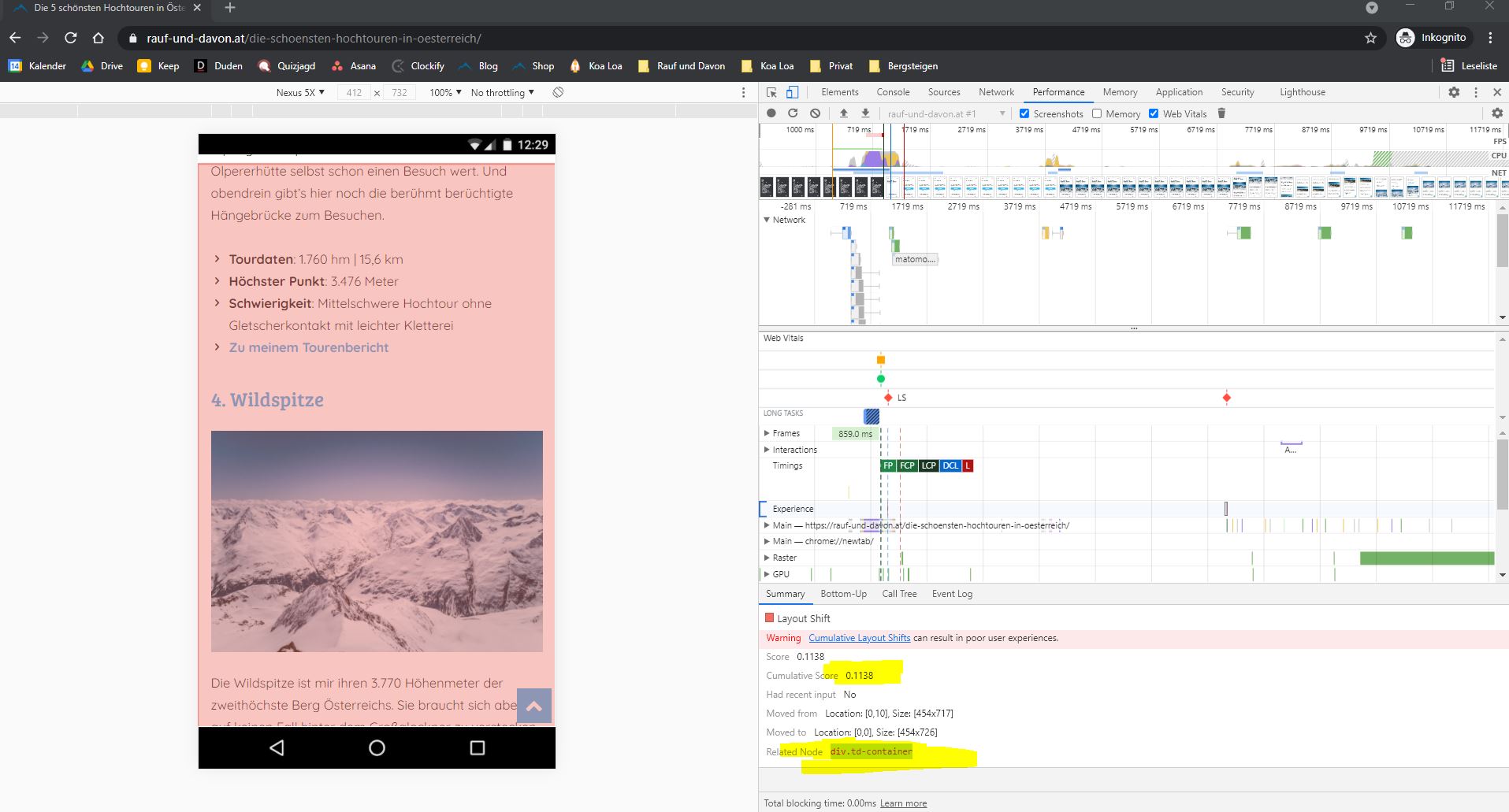
my Search Console tells me, that i have a very high CLS on mobile pages (i use the tagdiv mobile theme). Now i checked the page with the Developer Tools from Chrome and it seems, that the “div.td-container” causes this problem. Everytime you Scroll, there seems to be an invisible CLS. Do you know how to fix that?
This problem occures on every post URL. F. ex.: https://rauf-und-davon.at/die-schoensten-hochtouren-in-oesterreich/
All the best,
Daniel
