
- NewsmagSmart list ads
- NewsmagIntroduction
- NewsmagMain menu
- NewsmagLogo & Favicon
- NewsmagHeader ads
- NewsmagSmart sidebar
- NewsmagSharing buttons
- NewsmagCategory tag on modules/blocks
- NewsmagBackground introduction
- NewsmagTheme colors introduction
 Francisco Fernández
Hi, I’ve got a problem with images on https://wanerd.com
If I have got the LazyLoad active, in desktop it usually works, but in mobile and tablet devices the image loading animations doesn’t work. Also, sometimes the images aren’t being showed in all devices. What can I do?
 Incrosnatu
 The problem number one i want to fix it. I want to disable breadcrumbs and title only on pages and only on mobile.
 Catalin
 Hello mehedi57,
Unfortunately, the theme does not have any such an option that allows you to customize your mobile theme page, sorry! If you want to do this, you should use a bit of CSS code. You should provide your website URL and through such a useful screenshots you should explain what exactly you want to change.
Thanks for the message!
 Prabhurajendran
This is my website – http://www.freeyavidu.com
Suddenly images are not getting displayed but I am able to see the content.
Sometimes I am able to see images in desktop but not in mobile all the time. Please help
 Simion C.
 Hi,
I have inspected the website, it seems the mobile post content is not displayed on mobile. The mobile theme plugin is somewhat sensitive, it could be affected by other plugins. The only way of knowing if there is a plugin conflict would be to deactivate them all, except theme plugins and clear all caching.
Or deactivate the mobile theme plugin and use the default theme responsive version, the plugin is optional.
Thanks
 beppepicaro
Hello,
I installed the 8.5.1 update and noticed that there was an error on the mobile display. I manually installed the plugins included in the zip file and now everything is fine. I couldn’t find anywhere that the plugins were updated, but I think this was the case. If it is so and not some other problems that magically solved itself, you may advice on what plugins to reupload. I am saying this just in case other users have the same problem.
Simion C. Hi,
Mobile pages require the content to be entered in the mobile editor
– https://www.screencast.com/t/MuKPA1Xccj
Only content entered there will be displayed on mobile, when the mobile theme plugin is active. Please note that this plugin is not required, if you want the same content from desktop to be displayed on mobile, deactivate it. The main theme is fully responsive and will adapt the website for each device.
More about the mobile theme functionality here
– https://forum.tagdiv.com/the-mobile-theme/
Thanks
 mehedi57
Hello sir, I really like your mobile theme version which is light and blazing fast. But the original test color format doesn’t work on this mobile version. Is there any custom css for enabling text color and format for mobile theme also?
 biggleem
When i got to my site on a mobile device the content of the article is not showing. Just the image. How do I correct.
domain: http://wccg1045fm.com
 liberoarbitrio
Hi, I installed your mobile plugin. Unfortunately the pages and customizations made on thema child do not work for me.
I am currently using wordpress 4.9.1 and 8.5 of your thema.
Here are the links of some pages that are not seen with the mobile plugin
https://www.libero-arbitrio.it/marco-trevisan/
https://www.libero-arbitrio.it/aforismi-pensieri-riflessioni/aforismi-sulla-vita/
https://www.libero-arbitrio.it/aforismi/aforismi-vita/vita-azioni-bilancia/
https://www.libero-arbitrio.it/aforismi_tag/egoismo/
Thanks,
Marco
 Bogdan B.
 Hello,
Sorry but the mobile theme was designed to show a loop of all the posts on a site. There is no simple way to show the pages instead. You should not use the mobile theme if you nee to show pages. Use the standard responsive version of the theme to show your desktop content on mobile phones as well.
Thank you!
Catalin Hello AWAY FROM LIFE,
I have tested your website with a mobile emulator and I saw that you have some js errors on your console, as you can see here -> https://www.screencast.com/t/NjgrbW1drQi Also, I saw that you are using a lot of untested plugins which can interact with the theme core files and causes a lot of unknown issues. Try to disable all of these, clear all the caches and check the results.
Hope this helps!
Thanks for the message!
Simion C. Hi,
That would be in these files – https://www.screencast.com/t/WtzmQyPMlDt
If the mobile theme plugin is used here – https://www.screencast.com/t/Qi1wqEQKF0
Thanks
 kerone
 I copied and pasted the code in the advanced case under mobile devices. Did not display the top menu header on mobile
 allcirca
When site opened in mobil – it shows a list of posts. You have to used the navigation button to access pages. Is their a way to have the pages show up in the ‘landing page’ list instead of posts?
My site does not really have any ‘posts’ , it is mostly comprised of pages. Ideally, would like these to be the first thing mobile viewers see when visit site.
Uninstalling the mobile plug-in & relying on the native them responsiveness seems to make everything “wonky”
additionally – can the social media buttons be removed from the mobile menu ?
Please advise – thanks !
 sejpost
 Nevermind. I cleared my mobile phone cache and now it loads fine. Thanks.
 AWAY FROM LIFE
 I know I opened the thread long time ago, but the mobile search still not working. I’ve deactivate all plugins (except SEO Yoast) and the mobile search did not work…
 rvarnhem
 Update:
When opening the site on iPhone, there are no more issues and everything is exactly as test domain.
Desktop (Chrome & Internet Explorer) still shows the Mobile Menu on top of the page. Image of problem in Chrome (Desktop)
Further functions all seem to work correctly so it looks like the site thinks I’m on mobile or something. Unfortunately I cannot find it out myself..
-
This reply was modified 8 years by
rvarnhem. Reason: link didn't work
Simion C. Hi,
If you are using the mobile theme plugin, this has no option to remove the login. You could hide it with a code like this if needed
– https://www.screencast.com/t/e00b7BqcN
Enter it in Theme panel->Mobile theme->Custom CSS code section and the sign in/login will not be displayed when using the mobile theme plugin.
.td-menu-login-section {

display:none;

}
Thanks
rvarnhemHello,
I’ve created a website in a test subdomain on my domain camperreisverslagen.nl.
I used Newspaper theme and everything looks fine on test.camperreisverslagen.nl.
To test my migration I migrated complete site and database to dev.camperreisverslagen.nl. Still looks great and experienced no problems.
However, I migrated complete site to my root-domain and now the Theme settings seems to be different as there is a mobile menu popping up on the Home Screen (dekstop). Also background images have disappeared and Header style seems to be mixed up as both Logo as Text Logo are visible.
Also on mobile the site does not work correctly.
Any idea how this can occur and how it can be solved? It’s strange that migrating to my dev subdomain does work, and to my root domain changes things.
Thanks a lot, Rene
 haqemcom
 For mobile header ? where can i find to modify code ?
 soulfede
 Thanks for the reply, but it’s stuck, it doesn’t work. Whatever I do, the front page keeps being stuck on an outdated page that I already deleted but still keeps showing up.
I can’t have a front page AT ALL. Also any page or post gets stuck like that unless I put a number at the end of the permalink…??
Example: new post, permalink is “https://www.mysite.com/post”, it gets stuck and doesn’t get updated; permalink changed to “https://www.mywebsite.com/post1”, it works and it actually goes live.
This only happens from desktop. Mobiles can see pages and posts properly, UNLESS they try and go on the front page (“https://www.myswebsite.com”), in which case they also see this old stuck outdated page that was supposed to be in the trash.
This makes no sense to me and I’ve spent more than ten hours trying to figure out what could be causing this but to no avail.
Please help.
-
This reply was modified 8 years by
soulfede.
 frencheagle
hello,
I m having 2 errors on mobile, however on a pc the theme is working
first
Warming require_once/Lib/wp_content/themes/Newspaper/include/wp_booster/td_social_icons.php) failed to open stream. no such file or directory in /home/public_html/Lib/wp_content/theme/Newspaper/include/wp_booster/td_wp_booster/functions.php on line 41
Second error
Fatal Error require_once/Lib/wp_content/themes/Newspaper/include/wp_booster/td_social_icons.php) failed opening required ‘td_social_icons.php’ (include_path=’.:opt/php70/lib/php) . in /home/public_html/Lib/wp_content/theme/Newspaper/include/wp_booster/td_wp_booster/functions.php on line 41
How to fix these errors?
 dragoerny
HI.
How do I remove the login option in the mobile menu. I have nothing in the desktop menu but uwhen running on a mobile device I get a login option in the menu.
sejpost Hi Bogdan, on my mobile version, the white search icon is wrapped below. How do I make it be on the right side of the top bar when bringing up the mobile version of http://www.coronadotimes.com ? I want to use the “regular” mobile version I’ve been using for the site, but the “white search icon” wraps under the top header vs. showing up on the right? Thanks for the help.
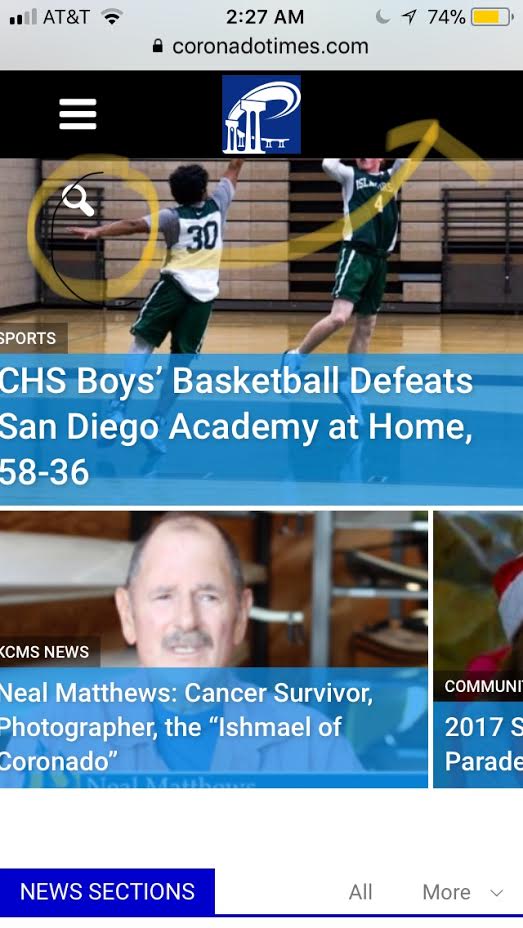
-
This reply was modified 8 years by
sejpost.
