
- TutorialsFrom WPBakery to tagDiv Composer
- TutorialsWhat is Ajax preloading?
 Bettina
 Hello @jivri!
This page was build with the TagDiv Composer. So, you can not have the Mobile Theme layout. Please uninstall the Mobile theme plugin from Newspaper -> Plugins and see the results!
Basically, we have 3 options for mobile versions that you can use:
1. Responsive version: A responsive version of your website looks similar to the desktop version. TagDiv Composer is used to edit the page. Click on the mobile viewport: https://www.screencast.com/t/XDQJedlggSB. There, you can see your mobile version and edit or adjust the elements to look better.
2. Mobile pages: https://tagdiv.com/newspaper-10-3-7-update-brings-customizable-and-fast-mobile-pages
3. Mobile theme plugin: The Mobile Theme is a performance-optimized theme included in the main Newspaper theme that only loads on mobile devices. It comes with its own templates and designs for pages, posts, categories, etc., so your current templates from the desktop theme will get converted to the mobile theme layout. Please see https://forum.tagdiv.com/the-mobile-theme/ and https://forum.tagdiv.com/mobile-theme-introduction/ for more information.
A full explanation is here: https://www.youtube.com/watch?v=SpGkOnJeNZY
Make sure you do not use Mobile theme plugin, if you use the mobile option 1 or 2.
Thank you!
Bettina Hello!
The sidebar is in the correct position when you check the website from a mobile phone.
Did you clear all the cache (also from your browser)?
Thank you!
 Anamaria
 Hello,
To hide the footer, please use this custom code CSS .td-footer-logo
{
display: none;
}
Set the code in Theme panel -> Mobile Theme -> Custom code -> custom css.
Thank you!
 redirected
Hi,
I am using the NFT Layout here: https://teqtoq.com/ensure-your-safety-with-stay-safe-the-revolutionary-fire-extinguisher-for-every-home/
Thing is, the sidebar when viewed on mobile comes up right after the share buttons, the sidebar should go all the way in the bottom when viewing mobile, how can we fix this?
thanks!
Bettina Hello @kozi!
The template 14 is a default template and and can not be customized with the TagDiv Composer. For the page speed I can only suggest some guides. However, page loading speed can depend on many factors, and each website is unique from this point of view. Let me explain some of these factors and maybe they give you some starting points for optimizing your website. A good choice for the page speed, it could be the mobile layout which contains less elements because it can improve a bit your page speed.
External factors: server speed, if you are using CDN or not, the external resources loaded by your website like ads, fonts, tracking scripts like Facebook Pixel, Google Analytics, Twitter analytics, Hotjar and so on.
Internal factors: the number of elements on the page, image size, image formats, if you are using mobile optimized layouts, console errors, if you are using the Standard Pack plugin or not, if you are using PRO demo or a standard one. So, we recommend to use for mobile the responsive version: https://forum.tagdiv.com/topic/issue-with-lcp/
A responsive version of your website is looking similar like on desktop, edit the page with TagDiv Composer, click on the mobile viewport: https://www.screencast.com/t/XDQJedlggSB ; there you can see your mobile version and you can edit the elements there.
Our developers are working a lot to improve the page speed in every update.
Also, to increase the page speed you can check these similar topics for more solutions:
– https://www.infophilic.com/get-almost-100-pagespeed-newspaper-theme/
– https://forum.tagdiv.com/topic/score-100100-pagespeed-with-newspaper-wordpress-theme/
– https://developers.google.com/speed/docs/insights/v5/about
– https://www.youtube.com/watch?v=tnkVapqhIHc
Check this useful guide: https://www.xtechkr.com/optimize-newspaper-theme/
Please check the tutorials from those platforms gt metrix and Google Pagespeed Insights and I’m sure you can increase the page speed.
Please note that page speed is not covered by the support team: https://forum.tagdiv.com/newspaper-theme-support/
Thank you!
Bettina Hello!
Google Discover is a feature that displays content from around the web to users on their mobile devices, based on their interests and search history.
In order to optimize Google Discover Content, please check this guide: https://delante.co/google-discover-feed/
Thank you!
 kozi
koziHi, I’m writing because i have some performance issue with Newspaper theme. Especialy in mobile devices we have poor PageSpeed score. I figure out that is JS scripts and CSS issue. There is a lot of not using code. If we using 14 themplate header, could we remove code from other header themes? We need making our page much lighter. Could you help us?
Anamaria Hi,
Please check if you don’t have the mobile theme plugin activated, if is activated, please deactivate it.
Thank you!
Anamaria Hi,
For Mobile Theme plugin, you can change the logo from Newspaper -> Theme panel -> Mobile theme -> Header and the copyright text in footer -> subfooter.
You translate it from Theme Panel -> Translations-> Translations or you can simply set a space and then will not be displayed.
Thank you!
 f5guru
Dear Support Team
Have been trying to fix this issue where the mobile version displays the site logo and a text ABOUT beneath it. please see snapshots of the mobile theme settings where no logo has been defined: https://app.screencast.com/eUzM5cxfl4mKv and also the place where logo and ABOUT: https://app.screencast.com/T5Q0eJS2XWonB
Can you please assist as where else to find this to remove them from footer?
 Central
Hello. I made a mobile template and use it for my posts. While editing with tagdiv it appears fine, but when viewed from a mobile phone, it shows the default template. What am I missing and how to make the posts use the mobile template?
 Stexs
Stexs Hi Bettina, in each article, after the main photo, there is an interscroller banner https://snipboard.io/VQWupj.jpg. But it doesn’t work, it doesn’t scroll. It should be so: https://ad.economia.cz/en/mobile-en/mobile-interscroller-en/
It seems that the class .td-fix-index automatically add by td composer plugin blocks the z scroll. https://snipboard.io/7s0UQD.jpg
Thanks!
Bettina Hello!
Basically, we have 3 options for mobile versions that you can use:
1. Responsive version: A responsive version of your website looks similar to the desktop version. TagDiv Composer is used to edit the page. Click on the mobile viewport: https://www.screencast.com/t/XDQJedlggSB. There, you can see your mobile version and edit or adjust the elements to look better.
2. Mobile pages: https://tagdiv.com/newspaper-10-3-7-update-brings-customizable-and-fast-mobile-pages
3. Mobile theme plugin: The Mobile Theme is a performance-optimized theme included in the main Newspaper theme that only loads on mobile devices. It comes with its own templates and designs for pages, posts, categories, etc., so your current templates from the desktop theme will get converted to the mobile theme layout. Please see https://forum.tagdiv.com/the-mobile-theme/ and https://forum.tagdiv.com/mobile-theme-introduction/ for more information.
A full explanation is here: https://www.youtube.com/watch?v=SpGkOnJeNZY
Make sure you do not use Mobile theme plugin, if you use the mobile option 1 or 2.
The AMP only works better with the Mobile Theme plugin. From my point of view, if you don’t use the Mobile Theme plugin, then there is no reason or benefit to AMP. Please read all about AMP here: https://forum.tagdiv.com/tagdiv-amp-plugin-tutorial/
For the cloud templates, you can choose a global font or a global color in the TagDiv Composer -> Website Manager: https://imgur.com/PM6VoBL. But, for the default templates, the theme panel settings are there. More info here: https://forum.tagdiv.com/theme-colors-introduction/ -> https://forum.tagdiv.com/font-customization/ -> https://www.youtube.com/watch?v=rbkYVyj1__Q
We recommend using cloud/PRO templates in order to have the possibility to edit them with the TagDiv Composer, which contains a lot of functions and features. Please check out our tutorial here: https://forum.tagdiv.com/tagdiv-composer-tutorial/
More documentation about the cloud templates is here:
– https://forum.tagdiv.com/cloud-library-templates/
– https://forum.tagdiv.com/design-post-pages-using-cloud-library-templates/
– https://forum.tagdiv.com/cloud-library-category-templates/
Thank you!
Bettina Hello!
Uninstall the mobile theme plugin from Newspaper -> Plugins.
Thank you!
 hidorid
 I can’t apply logo for mobile view. I’ve set show logo and hide text, but the logo still doesn’t appear. And again can not be saved
 Hamid Fekhart
Bonjour,
En fait, j’ai deux questions qui vont presque dans le même sens.
La première concerne le thème mobile. J’ai remarqué que quand les extensions “thème mobile” et “AMP” sont activées, le thème mobile choisi dans les templates Cloud ne marche pas. C’est quand ces extensions sont désactivées que ça marche. Dois-je donc désactiver et désinstaller définitivement ces deux extensions ? Et si c’est “oui”, mon site ne souffrira-t-il pas d’un manque ?
Ma deuxième question concerne les polices et les couleurs quand on travaille sur un site pré-construit. Est-ce que quand on travaille sur un site pré-construit, on n’a pas besoin de faire des réglages dans le thème panel, notamment pour les polices et les couleurs du site ? D’ailleurs – et je vous prie de me corriger si je me trompe -, quand on travaille sur un site pré-construit, les modifications qu’on apporte dans le thème panel ne sont pas pris en compte (du moins, je ne les vois s’afficher). Je vous prie de m’éclairer, car je voudrais bien acquérir les bonnes pratiques, notamment pour les prochains sites que j’envisage de construire avec Newspaper.
Merci infiniment
Cordialement
Bettina Hello!
Are you sure you assign this header on your mobile page?
If you can not handle it, then I could help you via email.
Contact us via email at contact@tagdiv.com and provide the following:
– admin url and credentials
– a link to this topic in order to identify you
Thank you!
 Gyanitechnews
 But mobile not sow post title only home and catagary
 tenacemente
Salve, sito https://tenacemente.com/
Si possono cambiare i tag presenti nelle categorie su dispositivo mobile? Grazie: https://imgur.com/a/uBYv1Mv
Bettina Hello!
If your settings are correct and you’ve added the ad to the mobile page or viewport, it should appear on mobile as well. Make a test and deactivate ALL plugins except tagDiv ones, also if you are using a cache plugin, deactivate it, clear all cache and try again.
Let me know the results!
Thank you!
 Minoumax1967
Hi, in this site: https://www.cruisesnews.es/ the header ad is not visible on mobile page.
everything is configured to be seen on all devices, but it is not seen.
Thanks
Screenshoot: 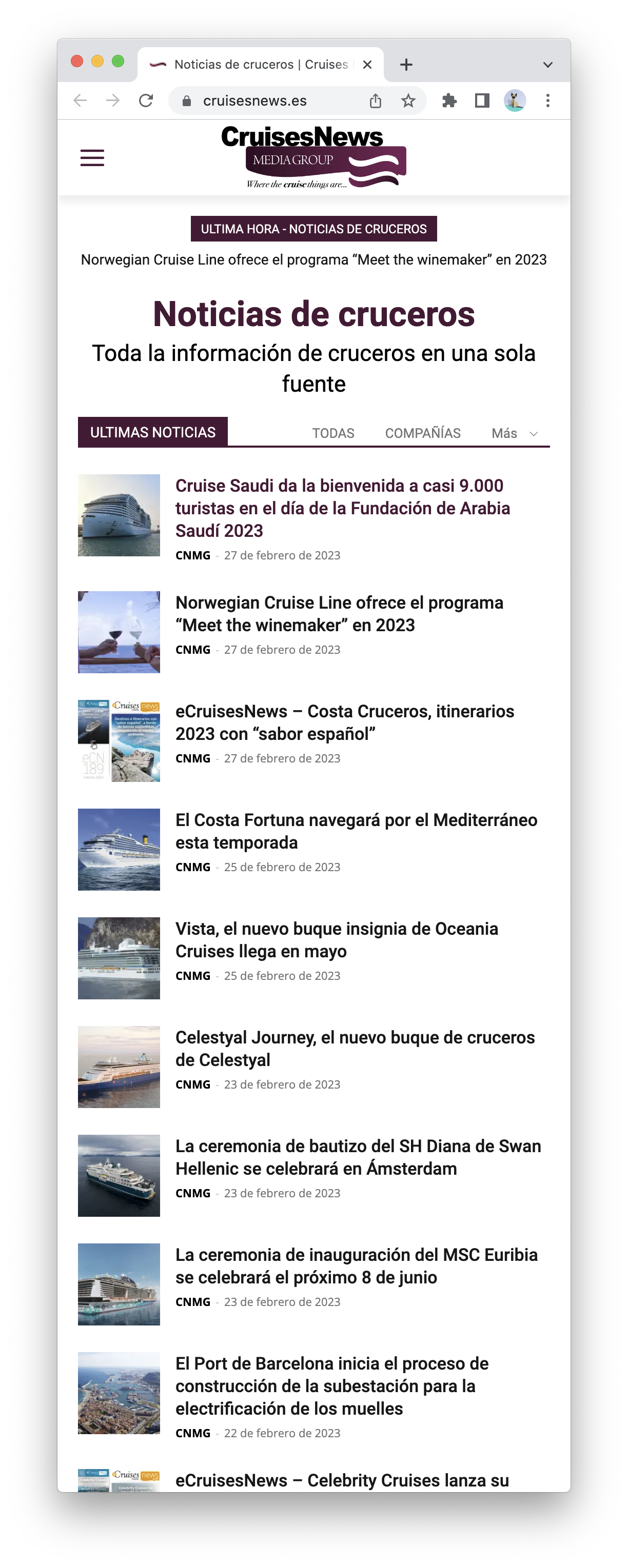
 SP1
SP1 Hi Bettina,
thanks, but I am not talking about the home page. I am talking about the article templates/single post template.
Like this – https://www.gadgetbridge.com/how-to/top-ways-to-turn-off-auto-emoji-on-discord-mobile-and-pc/
which is in Show site-wide settings in the tag div composer.
 dahlnewpage
 I have Newspaper 12.3
When I go to Theme Panel and then to Theme Fonts I have only these categories listed underneath, but in the screenshot you sent you also have Post title and Post content.
Do I have to turn on Post title and Post content somewhere? So strange I don’t have them listed???!
This is all the listings i have under Theme Panel – Theme Fonts:
Documentation on how to use custom fonts
Newspaper supports custom fonts files, Typekit Fonts and Google Fonts. Please refresh the main panel to see the fonts after you add them here!
Read more about the font system
Custom font files
Adobe/Typekit Fonts
Google Fonts Styles
Font Settings
General
Mobile menu
Pages
bbPress – Forum
WooCommerce default templates
Anamaria Hello,
Please check this topic https://forum.tagdiv.com/topic/mobile-theme-duplicate-titles-missing-categories-category-tag-colour/
Thank you!
 srzeyamlon
hi,
I struggle with mobile homepage.
https://prnt.sc/r-wNls1BT0XA – this is how it’s look in builder.
https://prnt.sc/VQIUlWMHDo3D – but on mobile (Android, Chorme) dosen’t look good (one column is under menu).
I try with margins and paddings to element, column, raw, but I can’t find solution.
How to fix that? podtext.io


