
No search results were found in Documentation!
 simchris
 They don’t do that, unfortunately.
There should be new theme update very soon, this month!
Best bet is to make sure you resave permalinks, clear transients with wp-optimize, and reset any/all caching/CDN you might be using.
That usually fixes any major update gremlins.
 Alin [tagDiv]
 Hi,
First please check the System Status section like Chris suggested above – http://screencast.com/t/4vBOkUvvXiW and increase those parameters(if it is necessarily) at least to the recommended values – https://forum.tagdiv.com/system-status-parameters-guide/
Also please try to disable your plugins except Visual Composer and check how it goes. Most probably you have installed a plugin recently which cause these issues. Try to use less plugins.
Check also the pagespeed guide and optimize your site – https://forum.tagdiv.com/how-to-make-the-site-faster/
To improve your server response time you can try to reduce the number of queries (fewer plugins, fewer blocks on page, reduce the elements which use ajax requests/pagination like mega menus/load more/infinite load). To improve the loading speed look the MySQL query cache: http://dev.mysql.com/doc/refman/5.1/en/query-cache.html we also use it on our demo.
Thanks!
Alin [tagDiv] Hi,
We cannot offer support in this regard but I can recommend to follow this topic as Chris provide many solutions how to optimize your site – https://forum.tagdiv.com/topic/tutorial-chriss-custom-optimizations-for-functions-php-etc/
Thanks!
simchris a) disable all plugins except VC
b) install theme and plugins via FTP
c) clear caching if used
d) clear transients with wp-optimize
e) resave permalinks
f) make sure you have at least 256M allocated to WP in your wp-config.php file and php.ini on hosting, for busy site can be higher depending on your hosting plan; 96M minimum needed for VC *default is 40M // you can check this on the system status panel in theme settings
g) note you need to then actually setup your site using a custom home page; then select that ‘page’ as the homepage in WP settings > set static page
h) you will need to regenerate thumbs to fit pages
i) you need to go through the theme panel settings and set defaults for page/category templates, post templates
** note any custom CPTs, plugins, shortcodes from former theme likely don’t work in the new theme as ‘shortcodes’ are styles included with theme not WordPress so don’t carry over, etc.
If site not working while you learn how it works, setup dev folder and import site, then test there prior to deploy.
If you can’t get anything to work; roll your site back to former theme/plugins, and resurrect your dbase from the last backup.
All common sense stuff. Good luck!
simchris How are you measuring that exactly?
Note Google has been changing algorithms for the new year to enable /AMP/ priority in mobile serps, mobile friendly priority, page speed priority, https priority for mobile, etc.
You may notice reads go down on your site if not optimized for speed, mobile score at 90 or above, and https vs http for mobile audience.
 Catalin
 Hi all,
Please notice that the speed of your website depends on how well your site is optimized. Please notice that this is not a simple task and if you do not have any experience in this regard you will do not bring good results for the theme. Also, notice that we have a speed optimization tutorial but this is addressed only to advanced users. So, if you follow the steps which are presented in this tutorial here -> https://forum.tagdiv.com/how-to-make-the-site-faster/ you can increase the page speed loading and if you are not aware of the steps in this regard, please consider hiring a freelancer/developer to help you because the speed optimization services is not covered by our support policy, as you can read here -> https://forum.tagdiv.com/support-policy-2/ Check our documentation here -> https://forum.tagdiv.com/requirements-for-newspaper/ regarding on dedicated server to fit to our requirements.
Hope this helps!
Thanks for your understanding!
simchris Do clean install of plugins. Clear cache; reset transients with wp-optimize; resave permalinks.
 lenusmedia
Hello team, grat work with newspaper. Could you help me in optimize css for printer version of articles? I am working on http://www.ilfattovesuviano.it and I have added a “versione stampabile” link (printer version in English).
I have tried to optimize my CSS to render a good versione but I have few issues. Any help will be appreciated.
simchris You might have had caching, transients, etc. “stored” in the WP settings which didn’t get cleared.
I do this when messing with turning things on/off;
when done:
a) resave permalinks
b) clear transients with WP-Optimize plugin.
Really helps!
simchris I use
a) mysql/phpadmin ‘check/repair dbase’
b) WP-Optimize plugin couple of years now; highly recommended:
https://wordpress.org/plugins/wp-optimize/
** ALWAYS make backups of your SQL dbase before doing anything to it, as precaution. I have not had any damage done to my 20 sites using above methods, but you should have periodic backups in any case.
 kobzeci
Hi,
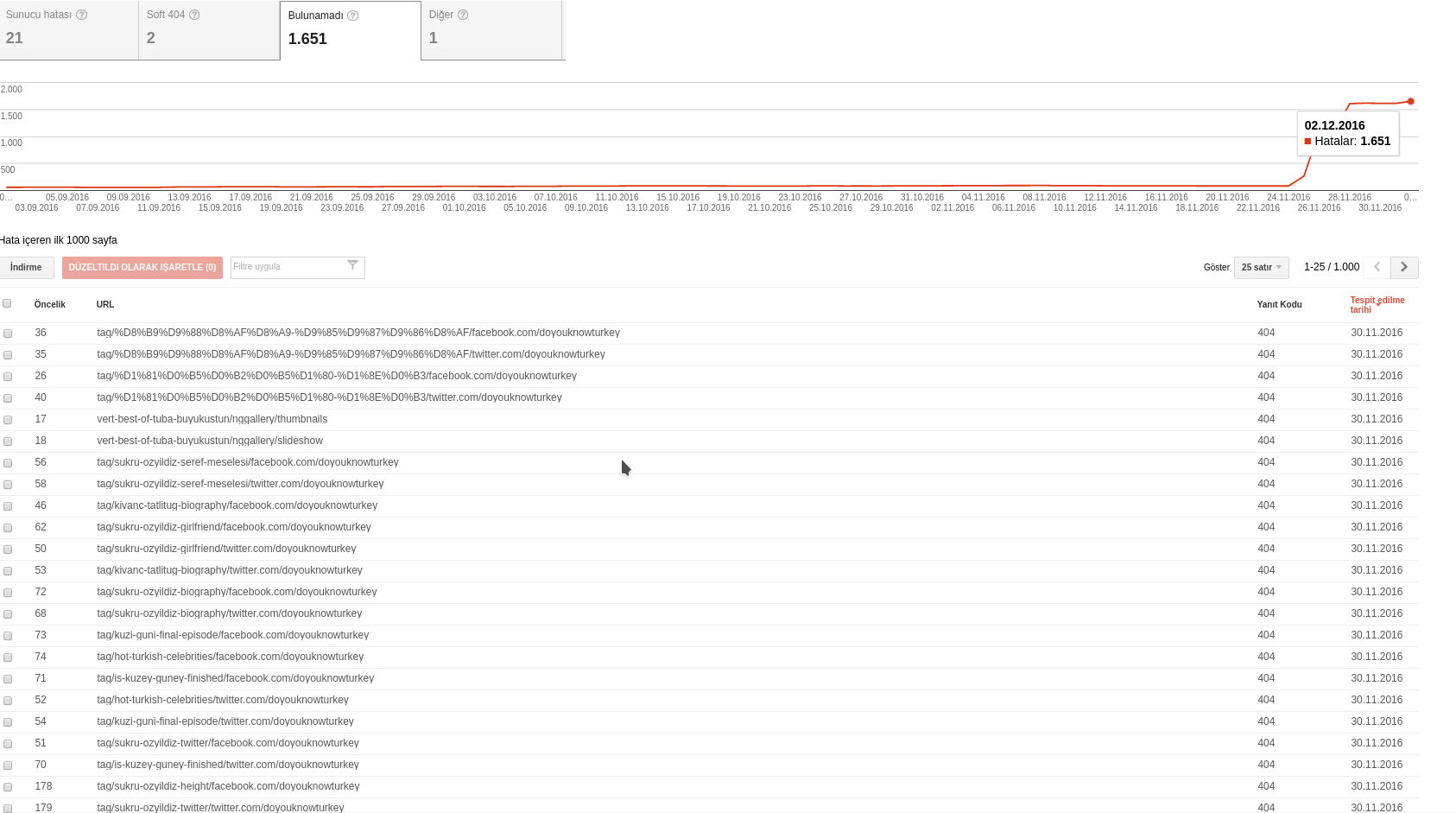
Last week i’ve installed Newsmag but i have lots of 404 error with some strance /facebook.com/sitename or twitter/sitename urls.
For example, the 404 given url is:
72
tag/sukru-ozyildiz-biography/facebook.com/doyouknowturkey which google search console says it has a 404 error upon crawling. I have not such urls in my site… The detail section says the following two pages linked to the url:
http://www.doyouknowturkey.com/tag/sukru-ozyildiz-biography
http://www.doyouknowturkey.com/tag/sukru-ozyildiz-biography/
no such urls in source code….
I’ve update the permalinks but i’m not sure it will restore the broken url&social structure. I had optimized the db after installation probably 25.11.2016
 Catalin
 Hello tribonet,
Please try to make a new clean install from scratch on the new sub-domain with the latest version from Theme Forest. You should do this only via FTP way because this is the surest and safe method in this regard. Notice that the Visual Composer is fully compatible with the theme and until now we have not encountered any problems in this regard. For more information about how you can install the VC, please consult here -> https://forum.tagdiv.com/newsmag-how-to-use-visual-composer/
I have inspected your website on Google Insights and I noticed that you have not optimized it properly.
Please notice that the speed of your website depends on how well your site is optimized. Please notice that this is not a simple task and if you do not have any experience in this regard you will do not bring good results for the theme. Also, notice that we have a speed optimization tutorial but this is addressed only to advanced users. So, if you follow the steps which are presented in this tutorial here -> https://forum.tagdiv.com/how-to-make-the-site-faster/ you can increase the page speed loading and if you are not aware of the steps in this regard, please consider hiring a freelancer/developer to help you because the speed optimization services is not covered by our support policy, as you can read here -> https://forum.tagdiv.com/support-policy-2/ Check our documentation here -> https://forum.tagdiv.com/requirements-for-newspaper/ regarding on dedicated server to fit to our requirements.
Hope this helps!
Thanks for your understanding!
 insomniac79
Hi,
I am using the Newspaper theme for http://www.daydreamdistrict.com. I haven’t done any modifications, it’s the pure theme. I have now received a warning message from Google that my website does not comply to Adsense policy! If I don’t change it, they will block my account! Is the Newspaper theme not compliant to Adsense policy?? Here Google’s email:
——————————
This is a warning message to alert you that there is action required to bring your AdSense account into compliance with our AdSense program policies. We’ve provided additional details below, along with the actions to be taken on your part.
Affected website: daydreamdistrict.com
Example page where violation occurred: http://www.daydreamdistrict.com/daydream-view-vs-gear-vr/
Action required: Please make changes immediately to your site to follow AdSense program policies.
Current account status: Active
Violation explanation
Publishers may not implement Google ads in a manner that disguises the ads in any way. In order to maintain a good user experience, it is important for publishers to clearly distinguish Google ads from site content. This includes, but is not limited to: site layouts in which the ads push content below the fold on mobile devices; placing 300×250 or larger ad units above the fold on a mobile optimized site.
In order to remain fully compliant please ensure that your site and ad layout remain compliant across all devices. More information about this policy can be found in our help center and on this short video.
How to resolve:
If you received a notification in regard to page content, we request that you immediately remove Google ads from the violating pages. If you are unable to, or unsure of how to remove the ads from these pages, or would like to continue monetizing the page with Google ads, please modify or remove the violating content to meet our AdSense policies.
If you received a notification in regards to the way ads are implemented on your site, please make the necessary changes to your implementation.
You do not need to contact us if you make changes. Please be aware that if additional violations are accrued, ad serving may be disabled to the website listed above. You should immediately take time to review your pages with Google ads to ensure that they comply with our policies.
Additionally, please be aware that the URL above is just an example and that the same violations may exist on other pages of this website or other sites that you own. To reduce the likelihood of future warnings from us, we suggest that you review all your sites for compliance. Here are some useful resources you might be interested in.
AdSense policy FAQs
Using site: search to find violations
Recommended solutions for policing your content
Content filtering
For more information regarding our policy warning notifications, visit our Help Center.
We thank you in advance for your cooperation.
Sincerely,
The Google AdSense Team
——————————
I am really worried now. What should I change? Do you need to change something on the Newspaper theme?
Please get back to me ASAP!
Sincerely, Sebastian
simchris Theme does not control caching.
So, you might try:
clear site cache if you have control panel for that
resave permalinks
clear transients using wp-optimize plugin
THEN, resave permalinks again
that’s what I do to “clean house” …
simchris You need to do the things in my thread
a) you need to optimize fonts either by not using Google Fonts, or you need to unhook them per my notes, then manually put the actual CSS in your style.css file at bottom
b) you need to minify the style.css file using my thread info.
c) consider some of the longer winded stuff — which is super advanced; the only way to fully eliminate above the fold issue is to put css in footer, after un-enqueuing it from the header, then use a critical css generator to build the CSS and put into your header.php file.
—
or — you can try to resolve some of that by using the speedbooster plugin.
Note I am only working with Newsmag optimzations now, and no longer use Newspaper.
Also note, that if you get everything else optimized, the ‘above the fold’ isn’t going to kill you in SERPS.
But there is *no* one click solution to fully optimize your site for maximum speed.
 orlando
 Hi Chris S,
you who are a real web professional, how can you fix this problem ???
Delete JavaScript and CSS that block the view in above-the-fold content
Your page has 4 blocking CSS resources. This causes a delay in the page.
It was possible to see about 58% of above-the-fold content of the page without having to wait for the loading of the following resources. Try to postpone or to load asynchronously lock resources or incorporates key parts of these resources directly into the HTML code.
Optimize CSS publication of the following:
https://fonts.googleapis.com/…family=Open+Sans:300,400,600,700&ver=3.2
https://fonts.googleapis.com/…00,700italic,400italic,300italic&ver=3.2
https://www.site.com/…r/assets/css/js_composer.min.css?ver=3.2
https://www.site.com/…content/themes/Newsmag/style.css?ver=3.2
I hope you can help me, Thanks
Orlando
simchris Try resaving permalinks;
try runing wp-optimize plugin
simchris Don’t use TagDiv WooCommerce plugins; remove them if previously installed.
If you cannot login, then via ftp do this:
a) rename /wp-content/plugins — to xplugins
b) delete all theme folders except for the stock twenty-sixteen
c) then login
d) then go to appaarance > themes, and change theme to twenty-sixteen
e) rename plugins folder back
f) only activate necessary plugins
g) install theme and plugins fresh, via FTP
once theme working
a) resave permalinks
b) use wp-optimize plugin to optimize your WP dbase
simchris Test with Google Pagespeed for “real” score with Google.
Speed cannot decrease by removing things. (note fewer items, smaller size?)
Depending on setup, which presumes an optimized htaccess file also, you may want to load jquery locally, for example with http/2 it may actually be quicker to “bundle” into the packet cache.
simchrisIf you cannot login, then via ftp do this:
a) rename /wp-content/plugins — to xplugins
b) delete all theme folders except for the stock twenty-sixteen
c) then login
d) then go to appearance > themes, and change theme to twenty-sixteen
e) rename plugins folder back
f) only activate necessary plugins
g) install theme and plugins fresh, via FTP
once theme working
a) resave permalinks
b) use wp-optimize plugin to optimize your WP dbase
*reminder:
you should be making periodic mysql dbase backups before doing any theme install, major WP or plugin update, etc. — note the WP export option does not provide a full restore ability, like the dbase export does (trust me!).
Chris S.
simchris If you cannot login, then via ftp do this:
a) rename /wp-content/plugins — to xplugins
b) delete all theme folders except for the stock twenty-sixteen
c) then login
d) then go to appaarance > themes, and change theme to twenty-sixteen
e) rename plugins folder back
f) only activate necessary plugins
g) install theme and plugins fresh, via FTP
once theme working
a) resave permalinks
b) use wp-optimize plugin to optimize your WP dbase
 Bogdan B.
 Hi,
You will have to copy over more than the css I provided above. Each case is a particular one as you do not have the same css as the previous site. The best way to do it is access your page source and copy the generated css from the page source at the end of style.css. (it is a big css code in your page source) I could not see it on kamoe’s site as it was optimized and the css minified and not shown in the page source. Your I cannot even access so you will have to do it. Find a big bunch of css in the page source you can see in the browser.
Thank you!
 sonyshreemadhan
I was trying to speed up my site in Google Page Speed test I got this message
Should Fix:
Eliminate render-blocking JavaScript and CSS in above-the-fold content
Your page has 1 blocking script resources and 1 blocking CSS resources. This causes a delay in rendering your page.
None of the above-the-fold content on your page could be rendered without waiting for the following resources to load. Try to defer or asynchronously load blocking resources, or inline the critical portions of those resources directly in the HTML.
Remove render-blocking JavaScript:
http://softechnogeek.com/wp-content/cache/minify/df983.js
Optimize CSS Delivery of the following:
http://softechnogeek.com/wp-content/cache/minify/4d65e.css
 BH160005
 I have tried turning off all plugins, one at a time until they were all off, then ran the wp-optimize tool, for a second time and I am still returning a “This site can’t be reached” error on all mobile devices.
 tricell
 Thanks Chris. We had not run WP Optimize in a while. It appears that after doing so, the old articles/site design has disappeared.
We are still having the issue of images not appearing on mobile devices in regards tagdiv_theme.min.js.
