
- NewsmagUsing other ads
- NewsmagSidebar ads
- NewsmagImport / Export theme settings
- NewsmagRequirements for Newsmag
- NewsmagNewsmag documentation
- NewsmagHow to update the theme
- NewsmagBlock settings tutorial
- NewsmagIntroduction
- NewsmagPage Menu
- NewsmagMega menu
- NewsmagLogo & Favicon
- NewsmagFooter templates
- NewsmagTheme thumbs
- NewsmagBackground introduction
- NewsmagVideo playlist
 Steven
 [ Version 6.4 ]
blog_post: http://tagdiv.com/newspaper-6-4-update/
– new: smart list with pagination
– new: this is the first version of our ajax preloader. The preloader loads the ajax subcategories on the initial pageload, this provides a better user experience and in some cases a better performance if the initial page is cache.
– new: all categories now have an option for infinite loading + load more instead of pagination
– new: 2 new smart lists templates (smart list 6 and 7)
– new: 2 new ad spots used for smart lists (smart list 6 and 7)
– new: 2 new post style template (style 12, 13)
– new: demo – Travel
– new: demo – Health & Fitness
– new: footer background option in Theme Panel -> Footer
– new: wooCommerce invoicing plugin
– new: wooCommerce label maker plugin with support for label Dymo label printer
– fix: default and custom ad size not working for tablet landscape
– fix: on the ad block the sidebar ad spot cannot be selected since the last visual composer update
– fix: IMPORTANT security issue with the ajax code that handles the sidebars.
– fix: issue with ajax subcategories. If you clicked them fast enough there was a chance that they will desynchronized with the content, showing the wrong content.
– fix: block 18 css fix for large image sizes
– improvement: a big part of the themes JavaScript now passes jsHint and complies to WordPress JavaScript Coding standards
– improvement: mega menu ajax loading now works smoother and the animation is top to bottom
– improvement: infinite loader now has a loading animation
– improvement: we improved the loading animation, when needed it’s smaller and it looks better
– improvement: added link to user page on login widget from top menu
 lbinternet1
Hi
I am using your newspaper theme and its a nice theme however I need help with my settings. I am building a video site and I want the formats for be like your demo video themes. I had a previous video site that I using another theme before, I now change it to your theme and using the video format however there are settings that are not working according to your video demo.
1) How can I get the video slider on the home page?
2) Where can I add the adsense code?
3)Why is the settings on the home page being duplicated eg the posts block layout?
4) when I change the theme to your theme I noticed I have lost all the previous url links that I got from Youtube?
5) How to post videos? Looking at your demo example it showing a video while my site is showing an article formats posting.
6) The streaming video section how can you enter the codes from youtube, what I mean, what info do you copy from Youtube to get the same format?
7) Editors Pick – how to set that option on the footer?
8) How can you allow user to add videos in the front page and the option to register on the site. How to submit Youtube videos on the front page?
9) Your sort code buttons is not easy to use, how to follow it to understand it?
10) Visual Composer – what is it use for and how to use it? If you use the theme demo would you need to add more visual composer?
11) The block setting how to use it and how it works with the widget?
I can provide password and login details including site url to check the settings from theme supports help team. Email me at avcupload@gmail.com
 jdmeier
I can’t seem to solve or make progress on my Newspaper Theme performance issues.
I’ve got five friends that want to use Newspaper, too, if only I can get past my performance issues.
(They’re new bloggers, they like the idea of the theme, they’re a bit worried about my inability to fix my performance issues, or to find someone who can.)
My performance sucks (in the 40’s) with no clear remedy in sight.
Worse, when users hit my site the first time, the page loads blank (no images show)
If they reload the home page, then images show the second time, but after a flash of gray.
Here are screen shots:
* Empty Images – http://www.awesomescreenshot.com/image/509260/1ae034f2ac380576a5dd1d8e49faed92
* On Reload – http://www.awesomescreenshot.com/image/509262/dd0893dd0a1944de6aab6f0a9591e297
I haven’t seen anybody else’s site load like mine, where it’s all framed out with gray placeholders, and then, as if a second flash, the images then show up.
Here’s my setup at a glance:
* I’m hosting on Siteground.
* I use WP Rocket which is tested with Siteground — just default options.
* I’m using a CDN (Cloudflare), with default options.
* I have Gzip working.
* I use WP Smush Pro to smush all images (all images are smushed.)
* I used P3 (Plugin Performance Profiler) to analyze plugin performance.
I contemplated W3 cache (well, In installed it, but it was immediate conflict with WP Rocket, and WP Rocket’s feature compare shows superior in all regards, but I don’t have enough experience yet to know of it’s true.)
I get Chris’s point on the difference between buying a car, and driving the car. Well, now I want to know how to drive like the Mario Andretti. I feel like I’ve got the “owner’s Guide”, but not the “Driver’s Guide”. But actually, I don’t want yet another guide, I want a student driver model where I pay a consultant to show me the ropes for a couple of hours while fixing things, looking over my shoulder, or me looking over theirs.)
My images are probably the main problem, I don’t know how to fix them without doing weird acts of God, and I’m trying to keep posting simple and pragmatic, not build a better mouse trap with weird optimizations and even weirder workflow.
Tutorial
—————-
I’ve seen these tutorials …
* Page Speed Tutorial – https://forum.tagdiv.com/topic/tutorial-pagespeed-2015/
* How to make the site faster – https://forum.tagdiv.com/how-to-make-the-site-faster/
* Better Explained – How Compression Works – http://betterexplained.com/articles/how-to-optimize-your-site-with-gzip-compression/
* Google on Image Optimization – https://developers.google.com/web/fundamentals/performance/optimizing-content-efficiency/image-optimization
Posts
—————
I’ve seen these posts:
* Pagespeed – https://forum.tagdiv.com/topic/pagespeed/
* What is your google page speed value – https://forum.tagdiv.com/topic/what-is-your-googlespeed-value/
Tips
——————–
I’ve seen these tips:
* Chris S – Additionally, I use the WP-Optimize plugin to regularly optimize my WP dbase. Cutting 800kb out of your dbase once a week, or after a large number of posts/pages, also speeds up your system overhead. https://forum.tagdiv.com/topic/what-is-your-googlespeed-value/
* Chris S – If you can hit 90+ on your desktop score and 85+ on mobile, you can live a happy life and not stress over it. https://forum.tagdiv.com/topic/what-is-your-googlespeed-value/
* Chris S – – There are numerous resources on the net to learn how to set-up your web server account for gzip, expiration headers, optimize your images prior to uploading to your site, editing your htaccess file for WordPress, limiting use of resource hogging plugins unless absolutely necessary, etc., using W3cache with the minimal settings recommended in this forum from Radu/Marius (( QUOTE: w3 total cache use only the ‘full page cache.’ )) – https://forum.tagdiv.com/topic/pagespeed/
* Radu – On the demo we are running a stock theme with our stock speed booster plugin! Also note that any additional plugins slow the theme down and lower the score in pagespeed. – https://forum.tagdiv.com/topic/what-is-your-googlespeed-value/
Tools
————
I’ve used these tools
* Google Page Speed – https://developers.google.com/speed/pagespeed/insights/
* GTMerix – https://gtmetrix.com/analyze.html
* Is compression working? http://www.gidnetwork.com/tools/gzip-test.php
* Pingdom Tools – reality test – http://tools.pingdom.com/fpt/#!/bGth8K/sourcesofinsight.com
* Web Page Test – http://www.webpagetest.org/
Google tells me my page speed sucks. Is Compression Working tells me Gzip is working. Pingdom tells me my images are bloated. GTMetrix fails with a 522 timeout and blames my CDN.
The quote that keeps me going is:
“Whatever doesn’t kill you makes you stronger.”
I guess I’m getting stronger day by day.
JD
jdmeier Ah, I see the only way to know which version is inside is to re-download my multiple Newspaper downloads.
Interestingly, when I re-downloaded one, in the Update Log it showed 6.3.2.
When I re-downloaded my other one, it showed 6.3.3.
When I re-downloaded the other one, it then showed 6.3.3.
(this was all in the span of < 5 minutes.)
All’s well that ends well.
Thank you,
JD
 doucare1971
 Please don’t take offense on what I say here. I think ads are almost pointless now to use, because of the adblock extension for browsers. A lot of people are using adblock and that keeps people from seeing ads. I hope you figure something out. I am using Zergnet and that is even used as ads and blocked by adblock. I have adblock myself but bypass it on my website. I am sure I am not getting much from Zergnet, because of this adblock extension that others use. I wish there was a way to unblock people from using adblock, but oh well. I use it for the other sites I go to. There is a lot of websites that have way too many ads that you are side tracked from seeing the real content.
 Lucian
 Hi HBP,
Glad to find you’ve managed to solve it. Thanks for letting us know!
The theme has also been updated to fix this deprecated widget constructor warning in wp 4.3 update so you if you’ve don’t already use it you can download it from themeforest: http://themeforest.net/downloads and update it or update just this file: http://screencast.com/t/pM8mC5BZtad with this one: http://cdn.tagdiv.com/wp-content/uploads/2015/08/td_widget_builder.zip
Let me know if you have any other theme related issues.
Thanks for the message!
 Walther
Hi,
on http://www.swedentips.se/ I use an AdSense link block 728×15 in the footer. For this ad I have chosen the same colour as for the footer. Nevertheless, the ad shows a white border 1px (Chrome) or 2px (IE 11) on the top of the link block. I don’t think this is an AdSense issue – I have other sites where this works alright without top border.
How can I get rid of this white top border and make the ad fit in nicely?
Thanks.
Walther
 desworks
 Thanks that did work but leaves me with another problem – all custom ads have a 44px bottom margin and since I want to use it as a superheader it looks weird to have a big white line above the top navigation.
I tried:
#td-a-rec-id-custom_ad_5 {
margin-bottom:0px !important;
}
As custom css but that didn’t work, do you have a solution?
 strawberrybase
Hi, i have two 300 x 250 pixel adverts, one in the ‘sidebar’ ad space and another in a ‘custom’ space. These are placed together in the Newspaper Default widget in the sidebar. The ad in the ‘custom’ space retains it’s size but the one in ‘sidebar’ stretches to 324 x 270 (in larger browser windows). Is there a way for the ‘sidebar’ ad to retain it’s actual size so both ads display at the same dimensions?
Thanks
 lecker
Hello, the default header menu background color and I want to change it to some other color. I know I could use the theme’s panel, but when the site loads up, the default color loads first and after that the one I set loads, and it looks awful.
I want to change the base color for the menu from the theme files, how can i do that ? Thanks.
 Aedin84
Hey,
So I’m in love with the video post format (Style 11) for the Newspaper theme and I want to emulate it for gallery purposes using the TagDiv Slider Gallery setting. I know how to tweak files and custom CSS, etc, but my problem is I don’t know what files to edit in order for the “theme panel” and “add/edit post” function to allow me you to change the style to one other than the default style through style 11.
To recap/be more clearer: I’ve created duplicates of style 11 and called them style 12 (single_template_12.php and loop-single-12.php), but before I begin designing/coding I want to be able to call the post format like so: 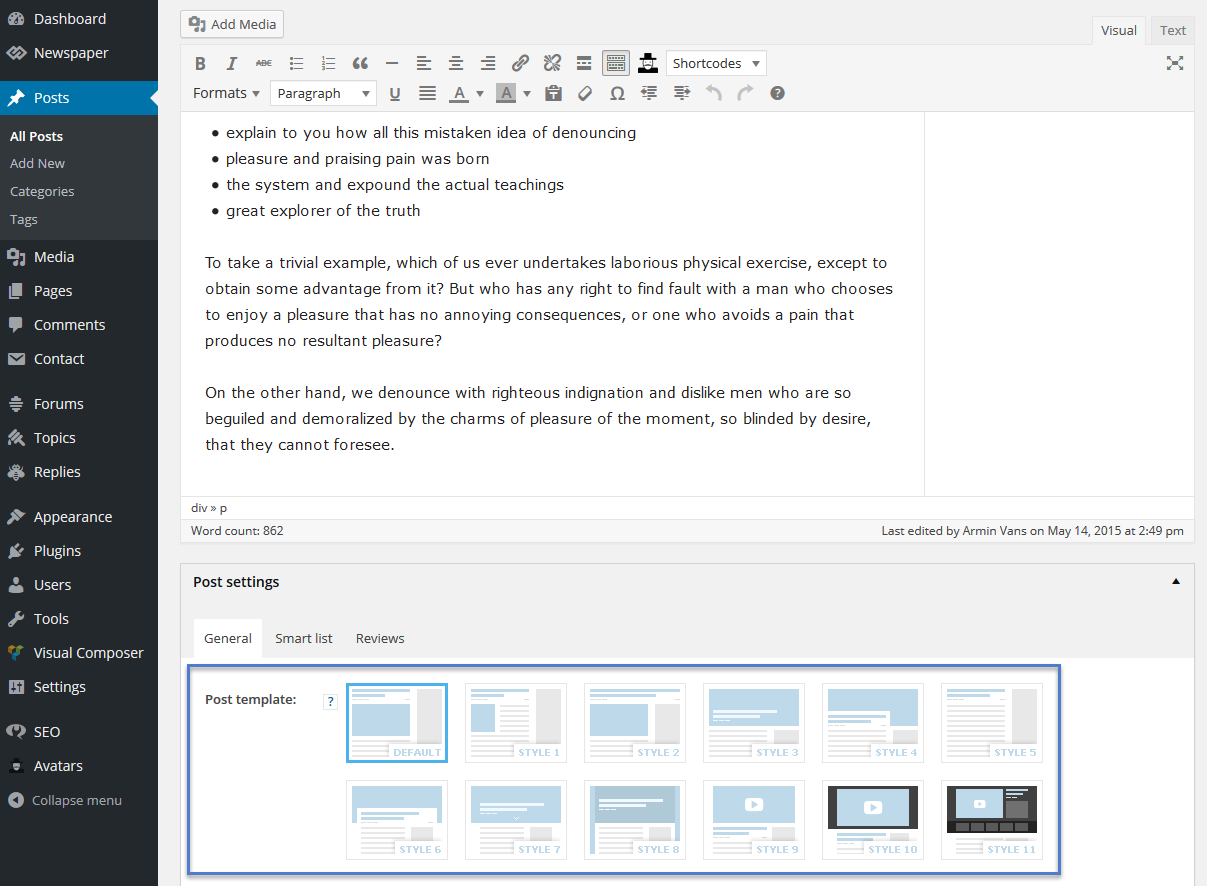
Thanks in advance for any/all help provided
 Andrei L.
 Hi
The theme it’s designed to handle just adsense, img/flash banners ad codes you can find a detailed explanation in this regard in our ads guide here: https://forum.tagdiv.com/ads-system-full-guide/
We recommend using those div’s from our docs to place other types of banner and the padding property it’s set on img tags so because you’re using a different ad system than ad-sense the theme’s css it’s applied only on ad classes, not to the ad content.
You can also try to use a plugin to render your ad code like suggested in the documentation.
Try this custom css to padding the header and sidebar ads:
.td-header-sp-ads .td-a-rec {

padding-top: 10px;

padding-bottom: 10px;

}

.td-a-rec-id-sidebar{

padding-left: 20px;

}
You can modify the values as you like, here id the ruslt: http://screencast.com/t/FqZ8Mb8r3z
Thanks!
 howtoisolve
Hi, Tag div support
Please help my problem suffering from last many months.
My Website: http://www.howtoisolve.com
My Website running adsense ads but can’t showing adsense ads based on cookies. Means if i Open amazon then my site showing not amazon ads. but at the same time other sites showing amazon ads.
i think, Some ware some thing blocked for my adsense ads (Cookie based).
Adsense running over 1 year on my side, But i experience that my site never showing cookie based ads, Never.
My site running: Newspaper 6 WordPress theme
Want more help from our end, please share with us we are very thanks and happy to follow you guide.
Please help me, This also affecting my earning (Poor earning) report discourage me that time.
 haychart
 Its the latest – V 6.3.2 – bought it the other day
that didnt work
What i am saying is the homepage – http://www.eastmidlandsbusinesslink.co.uk/mag/ – uses template newsmag – no ads show
but if you click on the Home button – taking you to http://www.eastmidlandsbusinesslink.co.uk/mag/news/ – it uses the template News – they do show
adding ‘– Select an ad spot –‘ => ”, has not worked
Have changed Pages> Homepage – Newsmag – Front Page and added the Ad Block a couple of times but not showing
 Thomas
Hello
Your theme is really great and more since the v6.
It is really cool for sites for lot of articles and works fine with Google ads for example.
However adblockers are used more and more.
I know some very big french sites where more than 40% of the people have one! 🙁
It means it is more and more difficult to earn money with advertising.
So we have to find other ways to make money.
Premium site options is an option.
Shop with some exclusive stuffs (PDF, video, goodies…) is another.
Like most of the site, we use WooCommerce for this part.
Even the theme is compatible, it is really the minimum.
I notice that other themes work hard to propose cool functions on the shop part.
Example on Sahifa (another magazine theme like Newsmag):
http://themes.tielabs.com/sahifa/shop/
It would be very cool if you add a lot of those features on the next updates.
For my point of view, here a list of importants things to add, in order of interest:
1/ Have an interactive basket shop icon meaning when I add elements in it, on top of the site the icon change and indicate the exact number of products I added.
2/ When I put the mouse on this basket icon, it would be cool that a block appear with the details products I add
3/ Heve a dynamic filter by price in AJAX (without reload the page)
4/ Have a sort option (price, name, newest, popular…)
5/ Maybe in the article detail have a more cool presentation of the images meaning using scroll ?
Here an example on a page (with a lot of photos taking to many places).
http://www.virtualmagie.org/produit/livre-vm-des-10-ans/
In the right column I notice on the categories, after the number the sign ) never show up.
I don’t know if it coming from the theme or WooCommerce. 🙂
Hope you consider my suggestions to improve the theme options.
Regards
 bobbymc
Hope you can help me fix this.
Images are not loading when I try to view links from my site through the facebook smartphone app.
As you can see in this shot, the logo has been replaced with another image and the featured images doesn’t show: http://brandinginasia.com/wp-content/uploads/2015/08/screen.jpg
And in these you can see that no images are appearing at all. This is in all posts viewed through the facebook app.
http://brandinginasia.com/wp-content/uploads/2015/08/IMG_1112.png
http://brandinginasia.com/wp-content/uploads/2015/08/IMG_11131.png
This is even after waiting an extended period of time. Videos are viewable, adsnse is viewable but not images.
You can go to my facebook page and see more brandinginasia.com posts through your mobile app to see.
 euzebius
Hi,
on the Newspaper theme header ad block, I wish to know how to implement 2 scripts for Google adsense ads and then a second one from an other ad system. I wish to have a kind of capping with adsense beijng displayed the first time they land on the site and when they visit a second page, then display the second source.
How could I do that ?
Thanks for your help.
Our website : http://www.iphonologie.fr.
Lucian Hi,
I’m not sure what you mean and I haven’t managed to realize it on the mentioned site either. Do you need ad banners here: http://screencast.com/t/nAnONkwwCGL If this is the case please note that the theme doesn’t have any options for that so you would have to customize its ads system for that or use another plugin or a ads codes. If you don’t know how to do it we advise you to ask the help of a developer or a freelancer because you need custom work for this.
If you refer to this one: http://screencast.com/t/HqgW66nU then you can use theme’s ad sport for that and place your ads, using VC page-builder or theme’s/wp widgets, wherever you need them. Please see theme’s ads guide and let me know if you still need assistance on this afrewards: https://forum.tagdiv.com/ads-system-full-guide/
Thanks
 Loiborg
I’d love a feature that allows sponsored content/advertorials to blend with the regular content while it is still very clear to the reader that it is indeed sponsored content. The feature request would be suitable for both Newspaper and Newsmag (which are both great themes).
The feature could include:
- One or several areas of the content page shows that it is sponsored content (example from The Atlantic and another from The New York Times)
- A visual difference when viewed in a content feed (example from Buzzfeed)
- A custom field for the content which contains an image/logo (for the sponsor), a description and a link.
- Content feed priority: A set priority area within the content feed. Alternatively it could work as a content box in the visual plugin.
- Visibility timer: A setting which automatically unpublishes content after a set amount of time
 TheMediumUTM
 This is part of the single template code, found in single_template_#.php and the corresponding loop-single-##.php in the Newspaper theme folder.
single_template_## loads loop-single-##, which has this block:
<?php echo $td_mod_single->get_social_sharing_bottom();?>

<?php echo $td_mod_single->get_next_prev_posts();?>

<?php echo $td_mod_single->get_author_box();?>

<?php echo $td_mod_single->get_item_scope_meta();?>
and single_template_## also has, immediately after loading single-loop-##, this:
comments_template('', true);
Swapping those various lines around would do the trick.
The two robust ways to do this update are via a child theme or via the new theme API.
The theme API is a simple plugin that adds your custom templates, modules, blocks, etc. to the theme panel. I just switched most of my modifications that were in a child theme to the theme API, since child themes come with other complications and potential slowdowns.
https://forum.tagdiv.com/the-theme-api/
In this case, you would (1) create a plugin folder, (2) find the template(s) you want to make this change in and copy both the loop-single-## and single_template_## files for those templates into your plugin folder, (3) edit them to swap the order of those elements, (4) add the code to register them in the main plugin file, and (5) upload and activate the plugin in your dashboard and switch your post templates in the theme panel.
If you wanted to do this via child theme instead, it would be less work but not quite as “robust”, at least in the opinion of some.
https://forum.tagdiv.com/the-child-theme-support-tutorial/
This time you would simply make your child theme as per that tutorial, copy the single templates in there, and edit and upload them and they would invisibly replace the ones that come with the theme.
P.S. Because that comment template code loading is in single_template_##, moving it to loop-single-## might work oddly. Or it might be fine. Haven’t tried it myself.
 Maros K.
Hello,
I would like to resolve a problem with category page pagination. Everytime when I try to go to next page, it gives me 404 – Page not found.

Sorry guys, I like this theme, but there’re a lot of errors, problems, configuration. I’d imagine a theme which works fine with a few configuration such as titles, posts etc. for that amount of money I spent. I’ve already spent a lot of nights to configurate my site to work properly, but still new problems and errors show up. It really starts to bother me.
 maverick
Hello,
I’d like to know if there is a possibility to create additional Custom Ads, and later add them via Visual Composer to certain pages?
Another thing is that my idea is to separate ads depending on category, so I can sell the adspace exclusively for certain category (page) of my website. Is that possible with your theme?
 bArA
bArAHi everyone, first I want to say Newspaper 6 is amazing beautiful and conigurable News Wp theme I’ve ever seen,dashboard it’s fantastic, GOOD WORK Team.
But I have a problem, when I change thisand other ad code it’s disappear.
<a href="http://frtya.com/go/btbDW_sGvf/DEFAULT" target="_blank"><img src="http://e1.static.hoptopboy.com/22129/49629/337441/22129A/300x250-xxa_5666.jpg" /></a>
or for header
<a href="http://frtya.com/go/dP_btbDX_sGvf/DEFAULT" target="_blank"><img src="http://e1.static.hoptopboy.com/22129/49629/337433/22129A/728x90-075a_5183.jpg" /></a>BTW. You have link error in header ad settings http://prntscr.com/81ka8y
Sorry for my language, it’s not my native.
 Frank
Frank Hi,
thanks for your quick response. I installed the Newspaper6-Theme now for three times. Before this i deleted the old theme and the VC. I select all elements from Visual Composer settings. The result is every time the same, there are missing some elements is VC (see attachements).I’m desperately and don’t know what to do anymore.
I hope the screenshots show you, what i mean.


Kind regards
Frank
Lucian Hi okti,
You can try this: http://stackoverflow.com/questions/25814914/chrome-youtube-cast-sender-js-console-error
The tagdiv_theme.min.js is theme’s js file, a minified version of it which loads when using the speed booster plugin, it can’t be removed as all js features will not work otherwise and I can see it’s already moved to the footer in your iste.
Thanks



