
- NewsmagUsing other ads
- NewsmagSidebar ads
- NewsmagImport / Export theme settings
- NewsmagRequirements for Newsmag
- NewsmagNewsmag documentation
- NewsmagHow to update the theme
- NewsmagBlock settings tutorial
- NewsmagIntroduction
- NewsmagPage Menu
- NewsmagMega menu
- NewsmagLogo & Favicon
- NewsmagFooter templates
- NewsmagTheme thumbs
- NewsmagBackground introduction
- NewsmagVideo playlist
 krizdabz
Hello!
We’ve purchased Newspaper 4 theme, but there is a small hiccup. After a year of operation site has become unbearably slow on relatively powerful hardware and with relatively modest load (70 concurrent users).
We have accumulated about 5 thousand articles most of which are in a single category, though we are using tags (which causes another funny side effect – thousands of cache update operations through terms_cache almost on each request).
Nevertheless, I have to give you a baseline. We’ve changed hardware over time in search of performance, so to be totally syre, we set up an empty virtual box (4GB TAM, 2 core CPU, 60GB SSD on DigitalOcean), simple LAMP server, a copy of our site and even then we were unable to get pageloads under a second (though all other plugins were enabled).
Next move was obvious and as follows (ensuring nothing beyond content, Newspaper theme and Visual Composer is present within installation):
a) Set up a new WordPress instance.
b) Populate content from production site (use wp-cli to update all links).
c) Add default Newspaper 4 theme and its default child theme, select latter as site theme.
d) Install visual composer (as recommended by theme).
d) Enable everything and set a few things up, so menus and category pages are as in production.
As a result all pages are being generated in approx. 1 second (1.09±0.13s; out of 100 measurements; page generation time), which is obviously not good enough, since under even moderate load and because of other plugins which are essential to site this time tends to grow.
What are your recommendations to gain significant performance improvements? Of course, enabling w3 total cache solves this problem for unauthenticated users, but we heavily rely on authenticated ones, so an advice would help.
 bfrye26
Hello,
Loving the way this theme has been supported. I looking to see if you all can help me add a widget location under the post layouts for us to add a banner or other forms of ads just under the body of the articles. I welcome all ideas you may have!
 simchris
 If you’re using a CDN or some other external thing, you likely need to ensure that is setup properly and clear cache; make sure you actually have ‘featured’ images setup for all of those posts, etc.
Do the images actually exist on your site?
seems they do ?
http://dawgtime.com/wp-content/uploads/2015/03/3.31Practice18-100×75.jpg
I will say this — it’s really bad to have dots in file names … most systems need to identify the file extension after a . so some systems will stop at 3.whatisthisextension?
Ideally this should be
NO
3.31Practice18-100×75.jpg
YES
3-31Practice18-100×75.jpg
dumb as it sounds, but try changing the image file names?
———-
or wait for tagdiv support …. I’m just a bystander ….. 🙂
simchris Yep. The only fix is to not use theme panel “over rides” for default colors, and make those changes directly to the style.css file.
Otherwise what is basically happening is
a) main CSS loads
b) CSS over-rides load
as you might expect in many situations due to the complexity of certain pages; especially with complex home page, and complex mega-menu — there is a couple msecs delay in there.
Also avoid using child theme on top of that since all child themes are basically redirects from one theme to another — which Google doesn’t recommend — but WordPress has made this their standard practice. Best to just edit the main theme, since with major theme updates, the child theme needs changes too and defeats purposes of using child theme to avoid not having to re-apply changes.
Much like WooCommerce — changes are done to functions.php — and one has to reapply them each time there is update.
Anyway — that’s been my experience. 🙂
 Alin [tagDiv]
 Hi,
Do you have any css customization?
If you use latest version of the theme(4.6.3) did you update from an older version? Di you used patch or a fresh install?
I can provide you css to fix this, but may cause cause another issues if you have custom css or did not updated properly. Also please first check this without any plugins active, leave just Visual Composer active, clear cache and check if you still have these issues.
If you want you can use this custom css in Theme Panel > Custom Css after you check what I asked above and without plugins: http://screencast.com/t/PzhbPITU7
.td-g-rec-id-header .adsbygoogle {

position: relative;

top: 0;

right: 0;

margin-top: 10px;

}

.top-header-menu li a:before {

top: -2px;

}
Thanks!
simchris Issue is not with theme — all themes using Visual Composer as a “drag and drop page builder” are having this issue. And this only impacts some servers. We’re using NewsMag on two high traffic sites right now; one which gets a lot of traffic every day, the other gets large hits “depending on the content.”
Not sure what “SmartMag” is as this is the “NewsMag” forum, but if you read my thread then you don’t need to worry …
a) use the theme with current Visual Composer; might not impact your site/CPU depending on how your server is setup.
b) if you have a large CPU hit you will know immediately, and you can switch to using the SHIM plugin.
c) if you have a VERY high volume traffic website (e.g., millions of page views per day) you should be building a “lean framework” which doesn’t have all the pre-built options baked in, as this is not as efficient as a lean framework where you have as little as possible — e.g., TIME magazine is running on a version of twenty-fifteen theme with some custom plugins to manage editorial matters. No page builder, but lots of stuff running via cloud for fast “edge loading” via the Automattic premium platform. In that situation you would be custom building a theme to fit your needs not buying a $50 off the shelf product.
d) in our case we chose the TagDiv folk to redo our news network sites because 16 months ago when looking around they were one of the VERY few who had some clue about pagespeed optimization beyond so-called “SEO READY” … meaning, some thought given to page speed and not just “feature bloat” with some meta tags built in. We had built our own lean framework which was a pain pre-bootstrap, in 2011; went to Woo Canvas in 2012; went to TagDiv end of 2013 (has it been that long?).
But like all CMS platforms where you have a platform running on top of php, then theme(s) running on top of that, then plugins and hooks going into that, there is always a dev/test process on your end to see what works, what needs to be massaged, and what won’t work at all in your particular environment.
If you’re starting a NEW news site, I don’t think you need to worry about high traffic at this stage, as it takes awhile to build that unless you’re using bots or entirely click-bait with paid adwords per story to drive that.
————–
so, if you reads my thread you know
a) they have a fix NOW that works for those with high CPU issues
b) not all users of Visual Composer have an issue
c) the folks who make VC (not TagDiv) may optimize or fix memory issues in future version; TagDiv has NO control over that beyond working with the WP Bakery developers on the issue.
d) they may “roll their own” sideways version of a page builder which is more ‘lean’ at some point, but obviously that takes a bit of time to develop.
So, have fun and build your site 🙂
 paulberrow
 Emil, the thing is i can’t use the theme ad system for these adsense blocks, because i put it manually every time to different places in content of posts.
I just saw a lot of sites using this 728*90 block (one of them even uses the same plugin as i do) and everywhere this block looks fine.
This plugin doesn’t manage sizes it just makes a shortcode.
is there any other way to make it look normal?
 Eugene
I want to place banner ads based on the post and category.
Example I have a category on sports
All sports related post are categorize under the sports category.
I want to place a banner ad related to sports but I only want
it to show under my sports category and not any other categories
I have.
Can this be done? If so how will I go about doing it?
Thanks
 Lucian
 Hi,
In relation to this: http://screencast.com/t/tQVHHY9oHuYi the theme doesn’t add any div above the main body: http://screencast.com/t/oS4O08WF
You issues might be due to other plugins you use as the browser give several errors: http://screencast.com/t/zdiS06bi0px so you can try and test this without any plugins also or contact plugin’s authors.
The theme also has a similar background ad system which you can use for a similar result: https://forum.tagdiv.com/ads-system-full-guide/
Thanks
simchris Last gasp … is
(assuming you tried deactivating your other plugins first; some people having issues with YOAST latest edition and conflict with Visual Composer 4.5 on some servers; issue with those plugins not theme — see the support threads on wordpress.org for yoast, for more info)
1) increase default php memory for WordPress in your wp-config.php file to 256MB. I’ve found, oddly, that for some reason, on some setups, changing the amount of memory via theme panel and php.ini does *not* actually increase amount of memory WordPress will actually use … adding the setting ALSO in config file makes difference.
https://codex.wordpress.org/Editing_wp-config.php#Increasing_memory_allocated_to_PHP
or
2) fully delete the js_composer folder, reinstall either the latest version from theme, or install version from prior theme version.
 alopfr
I want to create my header with the logo in the middle and in both sides two little ads (as New York Times). I attach two screenshots. One of The New York Times header and the other of my current header with the position where I want the ads.
Thanks.


 Riyathe
 thanks Alin, it appears i havent requested the one time application to adsense for ads other than youtube,
i dont have any traffic on my site though just now, is there any ‘minimum’ or such that adsense looks at for approval?
Cheers,
Riy
Lucian Hi,
Those ad codes aren’t handled by theme’s ad system. Those ad spots only work for adsense ad codes other ad codes are rendered as entered by the user so for other types of ad codes you can use plugins like: Simple Ads Manager or AdRotate and place the ad shortcode inside theme’s ad spots which will be rendered by the theme.
You can also use wp text widget which will also render your ad codes and place the ads using page builder.
Hope this helps!
Thanks
RiyatheHi,
Firstly great theme, love it!, i know very little about html coding and am finding wordpress and this theme very user friendly.
I have a couple of issues with my site im trying to work through maybe someone can help.
1) Social Buttons work in the TagDiv widget with FB/YT/Twitter when i enter the details there but for the top menu and bottom menu they dont work, i added the same info into the ‘Social Networks’ tab as i had for widget fields and it just take me to my website… eg for youtube i put channel/XXXXXX into the field, then when i click it goes to http://www.website.com/channel/XXXXXX instead of youtube. Am i making a mistake with the format?
2) Ad code, i made 2 types of ads in my adsense account, a 728 x 90 for the top banner and a ‘responsive’ ad for the sidebar (i figured these sound about right). I copied the code for the 728×90 one into the header adcode section and the responsive adcode into the sidebar section of themepanel>ads and saved but when i view my website there is no ads. Am i missing something here?.
3) Caching – is it better to disable W3 total cache while working on the site so i can see the changes reflected quickly live?, im finding in mozilla with ad blocker im having to use another browser to check what my updates look like and it behaves unpredictably (sometimes shows updates, sometimes not). When i did disable adblocker for my site page only all sorts of malware appeared on my computer subsequently i installed bitdefender and malwarebyte seems to have sorted it.
p.s im a newbie to all this stuff but trying hard and enjoying your theme and this learning curve alot 🙂
my website is http://tabletopminis.com (its still in early development)
 hhrankin4
Hi,
I’m preparing to install DFP on Newspaper. I’ve run a test with a single ad unit that worked, but still may not be set up correctly. I’ve searched the forums on this subject, but still can’t seem to find a definitive set of instructions on setting this up correctly.
So, I have a few questions:
1) Is there a definitive instruction guide that I’ve missed? This would be ideal of course. I don’t need help setting up DFP, etc. Just knowing the best practice for installing the header code and body code into Newspaper / NewsMag.
2) If not, then can you confirm that this is the proper way to install DFP ad code in Newspaper?
A – Insert Header code into a plugin (like “Insert Headers & Footers) which will include it in the header code of every page.
B – Insert the matching body code into the desired ad unit within the Newspaper Ads System, replacing the previous Adsense code.
C – Repeat for each DFP Ad Unit
Is this it, or am I missing some critical added step?
3) I conducted my test similar to the process described in question 2 above, except I used a text widget in the Homepage sidebar for the body code. It seemed to work, but also seems to have caused some problems with the slider on the Homepage. At times the slider appears half-loaded – typically when I have made a change to the ad order on DFP. Are Newspaper and NewsMag compatible with DFP?
4) Is there a plugin that will let you insert headers and footers and ALSO specify them for individual pages (i.e. I have ads units for the home page that aren’t on other pages).
Thanks in advance for your help, TagDiv!
Alin [tagDiv] Hi,
Our ad system was designed to work with adsense code and make it responsive for different screen sizes. I’m not sure if your code will work with those divs, but you can try to use those divs but you have to specify size for different screens size like our example there. Using only <div class="td-visible-desktop"> it will hide your ad on other screen sizes(than desktop).
Thanks!
-
This reply was modified 11 years by Alin [tagDiv].
Alin [tagDiv] Hi,
Please try to add it like this in the header.php – http://screencast.com/t/XHpJCgkKU3
And then use the other codes in Ads section from Theme Panel for example: http://screencast.com/t/DoGTPa1V4a
Thanks!
Lucian Hi,
The doubleclick ads aren’t recognized by theme’s ad system and the code is rendered as it is. So your ad banners always use 468x60 dimensions. The theme only works using google adsense ad codes: https://forum.tagdiv.com/ads/ ..for other type of ads you can either use wp text widget or a plugin like Simple Ads Manager or AdRotate to render the code then use theme’s ad spots.
Thanks
 happymedia
Hi there,
i have the problem that on my homepage when i use pre designed layout (infinite scroll and all others) there is space on the left and on the right at my blog post images.
When i use the default template “Homepage – with article list” there aren’t any wrong spaces.
But when i use “Blank Template” and then choose Template by the composer there is something wrong..
Please help me…
Thanks!

 Anonymous
 Hi,
It’s happening again. I put an adsense ad in the top right sidebar widget and now there’s an awkward ad between the Main Preview area and ‘Latest Articles’
I did as you suggested and disabled all the plugins other than Visual Composer and the problem remained, even after I cleared my cache.
I took the ad that caused the problem out, but the issue remained.
So the problem is any time I put a new widget in the top right sidebar, it puts a related widget in that space.
Thoughts? I really need to fix this problem.
Thanks
Steve
 Emil G
 Hi,
1. The top and the bottom ads are outside the content, you can only achieve that position by using the Inline Ad – http://screencast.com/t/bpfr7TVO1sp
Play with the paragraph (add 1 or 2) and test to see if the ad jumps in the position you want. The theme function breaks the content into paragraphs and you can select after which paragraph to display the inline ad.
After that set it’s position – http://screencast.com/t/eaYoJ6gfKK9
2. I already provided a custom css in the image from the dashboard: – http://screencast.com/t/OflIC1U7P
.td_module_mx1 .td-block14-border {
height: 100%;
}
Add the css in Theme Panel -> Custom CSS.
Some modules have extra elements like lines, shadows, etc, when you change the thumb size or other module parameters you also have to consider those elements.
Thank you, Emil G.
simchris Fix for php overload issue …
On some sites with high traffic, large number of page views, large number of pages, online for years and years — you may see warnings on server of php going from “green to yellow” or “green to red” and in our case on ONE site this was happening in weird 5, 10, 20 minute intervals “on the nose.” The site gets pinged a LOT from news aggregators, Google News feeds, etc.
Finally figured out it was NOT home page complex layout, was NOT sidebars, was not anything related to ads (e.g., 3 ads per page vs 2), not related to Disqus or sharing buttons/widgets or Mashshare, etc.
Turned out to be the built-in “related” posts and more from author below each story. Disabling this immediately stopped the pummeling.
For this one website, we reverted to using “Contextual Related Posts” plugin, which we were using on this one site prior to Newsmag, so we knew it already would play nice. So, I now have that running and the plugin is setup to show 5 related posts as “text only” at bottom of each story (above the tag buttons). The plugin caches the most common searches to maintain juicy goodness and not overload the php query system.
This hasn’t been an issue on the other 5 sites, even when limited to only 3 items — but this ONE big site, it just was pushing things right to the “one more straw…” — hitting some CPU peaks of “10” vs normal of “1” or “2” (anything regularly over “4” means something funky going on ….).
So, right now with
(6) x NewsMag Sites
(2) x Newspaper Sites
(1) giant site not running WP
(6) sites running Woo
(2) sites running other (e.g., Udesign)
(10) misc apps, placeholder, ecommerce sites — not using WP
CPU
Last 1 minute 1.78
Last 5 minutes 1.55
Last 15 minutes 1.25
this morning it was running “hot” at “10” …
so, in case you need to “tune” a specific site for high spike-o-ramas, try disabling the “related” items bottom of your post page FIRST (!)
 Alin [tagDiv]
 Hi,
I have checked your site, but you use a non-responsive fixed ad and I’m afraid that it cannot be fixed via custom css as it take the image at fixed sizes how you can see – http://screencast.com/t/eTgg4jOZg
I cannot overwrite the image container and image size via custom css – http://screencast.com/t/IKreevED – http://screencast.com/t/G7kiaUPaq
The theme ads system was designed to work with adsense code, the other ads are rendered as entered by the user.
Thanks!
 spu
spuHi Guys,
The heading of all the boxes are jumbled up. See attached image. If you refresh then they become fine, otherwise at times this happens.
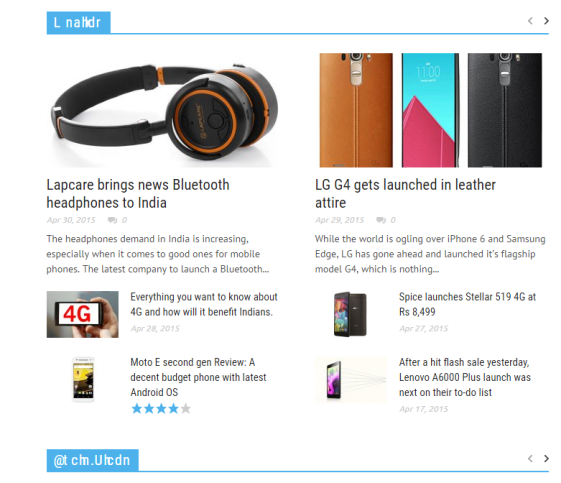
Plz help.
Alin [tagDiv] Hi,
@pet76 If you use 1.7 version of the theme you can copy only the patch files.
Also if you want to make a full update please follow this guide and use FTP method – https://forum.tagdiv.com/how-to-update-theme/ and also update plugins that come with the theme files from the /plugins folder.
@hintzebros and @pet76
Check the treads/guide below for more info on how to customize your site’s page speed and other matters please follow and use all instructions provided in all this treads:
* https://forum.tagdiv.com/topic/pagespeed/
* https://forum.tagdiv.com/topic/tutorial-chriss-custom-optimizations-for-functions-php-etc/
* https://forum.tagdiv.com/page-speed-guide/
Also please post your issues in newsmag section – https://forum.tagdiv.com/forum/newsmag/
Thanks!

