- TutorialsFrom WPBakery to tagDiv Composer
- TutorialsDefault Block Settings Guide
- TutorialsOffset Feature
- TutorialsSystem status parameters guide
- TutorialsWhat is Ajax preloading?
- TutorialsHow to Update the WPBakery Page Builder plugin
- TutorialsHow to Install bbPress forum
 idove
idoveI need a way to create a slider (carousel) with images and links, possibly a title below if necessary.
The idea is to place ads as images (thumbnails) in the slider (carousel), each of which has a link.
Is there a way to do this in the newspaper tagdiv theme or are there any other solutions in the form of WordPress plugins?
 CreekWalker7291
I’m using the latest version of Newspaper 12.4 on a new website. Installed The Rimont prebuilt content and attempted to start modifying, and the TagDiv Composer isn’t working. When clicking “Edit With TagDiv Composer,” it never loads and the page becomes unresponsive. This isn’t a plugin conflict; there are no other plugins installed. It’s also happening on both Safari and Chrome. Is this a known bug? Any suggestions?
 elitechronicle
I am using the custom ads section as well as the normal ads section for displaying ads for my site https://elitechronicle.com/ but none of the ads are displaying. Can you please guide me for the same as the revenue is very important for a small site like ours 🙂
 marcona
in2website.com
this is original background https://in2website.com/wp-content/uploads/2023/05/homepage-background2.jpg
when I upload another image or even the original image the image is pixelated and blurry
 Anamaria
 Hello,
The image ads are added in demos, so to remove them you need to edit with tagDiv Composer, select the element Ad Box and with right-click, you can delete it => https://www.screencast.com/t/2GfCVx9BCAw7 or with drag & drop place it into the deleting red zone from the bottom right of the page.
The ad box has 3 sections for ads: using theme panel ads -> https://i.imgur.com/KFa9ibl.png, using images/banners -> https://i.imgur.com/MfAPTaE.png and custom code -> https://i.imgur.com/2rh8SuD.png save it and will appear on the post (you can set a shortcode like a shortcode from adrotate plugin or other plugins)
Thank you!
 volvano
Hi, using the downtown homepage, there is a button that wont click and reloads the homepage regardless of the settings added to it. all other buttons follow the rules and hover rules except for this one. I reinstalled this homepage block from the cloud but this button still creates the same issue. can i share my details by email so someone can have a look at this issue?
 Yash M.
Hi there,
I am using the Post Content element on the page. I have uploaded the images in the post and published it. After that if I check in the post there is spacing on the right side.
I have put the RAW and divided in two parts. In one part there is a Title and On another one (in the right side) I have added this post content element. As you can see in the screenshot, there is a remaining space on the right side. But it is not using that space. I tried to change the settings, but none of them are not working.
It uses the large width of the Vimeo video I have attached in the post. But it is not working with the images uploaded in the post. I am using the WordPress Block editor.
Can someone from Tagdiv please help me solve this issue?
If you want to check on the live website you can use the following link;
https://axiompost.in/gargi-weds-yash-wedding/
Screenshot of the problem;

 simchris
Hi, folks
after trying some normal debug stuff; a) disable any custom CSS; b) remove Google ads; c) disable some widgets; still having minor CSS issue cannot solve, as not sure if specific to me, or general element from composer plugin.
Specifically, on Chrome Desktop, Windows 11 Pro (all latest versions); latest version of Newsmag theme and composer plugin. No other composer plugins installed; have the default WordPress plugins to allow legacy widgets and post editor.
ISSUE: on home page, the ‘slider’ element, background gradient seems to run full width to the edge of the left column outside the slider element.
I am using simple grid layout as
[ row ]
inside row,
[ 2/3 col ] [ 1/3 col ]
in right col have the widget element and nothing else
You may be able to see the issue here:
NewYorkNetwire.com
and here is home page code elements from composer
[tdc_zone type="tdc_content"][vc_row][vc_column][/vc_column][/vc_row][vc_row][vc_column width="2/3"][td_block_slide title_tag="" ms_title_tag="h2" custom_title="FEATURED" limit="2" category_id="4048" header_color="#dd3333"][td_block_4 custom_title="NEW YORK BUSINESS NEWS" limit="2" category_id="4048" offset="2"][td_block_4 custom_title="NEW YORK BUSINESS NEWS" limit="2" category_id="4048" offset="4"][td_block_11 ajax_pagination="load_more" category_id="6" limit="6" offset="6"][td_block_4 custom_title="NEW YORK GOVERNMENT AND POLITICS" limit="2" category_id="10"][td_block_11 category_id="10" offset="2" ajax_pagination="load_more" limit="2"][vc_separator border_width="2"][td_block_8 custom_title="NATIONAL NEWSWIRE STORIES" header_color="#1e73be" limit="8" category_id="5" ajax_pagination="load_more"][/vc_column][vc_column width="1/3"][vc_widget_sidebar sidebar_id="td-homepager"][/vc_column][/vc_row][/tdc_zone]
This site was just migrated to v5 from v3. I delete old home page elements completely, but still same ‘page’ — started with fresh layout.
On my iPad it looked just fine; but not on PC desktop.
Thanks for help on this one 🙂
 RECORD EUROPA
How to deselect the ‘global’ assigned to a template?

It is possible to select a template globally, but I can’t deselect it, without assigning the ‘global’ to another template!
Thanks.
 kaspererling
 There are ads showing in the sidebar, but they are manually placed, so thats not a part of Theme Panel insertion.
But all other from Ad Inserter plugin are gone, as you see here in the articles, that used to have a few sections of ads: https://www.mandesiden.dk/wp-content/uploads/2023/05/Foto-2023-05-12-kl.-13.37.06.jpg
Site is: http://www.boosted.dk – screenshots are just placed at Mandesiden.dk FYI.
kaspererling Thank you.
We have just disabled the plugin and cleared cache. And the old ads from the old Header Ads from Theme Panel are still there. All other ads are gone.
And as you see, there is nothing in the Theme Panel.
See screenshot: https://www.mandesiden.dk/wp-content/uploads/2023/05/Foto-2023-05-12-kl.-13.32.13-scaled.jpg
And her: https://www.mandesiden.dk/wp-content/uploads/2023/05/Foto-2023-05-12-kl.-13.34.47-scaled.jpg
 sweetgunner
Hi,
I’m using a cloud template (Gossip) and I tried everything you said here > https://forum.tagdiv.com/set-block-inside-post-content/ but nothing happens inside my post content.
I’ve created a page and added a flex block, then I copied the code
[tdc_zone type=”tdc_content”][vc_row][vc_column][td_block_trending_now][/vc_column][/vc_row][/tdc_zone][tdc_zone type=”tdc_content”][vc_row][vc_column][td_block_trending_now][/vc_column][/vc_row][/tdc_zone]
And pasted inside the single post template, on Content block as an inLine Ad:
Not even adding in the Theme Panel… (I dont use any other kind of ads)
Am I doing something wrong?
 smilelondon
Hi there,
we are facing an issue with the Flex Block only.
When we create new posts we often have the thumb placeholder not showing, actually nothing – which then causes the formating to fail for our newsroom page.
You can check the normal behaviour here: https://www.livetube.tv/news
Here is an example how it looks when the first image is not showing and also not the thumb placeholder
https://app.screencast.com/HQv1Q5nE4fzLq
Here with magnifier
https://app.screencast.com/w9BRg0tku0qUk
Here is a link to our thumb placeholder
https://www.livetube.tv/news/wp-content/uploads/sites/8/2022/11/Placeholder-Large-LiveTube.jpg
For all other blocks the thumb placeholder is showing correctly
We would appreciate your help with this
Thanks
 Archerix
 A site skin add is something that advertiser sometime ask us, and that newspaper don’t have, only background add, which leaves us no other option but decline the ad campaign.
Tried several plugins, without success.
In other posts already pointed some problems and bugs with the ad placement in newspaper.
Don’t know what a site skin add is? Here
It’s a shame that newspaper does not allow us to fully explore ad solutions leading to loss in revenue
vakvas for what you want you don’t need a plugin, in the theme menu in ads go to “Background click Ad” and place the url, then go to “Background” and upload the ad
-
This reply was modified 3 years by
Archerix.
Anamaria Hi,
You can use the Ad Box. The ad box has 3 sections for ads: using theme panel ads -> https://i.imgur.com/KFa9ibl.png, using images/banners -> https://i.imgur.com/MfAPTaE.png and custom code -> https://i.imgur.com/2rh8SuD.png save it and will appear on the post (you can set a shortcode like a shortcode from adrotate plugin or other plugins).
Thank you!
 hadharm
 Yea, thanks he has checked but the issue still pesists. After lots of issues making it work I finally conclude to use woo myaccount page as the optin in builder myaccount page at https://hiideemedia.com/my-account/. So it serves as both login and my account page.
You can login using Tagdivfix as both username and password.
Now i have an issue after logging in. The page shows two my account as i have set it. Both Woo and subscription account.
Can I merge the two into one just like it should align with Guestpost and others on the my account page after logging in? I have tried editing the page account block but it only request for page id. It would have been better if it can ask for page id or URL. Also, it will be better to increase pages(custom pages) to 10 to merge everything at once (the maximum is 7 but I need 8 to merge everything on myaccount page).
Are you guys planning to make URLs work for custom pages in the future so that we can maintain only one dashboard. Or if you have the fix kindly help me with it now by giving me instructions on how to get it done.
Screenshot is attached for clarity. Thanks looking forward to a response from you soon.
Screenshot => https://prnt.sc/ZKXeHs9GAbNZ
So my final Dashboard should be the list below while I hide woo myaccount block for loggedin user:
Dashboard
Account details
Subscriptions
Orders
Downloads
Addresses
Payment methods
My Wallet
Guestpost
Logout

 mbbaureihende
 dlicoppe
Wordpress tagDiv Composer plugin < 4.0 – Reflected Cross-site Scripting vulnerability : https://patchstack.com/database/vulnerability/td-composer/wordpress-tagdiv-composer-plugin-4-0-reflected-cross-site-scripting-vulnerability?_a_id=110
Solution : Update the WordPress tagDiv Composer plugin to the latest available version (at least 4.0).
Details: Truoc Phan discovered and reported this Cross Site Scripting (XSS) vulnerability in WordPress tagDiv Composer Plugin. This could allow a malicious actor to inject malicious scripts, such as redirects, advertisements, and other HTML payloads into your website which will be executed when guests visit your site. This vulnerability has been fixed in version 4.0.
The tagDiv Composer module must be updated to avoid wordpress hacks. Could you give us a feedback on this point. THANKS.
 NDDdude
 Hi, we’re running Newspaper on nbnnews.com.au.
and we’re using Newspaper v9.5.
We’re trying to upgrade to the latest version, but we’ve hit a major stumbling block.
Here’s the problem, when we have a video and enter its file name in a custom the video player appears.
We use custom fields to populate required fields to display a video player and poster frame.
1) Enter a file name
2) Enter a image name
SO basically our journalist enters a video file name and image file name and the video appears.
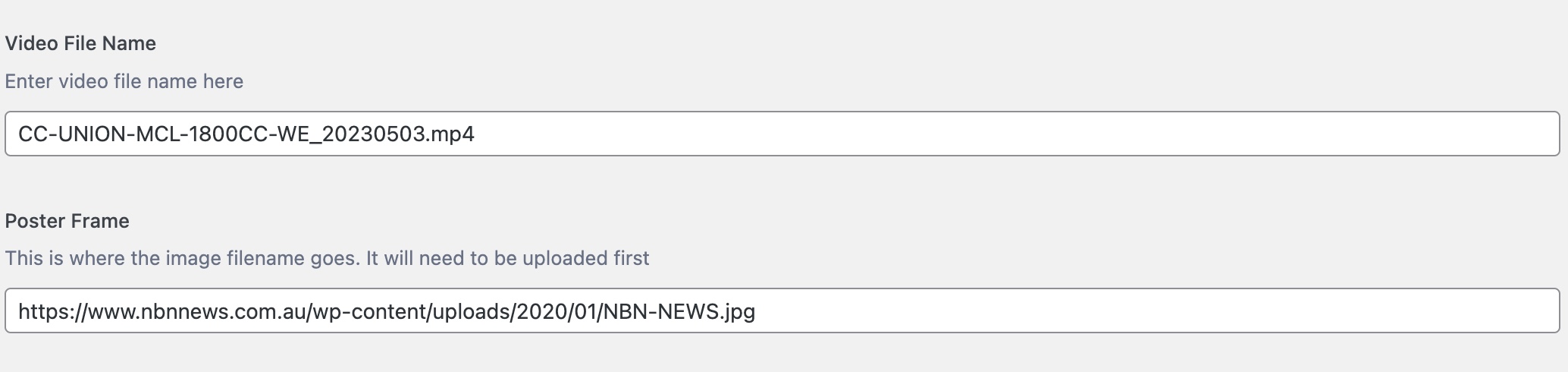
Please see here for reference:-
https://www.nbnnews.com.au/2023/05/03/father-and-son-avoid-jailtime-after-defrauding-mining-company/
Using an if/else php call, we either display a video player or not by using CSS classes.
Once the video file name is entered the “else” bit kicks in and shows the video player.
We’re using the loop-single.php file and sitting the code block just under the
And on version 9.50 this works.
On v12 I can’t get this to work in a child theme or hacking the main theme.
I can’t insert any code (php, html) anywhere and have it render.
I’m not a programmer, but through looking at tutorials and trial and error I got it to work.
And it’s been ok for years.
This has become critical to fix because using v9.5 and updating to php8, it’s throwing up a cross-scripting error.
Here’s the code:-
Any help would be greatly appreciated. I love this theme, but I might have to try other theme to make this work. And I really don’t want to do that.
 newsdesk@newsport.wales
 Hello
when you go onto the article on a mobile your see the feature image is at the top with the title but between that and the article there are related story boxes showing other articles, I was wondering how to swap it around so the article appears above the recommendations


 cdpragazzi
hi, I have to insert another personalized advertising for amp pages, how to do it?
 DocDigit
 That is exactly what we try to do. Let me explain what is happening
1.
> If I click on this tag: https://prnt.sc/ve568HZEL0e6, then it leads me on
> the correct page: https://prnt.sc/u-dOw8it7NqN
Correct, the page says ‘RC Nieuws’ but its content has no RC Nieuws related articles in it.
2.
> If you mean these tags are different: https://prnt.sc/_ad7x_etWVS1 , then
> please edit this page https://cloudzeeland.nl/category/rcnieuws/ with the
> TagDiv Composer and check the filter of that block
Yep, that is what we do. Only after that, and click on another category tag, the name of that page is ok, but the content of that page (or the set filter) is exactly the same as the one I altered at (1).
Now just click on another category tag in an image.
You now will see that if you click again on the category tag (1), it brings you to the page with the correct heading, but with the content we set filtering at (2).
Hope this will be more clear to you. All help is appreciated.
Anamaria Hi,
@Viju You can use the Ad Box. The ad box has 3 sections for ads: using theme panel ads -> https://i.imgur.com/KFa9ibl.png, using images/banners -> https://i.imgur.com/MfAPTaE.png and custom code -> https://i.imgur.com/2rh8SuD.png save it and will appear on the post (you can set a shortcode like a shortcode from adrotate plugin or other plugins).
The PHP can be added only in the theme files, or you use an xtra plugin.
Thank you!
 denya
denyaHello.
I installed ads here.
https://ibb.co/Z2TZQ88
and here
https://ibb.co/18XB5VM
I can’t understand why they follow each other. It turns out that this is the result.
https://ibb.co/tpTmr0B
https://ibb.co/kMcnrRJ
How to fix it?
 tfin
tfinHello,
How can I change (decrease) distances between a title and the following content (one is an eventon content, the other is custom field content)? Also, is it possible to change the distances between custom field content rows?
All areas that I would like to change are marked in red. https://www.guidebg.com/wp-content/uploads/2023/04/Q1-scaled.jpg
Thank you in advance and best regards,
T