
- NewsmagUsing other ads
- NewsmagSidebar ads
- NewsmagImport / Export theme settings
- NewsmagRequirements for Newsmag
- NewsmagNewsmag documentation
- NewsmagHow to update the theme
- NewsmagBlock settings tutorial
- NewsmagIntroduction
- NewsmagPage Menu
- NewsmagMega menu
- NewsmagLogo & Favicon
- NewsmagFooter templates
- NewsmagTheme thumbs
- NewsmagBackground introduction
- NewsmagVideo playlist
 Anamaria
 Hello,
For the footer sticky, you can use the option on the row and set it to the bottom -> https://i.imgur.com/gIX3LCA.png other option doesn’t exist.
You can try to use the Flex Block element inside the Single Post Template.
The Posts Loops settings are divided into 5 tabs: General, Layout, Style, ADS and CSS. The Posts loop is a special block and doesn’t have filtering options.
Also, one of the options for pagination of the Posts Loop has the option for normal numbered and the flex blocks do not have this option.
The Posts Loop is automatically filtering the posts depending on the cloud template you set (for example on the category page there will be posted posts from that category).
Thank you!
 esalinas506@gmail.com
 Hi, Sorry about the deadlinks. It was just a screenshot of the menu button not working on my phone.
I found out what the issue is though. The homepage is taking over 1 full minute to load, so if I press on the menu icon while the page is loading, it wont work. Once the page is loaded, the menu button works.
I’ve never had an issue with the home page before, is there a way to check why it’s taking so long for that page to load? Every other page loads very fast except the Home Page.
 be2name
Hello,
the Newspaper theme is not compatible with the Yoast Video SEO plugin. When installed and enabled, the RSS feed shows wrong media enhancements with a doubled domain, so services like Deezer do not update the feeds, due to 404 errors caused by that links. They look like:
<media:thumbnail url="https://www.literaturcafe.de/www.literaturcafe.de/wp-content/uploads/rebecca_gable-1-1190x448.jpg" />
<media:content url="https://www.literaturcafe.de/www.literaturcafe.de/wp-content/uploads/rebecca_gable-1-1190x448.jpg" medium="image">
Here are the results of different settings:
– Standard theme Twentytwo with Yoast SEO: Video
=> Only post with videos have the media:thumbnail tag in rss-feed (desired behavior)
– Newspaper theme with Yoast SEO: Video
=> ALL posts have the media:thumbnail tag in rss-feed with wrong double-domain
– Newspaper theme with Yoast SEO: Video DISABLED
=> NO posts have the media:thumbnail tag in rss-feed
– Newspaper theme with Yoast SEO: Video enabled and ‘disable media RSS enhancement’ option in plugin settings ticked
=> NO posts have the media:thumbnail tag in rss-feed
I reported this issue to the Yoast support, and this is their reply:
Thank you for troubleshooting this. We endeavor to be compatible with the main page builders in WordPress, like Elementor, and other important themes in the WordPress environment, but in this case, would you mind escalating this to the theme developer so they can look into this further? If they need anything from us, they can email us with the details and we’d be happy to help them troubleshoot.
Could you please fix this or get in contact with Yoast to fix this.
 suffolk_nick
I have used add ‘Text with title’ element in the past (no problems), for adding iframes for mail subscriber forms and other things. I have recently tried to add ‘text with title’ element and when I click on ‘edit content’, the WP Editor pops up but then it gets stuck loading with a looping circle but it never loads.
I updated to version 11.5 Newspaper and perhaps it broke then. Is this a known issue? Is there a fix?
 willkar
Hello,
I’m really in love with every update that is being delivered for Newspaper theme but, I would like, if possible, to leave here some suggestions for future features, and also some possible bugs I’ve found while playing around with tagdiv shortcodes in my website.
I’ll try my best to explain below, all the features and bugs founds related with newspaper theme.
Possible BUGS detected?
1 – “Tabbed Content” with a flexbox block 5 does not display the row columns correctly when the “Style 1 – Tabs on top” is used. This is the page result with the tab content shortcode (not formated correctly) – https://gamingnovato.com/popular/. This is the page used inside the tab – https://gamingnovato.com/popular-gaming/ (well formated)
2 – The “Flex Loop Filters” shortcodehttps://imgur.com/undefined does not display the live modifications I make in composer plugin. The shortcode appears “different” as shown in the image.
3 – In the shortcode “Post List”, in the “General Text” section, the line heigh seems to do nothing to the post. Changing it does not affect the text – https://imgur.com/rAiUQXG
Possible new features to be implemented?
1 – On the shortcode “Tabbed Content”, make the tabs act as a slide on mobile. Right now they are static, and when having multiple tabs added, this new feature becomes a bug (tabs are cut and not possible to be seen and select – live example: https://gamingnovato.com/popular/)
2 – More easy / intuitive way to display custom fields in a shortcode. Right now I believe the only possible way to do this is using one of the imported CPT from a demo – https://imgur.com/8Lfl5b7 and then editing the source files or using some CSS on them. I understand that this might be a more tricky and hard job to do, but it would help alot in mantaining the non-complexibility of composer plugin and would be just too perfect to dinamic create those styles too 😀
3 – In the shortcode “Posts List” https://imgur.com/ctkKzEJ there should be added more “Columns to display” options, for example “Category”.
4 – I really love the new possibility implement by your guys, that allow users to edit and add posts directly in front-end, but even as a regular user, I find myself lacking a feature to directly edit a singular post without having to go to the post listing feature. What I mean is, there should be a way to add a feature directly into a singular post and even on flex blocks that would allow users to directly edit that sepecic post. This would work for any user with permission for that, ofc.
5 – Somehow related with the previous suggestion, the system should allow users to edit other people posts (if they are allowed to do so). Right now from what I’ve checked, I cannot edit a post created by someone else. For example, I have 2 admin profiles on my website, but my Admin number 2, even though he can see all the posts created in the website, when I click “Edit” with him the custom page opened is displayed with the fields blank (none of them are selected).
6 – Regarding the post creation by users,there should be a functionality that allow users to report other users posts (for any reason).
7– Regarding the posts created by the users, there should be a feature that allow the users to add it to a favourite list or maybe a “read later” list.
8 – Regarding the users, I believe it would be cool to have a functionality to follow users / authors and/or the posts they create or categories.
9– A feature that tracks all the posts and pages visited by the user? Something like youtube history (videos views).
10 – In the shortcode “Post List”, right now the listing seem to be missing some important features. In my case, I have alot of posts created (alot more to be added) and I missed a functionality for filter those posts for example by posts status (pending, draft, etc), and an even more important feature that is a way to keyword search a post so I can easyly find the post I want to edit. Going to the pagination is a tedious and almost impossible work to find the intent post to be eddited.
11– In the shortcode “Post List” maybe add the possibility to have other types of loading, for example “Infinite loading”
12 – In the “Post List” shortcode, deleting a post does not display a confirmation message. I believe there should be some type of alert message alerting the user of this action
13 – What about a functionality that link the subscription system with ads displaying? For example after a user subscribe a service, he no longer sees the ads displayed in the website.
14 – I feel like despite having some styling options for the comment sections, it is now time to add some more features to it. For example liking comments.
15 – What about BBPRESS and Buddypress? Is there a plan to start including composer plugin on it?
Anamaria Hi,
You can use the element Ad Box, and set the element where you want. The code does not need to be auto ads, so the theme will not have control.
The ad box has 3 sections for ads: using theme panel ads -> https://i.imgur.com/KFa9ibl.png, using images/banners -> https://i.imgur.com/MfAPTaE.png and custom code -> https://i.imgur.com/2rh8SuD.png save it and will appear on the post (you can set a shortcode like a shortcode from adrotate plugin or other plugins).
Thank you!
 dpernar
Hi,
I was wondering where it would be best to place google auto ads snippet in newspaper theme? Is it in header or?
Namely if I place it in header then it modifies my page by adding additional blank placeholder below my header.
Is there any other recommendation on how to use google automatic ads with newspaper theme.
My site is: CuriousMatrix.com
 hadharm
 I noticed you didn’t get what I mean’t. Here is a screenshot => https://prnt.sc/a6eSvFGQQU9s
On this screenshot there are two sections one for subscription and other for woo commerce. Now I want the woocommerce section look like tds own and merge the sections together.
Custom pages asked for page id but I am confused how to get page id for orders, downloads and others
The final section will now be;
Dashboard
Account Details
Order
Subscription
Downloads
Addresses
Payment method
My Wallet
Logout
-
This reply was modified 3 years by
hadharm.
 RoskinGary
http://www.RoskinGemNewsReport.com
So I have two rotating Banner Ads in the post content working just fine. I added the short code from Advanced Ads and I have 10 Ads rotating in the Article Inline Ad position after the 2nd paragraph, and I have another 10 banner Ads rotating in the Article Bottom Ad position. But I cannot seem to get the Sidebar Ad to accept a short code, not for one ad or a group of rotating ads. I am stumped. When I try to save the new code, the swirling squares do not stop. I have let them swirl over nite and that didn’t help either. Help!
 daimpa
Hello, in the newspaper theme (I’ve a license associated to another account, I’ve email you to have istructions on how to assign that license to that account), when from the AMP plugin I select that I want to load AMP version on homepage, then when I visit the homepage it does an infinite loading loop and never loads. How can I fix? I’ve no custom code.
 banglak1993
 Thanks @Anamaria for replying to the thread
I checked on another viewport but still can’t find the ads box
Here is a screenshot when checking another view:
https://ibb.co/dgfcRc2
daimpaHello, I’ve a Newspaper license, I’m waiting instructions on how to switch it from another account to this one.
I don’t understand that much how should I work with the responsive options, and the mobile theme.
I’ve built an homepage with the tagdiv composer. I set things like “columns width”=50%. Now if I resize the window from PC, on smaller window it looks bad. If I enter from mobile, it loads the mobile them.
In order to have my website work 100% with any screen resolution, screen resize etc., should I edit the options of ALL ROWS/COLUMNS/ELEMENTS for ALL the 4 viewport that appear on the top of the tagdiv composer siderbar?
Thanks.
 Hamoon
Hey guys, I’m very new and checking out the theme so I can use it for an upcoming project. Unfortunately I’m having big problems showing my ads, no matter what I do. It just doesn’t work. I’ve currently just put a ad in the header section, but it just won’t show up.
The other problem is that although I increased the Max Input Vars value via wp-config.php, the status still shows me that the value hasn’t changed. Could anyone help me, please?
Thanks very much!
 DutchReview
Hi TagDiv team,
We are really interested in using the new Directory options. We want to create a paid directory that automatically renews each year.
I’ve been through all the threads and documentation but it seems like explainers on how to create this are really sparse. I’ve seen other people ask this question and get a copy-paste response, but the guides in that response don’t answer my questions.
The website is http://www.dutchreview.com. The directory is in addition to our normal activities (so I can’t import a whole website template as far as I understand).
Can you please answer the following questions:
– What pages do I need to create for one directory (e.g. tax accountants)? (I think I need a directory page, a signup page, a submission form, etc. but I’m confused about how to link all these together).
– How do I create the paid option?
– Can I set a character limit on descriptions for listings?
– Currently when I try to load the Doctors Listings template I get an error saying “Flex Block X” and that the module style does not exist and that I need to reactivate the plug. Which plugin is this referring to?
Thanks in advance for your help.
Best,
Sam
 damir78
 ok, thanks for the answer.
1. do you mean newspaper?
2. ok, maybe do some action for the New Year holidays 🙂
I managed to expand the width of the template to 1200px and on the first P+V website, I got 90 for mobile / 95 desktop on the google page speed test
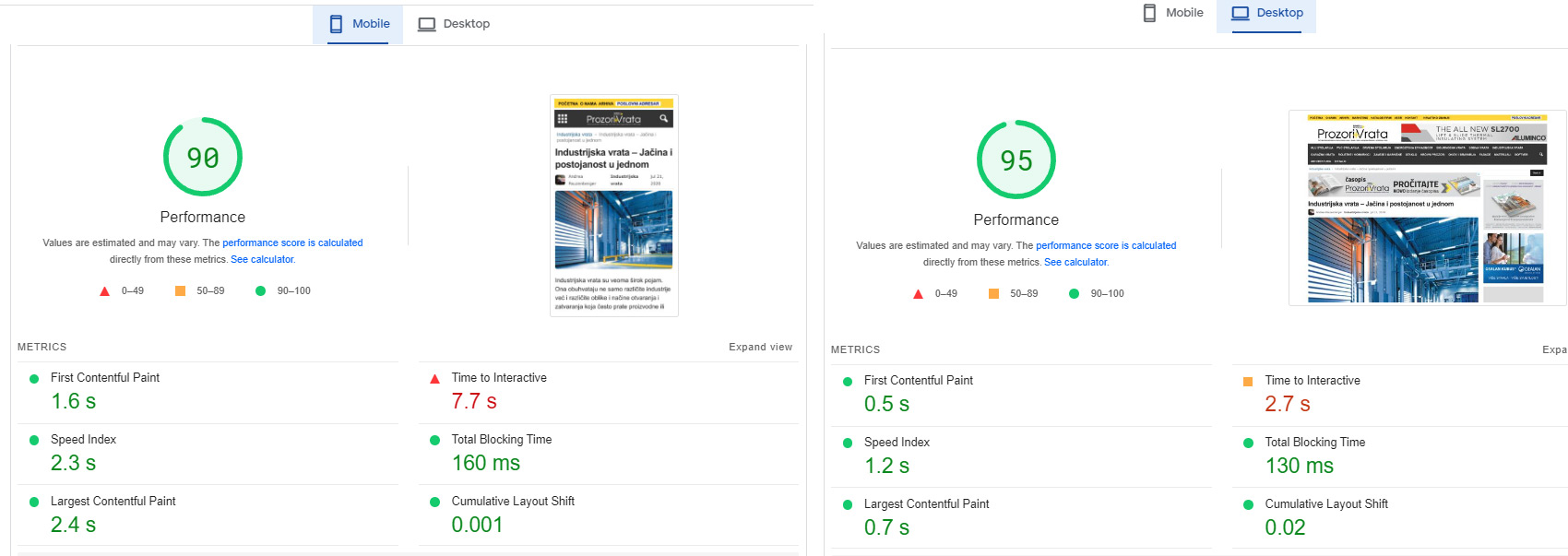
Although it is a huge website with over 20 google dfp banner positions.
I had to modify your Newsmag/style.css and td-composer/legacy/Newsmag/assets/css/td_legacy_main.css a lot
there is still space for reduction and a better rating.
On the other Podovi website, I didn’t change those two files, so far.
I just minified them, I get 83 mobile / 93 desktop
Basically, these two files must definitely be reduced, they are too big and too unused.
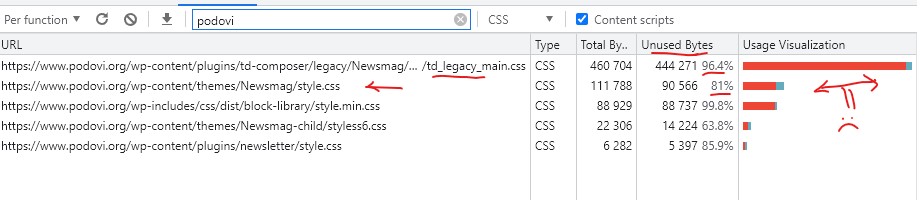
Basically, I am satisfied with the template. I will probably try the newspaper as well, because I am planning to upgrade one of those two web portals soon.
 wpjim23
Hi I have a problem that you might help. How my website works is it sends post data to firebase, and firebase is linked to my mobile app to display the same content as shown on my website.
I have recently been made aware that there is a problem with the images loading on different devices. The image urls of each post (which are just the image urls to the image saved on my wordpress database) don’t seem to load on some devices (the images just appear as empty white images similar to when you open the website and the lazy load forces images to first appear as white), but on other devices they load fine.
Did you have any ideas on what could be causing this?
I have tried disabling different plugins to find the problem but haven’t been successful, and there doesn’t seem to be a link between older and newer versions of android because I have heard feedback that the images worked fine on android 9.
My website is https://balancednewssummary.com/ and you can find the mobile app download link on the website if you wish to see the problem.
If you can direct me to a more suitable forum that would also be helpful!
 contactosama
Please let me know how to restrict users who are using Ad blocker?
Any plugin? Script? or any other thing?
People use Ad blocker that is why it is harden to earn from Ads.
 Dilyana Gaytandzhieva
Hello, I have activated the AMP and Mobile plugin. However, I can’t see Google Ads showing up on the mobile version. I have two other plugins installed – GA Google Analytics and WP Code as I am using them for integration with Google Analytics and Google Ads Sense. I guess they do not work for the mobile version, and I need to insert the codes separately, but I do not know how to fix this issue so that Google Ads appear on the mobile version and Google Analytics be connected to my mobile version as well. Thank you for the time dealing with my questions.
P.S. This is my site:
https://obektivno.bg/
Anamaria Hi,
Unfortunately, we do not know another solution, considering that it is also related to the code of AdSense.
I appreciate your understanding!
 niceguyitachi
How to make in linde ADS in article scattered thru the article not one after the other? https://prnt.sc/O0Pkw7LRiaHn
 ken2ns
Hello,
See attached 
Social Login not showing in Theme Panel.
Also when the customer is prompted to choose a plan to sign up it takes the customer to the login page. Is there a way for the sign-up and checkout to all be one process instead of a double sign-up?
Screenshot of process 
Please ignore the social login in .gif I embedded that with another plugin.
 bippermedia
I’m wanting to use all of the ad zones available in our theme (Newspaper theme).
But I want to control what shows up based on specific categories.
For example, I want Google Ads to display in the ad zones on all blog posts in categories EXCEPT FOR categories we use specifically for agency’s blog posts.
And for our agency’s blog posts, I want to use the ad zones display custom banners we create for our free ebooks.
Is this possible? can I use the ad zones AND control what displays based on “show” or “hide” type logic by category?
And if not possible by default in the Newspaper theme, is there some other way I can achieve this?
Thank you
 Bettina
 Hello @danielcasciato !
Unfortunately, you can not disable the latest article there. The mobile theme layout can not be as customizable as the other mobile options.
We have 3 options for mobile versions that you can use:
1. Responsive version: A responsive version of your website looks similar to the desktop version. Edit the page with TagDiv Composer. Click on the mobile viewport: https://www.screencast.com/t/XDQJedlggSB. There you can see your mobile version and edit or adjust the elements to look better.
2. Mobile pages: https://tagdiv.com/newspaper-10-3-7-update-brings-customizable-and-fast-mobile-pages
3. Mobile theme plugin: The Mobile Theme is a performance-optimized theme included in the main Newspaper theme that only loads on mobile devices. It comes with its own templates and design for pages, posts, categories, etc., so your current templates from the desktop theme will get converted to the mobile theme layout. For more information, please visit https://forum.tagdiv.com/the-mobile-theme/ and https://forum.tagdiv.com/mobile-theme-introduction/.
A full explanation is here: https://www.youtube.com/watch?v=SpGkOnJeNZY
Thank you!
 felvaccari
 I looked at the link you sent and I checked that everything is ok in cloudflare.
Normally when I open a post for the first time, no image loads. I need to hit ctrl+f5 for the images to work. I even recorded a video for you to see: https://youtu.be/7di9KMROnNQ
I use wordpress on cloudways. The native cache plugin is breeze. I have other blogs (other templates) on cloudways, I use breeze too and I don’t have any problems. This problem is only happening on newsmag with me…
Anamaria Hello,
If the AdSense code needs to be set between head tags, this can be put in our theme in Theme Panel -> Analytics/Js Codes -> https://prnt.sc/10jk7fq -> https://infotechapb.com/disable-top-adsense-anchor-ads/
Also, make sure your ads are approved.
You can use the element Ad Box, and set the element where you want.
The ad box has 3 sections for ads: using theme panel ads -> https://i.imgur.com/KFa9ibl.png, using images/banners -> https://i.imgur.com/MfAPTaE.png and custom code -> https://i.imgur.com/2rh8SuD.png save it and will appear on the post (you can set a shortcode like a shortcode from adrotate plugin or other plugins)
Thank you!



