
- NewsmagPage templates
- NewsmagCategory templates
- NewsmagFooter templates
- NewsmagDefault post templates
- NewsmagPost templates
- NewsmagHomepage – How to build and set it
- NewsmagtagDiv Composer Tutorial
- NewsmagCustom Post Type Support
- NewsmagNewsmag documentation
- NewsmagHow to use the Visual Composer plugin
- NewsmagHeader styles
- NewsmagSmart sidebar
- NewsmagCategory grid styles
- NewsmagCategory top post styles
- NewsmagHow category settings work
- NewsmagFeatured images
 sumitkumarsid@gmail.com
Hi Team,
My post page is looking like this-
https://dashofturmeric.in/orange-chiffon-cake/
But, there are some responsive problem so i want to show in the below post-
https://demo.tagdiv.com/newspaper_recipes/td-post-girl-scout-cookie-samoa-shake/
Please help me, how i can design like the way it designed.
Or can i get the template of the post – https://demo.tagdiv.com/newspaper_recipes/td-post-girl-scout-cookie-samoa-shake/
Thanks in Advance
 Anamaria
 Hello,
You will have to first start looking for a plugin conflict. please deactivate ALL plugins except tagDiv ones, also if you are using a child theme or cache plugin, deactivate them, clear all cache and try again to disable the mobile theme.
In most cases when you get a similar message “ Error at zones: 18(models): 16(dom). T.. The model does not match the content Current state has involved an issue. You could try an UNDO operation (CTRL+Z / CTRL+SHIFT+Z)” then indeed it is a problem, most of the time the problem is from a shortcode that is not compatible with our theme, therefore after you set it with tagDiv Composer and save the page/cloud template, the next time when you try to edit it, you’ll get that error.
For this error, you can check our guide from here at point 5 -> https://forum.tagdiv.com/tagdiv-composer-not-working/ also after trying the steps from our guide you do not get any good results, you can send us an email at contact@tagdiv.com and provide wp-admin login, as well as cPanel and credentials. We will take a look. Include a link to this topic in the email.
Let me know the results!
Thank you!
Anamaria Hello,
In most cases when you get a similar message “ Error at zones: 6(models): 0(dom). T.. The model does not match the content Current state has involved an issue. You could try an UNDO operation (CTRL+Z / CTRL+SHIFT+Z)” then indeed it is a problem, most of the time the problem is from a shortcode that is not compatible with our theme, therefore after you set it with tagDiv Composer and save the page/cloud template, the next time when you try to edit it, you’ll get that error.
For this error, you can check our guide from here at point 5 -> https://forum.tagdiv.com/tagdiv-composer-not-working/ also after trying the steps from our guide you do not get any good results, You can send us an email at contact@tagdiv.com and provide wp-admin login, as well as cPanel and credentials. We will take a look. Include a link to this topic in the email.
Let me know the results!
Thank you!
 Testventure
Hi Tagdiv Team,
Pagespeed Insgights shows me bad results for CLS on all my desktop sites.

https://www.testventure.de/lifestyle/jabra-elite-75t-im-test/
Any suggestions how to improve the Layout shift?
Thanks in advance
 Bettina
 Hello!
Please make sure you have a cloud/PRO template for that single post/category template in order to assign your mobile page.
If you want to use a mobile page, then you need to assign it to your homepage. For more information about this mobile version please take a look in this article: https://tagdiv.com/newspaper-10-3-7-update-brings-customizable-and-fast-mobile-pages/
Thank you!
Anamaria Hello,
You can have a different header template if you use a mobile page for pages and cloud templates, for this you need to have assigned a mobile page for pages, for example like this => https://www.screencast.com/t/lektAhyjd after edit the mobile page with tagDiv Composer and convert the header template that you have for that page => https://www.screencast.com/t/udKjGPpf0, also for post create a mobile template, and you need to do the same steps like for page => https://www.screencast.com/t/wYK81I8RQ6Ub
Hope this helps you!
Thank you!
Bettina Hello!
@webjump Please send an email at contact@tagdiv.com and provide wp-admin, so we can investigate your issue. Also paste a link to this topic so we can easily identify you.
Let us know and we will gladly assist you.
@dadfi You can not edit a default template with TagDiv Composer plugin.
Check the differences between cloud and default template here:
– https://forum.tagdiv.com/design-post-pages-using-cloud-library-templates/
– https://forum.tagdiv.com/design-post-pages-using-default-templates/
Thank you!
 Ruthy Chiang
 I’m sure that all the requirements are met, and I’ve deactivated ALL plugins except tagDiv ones and tried again,but nothing fixed. I still cannot edit page templates with tagDiv Composer. I still cannot use tagDiv Cloud Library.
Now everything is in hurry but I still cannot edit page templates well.
Now I wanna rate you one star on EnvatoMarket for this theme.
 LucasGuerra
Hello, I installed the template in my website but this one broke it. Now the website is out of order I don’t know what to do anymore. The support of hostgator told me that I should to talk to you to solve this problem, because this one would be in the template.
I attached a print screen where is showing the website’s home page and another where you can see my wordpress workspace
https://www.screencast.com/t/topocPhqXz
 blogmind
 Hi, thanks. I fixed the issue deactivating tagDiv Mobile Theme plugin.
Now I have another problem. When I want to create a new page doesn’t work. Doesn’t respond at the command “Publish” .
If you don’t understand my question, can you explain me how can I create a new page and import a template? For example create a page and import author template (example).
Anamaria Hello,
The footer templates do not have the button to be edited with tagDiv Composer in the backend. Please check this guide:https://forum.tagdiv.com/footer-templates/
If you a Pro Prebuilt Website you can edit with tagDiv Composer the footer template can be edited only from the frontend if it is assigned, edit a page/post template with tagDiv Composer and go down to the footer. => https://www.screencast.com/t/rpfNhfyrF
And now you can select the text, hit the element and you can edit it => https://we.tl/t-J69lnPYecc
Thank you!
Anamaria Hello,
The footer templates do not have the button to be edited with tagDiv Composer in the backend. Please check this guide:https://forum.tagdiv.com/footer-templates/
If you a Pro Prebuilt Website you can edit with tagDiv Composer the footer template can be edited only from the frontend if it is assigned, edit a page/post template with tagDiv Composer and go down to the footer. => https://www.screencast.com/t/rpfNhfyrF
Also, if you have a standard footer template https://www.screencast.com/t/ND7OiqEpPFK ->https://www.screencast.com/t/Z5ZdVYY4wAuP then you need to make changes in Theme Panel -> Footer.
Hope this helps you!
Thank you!
Anamaria Hello,
The Posts Loops settings are divided into 4 tabs: General, Layout, Style, and CSS. The Posts loop is a special block and doesn’t have filtering options.
Also, one of the options for pagination of the Posts Loop has the option for normal numbered and the flex blocks do not have this option.
The Posts Loop is automatically filtering the posts depending on the cloud template you set (for example on the category page there will be posted posts from that category).
If you want to exclude posts, then you can use another block, like a flex block => https://forum.tagdiv.com/flex-block-settings-guide/, where you can apply filter.
Thank you!
Anamaria Hello,
I just checked your website and seems for post the AMP is working, if you want to have the AMP version on the homepage you need to go in AMP -> Settings -> Supported Templates -> and check the homepage => https://www.screencast.com/t/p35CYRtY
Hope this helps you!
Thank you!
 Gatso
GatsoHi there,
Could you please teach me that how can I set it in most popular when the page loaded. This category page is in category template 7. (Not used TagDiv). Please see below picture.
https://imgur.com/JxMD4lI
Thank you
 sirms
sirmsHi, i have problems with the desktop and mobile. Caching work by creating a copy of the page when an URL is visited for the first time. And the cached versions are always stored by the pages URL. It caches the first viewed template ie if you open the Site on Mobile it caches Mobile template and shows the Mobile version on Desktop too.
So what I’m trying to do now is delete mobile templates from cloud templates so that it only uses responsive css.
But this was not as easy as I thought then after I deleted mobile temples, so theme thinks I still use them and show me a blank page instead.
All cache has been deleted (I have also changed the caching filenames to see if this resolved the issue without success)
Can you help me?
 SeanKing
Try as a might i cant seem to get newspaper to display a full width video on a single blog post no matter what template i use, it allways comes up as a square and does not look visually appealing. my site is make-money-online.biz i want the video to look like the one on my home page, but if you check any post page its just a square. any help would be greatly appreciated.
GatsoHi there,
Could you please teach me how can I change the category style on the category page which is on category template (not created by TagDiv). It is on the category template 7. Below is the example picture.
https://imgur.com/bhIC3HV
Thank you
GatsoHi there,
I faced with some problems. I created a page & then inserted some texts on that page. Then those pages appeared under my categories pages which are in category template. Below is the example picture.
https://imgur.com/hVgQnFm
The link is here:
https://www.travelgobimongolia.com/south-gobi-tours/
Thank you
GatsoHi there,
Could you please teach me that how can I create a category page by TagDiv composer? I mean that not using category template.
Thank you
 SnakeEater
Hi,
I am trying to understand how to use a default site-wise mobile menu.
First of all:
– I have different page templates, each one of them with different desktop header templates.
– I am NOT using the mobile plugin.
What I am trying to achieve:
1) When I am on desktop, use the headers defined in each page template
2) When I am on mobile, just use a simple mobile sticky template
What’s the issue:
– I am currently unable to see any mobile header
Stuff I have tried:
– I have tried designing a mobile header within the mobile header zone (as explained here: https://forum.tagdiv.com/header-manager/). The header doesn’t show up, I assume because it is trying to load the custom desktop header?
– I have tried creating a mobile header blank template. Problem with this is that, after I create it, I have no idea how to set it as the default header when visiting the website from mobile.
All in all I am _very_ confused because there are so many option and it is unclear how to set a default behavior. Can you please send some help? :'(
 yourexpatfinance
Hi,
In word press I have set the URL slug to be text
However then I publish a post it always just gives the post number.
For example:
https://yourexpatfinance.com/?p=326
However, I set the slug for this page, in wordpress, to greyscale-digital-currency-investment-funds
Why is your template giving me these bad URL’s.
I want the text in the URL for good search engine placement.
 fatih-2
 Hi Calin
Just find this topic. We are using cloud templates for posts and category pages. Instead of adding yoast breadcrumbs individually via gutenberg editor., we would like to embed this all posts and most of the pages. How do we achieve that?
 Ahmetdolmaz
 I already use a tagDiv Pro template on the pages, but there is no change on the category page.
I can’t find the same template in both.
look: http://www.tybistanbul.org.tr
https://tybistanbul.org.tr/category/haberler/
 byothe
Hello,
When my article is laoding, there is a “Sing in form” that shows up for a very short time at the top of my page… It appears after I used a template from Cloud Library for my posts.
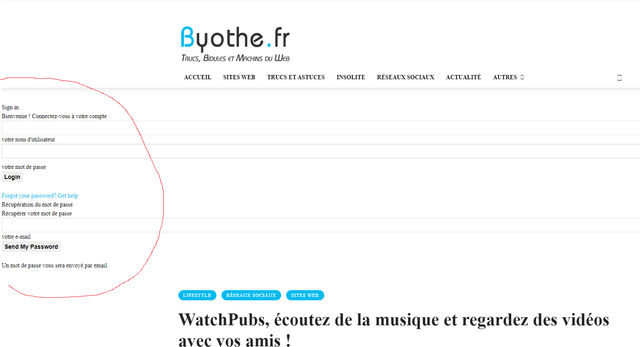
Is it possible to remove that ? It’s very quick but annoying… And I don’t need this form that doenst appears on the loaded page.
