
- NewspaperWP Rocket and Newspaper Theme: Optimization Guide
- TutorialsDefault Block Settings Guide
- TutorialsOffset Feature
 Prateek
 Hi again, DecentralBox.
I also see the subfooter with newspaper branding while editing the footer template(page). But it doesn’t load in the frontend. I checked it by using the View Source functionality provided by browser.
Just copy the default footer copyright content, that is, Newspaper WordPress Theme by TagDiv and then go to the homepage of your website, use view source, press Ctrl+F and paste the copied text. You won’t find anything which means that part is not loaded.
Hope it helps.
You can tell me if there’s any doubt.
 Vlad S
 Hello !
You now can add SVG logos but that is available only for Cloud Template headers.
As you can see here: https://www.screencast.com/t/TJyG3RuC
1. You have to right click on your .SVG image and open it with notepad ( i used notepad++ but that doesn’t matter )
2. Copy the code found in the notepad
3. Paste the code into tagDiv Composer as you can see in the page above.
Keep in mind that all the modification regarding size of the image must be done in the code that you have pasted.
Thank you for your understanding !
 Janus Moos
Hi TagDiv,
Templates from the Cloud Library breaks the paywall on my site.
Whenever the page I’m viewing uses a cloud template the paywall starts posting itself over and over again. So if I have a cloud template as header or footer it breaks everywhere. If I disable cloud templates on header and footer it works fine. And if I use a cloud template on a single post – then that post creates the same error.
This happen on both my production site with Newspaper 9.8 and a local site with Newspaper 10.
If I use only the standard templates for everything there are no problems.
Do you know what is causing this? And more importantly: what can I do to avoid this problem?
Thank you in advance!
 laurentz
very nice template with a lot of content 🙂
On Homepage Influencer template
I find how to edit the items displayed in the first block :
Featured Articles
Flex Block 1=> filter => Category filter 🙂
But
I would like to filter the content of other blocks:
– Latest Articles
but I did not find how to filter the category
 hwhosting
 i have selected template 11 and that is not showing good on the homepage
 mparlevliet
We already use Cloud Templates for a lot of our pages, but we also use normal Pages still, etc. I’ve read through this link (https://tagdiv.com/newspaper-theme-update-standard-pack-or-tagdiv-cloud-templates/), but is there some kind of step-by-step guide as to the things we need to do before we deactivate the Standard Pack? I think we are close to being able to do that, but I don’t want to do it too early.
Our site is: https://www.vitalthrills.com
 PFN365
Hi,
I used the Envato Market plugin to update the theme to Newspaper X. But now when I try to add a new page and edit with TagDiv composer, I get at 404 page not found template and the following error: Error at zones: 5(models) : 4(dom). The model does not match the content Current state has involved an issue. You could try an UNDO operation (CTRL+Z / CTRL+SHIFT+Z)
 Calin
Calin Hi,
So if I understand correctly the plugin for multiple authors is working on posts, but is not applying on pages, if is so then you can edit the pages using the tagDiv Composer and you can replace the “Author box” with “Authors box” -> http://prntscr.com/ptn6kf in this way you’ll show in page all the authors, do the same on search template that is from cloud .
Also usually the word “By” is coming from tagDiv Composer -> http://prntscr.com/ptn87b on pages and templates also on default post styles you can change it from theme panel -> http://prntscr.com/ptn8rf
Hope this will help you!
Thank you!
 Decentralbox
 Hi pratiek,
Thank you very much for your help and your valuable time. I appreciate that very much.
I did it the way you did it now, and it works with the footer. You’re right, the footer template is in the pages and not in the cloud template library.
The sub-footer now also disappears in the frontend. However, the sub-footer still remains in the TagDiv Composer when I edit the footer page. Do you see that too when you edit? Here is a picture from what i mean: https://imgur.com/a/wqtRafy
My fear is that the subfooter will be loaded unnecessarily in the frontend.
I will now try it with the icon pack as you suggested. Hope they will add some more important icons to the social media module.
I wish you a wonderfull day, thanks for helping me 🙂
Prateek Hi, DecentralBox.
Let me help you out.
I understand what you mean. Had the same problem and figured it out somehow.
You first have to create a template for the footer (import a footer template from the cloud library). Customize it according to your taste. You’ll notice that the footer template that you created will be moved into the pages section unlike other template that remain in the Cloud Template section.
Now go to the theme panel and in the footer section select the footer template(page) you created from the footer page dropdown. Save changes. You done. I faced some issues while saving changes don’t know why but I solved it by selecting an actual page (about/contact/etc), clicking on the edit footer page button and coming back and selecting the footer page template. It just worked.
Now if you’re using the mobile theme also (with or without amp), the footer template wouldn’t work on the mobile theme. For this, you have to activate the standard pack. After activating choose the a footer option or subfooter option (if you need one) from the theme panel. Save the changes. then go to mobile theme section select the footer menu and save changes again. Finally disable the standard pack. That’s it.
Hope you understand. You can DM on insta (@prtksng) if you have any doubt.
I can’t help you much with the telegram thing. In cloud library templates some icons are missing (stumble upon in my case). So what I did was used the icons module instead of social media and the copy pasted the icons for all the social media profiles and then changed the links and icons.
-
This reply was modified 6 years by
Prateek.
Vlad S Hello !
In order to make the site full width you have to select every row of your page using the tagDiv Composer and then set the stretch mode you want like here : https://www.screencast.com/t/BkWwdHh6
In order to make the post page full width you will have to add a single post template and then edit it. Check more about how to have single post template here: https://tagdiv.com/customize-articles-with-single-post-templates/ And for the header you can do it here: https://www.screencast.com/t/xf56tQN0.
These are the ways you can increase your page width from theme options. Anything above this will require custom code.
If you are using a background color / image this will cause the boxed layout.
Let me know if this helped you !
Thank you !
Vlad S Hello !
When applying a background color or image your content will get boxed.
In posts you can achieve that by applying a single post template from the cloud library, edit the row background to black as you can see it here: https://www.screencast.com/t/0VJOZi5S
Find out more about it here: https://forum.tagdiv.com/design-post-pages-using-cloud-library-templates/
Thank you !
 Jose
Jose Hi Calin,
I’m a little clumsy about this. But I’ll try until I get it.
I have created a new header with template cloud, I have activated it from the newspaper control panel. But when under the page, the header disappears and appears the original “unmodified”.
How can I avoid this?

And the post/publications, appear with this error in group:

This is the website: https://cutt.ly/oeTZNd9 ((now the standard plugin is activated and the header replaced by the theme, to avoid problems with visits)
Thanks
Vlad S Hello !
Coming with the new version Newspaper 10 you have this option when editing your post template from the cloud library as you can see it here: https://www.screencast.com/t/fT0qQRsrYKRT
Find out more about single post templates here: https://forum.tagdiv.com/design-post-pages-using-cloud-library-templates/
Thank you !
PrateekI was using the multipurpose header for my theme. The rest of the page was custom designed. After the latest update I decided to import a custom header template from the cloud library so that I can disable the Standard Pack for improved speed and performance. But there is no icon for the StumbleUpon/Mix in the social icon module of page builder.
So how can I show StumbleUpon icon?
Please help.
 jkfriendsnm
 For A), I need a clean url ending with /amp so that I can setup page cache correctly. With ?amp, it messes up the mixed caching for mobile & desktops. Please suggest how to fix the ?amp to /amp using the mobile plugin.
For B), OK
For C), how do I go about debugging this? Any suggestions?
For D), when I try to open cloud templates, I get this error: Invalid reply from server endpoint. Please suggest.
Thanks.
hwhostingWhen i go to templates and go to change blog and post template for the homepage it is not showing te right template which i have selected i upgraded this day tot newspaper 10.
The site is http://www.hoekschnieuws.nl
Calin Hi,
A) The link for amp are like this site.com/page/?amp only for testing the actual link from google amp will look like this -> https://www.screencast.com/t/BqlFLsYx5
B) Please check this similar topic -> https://forum.tagdiv.com/topic/how-to-implement-adsense-amp-ads-in-amp-posts/
C) Usually this a plugin conflict that reset the mobile theme settings.
D) This can be achieve if you are using the a header template from tagDiv Cloud Library and responsive version in mobile theme ( set the option “Amp” ) in this way the logo set with TagDiv Composer will be display on desktop and mobile and the logo for mobile set in theme panel will be show only on amp version.
Hope this will help you!
Thank you!
Calin Hi,
1. Please notice that the Disqus plugin was not tested with our theme, therefore we can not provide technical support for the provide provide by this plugin, please make sure that you are using this plugin only on posts, not pages.
2. Unfortunately there is no settings for the default top bar to change the size ( height ), only the width -> http://prntscr.com/pt9edo
In order to have more control over the header and top bar we recommend to use a cloud header from tagDiv Cloud Library and edit it with tagDiv Composer
3. Unfortunately for the moment there is no option to set the social media in the order you want, sorry!
4. if the H2 is inside the content, then the settings from theme panel should be apply -> http://prntscr.com/pt9hkq, please provide some more details or a link where I can inspect this problem.
5. So if I understand correctly you want to have unique articles on pages, if is so then you can use this option -> https://forum.tagdiv.com/unique-articles/
6. The page templates are these -> https://forum.tagdiv.com/page-templates-2/the unfortunately there is no settings to make a page template, the design nee to be make with tagDiv Composer.
7. Only the the videos from YouTube will work -> http://prntscr.com/pt9ojh, maybe this option will be add in the coming updates.
8. The WP Rocket plugin was not tested with our theme, therefore I can not say how or it will work properly with our theme, sorry! -> https://www.screencast.com/t/cmPkh9jba4sZ
9. The flex can be adjust for all device individual -> http://prntscr.com/pt9qrl -> http://prntscr.com/pt9r37 you can check more about flex blocks in our documentation from here -> https://forum.tagdiv.com/flex-block-settings-guide/
10. There is an general option in theme panel -> http://prntscr.com/pt9s7p but this will not apply only on block headers that do not have set an individual style.
11. That is happen because the standard width of the website is 1068px -> http://prntscr.com/pt9z53 + margin -> https://www.screencast.com/t/FmgLs3wRkAAS when you edit the page will add and extra width from tagDiv Composer sidebar and some padding on the page content, so this will exceed the 1366px.
12. If you are referring to the mega menu next/prev buttons -> https://www.screencast.com/t/xZxnf7Sq2 then you can hide theme only with custom css, you can try this custom css
.td_block_mega_menu .td-next-prev-wrap{
  visibility : hidden;
}
The code need to be set in Theme panel> Custom code> Custom css
If you still have some questions, or I was not clear enough please let me know!
Thank you!
 Alsok
Alsok I didn’t manage to add anything to Cloud Templates. Only pictures are saved. I already have a million of them, I tried to add
https://cloud.tagdiv.com/blog-page-restro/
to Cloud Templates many times
Thanks you!
 Alina S
Hello, Community!
We know you all want to make your website faster :), we want that for you, too. Newspaper theme 10 brings you a new way to build a faster WordPress website. For the first time in WordPress, you have the freedom to choose how much code the theme is loading and optimize your website’s performance straight from the beginning.
To give you this functionality, we’ve introduced a new plugin called the Standard Pack (available to you for free.) When you update to Newspaper 10, you must activate this plugin, or your website will display the shortcodes on the frontend. We cannot make the plugin automatically activate for you, so you’ll need to go to WordPress Admin area > Newspaper Theme > Plugins and enable the Standard Pack plugin.
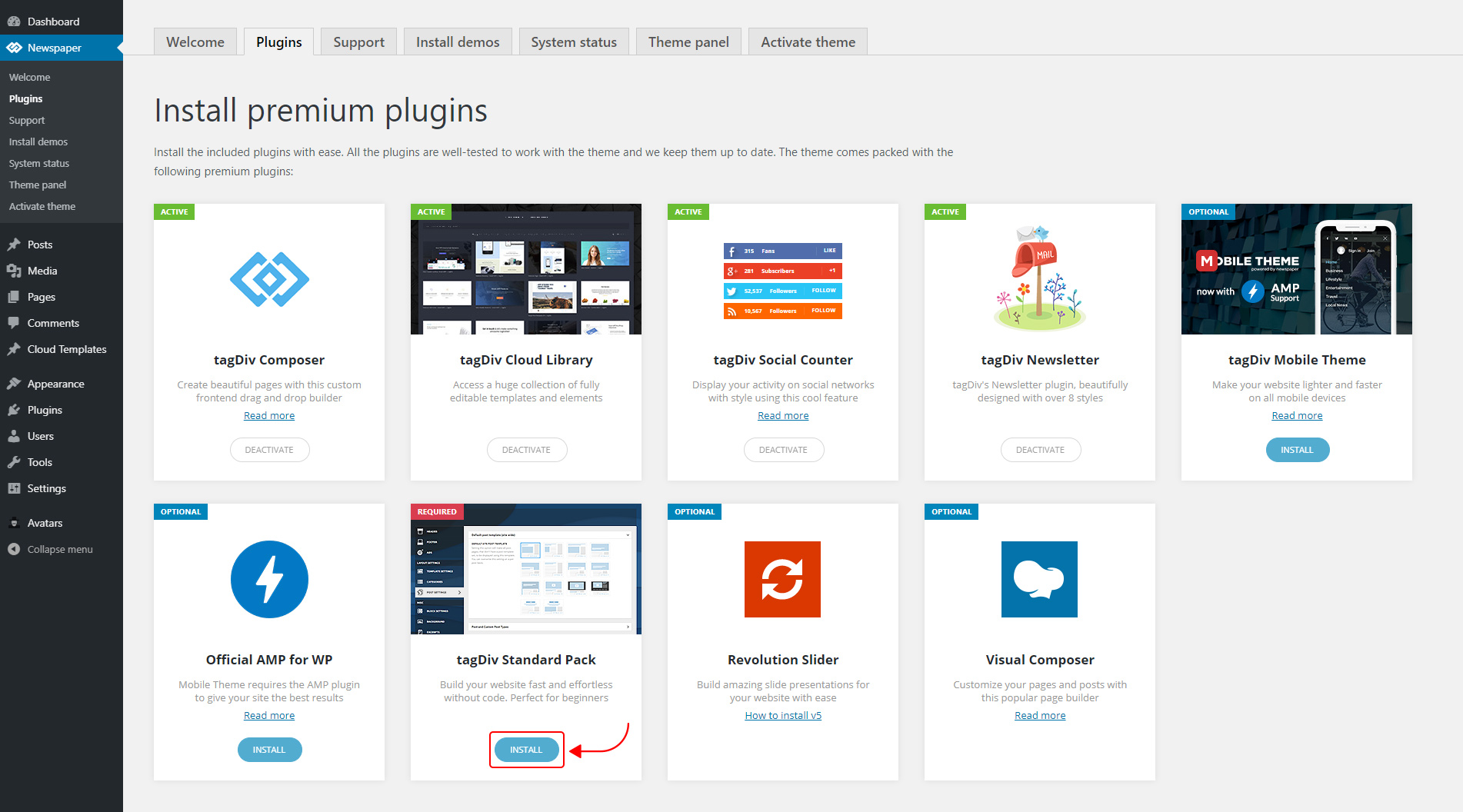
The new Standard Pack Plugin has two functions:
– it brings all the functionality you love in the previous versions
– allows you to separate things when you want to build everything customized and go for website’ performance.
The complete list of templates influenced by the Standard Pack plugin:
In the theme panel:
15 Headers
8 Category templates
10 Big Grids
19 Modules for blocks
14 Single post styles
14 Footer templates
In the tagDiv Composer:
25 Blocks
12 Big Grids
10 Big Grid Full
1 Big Grid Slide
Extra
All the demos that are not marked as PRO Demos.
You can find more details on how to use the Standard Pack Plugin in the dedicated article. When your website has no more dependencies on the Standard Pack plugin, you can deactivate it to increase the page loading time and performance.
If you need the previous version, you can download it from here (Newspaper v9.8).
I hope you’ll enjoy this update!
Thank you!
Calin Hello,
I do not quite understand, you want to show dates for one category and the posts that make part from that category? if is so then you can achieve this with using tagDiv Composer with tagDiv Cloud Library, get from cloud two single post template and two category templates and edit them, let on one category the date and set it in theme panel on the category you need to set the date -> http://prntscr.com/pt84iy, on the second category template remove the date -> http://prntscr.com/pt83zq and set it general in categories templates ( theme panel -> http://prntscr.com/pt84tg), do the same with single post template.
Also from home page you can use flex blocks and remove the date from the blocks you want -> https://forum.tagdiv.com/flex-block-settings-guide/
Hope this will help you!
Thank you!
 aure
aureHi guys,
First of all congratulations for your great theme, i bought Newspaper a few months ago and i only found the courage to remake my website last month.
So, as you can guess i met tons of details that need to be cleared, even after reading the documentation.
Please can you help me with these questions ?
1. If the plugin Disqus is activated, the main menu bar takes long time to appears, how to resolve that ?
2. Is it possible to modify the size of the top menu bar ? Can’t find this option in the TagDiv Composer,
3. Is it possible to change the order of the social medias ? (on the top menu for exemple),
4. When i try to change the H2 title style, to make it bold from the theme panel, it doesn’t looks like it works,
5.I have 3 articles at the top of the welcome page (Big Grid Flex 4), then the list of the newest article (Posts Loop) : is it possible to start this second list, with exception of N-3 article ? In other words, to start this Posts Loops from the 4th newest article, to avoid repeating the top 3 newest articles,
6. Is it possible to parameter a template page for all pages at once ? Because for now it looks only possible one by one,
7. Is it possible to make a background video without Vimeo or Youtube ? For exemple a local video, or it would be too heavy ?
8. Is the plugin “Lazy load by WP Rocket” is still usefull if the lazy load option included in the theme is actived ?
9.The Flex Box 1 element is not responsive, it appears well on the computer but not on my smartphone : do you have a solution please ?
10. The sidebar widget looks like it appears different from the native theme widget, for exemple the title : how it is possible to have the same widget title style for everything ?
11. On Chrome with a resolution of 1366*768, i have to unzoom to have full complete page composer and make the scrollbar to appear, do you know about this bug ?
12. How is it possible to disable the arrow in each title of the main menu when i choose to activate the mega sub-menu ?
I know it may be a long email but i have all my questions here 🙂
Thank you very much for your help, i highly appreciate your theme and keep the good work.
See you
Calin Hi,
Please notice that the Influencer PRO is made only with tagDiv Composer and cloud templates, so the settings from the theme panel will not affect the pro demos.
In order to change the logo you need to edit the header template with tagDiv Composer -> http://prntscr.com/pt32m2 -> http://prntscr.com/pt331k
Hope this will help you!
Thank you!
AlsokI would like that when clicking on this link
https://yadi.sk/i/o2iwBW72_3BS3A
one specific templates is always will be used, for example, this
https://cloud.tagdiv.com/blog-page-restro/
I tried saving the “blog-page-restro” template to “Cloud Templates” but could not. Media files are saved, but not the template itself.
Thank you!
