
- NewsmagPage templates
- NewsmagCategory templates
- NewsmagFooter templates
- NewsmagDefault post templates
- NewsmagPost templates
- NewsmagHomepage – How to build and set it
- NewsmagtagDiv Composer Tutorial
- NewsmagCustom Post Type Support
- NewsmagNewsmag documentation
- NewsmagHow to use the Visual Composer plugin
- NewsmagHeader styles
- NewsmagSmart sidebar
- NewsmagCategory grid styles
- NewsmagCategory top post styles
- NewsmagHow category settings work
- NewsmagFeatured images
 Bogdan B.
 Hello,
Ok, in order to get just the layout but not the content, there is a trick you can make.
1. intall the demo with content so you get all of the posts, pages, etc.
2. make copies of the templates you are looking for, ex: pages, posts..etc.
3. uninstall the demo
4. Install the demo again but this time without the content.
This way you get to keep the layouts you need but without the extra content.
I hope this helps.
Thanks.
 Olya
Olya So, a little unclear. I install demo without content. I edited so as WPBakery Page Builder, for example? I have the content on the website is, I need only the layout of some templates
Olya Read all the instructions, I realized one thing – I have no buttons for saving my generated template. That is, I open WPBakery Page Builder, choose a predefined template, nastavljaju blocks as I need. Publish the page, but it is a separate page, not the home.
Can you help? Can give login details for the website, as some bug is clearly present.
Olya went to settings WPBakery Page Builder Settings
In the section the default Template to output the records to select different templates, but the main page does not change.
Here is my website https://o-tele.ru
Can provide login details to have you set me the normal template on the main. The flow of visitors becomes less, since the site is that it looks ugly
OlyaHello! In WPBakery Page Builder choose a predefined template, I need a rubric. Called the Homepage, all settings save and click on Publish.
But it is not changing, only has one kind of like this https://o-tele.ru
For a few days already can not install the normal template, because of this, attendance drops. What you need to do?
Olya Hello! Thanks for the reply, already a little understood.
Want to make a home page using Visual Composer. Open in the settings template home page, put in it, I need blocks. Now, please explain. I want to put the page on the main. How can I do it? Do I need to set the page title and set it on the url or just click on publish?
And where I can find settings to improve speed in Google speed?
 simchris
 What I usually do is put something in the template like
<p>Text Here</p>
then upload, then go to page to see where it is.
So, might try that with the ‘page’ template.
Or, use a conditional php hook to do an if page ID xx or page ID yy, print code in the footer file.
simchris Pages are created in > wp login > pages
so, if you have an ‘about’ page, it’s edited from ‘pages’ to change the content.
if you want to edit the ‘page’ template it’s in the theme folder. There is not a template for each page post – not how WordPress works. There is no “about” template. There is a page template, and you edit the content on the pages editor built in to WordPress.
Look in the root folder for theme to see templates!
 GusV
GusV Hi I have tried installing the wp super cache following the requirments but still getting that error, as for the page builder I do not have visual composer or any other, I did use Blog and Post Template under wordpress templates, and set the Article Display to M2 for my post page: http://vards.net/home/auction-coin-shop/ all I want to do is add some text or heading on the top this page http://vards.net/home/auction-coin-shop/
Thanks.
Gus
 SW1988
Hi there,
I hired a company to help me with my SEO and get my page on the radar on google.
They said to me that they can’t get my page higher because of the layout code.
This is what they said :
” When I walk through it, I notice that there is a lot of “layout code” in this source code. Mind you: how you see the website, Google also reads it like that! And if Google first has to struggle through a lot of code before they reach the real content, that has a negative effect on your ranking.
The above example, what you find around line 500 in your source code, is all pure layout and not interesting for Google. And the error in this is in your template.
The eventually relevant code of your website starts at line 1.020 …. For comparison: at (example website) that is line 143, at my site line 121, and that is how I can continue for a while.
Conclusion: with your current template you will never end up high on Google. “
They recommend me to change the theme if I want to benefit from their qualities.
Is this true? Can I do something to prevent me from changing the theme?
 sil2
sil2I have an issue with header image animation let say page template style 7 and style 8
Header image appears after a delay. Can I disable this fade animation at all or speed it up? All I need is full width image on the top. Lazy load is disabled. Thanks!
Ex: http://www.tart-aria.info/ivan-vasilevich-chast-ii-blagochestivyj/
 g00dnews
I have a block on the homepage which is set to use infinite load but stop at 72 (6 loads). The shortcode:
[td_block_3 category_ids="34,37,36,33,74,38,49,30,53,42,50,51,40,41,39,31,32,10466,10468,10999" installed_post_types="post" limit="12" block_template_id="" custom_title="Latest Articles" ajax_pagination="infinite" ajax_pagination_infinite_stop="72"]
The infinite load never stops. You can check the page here: http://gnn.to/temptagdiv
Can we fix this? We need people to be able to get to the footer but want the infinite load working.
 cristopowertv
Hi. I want to know if you think about updating the design of the template or think about adding more options or remodeling the style of the page. thank you and I am very happy with the template and my website http://www.cristopower.com
 Simion C.
 Hi,
The lightbox can be disabled, but the featured image cannot have a custom link set. An option would be to use a post template that does not display the featured image on the post page (like style 5 or 12)
– https://forum.tagdiv.com/post-templates-2/
Set a featured image normally, and add the image with link you want in the post content. It should produce the result you want.
Thanks
 frangdelsolar
Hi!
I don’t know what I have done, but the cover image in my web is no longer full width as it was at the very begining, like in Homepage – Travel template. Is there any way to fix that? I’ve tried modifying this
https://drive.google.com/open?id=1U6nKt1VMLbZSmCj-nLJDwG5NRh4i_3CT
But it keeps looking like this
https://encrypted-tbn0.gstatic.com/images?q=tbn:ANd9GcRtjrTrCuZuuiq2A069-yCeirqLdTzQls26ZG2YHTBTvAJUZHnTBA
Could you help me with it?
BTW: my website is http://www.solucionespsicologia.com if you need to have a look
Francisco
 Edward
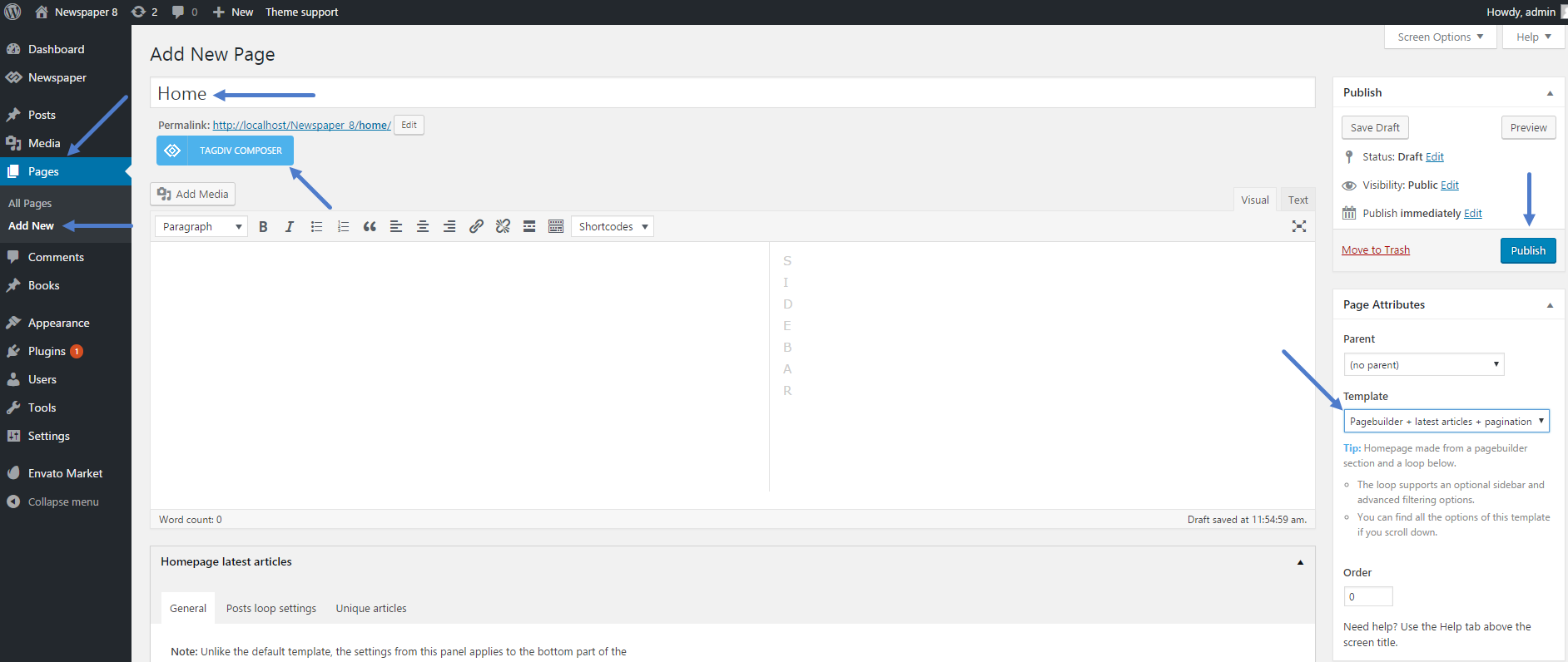
 Set template “Pagebuilder + latest articles + pagination” for your page.
Simion C. Hi,
It is considerably faster because for example it does not display page builder content. Mobile pages have to be created through the mobile editor. There are predefined templates for the front page, post pages, category pages, smart lists etc. It has also predefined fonts. These cannot be changed. Settings are kept to a minimum
– https://forum.tagdiv.com/the-mobile-theme/
The mobile theme is not a required plugin however. You can choose not to use, and display the same content from desktop.
There is no option to remove the sidebars for mobile at the moment, this will work only for the mobile theme. Something like this could be available in the coming updates.
Thanks
simchris Switch to text edit mode and just delete the html for the image.
If using a template pulling featured image, you would need to delete featured image from that box on post edit page. Basic part of wordpress and not theme specific.
Simion C. Hi,
@BruceInLouisville
1. If the page contains no page builder elements (blocks, grids etc) regardless of composer used, the page title will be displayed. The page title will appear if the page contains content added through the default MCE editor.
A solution would be to enter this code in Theme panel->Custom CSS when using default page template
.page-template-default .td-page-title{

display:none;

}
2. You could target specific pages with the actual CSS code. So for example you would like to remove the page title on one specific page, with the code mentioned above
– https://www.screencast.com/t/OCrsCnUuJ13s
– https://www.screencast.com/t/187t2cwS5
@pildat
The author can be removed for pages in block settings
– https://www.screencast.com/t/H70ufYfxy
And for posts in post settings
– https://www.screencast.com/t/3D0eMOXyxqZ
Thanks
 BruceInLouisville
 So, two follow-up questions:
1. I’m using the default page template, but NOT the tagdiv composer. I am getting a page title. I assume that is because I am not using the tagdiv composer?
2. Is there a place on the page, or a way, to add CSS to just this page? I’ve seen that in other themes, but cannot find it for this one.
Thanks!
 pildat
Hello, I would like to know how can I design the template page via Drag and Drop functionality of TagDiv composer or even WPBakery visual composer. I would like to have individual category pages viewed with different wireframes or templates. Plus each individual post page should also be drap and drop built?
Please explain to me how it is possible.
Thank You
 Ignacio
 Thanks very much, and there is not possible copy the code of the post in page template?
Simion C. Hi,
Each post template has a corresponding loop single file (Ex: post template 2->loop-single-2.php) These files are located in the main theme folder
– https://www.screencast.com/t/mhczc6hKSq4t
Editing one of the post template files you can see the post structure, enter the code where you want.
The page templates as well are found in the main theme folder, edit them as you wish
– https://www.screencast.com/t/N7w6qnK3r
Copy the files in the child theme and customize them. This is a child theme tutorial
– https://forum.tagdiv.com/the-child-theme-support-tutorial/
Thanks
Bogdan B. Hello,
Please check the post loop settings and sidebar of this section from the page templates: https://forum.tagdiv.com/page-templates-2/
Thank you!
Simion C. Hi,
The post sharing cannot be moved, there is no option for that. Maybe it can be done by modifying the actual post template.
Each post template has a corresponding loop-single file (Ex: Post template 2 -> loop-single-2.php) these are located in the main theme folder.
Editing such a file you can see the structure of the post page, and the order in which the elements are placed
– https://www.screencast.com/t/RCaH18ga9rl
Thanks
