
- NewspaperWP Rocket and Newspaper Theme: Optimization Guide
- TutorialsDefault Block Settings Guide
- TutorialsOffset Feature
 forcenews
Currently, the layout of my page (page template) looks like this:
I want to create a new page with a different layout. When I try to modify the layout of the new page based on , unfortunately, the layouts of all pages change. Additionally, the introduced changes appear on the homepage and in all categories.
 Bettina
 Hello!
Style 4 template can not be edited with the tagdiv composer or be duplicated.
If you want to create a new single post template, then go to the Cloud Templates and add a blank template https://app.screencast.com/bjWWsS7z2VgFC and start customizing it with the tagdiv composer.
More documentation about the cloud templates is here:
– https://forum.tagdiv.com/cloud-library-templates/
– https://forum.tagdiv.com/design-post-pages-using-cloud-library-templates/
– https://forum.tagdiv.com/cloud-library-category-templates/
Thank you!
Bettina Hello!
Delete the menu from here: https://app.screencast.com/DGl1ECQrgeb2T
Edit the page: https://app.screencast.com/DmwHOMvdpriFr You can choose to use other header template from the Website Manager: https://forum.tagdiv.com/tagdiv-composer-website-manager/
You can choose the template you would like to use and add or remove elements from the tagdiv composer.
Try to delete the empty columns. You could try to delete it like this: select the row, press the button delete from your keyboard, then with your mouse select “YES”.
Also you have another option too, check this: https://www.screencast.com/t/pxuOzYIIpcG
More documentation about the cloud templates is here:
– https://forum.tagdiv.com/cloud-library-templates/
– https://forum.tagdiv.com/design-post-pages-using-cloud-library-templates/
– https://forum.tagdiv.com/cloud-library-category-templates/
Thank you!
Bettina Hello!
We have 3 options available for mobile versions that you can use:
1. Responsive version: A responsive version of your website looks similar to the desktop version. TagDiv Composer is used to edit the page. Click on the mobile viewport: https://www.screencast.com/t/XDQJedlggSB. There, you can see your mobile version and edit or adjust the elements to look better.
2. Mobile pages: https://tagdiv.com/newspaper-10-3-7-update-brings-customizable-and-fast-mobile-pages
3. Mobile theme plugin: The Mobile Theme is a performance-optimized theme included in the main Newspaper theme that only loads on mobile devices. It comes with its own templates and designs for pages, posts, categories, etc., so your current templates from the desktop theme will get converted to the mobile theme layout. Please see https://forum.tagdiv.com/the-mobile-theme/ and https://forum.tagdiv.com/mobile-theme-introduction/ for more information.
A full explanation is here: https://www.youtube.com/watch?v=SpGkOnJeNZY
If you need to use mobile version 1 or 2, then you need to uninstall the Mobile Theme plugin and AMP.
Thank you!
Bettina Hello!
I’ve tested on the latest update of the theme and it works well. Please apply the background style: stretch an try again.
We have 3 options available for mobile versions that you can use:
1. Responsive version: A responsive version of your website looks similar to the desktop version. TagDiv Composer is used to edit the page. Click on the mobile viewport: https://www.screencast.com/t/XDQJedlggSB. There, you can see your mobile version and edit or adjust the elements to look better.
2. Mobile pages: https://tagdiv.com/newspaper-10-3-7-update-brings-customizable-and-fast-mobile-pages
3. Mobile theme plugin: The Mobile Theme is a performance-optimized theme included in the main Newspaper theme that only loads on mobile devices. It comes with its own templates and designs for pages, posts, categories, etc., so your current templates from the desktop theme will get converted to the mobile theme layout. Please see https://forum.tagdiv.com/the-mobile-theme/ and https://forum.tagdiv.com/mobile-theme-introduction/ for more information.
A full explanation is here: https://www.youtube.com/watch?v=SpGkOnJeNZY
If you need to use mobile version 1 or 2, then you need to uninstall the Mobile Theme plugin and AMP.
Thank you!
Bettina Hello Bernd!
It’s a gradient there: https://app.screencast.com/AT1FaLeQQa0ol
There are also the settings for the fonts: https://app.screencast.com/6RrHkkdBmNYVP
Please note that mobile theme layout is limited in customizations.
We have 3 options available for mobile versions that you can use:
1. Responsive version: A responsive version of your website looks similar to the desktop version. TagDiv Composer is used to edit the page. Click on the mobile viewport: https://www.screencast.com/t/XDQJedlggSB. There, you can see your mobile version and edit or adjust the elements to look better.
2. Mobile pages: https://tagdiv.com/newspaper-10-3-7-update-brings-customizable-and-fast-mobile-pages
3. Mobile theme plugin: The Mobile Theme is a performance-optimized theme included in the main Newspaper theme that only loads on mobile devices. It comes with its own templates and designs for pages, posts, categories, etc., so your current templates from the desktop theme will get converted to the mobile theme layout. Please see https://forum.tagdiv.com/the-mobile-theme/ and https://forum.tagdiv.com/mobile-theme-introduction/ for more information.
A full explanation is here: https://www.youtube.com/watch?v=SpGkOnJeNZY
If you need to use mobile version 1 or 2, then you need to uninstall the Mobile Theme plugin and AMP.
Thank you!
 mubassirhayat
 Thank you for the reply. The problem I was having was because of the template I was using for the search page. By removing it the search is now working fine. But I have a different issue now. I cannot edit the search page. What are the steps I need to take in order to be able to edit the UI of the search page.
 bburzycki
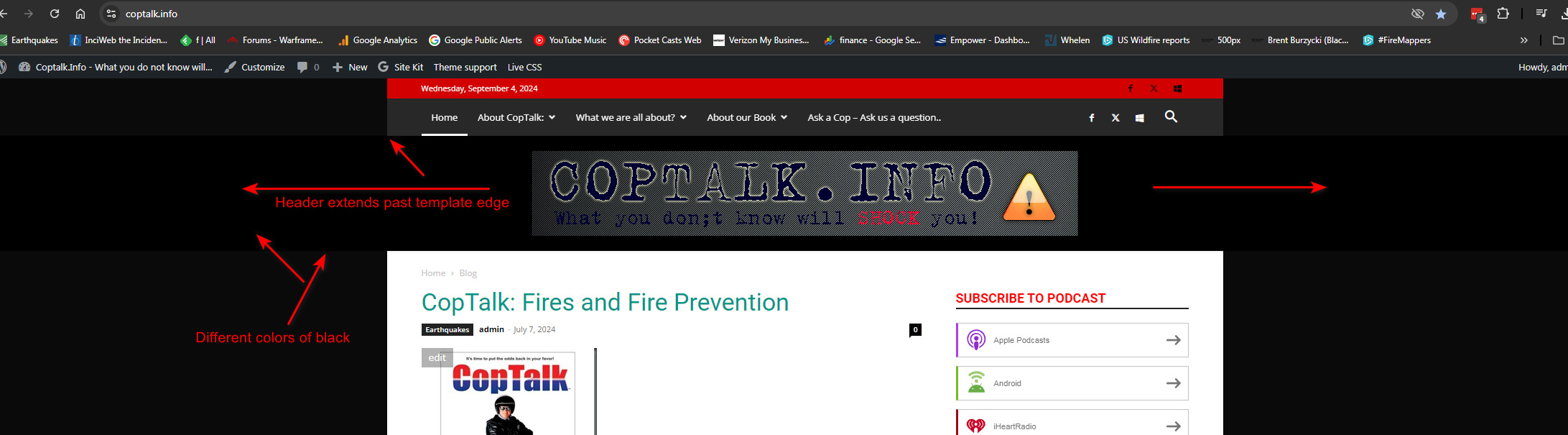
 Actually I think it is still showing a full width header but the footer is not showing that behaviour. Maybe this is just how the template shows on wider monitors?
I am very possibly just not understanding how the template works or the header is supposed to work with its background color inside that header space in relation to the edges of the template overall.
Is there a way to keep it from extending past the edges of the actual page template?
Image
Bettina Hello!
Please note that you can not edit the default header template with the tagdiv Composer. You can choose to use other header template from the Website Manager: https://forum.tagdiv.com/tagdiv-composer-website-manager/
When I check your website, I can see that your header template is a cloud one even on the single template. If you use the Mobile theme layout on the single post template, then you can control the way is looking from the theme panel settings -> Mobile theme.
We have 3 options available for mobile versions that you can use:
1. Responsive version: A responsive version of your website looks similar to the desktop version. TagDiv Composer is used to edit the page. Click on the mobile viewport: https://www.screencast.com/t/XDQJedlggSB. There, you can see your mobile version and edit or adjust the elements to look better.
2. Mobile pages: https://tagdiv.com/newspaper-10-3-7-update-brings-customizable-and-fast-mobile-pages
3. Mobile theme plugin: The Mobile Theme is a performance-optimized theme included in the main Newspaper theme that only loads on mobile devices. It comes with its own templates and designs for pages, posts, categories, etc., so your current templates from the desktop theme will get converted to the mobile theme layout. Please see https://forum.tagdiv.com/the-mobile-theme/ and https://forum.tagdiv.com/mobile-theme-introduction/ for more information.
A full explanation is here: https://www.youtube.com/watch?v=SpGkOnJeNZY
Thank you!
 animationmagazine
https://www.animationmagazine.net
This error apears in every Cloud templates exept header and footer when tring to edit.
I have already follow the steps here: https://forum.tagdiv.com/topic/errors-at-columns-1models-0dom-the-model-does-not-match-the-content-curr/
js_files_for_wp_admin.min.js?ver=5b75a1149b707159a7e71fd3bf09ff7b:42 Object

js_files_for_wp_admin.min.js?ver=5b75a1149b707159a7e71fd3bf09ff7b:30 Uncaught Errors at columns: 2(models) : 18(dom). The model does not match the content Current state has involved an issue. You could try an UNDO operation (CTRL+Z / CTRL+SHIFT+Z)
js_files_for_wp_admin.min.js?ver=5b75a1149b707159a7e71fd3bf09ff7b:42 Object
js_files_for_wp_admin.min.js?ver=5b75a1149b707159a7e71fd3bf09ff7b:30 Uncaught Error at zones: 6(models) : 4(dom). The model does not match the content Current state has involved an issue. You could try an UNDO operation (CTRL+Z / CTRL+SHIFT+Z)
 Simion C.
 Hi,
That is the latest articles section, it is displayed at the bottom of the page when this page template is selected https://prnt.sc/Qfa58JtC3Q1K
If you want to customize it there are settings in the page edit screen in the backend. But there might be an issue (which will be fixed) causing the page settings to not appear if you edit the page with Gutenberg.
If that is the case, you could install the classic editor and edit the page with it, the page settings will appear in this case https://prnt.sc/ujy4UJNPd7k8 Then after you use the settings you can remove the classic editor plugin.
Or if you want to remove that latest articles section, you can switch to the default page template https://prnt.sc/-YrAZFCNg7ls
Thank you!
Bettina Hello!
Make sure you have all the plugins installed and active in the Newspaper -> Plugins. Activate also the Standard Pack plugin if you use the default templates. Although I recommend you to use cloud templates and also cloud header templates and change the logo in the tagdiv Composer.
More documentation about the cloud templates is here:
– https://forum.tagdiv.com/cloud-library-templates/
– https://forum.tagdiv.com/design-post-pages-using-cloud-library-templates/
– https://forum.tagdiv.com/cloud-library-category-templates/
Thank you!
 MDNM2017
Hi, In our Google Search Console, we continue to be informed that various pages show a no-index. We have checked every one of your cloud templates, etc. and they are all marked index, yet we continue to receive these messages in Google Search Console. We also have Rank Math and they have informed us that we have everything configured right in the Rank Math panel. Seems the issue is on your end. Please help.
 Jindra
Hello,
I’m building a custom page, with a Flex Block Builder and a custom module (from a blank template).
For every article in the loop, I successuflly recall an image through a custom field image.
Now I would like to make this image a link to the article.
I suppose I could use the “URL” field with a sort of {…} snippets ?
Is there a place where I would find the documentation about the custom codes “{…}” ? (I means like this one {cf_nameoffield} quoted here : https://forum.tagdiv.com/topic/link-url-in-custom-field/ )
Thank you
Bettina Hello!
I can see that you use Elementor. Unfortunately, you can’t use 2 builders in the same time.
We recommend to use cloud/PRO templates in order to have the possibility to edit them with the TagDiv Composer which contains a lot of functions and features, please check our tutorial here: https://forum.tagdiv.com/tagdiv-composer-tutorial/
More documentation about the cloud templates is here:
– https://forum.tagdiv.com/cloud-library-templates/
– https://forum.tagdiv.com/design-post-pages-using-cloud-library-templates/
– https://forum.tagdiv.com/cloud-library-category-templates/
Thank you!
Bettina Hello!
We have 3 options available for mobile versions that you can use:
1. Responsive version: A responsive version of your website looks similar to the desktop version. TagDiv Composer is used to edit the page. Click on the mobile viewport: https://www.screencast.com/t/XDQJedlggSB. There, you can see your mobile version and edit or adjust the elements to look better.
2. Mobile pages: https://tagdiv.com/newspaper-10-3-7-update-brings-customizable-and-fast-mobile-pages
3. Mobile theme plugin: The Mobile Theme is a performance-optimized theme included in the main Newspaper theme that only loads on mobile devices. It comes with its own templates and designs for pages, posts, categories, etc., so your current templates from the desktop theme will get converted to the mobile theme layout. Please see https://forum.tagdiv.com/the-mobile-theme/ and https://forum.tagdiv.com/mobile-theme-introduction/ for more information.
A full explanation is here: https://www.youtube.com/watch?v=SpGkOnJeNZY
If you need to use mobile version 1 or 2, then you need to uninstall the Mobile Theme plugin and AMP.
Thank you!
 vimalgopal
I am unable to change the header background for posts on mobile devices. It works fine for the homepage.
There is only one global header template from the cloud library.
Site URL: concentratedwisdom.com
You can refer to the video recording below.
https://www.loom.com/share/954cbe41839d49669037a48859310b16?sid=cad37cb5-055f-4c8c-acd9-04a77bd47b11
Bettina Hello!
We have 3 options available for mobile versions that you can use:
1. Responsive version: A responsive version of your website looks similar to the desktop version. TagDiv Composer is used to edit the page. Click on the mobile viewport: https://www.screencast.com/t/XDQJedlggSB. There, you can see your mobile version and edit or adjust the elements to look better.
2. Mobile pages: https://tagdiv.com/newspaper-10-3-7-update-brings-customizable-and-fast-mobile-pages
3. Mobile theme plugin: The Mobile Theme is a performance-optimized theme included in the main Newspaper theme that only loads on mobile devices. It comes with its own templates and designs for pages, posts, categories, etc., so your current templates from the desktop theme will get converted to the mobile theme layout. Please see https://forum.tagdiv.com/the-mobile-theme/ and https://forum.tagdiv.com/mobile-theme-introduction/ for more information.
A full explanation is here: https://www.youtube.com/watch?v=SpGkOnJeNZY
If you need to use mobile version 1 or 2, then you need to uninstall the Mobile Theme plugin and AMP.
You can edit the menus items from Dashboard -> Appearance -> Menus. From the tagdiv Composer, you can choose from that dropdown the menu name you want to display.
Thank you!
 SPopov
Hello. I encountered the following problem: pagination does not work on the Categories page of the site. In the template, pagination is activated and included in the status “normally numbered”. Numbered buttons are displayed, but do not transfer to the second or another page, it simply reloads the first page of the category.


Link to category: https://blog.wo.ua/kategoryi/golovna/ogliady/
 snoopy
 i resolved the issues above, only have the issue below now.
i created an ar-eg language, the template is a copy from your Default Pro RTL, however, it seems that RTL is not applied.
i added the code below in the custom code to solve the RTL issue:
html[lang="ar"],
html[lang="ar-eg"] {
    direction: rtl;
    text-align: right;
}
however, the issue in the footer and header as in the images occurred https://ibb.co/VTkqTvY
https://ibb.co/DW6KJxq
also the problem of not being able to assign a Global Homepage template in the Arabic language.
i’ve already emailed you the access credentials, appreciate advising on how you resolved it.
Thank you
-
This reply was modified 2 years by
snoopy.
 deepd999
After struggling googling and youtubing I think I should say this theme is not for beggering and for people who don’t have knoweledge, I could manage website builder and thought same might go with this theme, but no it.
edit with TagDiv Composer wont work tried all the browser and on the page itself it says Global 404 Template – Pulses Pro
sign in / sign up even after enabling it work on the site, and only say sign in
the logo wont change and next to demo name it would shows super annoyed. The social media icons wont work even after the links for the business accounts.
how to i change time/date weather etc, for some reason the image of all the pages take few secs to load
Can i please get some help.
 Nawshard
 when i try to add Homepage templates and Page templates appearing below error message
Pre-designed Templates – Cloud Library
Invalid reply from server endpoint.
how to resolve this error message
Nawshardwhen i try to add Homepage templates + appearing below error message
Pre-designed Templates – Cloud Library
Invalid reply from server endpoint.
how to resolve this error message
Bettina Hello!
Make sure you do not set the category template as global and only assign it to a category page. Check the guide here: https://forum.tagdiv.com/cloud-library-category-templates/
Can you please provide more information about your issue?
A solution for sending a screenshot/video is this:
Download, capture, and send: https://www.techsmith.com/jing-tool.html
After making the screenshot, you will have a link; paste it here.
Thank you!
 Anamaria
 Hello,
Using our theme you can choose from 3 mobile versions
-> mobile responsive => https://www.screencast.com/t/oJ2ShOp47
-> mobile theme plugin => https://forum.tagdiv.com/the-mobile-theme/
-> mobile page => https://tagdiv.com/newspaper-10-3-7-update-brings-customizable-and-fast-mobile-pages/
If you created the mobile pages with tagDiv Composer, then when you install the Mobile Theme plugin, your pages will be overwritten by the plugin (the mobile theme comes with its templates for page, post, category, etc so your current templates from the desktop theme will get converted to the mobile theme layout, the page content is made without builders in mobile editor => https://www.screencast.com/t/xbgZG8kH also, the options that are provided to edit the mobile theme version are limited (this keeps the things simple)).
This is a video about Responsive Newspaper Theme, AMP & Mobile Theme, Mobile Pages & Templates -> https://www.youtube.com/watch?v=SpGkOnJeNZY
So, the mobile responsive is what you see then that you select the viewport on phone => https://www.screencast.com/t/matV17hH, so some settings may apply for each viewport(where is the border blue), and others are not(where the border is black).
The mobile page has the mobile templates from Cloud Library => https://www.screencast.com/t/YCcZ8rL8
Mobile responsive version of the theme and the mobile page editor can be edit with tagDiv Composer, the mobile theme plugin not.
For example, you can have the mobile theme plugin activate and use the mobile page/mobile responsive version for the homepage/pages, but for the categories pages/404 page you can’t use the mobile page/mobile responsive version if you have the mobile theme plugin activate.
So, if you want to design the pages with tagDiv Composer, you can use the mobile page or mobile responsive version.
Better deactivate the mobile theme plugin and see the results, and assign the mobile page for page, like this => https://www.screencast.com/t/lektAhyjd
Also, clear your cache.
Thank you!
